outline.nvim is a symbols-outline fork that adds treesitter sources and a preview window
Fancy code outline sidebar to visualize and navigate code symbols in a tree hierarchy
At a glance
- What is it?
- outline.nvim is a Neovim sidebar that renders a tree of code symbols from LSP or treesitter, with collapsible nodes, an optional preview window and a Lua API. It fits a Neovim user who wants a live outline sidebar, and it does not fit a user still on the original symbols-outline.nvim without reading the migration notes, since the configuration was refactored.
- Who is it for?
- outline.nvim fits a Neovim user who wants a live symbol tree that keeps up with the cursor and can preview a symbol before jumping to it, and it does not fit a configuration that still carries symbols-outline.nvim options unchanged, because the setup table was refactored.
- Can I use it commercially?
- Yes. MIT is a permissive licence: you can use, modify and sell software built on it, as long as you keep its copyright and licence notices.
- Is it still maintained?
- Yes. The repository last received commits 13 days ago.
- What is it written in?
- Mainly Lua, according to GitHub's language statistics.
Answers come from the project's GitHub data, last synced on November 7, 2026, and from our analysis. They are not legal advice.
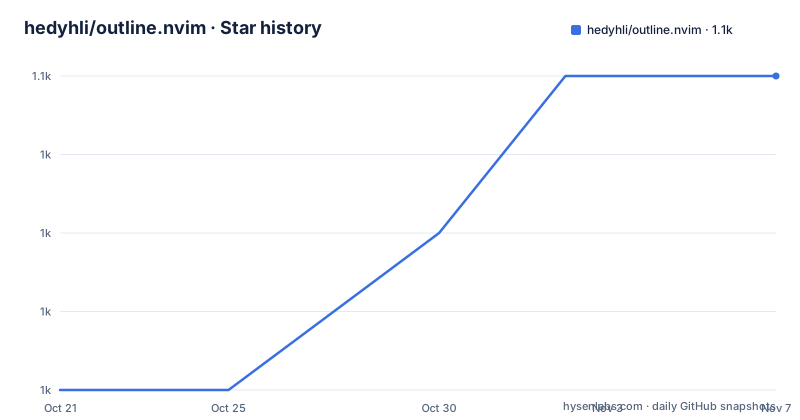
Star history
- hedyhli/outline.nvim1,050 ★ · +4
| Repository | 2026-10-21 | 2026-11-07 |
|---|---|---|
| hedyhli/outline.nvim | 1k | 1.1k |
4 Stars in the last 17 days, measured from the daily GitHub snapshot. Compare with other projects
Editorial analysis
This is a fork of symbols-outline.nvim, and the fork is the point
outline.nvim describes itself as a sidebar with a tree-like outline of symbols from your code, powered by LSP. The first thing the README tells you is where it came from: it is a fork of the original symbols-outline.nvim with many fixes and improvements.
The fork history is documented in two places. Issue 12 on GitHub lists the full set of changes with links back to the issues in the original repository, and after outline.nvim was detached as a fork, all changes are recorded in the CHANGELOG.md at the root. That combination, a curated issue as the migration guide and a changelog as the record, is what a responsible fork looks like, and it is a good sign for anyone deciding whether to move.
The migration path is concrete. If you have existing setup options for symbols-outline.nvim, the repository ships a conversion script at scripts/convert-symbols-outline-opts.lua that converts them into options outline.nvim can use. The configuration structure itself was heavily improved and refactored, and the README points at the breaking changes section of issue 12 for the details.
The plugin is MIT licensed, the homepage is at sr.ht, the author publishes on SourceHut as well as GitHub, and the last push was on 2026-10-10, with v1.2.0 released on 2026-01-31 after v1.1.0 in April 2025 and v1.0.0 in May 2024.
The provider is the source of symbols, and it is not only LSP
The configuration uses a specific vocabulary that is worth reading before the options, because the terms are overloaded in editor plugins. The README defines them explicitly.
A provider is the source of the items in the outline view, and it could be LSP, CoC, or something else. A node is an item in the outline view. A fold collapses a collapsible node. A location is where in the source file a node comes from. A preview shows the location of a node in code using a floating window, with syntax highlighting provided if treesitter is installed. A jump or peek goes to the corresponding location in code without leaving the outline window. A hover is the cursor currently on the line of a node, and a hover symbol is a floating window showing symbol information provided by the provider. Focus is which window the cursor is in. Follow means updating the hover highlight and cursor position in the outline to match the position in code, which is the opposite of jump.
That last distinction is the useful one. Follow is passive tracking, and jump is an active navigation. A plugin that conflates them gives you a sidebar that moves under your cursor, which is the opposite of what you want in a file you are reading.
The feature list also states that providers can be LSP, CoC, or other language servers, and that built-in providers support JSX, Markdown, Norg and Man; the README identifies JSX and Norg as treesitter-based. This makes the plugin useful in a setup where the language server does not provide good symbol information, or in a language where you use treesitter for highlighting but have no LSP running.
Installing through lazy.nvim, with an optional lazy-loaded variant
The plugin is available from two sources, and the README gives the exact keys. The GitHub repo is hedyhli/outline.nvim, and the SourceHut repo is at https://git.sr.ht/~hedy/outline.nvim, described as an equivalent key for your plugin manager.
The Lazy.nvim example is the standard spec table with a config function:
{
  "hedyhli/outline.nvim",
  config = function()
    -- Example mapping to toggle outline
    vim.keymap.set("n", "<leader>o", "<cmd>Outline<CR>",
      { desc = "Toggle Outline" })

    require("outline").setup {
      -- Your setup opts here (leave empty to use defaults)
    }
  end,
}
The lazy-loading variant moves the keymap into a keys list and declares the commands the plugin responds to:
{
  "hedyhli/outline.nvim",
  lazy = true,
  cmd = { "Outline", "OutlineOpen" },
  keys = {
    { "<leader>o", "<cmd>Outline<CR>", desc = "Toggle outline" },
  },
  opts = {
    -- Your setup opts here
  },
}
That allows Lazy.nvim to lazy-load the plugin on the commands Outline and OutlineOpen, and on your keybindings. For a plugin that opens a sidebar rather than a command you run constantly, this is the right shape, because the outline plugin itself loads when a declared command or keybinding is used. Your LSP client and parsers may be loaded separately by your configuration.
There is one requirement that catches people out. A call to .setup() is required for this plugin to work, otherwise you might see a specific error, and the README links the upstream issue about it. The minimal form is require("outline").setup({}).
The prerequisites are Neovim 0.7 or later, with the recommendation to use 0.8 or later for all the features and fixes, and everything else working as normal in 0.7. To use it with LSP, a properly configured LSP client is required.
Window behaviour: position, width and the auto-close decision
The outline_window options control where the sidebar goes and how it behaves, and the defaults are documented in enough detail to make the reasoning visible.
The position option is right or left, and the default split commands are topleft vs and botright vs depending on the position. If you provide your own split_command, the position is not considered. The comment notes that a valid vim command for opening the split should be used, for example rightbelow vsplit, and that a width can be included to prevent a flash of windows when resizing, with topleft 20vsp given as the example.
Width is 25, expressed as a percentage or an integer of columns, and it serves as the base or minimum width. What that means depends on another option. When auto_width.enabled is true, width is the minimum window width; when it is false, width is the exact or default window width. The auto_width block itself is disabled by default, and when enabled it resizes the window to fit content up to a max_width of 40, with include_symbol_details controlling whether symbol details count toward the calculation.
The relative_width flag decides how the number is interpreted. When it is true, the width is relative to the total width of nvim, so 25 means a quarter of the screen. When it is false, it is an absolute column count.
Two behaviour flags come next. auto_close defaults to false and closes the outline window if goto_location is triggered, but not for peek_location. auto_jump defaults to false and controls whether the code scrolls to the location automatically when navigating the outline window. The combination matters: with auto_jump off you can move around the tree without your file scrolling underneath, which is the behaviour most people want when they are reading a structure rather than navigating it.
Preview, follow and per-tabpage windows are the navigation model
The feature list is where the plugin's personality comes from. Items and the highlight for the current symbol update automatically as the cursor moves. The outline window is opened for each tabpage. The symbol hierarchy UI has collapsible nodes with automatic collapsing based on cursor movements. There is a custom symbol icon function, mapping, or the option to use LspKind. The cursorline and cursor colors in the outline can be set dynamically. Extra symbol details and line numbers of symbols are available. There is a preview of the symbol location without visiting it. And Neovim command modifiers are supported on where to open the outline, pointing at the:h mods help.
Preview without visiting is the feature that separates this from a file tree. In a file tree you see names and you trust the tree. Here, you can see a symbol's location rendered in a floating window, with syntax highlighting if treesitter is installed, and decide whether to jump. For a large file with deeply nested scopes, that is the difference between navigating and wandering.
The automatic collapsing based on cursor movements is the other quiet improvement. A tree that stays fully expanded as you move through a large file becomes noise, so the plugin collapses the branches that no longer contain the cursor.
Symbol data comes from a provider: built-in providers cover JSX, Markdown, Norg and Man alongside LSP, and the README identifies JSX and Norg as treesitter-based. LSP requires a properly configured client; an external provider adds treesitter support for other languages.
Where outline.nvim is the wrong tool
The first wrong-tool case is a Neovim user on 0.7 who expects parity. The README says 0.8 or later is recommended for all the features and fixes, and that everything else works as normal in 0.7. If you are still on 0.7, some features and fixes are unavailable: the README specifically lists command modifiers and renaming Go methods from the outline.
The second is a heavy LSP or treesitter setup where the symbol data is not what you want to navigate by. This plugin shows what the language server reports. If your server reports workspace symbols rather than document symbols, or reports them with poor names, the outline will be a faithful rendering of a poor source. The plugin is a view, not an index.
The third is the migration itself. The configuration structure was heavily improved and refactored, and the breaking changes are listed in issue 12. Options that do not exist any more are not ignored gracefully in every case, and the fix is to run the conversion script rather than to hand-port the table.
The fourth is a plain file tree. outline.nvim shows symbols within a buffer. If what you want is to move between files in a project, a file tree or fuzzy finder is the right tool, and this plugin is a complement to that rather than a replacement. The README itself points to alternative outline plugins and related plugins for people who are unconvinced, which is worth reading if your needs differ from an LSP symbol sidebar.
The repository layout is small and conventional for a Neovim plugin: a lua/ directory, a doc/ directory for the vim help, a scripts/ directory holding the conversion script, a .nvim.lua file, and .stylua.toml for formatting with an .editorconfig. The style tooling and the presence of a help directory are the small signals of a plugin that treats itself as a maintained Neovim citizen.
Editorial conclusion
outline.nvim fits a Neovim user who wants a live symbol tree that keeps up with the cursor and can preview a symbol before jumping to it, and it does not fit a configuration that still carries symbols-outline.nvim options unchanged, because the setup table was refactored. Before switching, run the conversion script at scripts/convert-symbols-outline-opts.lua against your existing options, call require("outline").setup({}) as the README requires, and note that the plugin needs Neovim 0.8 or later for all the features and fixes, with 0.7 working only in a reduced form.
Frequently asked questions
What is outline.nvim and how does it differ from symbols-outline.nvim?
outline.nvim is a Neovim plugin that shows a tree-like outline of code symbols in a sidebar, powered by LSP or treesitter. It is a fork of symbols-outline.nvim with many fixes and improvements, documented in issue 12 on GitHub with links to the original issues, and all changes recorded in the CHANGELOG.md.
How do I migrate my symbols-outline.nvim configuration?
The repository ships a conversion script at scripts/convert-symbols-outline-opts.lua that converts existing symbols-outline.nvim setup options into options outline.nvim can use. The configuration structure was heavily refactored, and the README points at the breaking changes section of issue 12 on GitHub.
How do I install outline.nvim with lazy.nvim?
Add the spec { "hedyhli/outline.nvim", config = function() vim.keymap.set("n", "<leader>o", "<cmd>Outline<CR>", { desc = "Toggle Outline" }) require("outline").setup {} end, } to your plugin list, and call require("outline").setup({}) since a setup call is required for the plugin to work.
Which Neovim version does outline.nvim need?
Neovim 0.7 or later is the minimum, but the README recommends 0.8 or later for all the features and fixes, with everything else working as normal in 0.7. Using it with LSP also requires a properly configured LSP client.
Can outline.nvim show symbols for languages without an LSP?
Yes. The plugin supports treesitter-based sources for JSX, Markdown, Norg and Man, and support for other languages through treesitter is provided by the external provider at outline-treesitter-provider.nvim. The provider concept also allows CoC as a source of symbols.
Official sources
Add this badge to your README
If you maintain this project, the badge below links readers to this analysis and shows its maintenance status from the daily GitHub snapshot. Paste the markdown into your README; add ?metric=license or ?metric=stars to the image URL for a different field.

[](https://hysenlabs.com/projects/hedyhli-outline-nvim)Star history chart for your README
[](https://hysenlabs.com/projects/hedyhli-outline-nvim)Was this useful?