Helio Sequencer: a free GPL-3.0 music sequencer for desktop, Android and iOS
Libre music sequencer for desktop and mobile platforms
At a glance
- What is it?
- Helio is a C++ sequencer built on JUCE that targets microtonal scales and a distraction-free editor. Here is what the README and repository layout actually document, and where the project is thin.
- Who is it for?
- Helio is worth adopting if you compose with exotic scales or microtonal temperaments and you want a GPL-3.0 sequencer that runs on the same desktop and mobile platforms. It is the wrong tool if you need a documented release cadence, packaged binaries for every distribution, or a sequencer whose manuals cover every dialog.
- Can I use it commercially?
- Yes, with conditions. GPL-3.0 is a copyleft licence: if you distribute software that includes it, you must release that software's source code under the same licence. Running it internally without distributing it does not trigger that obligation.
- Is it still maintained?
- Yes. The repository last received commits 1 day ago.
- What is it written in?
- Mainly C++, according to GitHub's language statistics.
Answers come from the project's GitHub data, last synced on November 15, 2026, and from our analysis. They are not legal advice.
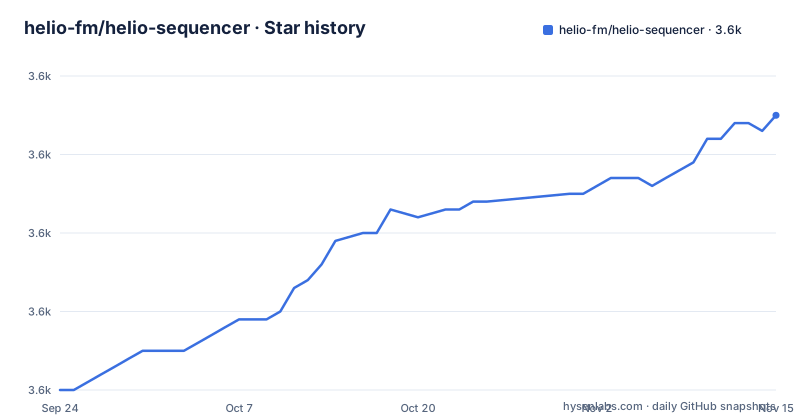
Star history
- helio-fm/helio-sequencer3,585 ★ · +35
| Repository | 2026-09-24 | 2026-11-15 |
|---|---|---|
| helio-fm/helio-sequencer | 3.6k | 3.6k |
35 Stars in the last 52 days, measured from the daily GitHub snapshot. Compare with other projects
Editorial analysis
What Helio Sequencer is for, and who it is not for
Helio is a music sequencer, which means it arranges and plays back musical material rather than synthesising it from scratch. The README describes the project as "an attempt to rethink a music sequencer": the stated preferences are an uncluttered, distraction-free interface, clarity over cleverness, and encouragement of experimentation in areas the author considers underexplored, naming exotic scales and microtonal temperaments. That last clause is the clearest statement of intent in the whole document, and it should drive your evaluation. If your music lives in twelve-tone equal temperament and you mainly need comping, mixing and plugin hosting, Helio's distinguishing feature is not aimed at you.
The audience is narrower than "musicians". It is people who want to enter notes and patterns on a grid, keep the surrounding UI quiet, and change the tuning system without leaving the application. The README shows the same build running on Windows, on a Pixel 6a and on an iPad mini, so the intended user may also move between a desk and a phone. Because the primary language is C++ and the topics list includes juce, vst and midi, the project sits in the same technical family as other JUCE-based audio applications: a native binary per platform rather than a browser app.
The repository is not archived, and the last push was on 2026-09-22, so the codebase is being touched. That fact says nothing about release quality, and the repository has no published releases.
How the sequencer is put together: C++, JUCE and a Lisp interpreter
The repository layout tells you most of what you can verify about the architecture. Source/ holds the application code, ThirdParty/ holds vendored dependencies, Resources/ holds assets, Projects/ holds the per-platform build projects, and Docs/ holds documentation and images. The README credits specific third-party components: the built-in SoundFont player instrument is based on SFZero by Steve Folta, extended by Leo Olivers and Cognitone as SFZeroMT; and the built-in scripting language is based on a Lisp interpreter by Adam McDaniel called wisp. Those two credits are the most concrete statements about internal mechanism the README makes.
The practical data flow is the one you would expect from a sequencer with a scripting layer. Musical material is arranged in the editor, playback drives built-in instruments (including the SoundFont player) and hosted plugins, and the scripting language gives you a programmatic way to generate or transform material rather than clicking every note. The topics list also includes vst, so plugin hosting is part of the design. What the README does not give is a signal graph, a threading model, or an explanation of how microtonal tuning is represented internally. If you need to know whether tuning is stored per project, per instrument or per scale definition, the README is silent; that answer lives in the documentation site or the source.
Building is handled by two continuous integration services, AppVeyor and Travis CI, each with separate status badges for the master and develop branches. There is no GitHub Actions workflow in the top-level entries. The default branch is develop, which is worth noting: the branch the project treats as current is not the one named master.
Installing Helio and starting a first project
The README does not publish install commands. It points to helio.fm for "the latest builds" and to docs.helio.fm to get started, and it links a packaging status badge on repology.org, which tracks which distributions carry the package. So the honest first step is to fetch a build from the project site rather than to run a package manager line that the README never gives.
If your distribution's repository already carries Helio, the repology page linked from the README is where you confirm the version before installing through your normal package tool. If it does not, or if you want the current code, you build from source. The README defers the detail to Docs/readme.md, under the heading "Building from source", and the build projects live under Projects/ with the platform-specific files. The README does not list the toolchain, the CMake invocation or the required JUCE setup, so read that file before starting:
git clone https://github.com/helio-fm/helio-sequencer.git
cd helio-sequencer
git checkout develop
The clone lands on the default branch, which is develop, so the explicit checkout is a reminder rather than a necessity. After that, follow the instructions in Docs/readme.md for your platform, because the README itself stops there. Expect a long first compile: this is a C++ audio application with vendored third-party code under ThirdParty/.
For a first real use, the README's own path is the documentation site plus the linked YouTube channel. The README describes that channel as containing "showcases", so treat it as a way to see the editor in motion, not as a manual. A sensible first session is to create a short pattern, add an instrument track, and switch the project to a non-standard scale, since that is the workflow the project was explicitly designed around. The README does not document the exact menu names for that, so use the documentation site while you work.
Where Helio is the wrong tool, and what the README leaves out
The biggest gap is release and support documentation. No release list is available for this repository, and the README's only distribution guidance is a link to helio.fm and a repology badge. There is no changelog summary in the README, even though CHANGELOG.md exists at the top level of the repository, so the file is there but the README does not tell you what is in it. If your workflow depends on knowing what changed between versions before you upgrade, you have to go read that file yourself.
Second, the README documents no rollback, no auto-save interval, no project file format and no recovery behaviour. For a sequencer, that is a real risk surface: a crash during a long arrangement session is exactly the scenario where those answers matter, and the README does not provide them. That is not proof the features are missing; it is proof the documentation at this level does not cover them. Verify before you trust a session to it.
Third, the desktop-and-mobile framing cuts both ways. The screenshots show the same application on Windows, Android and iOS, which suggests a shared codebase, but the README does not describe how project files, plugin hosting or the scripting layer differ between a phone and a desktop. VST hosting on a phone is a different proposition from VST hosting on a desktop, and the README does not address the difference.
Finally, the project's stated focus on exotic scales and microtonal temperaments is a filter, not a bonus. If you do not work in those areas, you are paying the cost of a smaller, more specialised tool without using the reason it exists.
Helio against a general-purpose DAW
The natural alternative is a general-purpose digital audio workstation, and the difference is one of scope rather than quality. A mainstream DAW bundles recording, editing, mixing, plugin hosting and export into one documented, commercially supported product with a release schedule you can plan around. Helio's README describes a sequencer with a deliberately reduced interface and an explicit interest in tuning systems that mainstream tools treat as an afterthought. That is the trade: you give up breadth and support documentation, and you get a smaller editor built around scales most DAWs do not foreground.
A second comparison point is the scripting layer. Helio's built-in scripting language is based on wisp, a Lisp interpreter. That gives you programmatic control over musical material in a language family that is unusual in music software, where scripting usually means a Python or JavaScript binding. If you already think in Lisp, that is a genuine difference in approach rather than a marketing line; if you do not, it is a learning cost with no equivalent in a DAW that ships no scripting at all.
A third difference is platform reach. A typical desktop DAW does not ship an Android build. Helio's README shows a phone screenshot, so the mobile target is real. What the README does not say is whether the mobile build is feature-equivalent, which is the question to answer before you plan to compose on a phone and finish on a laptop.
Licence, maintenance and the cost of upgrading
Helio is licensed under GNU GPL v3, credited to Peter Rudenko and contributors, with the full text in LICENSE. For individual use that is unremarkable. For anyone embedding the code in another product, the copyleft terms are the thing to read, and I am not going to paraphrase them as legal advice: read LICENSE and, if the stakes are commercial, a lawyer. Note that the licence covers the application, while the README states that documentation, translations and logotypes are distributed under CC-BY, and that the app icon, other icon fonts, the built-in metronome sounds and the third-party components carry their own terms (CC-BY, SIL Open Font License, CC0, and the SFZero and wisp projects respectively). Those are separate obligations from the GPL, and the README lists them individually.
On maintenance, the verifiable fact is the last push on 2026-09-22. With no release list to work from, there is no way to describe a release cadence. The default branch is develop, and CI covers both master and develop through AppVeyor and Travis CI, which tells you the project tests two branches rather than one. That is a maintenance signal in the sense that someone is watching builds, not a promise about how often binaries appear.
The upgrade cost is where the missing release list hurts. Without a published version history in the README, an upgrade means reading CHANGELOG.md and testing your own project files against the new build. Budget for that, especially if you use the scripting layer, because a change to the interpreter's behaviour would touch every script you have written.
Editorial conclusion
Helio is worth adopting if you compose with exotic scales or microtonal temperaments and you want a GPL-3.0 sequencer that runs on the same desktop and mobile platforms. It is the wrong tool if you need a documented release cadence, packaged binaries for every distribution, or a sequencer whose manuals cover every dialog. Before committing a project to it, open the documentation at docs.helio.fm, read Docs/readme.md for the build path on your platform, and check the packaging status page for your distribution. Then save a test project and reopen it, because the README documents neither an auto-save interval nor a rollback path.
Frequently asked questions
What is the purpose of a sequencer, and what does Helio sequencer do?
A sequencer arranges and plays back musical material, and Helio is one: the README describes it as an attempt to rethink a music sequencer with an uncluttered interface and room for experimentation with exotic scales and microtonal temperaments.
Is Helio sequencer one of the best free MIDI sequencer options?
Helio is free and open source under GNU GPL v3, with the latest builds at helio.fm and a packaging status badge on repology.org. The README makes no claim about how it compares to other sequencers, so that judgement is yours to make.
What is the best MIDI sequencer for microtonal work?
The README states that Helio aims to encourage experimentation in underexplored areas of music, naming exotic scales and microtonal temperaments as examples. It does not document how tuning is stored or edited, so check docs.helio.fm for that.
What is the main difference between a sequencer and a synthesizer, and where does Helio sit?
A sequencer arranges and plays back notes, while a synthesizer generates the sound. Helio is the former, though the README credits a built-in SoundFont player instrument based on SFZero, so it ships with a sound source as well as the arrangement tools.
Official sources
Add this badge to your README
If you maintain this project, the badge below links readers to this analysis and shows its maintenance status from the daily GitHub snapshot. Paste the markdown into your README; add ?metric=license or ?metric=stars to the image URL for a different field.

[](https://hysenlabs.com/projects/helio-fm-helio-sequencer)Star history chart for your README
[](https://hysenlabs.com/projects/helio-fm-helio-sequencer)Was this useful?