SonoBus: peer to peer network audio that deliberately refuses to process your voice
Source code for SonoBus, a real-time network audio streaming collaboration tool.
At a glance
- What is it?
- SonoBus streams uncompressed or Opus encoded audio straight between participants for remote music sessions and podcasts, with no echo cancellation and no encryption. Here is what that trade buys you and what it costs.
- Who is it for?
- SonoBus is a good fit for music played through instruments, for podcast recording where each speaker is on a separate machine, and for any session where uncompressed audio and controllable latency matter more than speech processing. It is the wrong tool for a call where two people share a room and one microphone, because there is no echo cancellation and the feedback loop is yours to solve with headphones.
- Can I use it commercially?
- Yes, with conditions. GPL-3.0 is a copyleft licence: if you distribute software that includes it, you must release that software's source code under the same licence. Running it internally without distributing it does not trigger that obligation.
- Is it still maintained?
- Yes. The repository last received commits 49 days ago.
- What is it written in?
- Mainly C++, according to GitHub's language statistics.
Answers come from the project's GitHub data, last synced on October 23, 2026, and from our analysis. They are not legal advice.
Star history
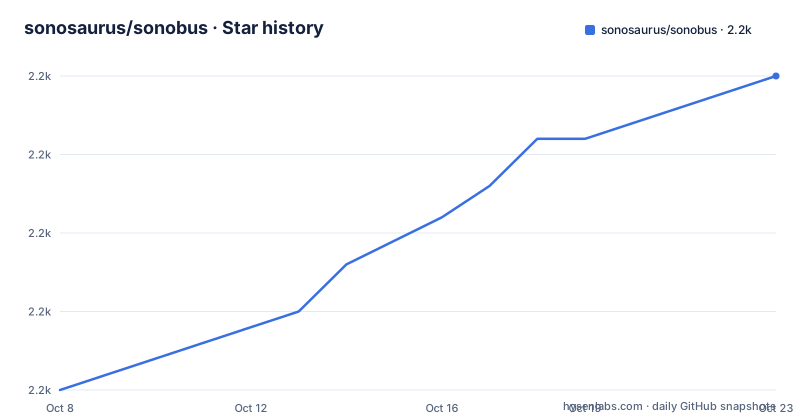
- sonosaurus/sonobus2,215 ★ · +20
| Repository | 2026-10-08 | 2026-10-23 |
|---|---|---|
| sonosaurus/sonobus | 2.2k | 2.2k |
20 Stars in the last 15 days, measured from the daily GitHub snapshot. Compare with other projects
Editorial analysis
A group name is the whole setup
SonoBus's usability claim is that you pick a unique group name, optionally with a password, and you are connected. There is no account, no server to provision and no room to configure. The README describes choosing a unique group name with an optional password and instantly connecting multiple people to make music, remote sessions or podcasts.
The network model follows from that. Audio is sent directly between users peer to peer, and the connection server's only job is to let the members of a group find each other. That server is `aoo.sonobus.net` by default. It is not in the path of your audio, which is a genuinely different architecture from the hosted mixing services people usually compare this to, and it is also why the project lets you build your own server. The standalone application contains a connection server internally, reachable on port 10999, and the README suggests port forwarding TCP and UDP 10999 from your router to the machine running it. The headless server lives in a separate repository, essej/aooserver.
Audio quality is adjustable per participant, which is the feature that matters when one person is on a fast wired machine and another is on hotel wifi. You can send full uncompressed PCM at 16, 24 or 32 bit, or compressed bitrates from 16 to 256 kbps per channel using the low-latency Opus codec, independently for each user in the group.
Why the microphone tips demand headphones
The README has an IMPORTANT TIPS section, and the first item is a deliberate absence rather than a feature. SonoBus does not use any echo cancellation or automatic noise reduction, in order to maintain the highest audio quality. The consequence follows immediately: if you have a live microphone signal you need headphones too, or the speakers pick up the mix and feed it back.
This is the right call for the project's core use case and the wrong one for a meeting. For a musician playing an instrument or a podcaster recording on separate machines, an automatic gain and noise gate on the input would be the enemy, since it would alter the signal being captured. The processing the project does offer is opt in and musical: optional input compression, a noise gate and EQ, plus a master reverb, all with dynamic settings.
The second tip is about the network rather than the audio path. Wired ethernet to the router gives the lowest latency. Over WiFi the added jitter and packet loss force a larger safety buffer to keep the signal intact, and a larger safety buffer means higher latency. So the latency figure you end up with is a function of the worst connection in the group, not your own. Network statistics are shown in the interface, which helps when someone sounds late and you need to work out whose network it is.
One detail to plan for is latency control granularity. The README describes fine-grained control over latency, quality and the overall mix, with every user in a group receiving and sending audio among all the others, so this is a mesh rather than a star with one mixer in the middle.
Building from source with the CMake scripts
Binary releases exist for macOS and Windows on sonobus.net and in the repository's releases, and Linux users have Debian packages plus a Snap. The build path matters mainly if you want a plugin host or a platform without a packaged build, such as working from the tip.
On macOS you need CMake 3.15 or newer and Xcode, then two scripts:
./setupcmake.sh
./buildcmake.sh
The application and plugins land under `build/SonoBus_artefacts/Release`. If you would rather inspect an Xcode project, `./setupcmakexcode.sh` produces one at `buildXcode/SonoBus.xcodeproj`. On Windows the README asks for CMake 3.15 or newer and Visual Studio 2017, and notes you need Cygwin if you want to use the scripts, though CMake can be driven directly instead. The same two scripts run there and the artefacts land in the same place. There is also a `setupcmakewin32.sh` next to the other Windows scripts, which suggests 32 bit targets are still configured.
That Visual Studio 2017 line is worth pausing on. It is the number the README states, and CMake 3.15 was released in 2019, so the documented toolchain is internally odd: a CMake minimum newer than the compiler the README asks for. The scripts are probably tolerant here, but if the Windows build fails on a current machine, the stale requirement is the first thing to correct rather than debugging your own setup. On Linux the README sends you to a different place entirely: `cd linux`, then read `linux/BUILDING.md`.
No encryption on a peer to peer stream
The README states it in plain language: SonoBus does NOT currently use any encryption for the data communication, and while it is unlikely the data will be intercepted, you should keep that in mind. It is the most consequential sentence in the document and it sits in the tips section rather than in a security section.
The peer to peer design makes this worse rather than better, in one specific way. Because audio goes directly between participants, the connection server never sees it, which means there is no central component where encryption could be added and enforced. The group password functions as a shared label for finding other users, and the README describes it as optional, without making any claim about what it authenticates.
So the practical reading is that a SonoBus session is as private as the network the participants are on. On a home LAN or a wired venue network that is a reasonable position for a rehearsal. Across the open internet it is not, and it is worth treating any session that carries unreleased music or a private interview with the caution you would apply to an unencrypted VoIP call.
The audio format deserves the same attention. A compressed Opus stream at 16 kbps is not confidential in any meaningful sense if intercepted, and full PCM gives away everything, including the room tone.
Vendored JUCE and AOO rather than package dependencies
SonoBus is built on JUCE 6 and on AOO, which the README describes as Audio over OSC and notes also uses the Opus codec. Neither is consumed as an ordinary dependency. The author uses the `git-subrepo` tool to bring the source of his own forks into this repository, so the JUCE fork lives on a branch called `sono6good` at essej/JUCE and the AOO fork on a branch called `sono` at essej/aoo.
That arrangement has a purpose and a cost. The purpose is reproducibility: the exact source of the audio toolkit is inside the repository you cloned, which is why the README can state that on macOS and Windows all dependencies are part of the git repository, including prebuilt Opus libraries. There is no dependency resolution step and no chance of a transitive upgrade changing your audio path. The cost is that a JUCE upgrade now requires merging a fork, and the repository has a `.gitmodules` file alongside the subrepo trees, so both vendoring mechanisms are present.
The tree shows the rest of the shape: `Source/` for the application, `deps/`, `mobile/` for the iOS side, `linux/` for the Linux build, `localization/` for translations, `snap/` for the Snap package, `release/` for packaging, `doc/` and `images/` for assets, and `scripts/` for automation. The JUCE directory at the top level is the vendored toolkit itself, which is why the repository is large for what is conceptually one application. There is a `LICENSE_EXCEPTION` file next to `LICENSE`, alongside the GPLv3 terms.
Credit is given by name, which is unusual and useful: Jesse Chappell wrote SonoBus, Christof Ressi is credited for the AOO library, Sten Wessel and Hannah Schellekens designed the soundboard feature, and there are separate documentation and translation credits including one Korean translator.
Three years of commits behind a 2023 release
The version picture here is the thing a prospective user most needs, and it is genuinely mixed. The newest tagged release is 1.7.2, published on 2023-12-11, with 1.7.1 on 2023-11-30 and 1.7.0 on 2023-11-28. The repository's last push was on 2026-09-04 and it is not archived.
So work has continued on the default branch for close to three years without a new tag. Both facts are in the repository and neither cancels the other. It could mean 1.7.2 is effectively the shipping version maintained quietly, or it could mean substantial work sits unreleased on `main`. The README does not say, and there is no statement about release cadence or a support policy for the 1.7.x line.
This matters more here than it would in a library, because the README tells users to download from sonobus.net rather than from the tags, and sonobus.net is a separately hosted site that could be serving either. If you are evaluating SonoBus, the useful step is to compare what the download page serves against the 1.7.2 tag and against the tip of `main`, so that you know which of the three you have. For anyone planning to depend on it, the absence of a recent tag is the honest risk to weigh, not the absence of commits.
The GPLv3 license is the other settled point. The README says the full text is in the LICENSE file and that some dependencies carry more permissive terms of their own, and GitHub records the repository as GPL-3.0. There is no commercial licensing offer mentioned anywhere, which is unusual for audio software of this kind and means redistribution obligations come with it.
Editorial conclusion
SonoBus is a good fit for music played through instruments, for podcast recording where each speaker is on a separate machine, and for any session where uncompressed audio and controllable latency matter more than speech processing. It is the wrong tool for a call where two people share a room and one microphone, because there is no echo cancellation and the feedback loop is yours to solve with headphones. Two things to verify before you rely on it. First, the newest tagged release is 1.7.2 from 2023-12-11 while the repository has been pushed to since, so confirm which build you are actually installing from sonobus.net or the releases page rather than assuming the tip is what you tested. Second, the audio travels peer to peer with no encryption, so treat the group password as a naming convention rather than a security control and keep sessions on networks you control if the content is sensitive.
Frequently asked questions
What is SonoBus used for?
It streams low latency audio between devices over the internet or a local network for music sessions, remote performances and podcast recording. You pick a group name and an optional password, and members connect peer to peer.
Is SonoBus a VST plugin?
Yes, on macOS and Windows it runs both as a standalone application and as an audio plugin in AU and VST formats. iOS and Linux get the standalone application only, and the README says you can use it on the desktop, inside a DAW, or on a mobile device.
Does SonoBus encrypt the audio it sends?
No. The README states plainly that it does not currently use any encryption for data communication, and because audio goes directly between users there is no central server where encryption could be enforced. The optional group password is not described as an authentication control.
Why do I need headphones to use SonoBus with a microphone?
Because there is no echo cancellation or automatic noise reduction, which the README says is deliberate to keep audio quality high. Without headphones your speakers feed the mix back into the live microphone and you get feedback, so headphones are required rather than merely advisable.
Can I run my own SonoBus connection server?
Yes. The default server is aoo.sonobus.net and only helps group members find each other, so you can build the headless aooserver from the essej/aooserver repository. The standalone application also contains a connection server internally that you can reach on port 10999.
Official sources
Add this badge to your README
If you maintain this project, the badge below links readers to this analysis and shows its maintenance status from the daily GitHub snapshot. Paste the markdown into your README; add ?metric=license or ?metric=stars to the image URL for a different field.

[](https://hysenlabs.com/projects/sonosaurus-sonobus)Star history chart for your README
[](https://hysenlabs.com/projects/sonosaurus-sonobus)Was this useful?