Helix Foundry: Local Data Workspace Setup and Architecture
Your company's data, connected into one ontology, on your own computer. A local-first data workspace built on HelixDB and DuckDB.
At a glance
- What is it?
- Helix Foundry combines HelixDB, DuckDB, and local or hosted AI models in a local-first workspace for connecting company data and exploring a suggested ontology. It suits technical teams that want local exploration, but its resource requirements and release limitations deserve attention.
- Who is it for?
- Helix Foundry fits technical teams that already use supported databases, SaaS platforms, files, or APIs and want local exploration with executed SQL and graph-backed answers. It is a poor fit for Windows users, environments without bash and Docker Compose v2, or organizations that require a mature release and upgrade process rather than an application with no GitHub releases.
- Can I use it commercially?
- Yes. Apache-2.0 is a permissive licence: you can use, modify and sell software built on it, as long as you keep its copyright and licence notices.
- Is it still maintained?
- Yes. The repository received new commits within the last day.
- What is it written in?
- Mainly TypeScript, according to GitHub's language statistics.
Answers come from the project's GitHub data, last synced on October 23, 2026, and from our analysis. They are not legal advice.
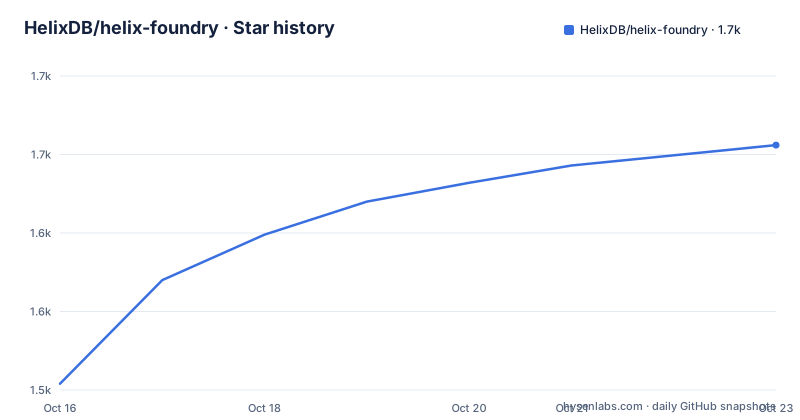
Star history
- HelixDB/helix-foundry1,656 ★ · +152
| Repository | 2026-10-16 | 2026-10-23 |
|---|---|---|
| HelixDB/helix-foundry | 1.5k | 1.7k |
152 Stars in the last 7 days, measured from the daily GitHub snapshot. Compare with other projects
Editorial analysis
Why Helix Foundry Exists for Connected Company Data
Helix Foundry addresses the problem of asking useful questions across company systems whose records do not share a common analytical structure. Its intended users are technical teams that already have databases, SaaS services, object storage, files, or APIs and want a workspace that can relate those sources. The project describes itself as a local-first data workspace built on HelixDB and DuckDB. It runs on the user's computer, does not require an account, and uses local AI by default.
The supported connector list includes Neon, Supabase, PlanetScale, PostgreSQL, MySQL, Neo4j, Stripe, WorkOS, PostHog, REST APIs, S3-compatible storage, CSV, JSON, JSONL, and Parquet uploads. An ingestion API is also listed. That range makes the project relevant when records such as customers, invoices, subscriptions, identity records, product events, and support data live in separate systems.
The central output is a suggested ontology. Helix Foundry attempts to match customers and records across connected sources, then stores objects and relationships as data in HelixDB. Users can confirm the suggestion during guided setup before exploring it. This review workflow matters because entity matching is not automatically equivalent to a company-wide definition of identity, ownership, or account hierarchy.
Helix Foundry is not a generic hosted business intelligence service or an unrestricted model for every possible data source. The documented connectors establish its scope. A source outside that list would need an existing API or ingestion route, and the README does not claim that arbitrary systems can be added without implementation work.
HelixDB, DuckDB, Worker, and Executor Data Flow
The repository layout separates the web application, API, worker, executor, packages, and tests. The TypeScript package configuration defines separate `apps/api/src/server.ts`, `apps/api/src/worker.ts`, and `services/executor/src/server.ts` processes for normal local development. Docker Compose brings these responsibilities together for the documented setup.
Imported data is represented as immutable Parquet snapshots with profiles, schema-drift review, and history. Queries run through isolated DuckDB processes rather than against an unrestricted shared database session. Answers in the Analyst interface are backed by executed SQL and snapshot citations, which gives users a trace from an answer to the data version queried. The executor has separate configuration values for query and job timeouts, while result and spill limits are also represented in the environment template.
HelixDB holds the suggested ontology as real objects and relationships. That graph model differs from treating every source as one flattened table. It is useful for questions that depend on connected entities, but it also makes ontology review a required part of setup. The README says users confirm the suggested ontology during the `AI → Data → Ontology` flow.
The API also exposes developer access through `/api/docs`, a TypeScript SDK, and scoped API tokens. AI-proposed changes do not pass directly into production data. According to the README, they are tested and wait for user review.
Docker Compose Installation and First Guided Setup
Helix Foundry requires Docker with the Compose v2 plugin, plus `git`, `bash`, and `openssl`. The manual quick start clones the repository and delegates key generation and stack startup to `scripts/setup.sh`:
git clone https://github.com/helixdb/helix-foundry.git
cd helix-foundry
./scripts/setup.sh --compose
The script writes fresh keys to `.env` when that file does not already exist, then builds the application and starts the app, background worker, DuckDB executor, HelixDB, and Ollama. The first run downloads images and the `qwen3:4b` model, which the README describes as roughly 2.5 GB. Several gigabytes of disk are therefore required before room is reserved for imported data.
Wait for the documented health endpoint to respond:
curl -fsS http://localhost:3001/api/health
# {"ok":true,"service":"helix-foundry"}
The expected response is the JSON object shown after the command. Once the service is healthy, open `http://localhost:3001`. There is no account creation step. In guided setup, select Local, Claude, OpenAI, Azure OpenAI, Amazon Bedrock, or a custom OpenAI-compatible endpoint. Connect data or select Continue with sample data, then review the proposed ontology.
The local model may still download after the health check succeeds, according to the README. That distinction matters: a healthy application does not necessarily mean the initial model download has completed.
Port, Origin, and Native Ollama Constraints
The default published port is `3001`, and the Compose configuration binds it to loopback. A different port requires both `PUBLIC_PORT` and `PUBLIC_ORIGIN` to match. Changing only the port can make pages load while save operations fail with `403 Origin is not allowed`.
To prepare an alternative port before startup, create `.env`, append both settings, and rerun the Compose setup:
./scripts/setup.sh
echo 'PUBLIC_PORT=3005' >> .env
echo 'PUBLIC_ORIGIN=http://localhost:3005' >> .env
./scripts/setup.sh --compose
The README warns to add the lines only once or change existing values. Keeping the browser origin and published port synchronized is a deployment requirement rather than optional tuning.
On Apple Silicon, Docker cannot use Metal, so the README recommends native Ollama when it is already installed. The documented alternative starts the stack and points the model endpoint at the host service:
./scripts/setup.sh
grep -q '^MODEL_ENDPOINT=' .env || echo 'MODEL_ENDPOINT=http://host.docker.internal:11434' >> .env
docker compose up -d --build
This route depends on Docker Desktop providing `host.docker.internal`. With another Docker runtime, the README directs users to the default command instead. Helix Foundry was developed and validated on macOS with Apple Silicon, while CI runs on Linux. Windows is untested and the scripts require bash.
Operational Limits for Files, Memory, and External AI
Helix Foundry is local-first, but it is not resource-light. The README reserves several gigabytes for the first run and warns that importing a large file can temporarily require several times the file size. The environment template exposes `DUCKDB_SPILL_LIMIT`, `EXECUTOR_RESULT_LIMIT`, `EXECUTOR_QUERY_TIMEOUT`, and `EXECUTOR_JOB_TIMEOUT`. Those controls are relevant when large files, long-running queries, or expensive HelixDB writes exceed an ordinary workstation configuration.
Memory is the sharper adoption constraint for the bundled model. The README states that local AI was developed and benchmarked on a 16 GB machine. It does not claim that Helix Foundry will fit comfortably on systems with less memory. Compose also includes memory budgets for Ollama and HelixDB, including `OLLAMA_MEMORY_LIMIT` and `HELIX_MEMORY_RESERVATION`. Operators should compare those budgets with the memory Docker can actually allocate.
External model providers offer another path. Claude, OpenAI, Azure OpenAI, Amazon Bedrock, and custom OpenAI-compatible endpoints are selectable during setup. The README does not provide a universal claim about their latency, cost, privacy, or model behavior, so those properties depend on the selected provider and its terms. Database credentials and Claude or OpenAI keys are entered in the browser rather than supplied to the coding agent.
For ordinary use, the documented lifecycle is based on Docker Compose:
docker compose --profile local ps -a
docker compose --profile local logs -f app worker
docker compose --profile local stop
docker compose --profile local up -d
These commands inspect services, follow application and worker logs, stop the stack, and start it again. Native Ollama deployments omit `--profile local` where the README specifies.
Alternative Approaches, Licensing, and Maintenance
A warehouse-backed BI tool is the clearest alternative when a team needs governed dashboards, established scheduling, centralized access controls, and a mature operational process. Helix Foundry takes a different approach: it combines Parquet snapshots, isolated DuckDB execution, HelixDB ontology objects, and model-generated answers on a local machine. That is closer to a personal analytical workspace than a centrally administered BI platform. The README does not document a hosted control plane or account system, so teams needing those governance features should not assume they are included.
A conventional notebook and SQL client is another practical alternative. When analysts already understand the source schemas and need complete control over every query, direct SQL avoids entity matching and ontology review. Helix Foundry is more relevant when records from several systems need exploration as connected business objects and when AI-assisted questions are part of the workflow.
The repository is licensed under `Apache-2.0`. That identifies the stated license, but it does not by itself answer questions about third-party services, source credentials, model-provider terms, or the legal obligations attached to a particular deployment. No legal interpretation is required to understand the repository's basic adoption implications: the code is published under the stated license, while external systems remain separately governed.
The repository is not archived, and its last push was on 2026-10-13. However, it has no GitHub releases. The README lists backup, restore, and upgrade scripts, but the supplied upgrade instructions are truncated, so this review does not invent an upgrade command or claim a release-based upgrade policy. For production use, that missing command-level documentation is a concrete review item.
Editorial conclusion
Helix Foundry fits technical teams that already use supported databases, SaaS platforms, files, or APIs and want local exploration with executed SQL and graph-backed answers. It is a poor fit for Windows users, environments without bash and Docker Compose v2, or organizations that require a mature release and upgrade process rather than an application with no GitHub releases. Before adoption, verify that the selected source connector has the required access, that Docker has enough disk and memory for the intended datasets, and that the documented backup, restore, and upgrade scripts match the deployment plan.
Frequently asked questions
What does Helix Foundry require for its first installation?
Helix Foundry requires Docker with the Compose v2 plugin, along with `git`, `bash`, and `openssl`. The first run needs several gigabytes of disk, and Node.js 24 with pnpm 10.7 is required only for local development.
Does Helix Foundry require an account or hosted service?
No. It runs on the user's computer, has no account creation step, and uses local AI by default. Claude, OpenAI, Azure OpenAI, Amazon Bedrock, and custom OpenAI-compatible endpoints are optional alternatives.
Can I change the Helix Foundry port from 3001?
Yes, but `PUBLIC_PORT` and `PUBLIC_ORIGIN` must be changed together. The README warns that changing only the port can cause save operations to fail with `403 Origin is not allowed`.
Which platforms are documented for Helix Foundry?
The project was developed and validated on macOS with Apple Silicon, and its CI runs on Linux. Windows is untested, while the setup scripts require bash.
Official sources
Add this badge to your README
If you maintain this project, the badge below links readers to this analysis and shows its maintenance status from the daily GitHub snapshot. Paste the markdown into your README; add ?metric=license or ?metric=stars to the image URL for a different field.

[](https://hysenlabs.com/projects/helixdb-helix-foundry)Star history chart for your README
[](https://hysenlabs.com/projects/helixdb-helix-foundry)Was this useful?