OpenMoji: a Unicode emoji set you can inspect, regenerate and ship
Open source emojis for designers, developers and everyone else!
At a glance
- What is it?
- Every OpenMoji graphic starts as a source SVG in the repository, is exported to PNG and fonts by shell helpers, and is published under CC BY-SA 4.0 with LGPL-3.0 on the build code.
- Who is it for?
- OpenMoji is the emoji set to pick when you want source files rather than a black box, because the artwork is SVG in `src/`, the metadata is a single JSON file in `data/`, and the export path is a set of shell scripts you can run. It tracks Unicode closely, with 17.0.0 landing on 2026-04-23 alongside full Emoji 17.0 support.
- Can I use it commercially?
- Yes, with credit. CC-BY-SA-4.0 allows commercial use as long as you credit the authors and indicate what you changed. It is written for creative content, so check how it applies to any code.
- Is it still maintained?
- Yes. The repository last received commits 74 days ago.
- What is it written in?
- Mainly HTML, according to GitHub's language statistics.
Answers come from the project's GitHub data, last synced on October 23, 2026, and from our analysis. They are not legal advice.
Star history
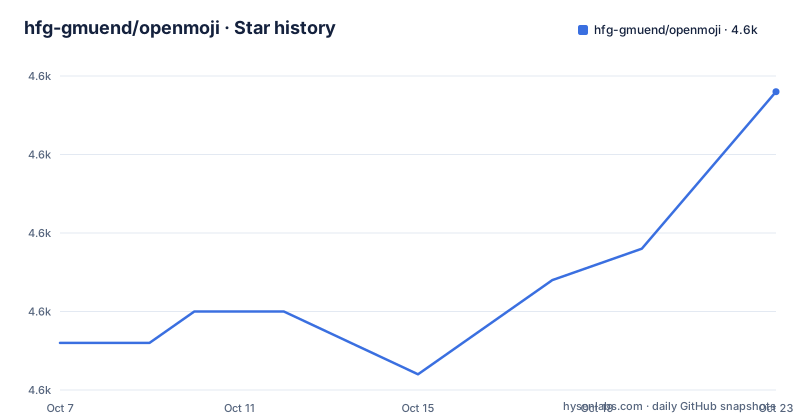
- hfg-gmuend/openmoji4,572 ★ · +8
| Repository | 2026-10-07 | 2026-10-23 |
|---|---|---|
| hfg-gmuend/openmoji | 4.6k | 4.6k |
8 Stars in the last 16 days, measured from the daily GitHub snapshot. Compare with other projects
Editorial analysis
Source SVGs, exported files and one metadata JSON
The repository documents its own layout in a section titled anatomy, and the directories divide cleanly by stage of production. `src/` holds the source `.svg` files, organised into folders matching the Unicode groups and subgroups. `black/` and `color/` hold the exported `.png` and `.svg` files. `data/` holds the central `openmoji.json` with the metadata for every emoji. `font/` holds the exported fonts, `guidelines/` holds the styleguide template files, `helpers/` holds the scripts that do the exporting, and `test/` holds automated unit tests that check consistency across all source SVGs.
That structure is the argument for the project. An emoji set distributed only as finished PNGs is opaque: you cannot adjust a stroke weight, re-export at a size the designer never tried, or check whether a shape meets a contrast requirement. Here the drawing is a file you can open.
The people behind it are named too, as a project of HfG Schwäbisch Gmünd by Benedikt Groß, Daniel Utz, more than seventy students and external contributors. That reads as a teaching project with a production output, which matches a repository where every emoji is a vector drawing under version control.
Picking a channel: releases, npm, CDN or UNPKG
Four distribution paths are documented, and they suit different situations. GitHub releases carry the SVG and PNG sets in colour and black, along with the fonts, and the README marks the SVGs and both PNG sizes as production ready while marking the fonts experimental. A size-limited PNG release exists at 618x618 and a small one at 72x72.
The npm package covers the JavaScript side.
git clone --depth 1 https://github.com/hfg-gmuend/openmoji.git
npm install openmoji
The README warns that the repository is big and recommends cloning without full history, which is why the `--depth 1` flag is in that command.
Two URL forms avoid an install entirely. A CDN path serves the file straight from the repository, and the README is explicit that it always fetches the latest version, with a pointer to jsdelivr documentation for pinning. UNPKG serves individual files from the npm package at a versioned path, with the example given being a single SVG at version 12.1.0.
For anything user facing, pin something. An unpinned CDN path means your icons change under you when a new release lands.
The fonts are experimental, the SVGs are not
The distinction between artefacts in this project is stated clearly and is worth internalising before you commit to a format. SVG and PNG, in both colour and black, are described as production ready. The fonts are described as experimental, in both the colour and black variants.
That matters because a colour font is a harder artefact than a set of SVGs. A font has to fit a design space, cope with fallback when a glyph is missing, survive rasterisation at small sizes on every platform, and not render as tofu in a terminal or an editor. The artwork itself can be perfect while the font build still has edges to smooth. The `font/` directory and its documentation are the place to look before promising users a font based on this set.
The SVG-first approach is also why skin tone variants are handled as separate source files rather than as a runtime colour transform. The helpers directory is described as containing scripts that generate skin tone variants among other jobs, which means the tone variants are drawn, reviewed and exported like any other emoji rather than recoloured by a consumer.
Regenerating artwork with the helpers scripts
The export path is scripted rather than manual, and the scripts are named in `package.json`. Exporting SVG, PNG, PDF or a zip archive are each one command, as are generating the data tables and building the fonts.
npm run export-svg
npm run export-png
There is a `generate` script that runs `helpers/generate.sh`, and a separate `generate-fonts` script for the font pipeline. A cache management command exists because exporting is expensive enough that the project keeps memoised refs per output type, including separate refs for 618px and 72px PNG output, colour SVG, and skin tone SVG, and the cache can be cleared from the same script.
Testing follows the same split. The `test` script runs mocha in parallel against the test files with the path to `data/openmoji.json` and the `src` folder passed as arguments, and a separate `test-dev` script inverts the `production` grep so the development-only assertions run without the production ones. That last detail is a small design lesson: the same test suite knows which set of checks applies to a work in progress build versus a released one, which is the same distinction the README draws for the fonts.
The scripts themselves are shell, and a `lint-sh` script runs shellcheck over `helpers/*.sh`.
Attribution is the price of the CC BY-SA licence
OpenMoji is licensed in two parts and it matters which applies to what. The graphics are under Creative Commons Attribution-ShareAlike 4.0. The code, meaning the helper scripts and the tooling, is under the GNU Lesser General Public License version 3. So if you run the export scripts you are working under LGPL, and if you put a smiley on your website you are working under CC BY-SA.
The README is direct about the attribution requirement, calling it critical from a legal, practical and motivational standpoint and asking for credit in a project README, an About section, or a footer on a website or in an app. It suggests the wording: credit the OpenMoji project by name with a link, and state the licence as CC BY-SA 4.0.
ShareAlike is the part people misread. It does not stop you from using the artwork commercially, and it does not force your whole application under the same licence. It applies to derivative works of the licensed material. Shipping an unmodified set with a credit line is straightforward; redrawing an emoji into your own icon set is a derivative work question, and one worth deciding deliberately rather than assuming.
There is a citation for academic use as well, with a Zenodo DOI and a BibTeX entry in the README: Groß, Utz and the OpenMoji contributors, 2026, as a dataset.
Unicode releases as the release cadence
The releases are organised around Unicode emoji versions, which gives you a predictable upgrade path. Version 17.0.0 shipped on 2026-04-23 with full support for Unicode Emoji 17.0 and a redesign of the Japanese ideographic emojis, adding glyphs including a ballet dancer, a trombone, a distorted face, a fight cloud, a treasure chest, chess pieces, the rainbow queer symbols, and a set of flags. Version 16.0.0 on 2025-08-08 added Emoji 16.0 and moved the Node.js build from version 14 to 22. Version 15.1.0 on 2024-12-17 added Emoji 15.1 with head shaking, larger family glyphs, a phoenix, and more programming language glyphs including .NET, Kotlin, Ruby and Golang.
Two caveats sit alongside that cadence. The README warns that the master branch is in active development and that a release is what you want for a stable production version, and it points at the OpenMoji Dev Catalog for the current state of master. And the open issue count on the repository is high for a project of this size, which for a design repository with a student contributor base is not surprising, but it does mean design requests will sit in a queue.
The last push was on 2026-08-12, so work continues between releases even though the release line follows Unicode.
Editorial conclusion
OpenMoji is the emoji set to pick when you want source files rather than a black box, because the artwork is SVG in `src/`, the metadata is a single JSON file in `data/`, and the export path is a set of shell scripts you can run. It tracks Unicode closely, with 17.0.0 landing on 2026-04-23 alongside full Emoji 17.0 support. Two caveats shape the decision. The master branch is explicitly work in progress, so production users should pin a release, and the fonts are labelled experimental while the SVGs and PNGs are the production-ready artefacts. Licence handling is the other: the artwork is CC BY-SA 4.0 and requires visible attribution, so add the credit line the README suggests to whatever you ship. Start from the pinned release URL format rather than the CDN, because the CDN always serves the latest version.
Frequently asked questions
Is OpenMoji free to use?
Yes. The graphics are open source under Creative Commons Attribution-ShareAlike 4.0, and the build code, meaning the helper scripts and tooling, is under LGPL-3.0. The condition to watch is attribution: the README asks for visible credit in a README, an About section, or a site or app footer.
Should I use the OpenMoji master branch or a release?
Use a release for production. The README states that the master branch is in active development and points anyone who wants a stable production version at the releases, where the SVG and PNG sets are marked production ready and the fonts are marked experimental.
How do I load a single OpenMoji SVG in a web project?
Two URL forms work without installing anything: a jsdelivr CDN path that always serves the latest version, and a versioned UNPKG path that serves one file from the npm package. Pin a version in either case, because the unpinned CDN path will change when a new release is published.
Can I edit OpenMoji artwork and re-export it?
That is what the repository is set up for. Source drawings live as SVG files in `src/`, organised by Unicode group, and the export path is scripted through npm commands such as export-svg and export-png, with separate scripts for generating data tables and building the fonts.
Official sources
Add this badge to your README
If you maintain this project, the badge below links readers to this analysis and shows its maintenance status from the daily GitHub snapshot. Paste the markdown into your README; add ?metric=license or ?metric=stars to the image URL for a different field.

[](https://hysenlabs.com/projects/hfg-gmuend-openmoji)Star history chart for your README
[](https://hysenlabs.com/projects/hfg-gmuend-openmoji)Was this useful?