QuickPassthrough: a terminal menu that wires a second GPU into a libvirt VM
A project to remove the complexity of setting up GPU passthrough for qemu
At a glance
- What is it?
- QuickPassthrough is a Go program that walks a Linux host through turning a spare GPU into a passthrough device for qemu and libvirt, from IOMMU detection to kernel arguments and initramfs rebuilds. It targets two GPU machines and headless servers, and it explicitly leaves VM configuration to the user.
- Who is it for?
- QuickPassthrough fits a Linux host with two GPUs, or a headless server with a spare card, where the person at the keyboard would rather not hand-edit initramfs and bootloader files. It does not fit single GPU machines, immutable systems such as Bazzite or Bluefin, or anyone expecting it to create and tune the virtual machine itself, since the project states that part is the user's job.
- Can I use it commercially?
- Yes. MIT is a permissive licence: you can use, modify and sell software built on it, as long as you keep its copyright and licence notices.
- Is it still maintained?
- Yes. The repository last received commits 119 days ago.
- What is it written in?
- Mainly Go, according to GitHub's language statistics.
Answers come from the project's GitHub data, last synced on November 6, 2026, and from our analysis. They are not legal advice.
Star history
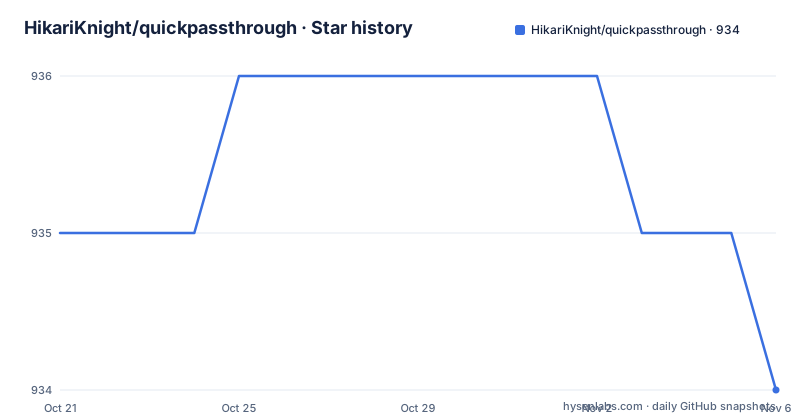
- HikariKnight/quickpassthrough934 ★ · -1
| Repository | 2026-10-21 | 2026-11-06 |
|---|---|---|
| HikariKnight/quickpassthrough | 935 | 934 |
-1 Stars in the last 16 days, measured from the daily GitHub snapshot. Compare with other projects
Editorial analysis
Two GPUs, one host, one spare card to give away
GPU passthrough on Linux is a configuration chore rather than a missing feature. The kernel has the pieces, libvirt can bind a PCI device to a guest, but getting there means detecting the right IOMMU groups, loading the vfio modules in the right order, rebuilding the initramfs so those modules exist early, and writing kernel arguments into whichever bootloader the machine uses. Each of those steps has a variant depending on the CPU vendor, the initramfs generator, the bootloader, and the card.
QuickPassthrough is a Go program that performs those host-side steps through a terminal menu. The project states its scope plainly: it is aimed at systems with 2 GPUs and headless servers where the only GPU is not needed. It also says it is not designed to be installed by a package manager, because the intent is to run it once unless the GPU changes.
The scope of the project is equally plain in the negative. It does not set up or configure the virtual machine, it does not optimise the virtual machine for passthrough, it does not optimise the host for passthrough or virtualisation, and it does not handle passthrough on systems with a single graphics card, with the note that an iGPU counts as one graphics card by itself, so an iGPU plus another card does work.
That last exclusion matters more than it first appears, because a single discrete card on an iGPU machine is the most common reason people try passthrough and the case where the tool refuses to help.
What the menu actually changes on the host
The list of actions is the clearest description of the tool. It warns the user and asks for a backup, then detects whether the CPU is AMD or Intel and supplies the matching IOMMU kernel arguments. It configures the second GPU for passthrough, one card for the host and one for the guest.
Device discovery comes from a companion project, ls-iommu, which finds PCI devices such as graphics cards and USB controllers and shows which IOMMU group each one belongs to. The project credits ls-iommu with handling cards whose parts land in separate IOMMU groups, giving the example of an RX6600XT, fetching device IDs and PCI addresses, locating the vbios rom path on the system, telling the user to enable IOMMU in firmware, and listing devices with their groups.
The vfio modules are enabled across the initramfs generators the project names: initramfs-tools, dracut, modprobe and mkinitcpio. Kernel arguments are then written for grub2, by editing /etc/default/grub or using grubby, and for systemd-boot, using kernelstub or grubby. When no supported bootloader is found, the tool provides the correct arguments to add to the bootloader entry by hand. It also checks that the vendor-reset module is loaded before vfio, pointing at that module's repository for the list of cards that need it, and it can generate a script to dump the vbios rom, since some cards need a romfile for passthrough to work. Rom patching is explicitly not planned.
One detail explains a lot of the design. The project originally was bash, and the author moved it to Go because bash became unmanageable with the regex and inline file editing this task needs. Go then let the tool use TUI toolkits for a real menu.
Building from source with a version stamp in the binary
Users can download the latest release and run it in a terminal, or build it themselves. The build is four commands, and the fourth embeds the short commit hash into the binary through a linker flag.
git clone https://github.com/HikariKnight/quickpassthrough.git
cd quickpassthrough
go mod download
CGO_ENABLED=0 go build -ldflags="-X github.com/HikariKnight/quickpassthrough/internal/version.Version=$(git rev-parse --short HEAD)" -o quickpassthrough cmd/main.go
The `CGO_ENABLED=0` part is deliberate. The project's stated reason for choosing Go was to avoid system dependencies, and compiling with cgo disabled statically links the libraries, so the result is a small binary that runs on a machine without a Go toolchain or extra runtime packages.
There is a second build recipe for the newest dependencies, which the project warns may break. It adds one command, `go get -u ./cmd`, before the same build line.
go get -u ./cmd
CGO_ENABLED=0 go build -ldflags="-X github.com/HikariKnight/quickpassthrough/internal/version.Version=$(git rev-parse --short HEAD)" -o quickpassthrough cmd/main.go
The module targets Go 1.20 and pulls in a small set of libraries: the charmbracelet set for the terminal interface, argparse for flags, grab for downloads, the klauspost cpuid package for CPU detection, and the ls-iommu module pinned at a 2023 pseudo-version. The dependency on ls-iommu is therefore fixed to a revision from 2023, while the rest of the tree moves independently.
The backup folder is the only way back
A tool that edits /etc/default/grub, rebuilds the initramfs and loads kernel modules needs an exit path, and this one has a simple one. On the first run it generates a `backup/` folder holding a copy of every file it was about to edit, together with their paths. To undo the changes, you compare `backup/` with the `config/` folder, work out which files to delete, copy the backups back over the originals, rebuild the initramfs and update the bootloader configuration.
There is a second, faster escape. To disable vfio for a single boot, you remove the vfio kernel arguments from the bootloader by pressing E on the boot menu, and the arguments that were added are recorded in the `config/kernel_args` file. Removing them from the bootloader and updating it permanently is the other option if you want to keep the config files on the system.
Neither of these paths is automatic. Undo means reading the diff yourself and deciding what to restore, and the single boot trick assumes you know how to edit a boot entry. The project does not document a rollback command, which is the main reason to read `config/` and `backup/` carefully before running it on a machine you cannot easily reach.
A related caution applies to firmware. The tool asks the user to enable IOMMU, VT-d or AMD-v, at the motherboard and bootloader level, and that setting lives in BIOS rather than in Linux, so a partial run leaves the host half configured.
Immutable systems have their own path, and the tool stays out of it
The project asks directly whether it works on atomic or immutable systems, and the answer is no. The reason given is not a missing feature but a different design: those systems are read-only and handle updates atomically, so editing files under /etc does not behave the way the tool assumes.
For those platforms the project points to a `ujust` command that does a similar job. On Bazzite you run `ujust setup-virtualization` and follow the prompts for `Enable Virtualization` and `Enable VFIO drivers`. On Bluefin and Aurora you run `ujust setup-vfio` and follow the prompts.
The distinction is worth understanding as a boundary rather than a gap. QuickPassthrough works on conventional Linux installations where /etc/default/grub, the initramfs configuration and the initramfs itself are files you own and can edit. The ujust path works on systems designed around image based updates, where those files are generated. The two approaches solve the same problem with different assumptions about who owns the filesystem.
A second limitation sits in the vbios handling. The tool can generate a script to dump the vbios rom, and some cards require a romfile for passthrough to work, but the project states that rom patching support is not planned. Cards that need a patched rom are therefore outside what the tool can finish for you.
Doing the same work by hand, and the tool that does the device part
The alternative to QuickPassthrough is the manual path, and the project describes it accurately enough to be worth spelling out. You would detect the IOMMU group yourself, write the vfio kernel arguments into /etc/default/grub or the systemd-boot entry, ensure vendor-reset loads before vfio in the initramfs configuration, rebuild the initramfs with the right generator, and reboot to find out whether you got it right. The tool's value is the menu and the ordering, not any capability the kernel lacks.
The other comparison is with ls-iommu on its own. That project does the device discovery: it lists PCI devices, their IDs and addresses, their IOMMU groups, and the vbios rom path, and it points out cards split across groups such as the RX6600XT. If your only need is to find out which group a card sits in and what its rom path is, ls-iommu alone answers that without touching a bootloader.
What QuickPassthrough adds on top is the destructive half: initramfs edits, bootloader edits, module ordering and the menu that walks through them. That is also why it warns about backups, and why the case of a machine with one graphics card is excluded rather than half supported.
MIT licensed, released occasionally, and aimed at one machine at a time
The licence is MIT, which leaves the code free to read, modify and redistribute, and the Go implementation makes it easy to fork for your own initramfs generator or bootloader combination. That is a real advantage over a shell script collection, and it is the reason the tool can present a menu at all.
Release cadence is irregular. The published versions are 2.1.5 on 2026-07-11, 2.1.4 on 2025-01-06 and 2.1.3 on 2024-12-30, and the last push was on 2026-07-11. The gap between the 2.1.4 and 2.1.5 releases is over a year, so the version number tells you little about how recent the work actually is, and you should read the commit history rather than the tag list.
The upgrade cost for a user is also close to zero by design, since the tool is meant to be run once per GPU change rather than kept installed. What it leaves behind is state on the filesystem: the `backup/` and `config/` directories, the modified bootloader entry, and the rebuilt initramfs. Re-running it after a kernel or bootloader update is the maintenance loop, and the project does not document an idempotency guarantee for that case.
The upstream dependency on ls-iommu is pinned to a 2023 revision, so the newest card support in that library does not arrive with a rebuild of quickpassthrough. If you are chasing support for a specific card, that pin is the first place to look.
Editorial conclusion
QuickPassthrough fits a Linux host with two GPUs, or a headless server with a spare card, where the person at the keyboard would rather not hand-edit initramfs and bootloader files. It does not fit single GPU machines, immutable systems such as Bazzite or Bluefin, or anyone expecting it to create and tune the virtual machine itself, since the project states that part is the user's job. Before running it, take the backup it creates on first run seriously, confirm the GPU and its IOMMU group are listed by ls-iommu, and check that your bootloader is one of the two the tool handles, grub2 or systemd-boot.
Frequently asked questions
What does QuickPassthrough do for GPU passthrough on Linux?
It configures the host side for qemu and libvirt: it detects AMD or Intel and supplies the right IOMMU kernel arguments, enables the vfio modules across initramfs-tools, dracut, modprobe and mkinitcpio, and writes kernel arguments for grub2 or systemd-boot. Setting up and tuning the virtual machine itself is left to you.
How do I build QuickPassthrough from source?
Clone the repository, run `go mod download`, then build with `CGO_ENABLED=0 go build -ldflags="-X github.com/HikariKnight/quickpassthrough/internal/version.Version=$(git rev-parse --short HEAD)" -o quickpassthrough cmd/main.go`. Compiling with cgo disabled statically links the libraries so the binary has no system dependencies.
How do I undo the changes QuickPassthrough made?
The tool creates a `backup/` folder on the first run with copies of every file it edited, and writes the arguments it added to `config/kernel_args`. You compare `backup/` with `config/`, restore the files, rebuild the initramfs and update the bootloader config yourself.
Does QuickPassthrough work on Bazzite, Bluefin or Aurora?
No, the project states it does not work on atomic or immutable systems. On Bazzite you run `ujust setup-virtualization`, and on Bluefin and Aurora you run `ujust setup-vfio`, following the prompts.
How many GPUs does a QuickPassthrough host need?
The project targets systems with 2 GPUs, one for the host and one for the VM, and it does not set up passthrough on systems with a single graphics card. An iGPU counts as one card by itself, so an iGPU plus another GPU does work.
Official sources
Add this badge to your README
If you maintain this project, the badge below links readers to this analysis and shows its maintenance status from the daily GitHub snapshot. Paste the markdown into your README; add ?metric=license or ?metric=stars to the image URL for a different field.

[](https://hysenlabs.com/projects/hikariknight-quickpassthrough)Star history chart for your README
[](https://hysenlabs.com/projects/hikariknight-quickpassthrough)Was this useful?