dshfind: A Community Site for DeepSeek Harness Learning and Plugin Discovery
Learn DSH (DeepSeek Harness) principles, plugin marketplace & best practices.
At a glance
- What is it?
- dshfind is a Next.js-based community site that teaches DeepSeek Harness principles through MDX lessons and aggregates DSH plugins from a GitHub topic. It is useful for developers new to DSH, but its value depends on the health of the external topic and the depth of its lessons.
- Who is it for?
- Adopt dshfind if you are a DSH developer who wants structured lessons on monads and coeffects or a plugin author seeking visibility through the GitHub topic. Avoid it if you need a curated, manually vetted plugin index or if you cannot rely on GitHub CLI for data regeneration.
- Can I use it commercially?
- Not without permission. GitHub finds no licence file in the repository, and without a licence all rights are reserved by default: you may read the code but not reuse it. Check the README, or ask the authors, before using it.
- Is it still maintained?
- Yes. The repository last received commits 1 day ago.
- What is it written in?
- Mainly TypeScript, according to GitHub's language statistics.
Answers come from the project's GitHub data, last synced on October 21, 2026, and from our analysis. They are not legal advice.
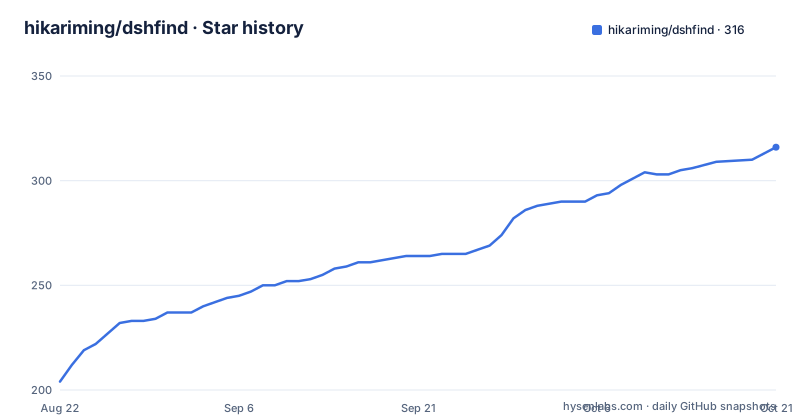
Star history
- hikariming/dshfind316 ★ · +112
| Repository | 2026-08-22 | 2026-10-21 |
|---|---|---|
| hikariming/dshfind | 204 | 316 |
112 Stars in the last 60 days, measured from the daily GitHub snapshot. Compare with other projects
Editorial analysis
The Problem dshfind Addresses
DeepSeek Harness (DSH) is a niche ecosystem, and newcomers face a steep curve when trying to understand its core concepts. The README positions dshfind as a learning and sharing community that fills this gap. It targets two audiences: developers who need to learn DSH principles, and plugin authors who want their work discovered. The site does not just host documentation; it offers structured lessons that go from basics to a chapter-by-chapter analysis of the Cordis paper. That paper is the theoretical foundation, covering monads, coeffects, revertible effects, and effect composition. For someone encountering these terms for the first time, a guided path is more practical than reading the original paper alone. The plugin marketplace addresses a different problem: finding plugins in a fragmented ecosystem. Instead of a manual directory, dshfind relies on an automated aggregation from a GitHub topic, which reduces the burden on maintainers. The site also includes best practices and community rankings, which gives authors a reason to participate beyond just listing their work.
How the Plugin Marketplace Works
The marketplace is not a hand-curated list. According to the README, plugin and ranking data are generated from the GitHub topic `dsh-plugin`. A scheduled job runs every day at 02:17 UTC and syncs the topic. When a developer adds the `dsh-plugin` topic to a public GitHub repository, that repo appears in the marketplace within about a day. No pull request or issue is required. This is a low-friction submission model, but it has a clear dependency: the entire index relies on the health of that topic. If the topic is sparsely used or contains off-topic repos, the marketplace quality suffers. The README acknowledges this by noting that repos may be filtered as off-topic or may be private or archived, which would prevent listing. The data regeneration command, `pnpm gen:data`, requires the GitHub CLI. This means the process is not fully automated for local contributors; you need `gh` installed and authenticated. The daily sync is a cron job, likely on the deployment platform, but the README does not specify where that job runs.
Tech Stack and Architecture
The site is built with Next.js 16 using the App Router, React 19, and TypeScript. It uses next-intl for internationalization, with English and Chinese UI strings. Lessons are written in MDX and stored in `src/content/lessons`. This structure separates content from code, making it easier for contributors to add lessons without touching the React components. The use of MDX means lessons can include interactive components, though the README does not detail which components are available. Tailwind CSS handles styling, and deployment is on Vercel. The README also mentions a production deployment guide for Vercel and Railway, suggesting that the site can run on either platform. The public API and query guide in `docs/api-query.md` implies there is an API endpoint for accessing plugin data, but the README does not describe its endpoints or authentication. This is a gap for anyone wanting to build tools on top of the data.
Getting Started and Local Development
To run the site locally, you need `pnpm` installed. The commands are straightforward: run `pnpm install` and then `pnpm dev`. This starts a development server at http://localhost:3000. For contributors who want to regenerate the plugin data, the command is `pnpm gen:data`. This requires the GitHub CLI, as noted earlier. The README does not specify any environment variables or configuration files needed for local development. That omission is a limitation for new contributors who might expect a `.env.example` file. The i18n setup uses `messages/` for UI strings, so adding a new language would involve creating a new message file. The README lists translations for English, Chinese, Japanese, and Korean, but only English and Chinese are mentioned in the tech stack as active UI languages. The other language files exist, but their completeness is not stated.
Content and Learning Path
The core educational content is the lessons. The README mentions structured lessons from basics to a deep dive of the Cordis paper. The topics include monads, coeffects, revertible effects, effect composition, and spatiotemporal composability. These are advanced functional programming concepts. The lessons are stored as MDX files, which means they can be versioned and reviewed like code. However, the README does not specify the number of lessons or their difficulty progression. It also does not mention any quizzes or exercises. For a learning site, this is a notable absence. The best practices section includes plugin development guides and a glossary, which are useful for authors. Community rankings of authors and projects are mentioned, but the criteria for ranking are not defined. This lack of transparency could be a concern for authors who want to know how to improve their standing.
Limitations and Failure Modes
The most obvious limitation is the reliance on the GitHub topic for plugin discovery. If the topic is polluted with irrelevant repos, the marketplace becomes noisy. The README says the sync filters off-topic repos, but the filtering logic is not described. There is no manual review process, so a repo with the topic but no actual plugin could appear. Another failure mode is the dependency on a scheduled job. If the job stops running, the marketplace goes stale. The README does not state how to monitor the job's health. The site is also a community effort, so the quality of lessons depends on contributors. If no one contributes, the content may become outdated. The README does not mention any content review process. For a learning resource, outdated information can be worse than none. The lack of a license is a significant issue for a community site. Without a license, it is unclear whether others can reuse the lesson content or code. This could deter contributors who want to build on the work.
Alternatives and Comparison
The main alternative is the official DeepSeek Harness documentation, assuming it exists. The README does not link to it, but the Cordis paper is mentioned as the source of lessons. Reading the paper directly is a more authoritative but less guided approach. dshfind adds structure and community context, which is valuable for beginners. Another alternative is a manually curated plugin directory, such as a website maintained by the DSH core team. That would offer higher quality control but would be slower to update and require more maintenance. The dshfind approach trades curation for automation. For plugin discovery, GitHub itself is an alternative: you can search for the `dsh-plugin` topic directly. That gives you the same data without the ranking or best practices. dshfind adds value through rankings and guides, but those are only as good as the data. The friend links to DSH Desktop and MZYAI GEO suggest a broader ecosystem, but those are separate projects, not direct competitors.
Maintenance and Upgrade Cost
The project is written in TypeScript with modern frameworks, which means it requires regular updates to stay compatible with Next.js and React releases. The README does not mention a release history or changelog, so it is unclear how often updates occur. The scheduled sync job is a maintenance burden because it must be monitored and kept running. The `pnpm gen:data` command needs GitHub CLI, which adds a dependency for local contributors. The license is unknown, which is a red flag for adoption. Without a license, you cannot legally reuse the code or content, even for personal projects. The documentation includes deployment guides for Vercel and Railway, which suggests the project is designed for easy hosting, but the cost of running the site is not discussed. For a community site, the main cost is content maintenance, not infrastructure. The README encourages contributions, but it does not provide a roadmap or list of open issues. This makes it hard to assess the project's long-term viability.
Editorial conclusion
Adopt dshfind if you are a DSH developer who wants structured lessons on monads and coeffects or a plugin author seeking visibility through the GitHub topic. Avoid it if you need a curated, manually vetted plugin index or if you cannot rely on GitHub CLI for data regeneration. Before relying on it, verify that the dsh-plugin topic is actively maintained and that the scheduled sync works for your repository. Check the public API docs to confirm the data format matches your needs.
Frequently asked questions
How do I submit a plugin to dshfind?
Add the topic to a public GitHub repository. A scheduled job syncs the topic every day at 02:17 UTC, so a newly tagged repository shows up in the marketplace within about a day, with no issue and no pull request needed. If it is still missing after two syncs, open an issue, because the repository was either filtered as off-topic or is private or archived.
How do I run dshfind locally?
With `pnpm install` followed by `pnpm dev`, then open the local development port in a browser. Regenerating the static snapshots needs database credentials in a local environment file, and the rankings step additionally needs the forge's command-line tool. A fuller refresh covers the topic sync, download counts, install methods, snapshots and a build check, and commits only the generated files.
Where are the dshfind lessons stored and what do they cover?
As MDX files in a lessons directory under the source tree, with a script that generates a manifest for them. The track runs from the basics into a chapter-by-chapter deep dive of the paper behind the architecture, covering monads, coeffects, revertible effects, effect composition and spatiotemporal composability.
What is dshfind built with?
Next.js 16 on the App Router with React 19, an internationalisation library for a four-language interface, MDX for lesson content, and Tailwind CSS for styling. The README names a hosted Node platform as the deployment target, while the build scripts also carry a full Workers build, preview and deploy path with three separate configuration files.
Does dshfind review plugin submissions?
There is no review step, since the marketplace is a projection of a daily topic sync rather than a curated registry. The documented failure path is a silent filter: if a repository does not appear after two syncs, it was either filtered as off-topic or it is private or archived, and the only way to find out which is to open an issue.
Official sources
Add this badge to your README
If you maintain this project, the badge below links readers to this analysis and shows its maintenance status from the daily GitHub snapshot. Paste the markdown into your README; add ?metric=license or ?metric=stars to the image URL for a different field.

[](https://hysenlabs.com/projects/hikariming-dshfind)Star history chart for your README
[](https://hysenlabs.com/projects/hikariming-dshfind)