dsh-genui installs under a different npm scope than its GitHub org
GenUI for DeepSeek Harness: interactive UI components rendered inline in assistant replies via the dsh-ui fence — layout, charts, plots, forms, quizzes, mermaid, 3D scenes, and an action event loop back to the model. Ships the fence-teaching host plugin, the browser renderer (client half), and the genui skill.
At a glance
- What is it?
- GenUI for DeepSeek Harness renders interactive components inline in an assistant reply through a fenced block, and it does so through two interchangeable rendering channels picked at activation time. The parts worth reading carefully are the ones the file states as constraints: a host version range with five branches that maps older hosts to a much older plugin, a prerequisite on pnpm installed through corepack, and a success signal that is a single log line rather than anything you can see in the filesystem.
- Who is it for?
- The engineering here is more careful than the pitch. The file tells you which channel is active, tells you that the other one is a fallback, tells you what a downloaded bundle does not prove, and tells you which host versions map to which plugin release instead of pretending one version fits all.
- Can I use it commercially?
- Yes. MIT is a permissive licence: you can use, modify and sell software built on it, as long as you keep its copyright and licence notices.
- Is it still maintained?
- Yes. The repository received new commits within the last day.
- What is it written in?
- Mainly TypeScript, according to GitHub's language statistics.
Answers come from the project's GitHub data, last synced on November 15, 2026, and from our analysis. They are not legal advice.
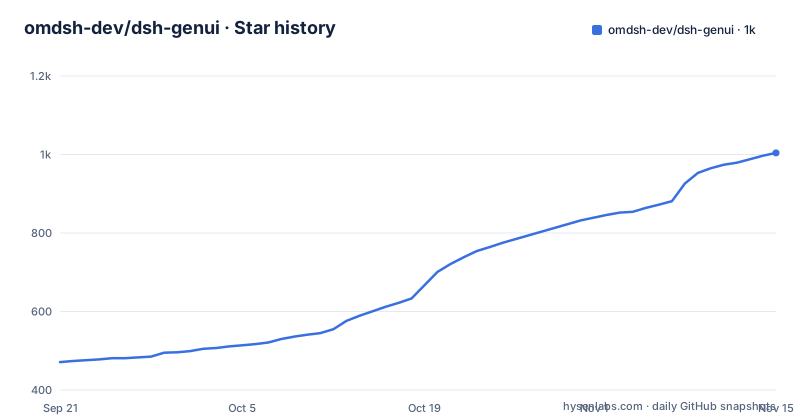
Star history
- omdsh-dev/dsh-genui1,004 ★ · +533
| Repository | 2026-09-21 | 2026-11-15 |
|---|---|---|
| omdsh-dev/dsh-genui | 471 | 1k |
533 Stars in the last 55 days, measured from the daily GitHub snapshot. Compare with other projects
Editorial analysis
The npm scope and the GitHub organization do not match
Two identifiers, two homes. The repository lives under the omdsh-dev organization, with its product site published as a GitHub Pages address under that same organization, while the published package is scoped to @changfenhuang. Both install paths in the file use the npm scope, not the repository name, so a reader who arrives from the repository page and types the name they just saw into a package manager gets nothing. The package manifest confirms the scope and pins version 0.11.3, declares itself an ES module, and points its main entry at a compiled file with a separate declaration file for types. Documentation exists in two languages, an English README and a Chinese one beside it, and the ecosystem note in the header says the repository carries two topics and invites other projects to be listed by a third account, which is the only place the file mentions anyone but the two namespaces above. The repository itself is a pnpm workspace with a lock file and a workspace manifest, built with a TypeScript bundler, tested with vitest, and carrying its own npm configuration file and a patch configuration alongside a scripts directory, a docs directory and a site directory for the product pages. The components named in the package description, from layout and charts through plots, forms, quizzes, diagrams and three dimensional scenes, map onto the asset subpaths rather than onto a documented component list, so the manifest is closer to a catalogue than the prose is. The fenced block itself carries a fixed language tag and a fixed body, which is what lets both renderers treat an assistant reply as ordinary text with one recognised region inside it rather than as a new document format.
Two channels, and the fallback one guesses at class names
The renderer picks one of two channels automatically once the host activates its browser module. The registry channel exists when the host exposes the fence-registry extension point, which the file attributes to newer builds, and then fences register through the host's own streaming render pipeline. The DOM channel covers everything else, including the stock builds the file says are supported, by watching the session DOM and mounting a render tree of its own. Since 0.7.2 that channel streams, so components appear as the model writes them and the first finished one shows up without waiting for the whole reply. Since 0.8.3 discovery matches several surfaces: the stock code block class, a deepsuite style pair of classes some builds render instead, and a structural backstop for any element whose banner is labelled as a GenUI fence and contains a preformatted body. If a build uses a different class name entirely, rendering still works and one console warning reports that the host DOM drifted. A third mechanism exists for the 0.1.7 host generation: when the finished DOM carries no language metadata for a fenced block, the plugin goes back to the public chat snapshot, reads the assistant's original Markdown, and takes over only the fences labelled as its own. If that source data is temporarily missing, a settled code block falls back to strict canonical validation.
A successful install prints one line and nothing else proves it
The file is unusually firm about what counts as installed. The repository ships both renderer channels, the host plugin and the built browser bundle, but activation belongs to the host, which must also provide its slots and sessions services. A downloaded client file, or an entry in the module loader cache, proves only that bytes arrived. The one reliable signal is a printed line naming the client as active and naming the channel it settled on, either registry or dom. If that line is missing, the file says to fix package or profile identity and host activation first, and to treat the streaming and chat anchor DOM attributes as optional fallbacks rather than installation prerequisites. It also draws a line around its own test evidence: the packed host smoke verifies host startup and rendering, integration tests cover source backed fence routing, and the smoke does not claim to validate a real model response. Whichever channel ends up active, the file promises identical behaviour for components, interactions, panels and persistence, so the channel is an implementation detail rather than a feature difference, and the two DOM attributes it names are described as optional rather than required. One consequence follows from that arrangement: because the host decides activation and the plugin only observes the result, a plugin upgrade cannot make an already running host render anything, which is why the file puts the activation line ahead of any troubleshooting advice.
The host version range has five branches and two mapping tables
The first prerequisite is a single dependency range with five alternatives: two release candidate lines, three alpha lines, and a final clause spanning the next minor below 0.3.0. The file then explains what those strings mean in practice. The 0.2.0 release candidate is a prerelease, and three host builds are described as verified roles: a minimum, a current one, and the next one, each at its own release candidate. Then comes the mapping that matters most for anyone on an older host: users at or below the previous line are told to use plugin version 0.9.8, which is more than twenty minors behind the 0.11.3 in the manifest. The range is not a formality, and the plugin chooses not to support older hosts with its current version, which means the install is a two step decision: find your host build, then pick the plugin line that matches it. The release cadence suggests a project shipping against a moving host: three of the most recent tags are 0.11.3, 0.11.2 and a preview build of 0.11.2 that predates the stable one, and the default branch's last recorded push is 2026-10-01.
pnpm arrives through corepack, in a new terminal
The second prerequisite is a package manager on the PATH, because the plugin command itself depends on it. The file gives two ways to get one, corepack enable or a global npm install of pnpm, and then three instructions that read like a bug report: open a new terminal, and confirm the version command prints a version. That is a real failure mode of shell activation rather than an instruction the file forgot to delete. The install itself is one command with a comment saying the package is public and works without an npm account:
# Public npm package (works without an npm account)
dsh plugin --profile web add @changfenhuang/dsh-genui
A second path installs the same package as a plain Node dependency, and the file warns immediately after that this only adds the dependency: it does not register the plugin with the host. It also warns against using a link style reference on a freshly cloned directory, though the sentence explaining why stops there. What the plugin is meant to change is spelled out in a before and after pair: a plain revenue line with a figure, a month on month percentage and a note to watch the conversion rate becomes one line of analysis beside three stat cards, a trend chart and a progress bar, and the follow up question the plain answer would need is replaced by refresh and switch view buttons that send an action back to the model.
The package exports raw TypeScript and its own build config
The exports map is where this package stops looking conventional. Alongside the root entry there are two more entry points, an invariant module and a client module, but then the subpaths start pointing at source files rather than build output: an embed entry resolves to a TypeScript file under the client source directory, and four asset entries do the same for the Mermaid, Three.js and two ECharts bundles, while only the standalone runtime resolves to a compiled asset. The skill entry resolves to the Markdown file itself, which is a deliberate choice for a plugin that teaches a host to read a specification. The published file list matches the exports and then adds more: the whole source directory, the TypeScript configuration and the bundler configuration. A consumer that resolves those subpaths is compiling TypeScript it did not write, which the manifest never warns about. Publishing the build configuration alongside the source also means the compiler settings that produced the shipped files travel with them, which is convenient for anyone debugging the output and is not a convention most packages follow.
ECharts ships twice and the naming does not line up
Two charting variants appear in the manifest and they are not named consistently between the two places that matter. The exports map offers an echarts core entry and a full echarts entry, and both resolve to source files whose asset names follow the pattern of the other assets. The published file list, which is what actually goes into the tarball, names the corresponding compiled artifacts as echarts core and echarts full instead. So the public subpath says full where the shipped file says full in a different position, and a script that resolves the documented subpath and a script that reaches for the listed artifact are reading two different names for the same bundle. The Mermaid and Three.js entries do not have this problem, since their export names and file names agree. None of the file explains which variant a consumer should take, which matters because one is a smaller bundle and the other is not. The same question applies to the three dimensional and diagram entries, which resolve to sources rather than to bundles and therefore carry no compiled counterpart in the file list at all.
The evidence is a video, a fallback video, and a caption
The demonstrations are presented with unusual emphasis on their own provenance. A banner states there are no concept mockups and that the recording and images are captured from the plugin rendering inside the host interface. The forty second walkthrough is embedded as a hosted attachment, and directly beneath it sits a link to the original MP4 in the assets directory with a note telling the reader to download it if the player is unavailable, plus a sentence noting that the player does not autoplay and that the four step prompt sequence is documented in a separate file. The three output examples that follow, a monitoring panel with refresh and reset controls, a function plot that redraws locally as sliders move, and a set of layout primitives composing into work surfaces, are each introduced by an italic caption describing what is visible rather than by anything a text reader can inspect. The same pattern runs through the navigation table near the top, which routes each reader goal to a destination and a line about what can be verified there, so the file's own argument for its evidence is laid out before any of the evidence appears.
Editorial conclusion
The engineering here is more careful than the pitch. The file tells you which channel is active, tells you that the other one is a fallback, tells you what a downloaded bundle does not prove, and tells you which host versions map to which plugin release instead of pretending one version fits all. Use it if you want live components inside an assistant reply and you control the host, and expect to read the activation log line rather than the filesystem when something is wrong. Before you start, check your DSH version against the range, because hosts at or below the previous line are pinned to a plugin release many minors behind the current one, and install pnpm through corepack before the plugin command rather than after. Note also that the CI evidence stops at host startup and rendering, that a real model response is explicitly not covered, and that the published package exports raw TypeScript, so a consumer has to be able to consume TypeScript to use those entry points.
Frequently asked questions
What is omdsh-dev/dsh-genui?
It is a MIT licensed TypeScript plugin that renders interactive components inline in DeepSeek Harness assistant replies through a fenced block, covering layout, charts, plots, forms, quizzes, Mermaid diagrams and 3D scenes, with an action event loop back to the model. It ships the host plugin, the browser renderer and a skill file.
How do I install dsh-genui into a DSH host?
With dsh plugin --profile web add @changfenhuang/dsh-genui, which needs pnpm on your PATH, obtainable through corepack enable or a global npm install, followed by opening a new terminal. A plain npm install of the same scoped package only adds the dependency and does not register the plugin.
What DSH versions does dsh-genui support?
A range covering two release candidate lines, three alpha lines and a span up to but below 0.3.0, with 0.2.0-rc.1 described as a prerelease and three builds named as verified roles. Hosts at or below the previous line are told to use plugin version 0.9.8 rather than the current 0.11.3.
How does dsh-genui decide which renderer to use?
Automatically, once the host activates its browser module. A host exposing the fence-registry extension point gets the registry channel, and everything else, including supported stock builds, gets the DOM channel, which observes the session and mounts its own tree, matching several possible code block surfaces plus a structural backstop.
How do I know the dsh-genui client actually activated?
A printed line naming the client as active and naming the channel it settled on, either registry or dom. The file states that a downloaded client file or a module loader cache entry proves only that bytes arrived, and that if the line is missing you should fix package or profile identity and host activation first.
Does dsh-genui have automated tests against a real model?
Not as a claim. The file says a packed host smoke installs the generated tarball in a real host and verifies startup and rendering, that integration tests cover source backed fence routing, and that the smoke does not claim to validate a real model response, with real model end to end runs requiring configured credentials.
Official sources
Add this badge to your README
If you maintain this project, the badge below links readers to this analysis and shows its maintenance status from the daily GitHub snapshot. Paste the markdown into your README; add ?metric=license or ?metric=stars to the image URL for a different field.

[](https://hysenlabs.com/projects/omdsh-dev-dsh-genui)Star history chart for your README
[](https://hysenlabs.com/projects/omdsh-dev-dsh-genui)Was this useful?