dsh-TUI: a terminal front end for DeepSeek Harness that is turning from plugin into its own app
DSH official WeChat-featured TUI plugin - Claude Code style: whale bar, live status, streaming thoughts, double-Esc rollback, context bar and TPS. One-click npm install.
At a glance
- What is it?
- dsh-TUI is an MIT-licensed interactive terminal UI for DeepSeek Harness, published on npm as @deepseek-harness-tui/dsh-tui. It adds streaming thinking, double-Esc rewind, a context bar, a TPS gauge and terminal-native notifications, while its architecture shifts from a mounted plugin to a standalone entry point.
- Who is it for?
- dsh-TUI fits DeepSeek Harness users who live in a modern terminal such as Ghostty, WezTerm, Kitty, iTerm2 or Warp and want streaming output, rewind and task notifications without patching DSH itself. It is a poor fit for anyone who needs stable saved preferences across upgrades, since the project is pre-1.0, ships releases about a week apart and already has preference entries it cannot migrate.
- Can I use it commercially?
- Yes. MIT is a permissive licence: you can use, modify and sell software built on it, as long as you keep its copyright and licence notices.
- Is it still maintained?
- Yes. The repository received new commits within the last day.
- What is it written in?
- Mainly TypeScript, according to GitHub's language statistics.
Answers come from the project's GitHub data, last synced on November 15, 2026, and from our analysis. They are not legal advice.
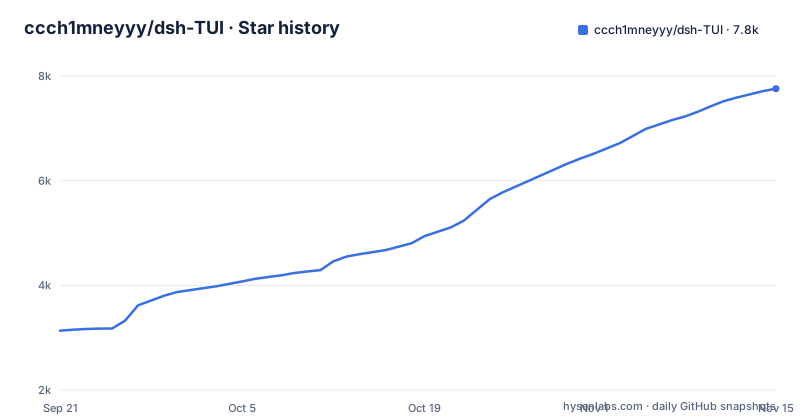
Star history
- ccch1mneyyy/dsh-TUI7,757 ★ · +4,623
| Repository | 2026-09-21 | 2026-11-15 |
|---|---|---|
| ccch1mneyyy/dsh-TUI | 3.1k | 7.8k |
4,623 Stars in the last 55 days, measured from the daily GitHub snapshot. Compare with other projects
Editorial analysis
Zero core changes: it reads only DSH's public exports
dsh-TUI is an interactive terminal UI for DeepSeek Harness, which the project abbreviates as DSH. Its central design claim is zero core changes: it consumes only DSH's public exports, installing it enables it, and uninstalling leaves no patches behind. The npm package is @deepseek-harness-tui/dsh-tui, version 0.18.0, and it registers two commands that point to the same file, dsh-tui and dst, both mapped to ./bin/dsh-tui.js.
The architecture is in the middle of a move. The project describes itself as going from a mounted plugin to an app with its own entry and composition root, where DSH loads in process as the first-party backend. The repository reflects both sides of that shift: a standalone/ directory sits beside cordis.yml, cordis.patch.yml, patch-surface.snapshot.json and host-replica.snapshot.json. For users the consequence is that the way dsh-TUI starts is not settled yet, and the v0.16.1 release on 2026-10-17 was specifically a fix for a startup regression in the standalone entry and for the update package.
Task notifications depend on which escape sequences your terminal speaks
After live work settles successfully, with no queued follow-up and no active goal, dsh-TUI sends a notification titled dsh-TUI · Task complete. The body is a single-line plain-text preview of the latest reply with Markdown removed, up to 200 characters, and OSC 777 and OSC 9 add a 2048-byte budget that counts title and protocol bytes while keeping whole graphemes. Replays, cancellations and failures never notify.
Two settings under /settings, Conversation, control it. taskNotifications takes unfocused (the default), always or off. notificationMethod takes auto (the default), osc9, bel or windows. In auto, Ghostty and WezTerm get OSC 777 with separate title and body, Kitty gets OSC 99, iTerm2 and Warp get a title prefix through osc9, and every other terminal only rings the bell. A terminal without focus reporting cannot tell when you have looked away, so the unfocused default will not behave as intended there; set taskNotifications to always instead. Inside tmux, both of these are required:
set -g allow-passthrough on
set -g focus-events on
The first lets OSC notifications through, the second passes focus reporting.
Windows toasts write to HKCU and arrive about 3 seconds late
On local Windows, auto resolves to windows, which means the system's native task-completion toast. The cost is spelled out plainly. The first toast registers the user's AppUserModelID under HKCU, so dsh-TUI writes to the registry the first time it notifies. Each toast appears about 3 seconds after the task ends, because the route goes through a PowerShell cold start in exchange for needing no extra install.
The fallback rules matter if you run other tools. For DSH sessions, an enabled and active external DSH notification plugin in the running profile makes dsh-TUI yield completely, with no toast and no bell; an installed but disabled plugin does not suppress anything. If the AppUserModelID cannot be written, the notification falls back to the bell rather than going silent. Over SSH, auto keeps the attached terminal's notification protocol, while an explicit windows setting still uses the host's native transport, which means the toast lands on the remote machine, not the one in front of you.
Reasoning effort resolves through a fallback chain
The default reasoning-effort setting lists the tiers the current backend and model declare, custom IDs included. A saved value missing from that catalog stays visible and stored rather than being silently dropped, and while the catalog is loading or unavailable, only Auto can be selected.
What Auto means depends on the backend. On DSH it follows the saved /effort choice first, then the configured effort, then the model default. The Claude and Codex backends keep their own backend preferences for Auto at startup and for resumed sessions, and choosing Auto explicitly resets to the model default. Resuming a DSH session keeps the reasoning effort recorded for it, or the live selection when reattaching, and the saved default only seeds new sessions. Explicit /effort and settings changes apply to the next request. When a preference is not supported, dsh-TUI falls back with a notice and never forces it onto a route, so a request can run at a different effort than the one you picked; read the notice rather than assuming your choice was applied.
Old actN:panel preferences cannot be migrated
Panels that lack a verified Component identity are treated as temporary. Settings show their title and a number that is distinct only for the current run, and their toggles take effect immediately without being saved. Unrelated settings changes leave that temporary choice alone.
The upgrade problem is with older saved preferences. Entries in the old actN:panel form cannot be mapped safely to anything current, so dsh-TUI does not try. You have to remove the placeholder and select the current panel again by hand. Verified Components that happen to be named actN keep their public runtime address, and an explicit selection is saved as component:actN:panel so it cannot be mistaken for an old anonymous entry. For anyone who has customized panels in an earlier version, the consequence is a manual cleanup after upgrading, and with releases v0.16.1 on 2026-10-17, v0.17.0 on 2026-10-24 and v0.18.0 on 2026-11-01, saved preference formats are still moving.
Every launch lands on a launchpad with a real input box
Ordinary launches open a landing page with large text, the pixel whale, quick actions and a real input box. On short or narrow terminals it drops whole blocks rather than squeezing them. The launchpad is on by default; setting launchpad off in /settings boots straight into chat. Command completion works as in chat, with Tab filling the input and Enter running the command and clearing it.
The first run walks a four-step wizard: accounts and models, language and theme, model and workspace, then shortcuts. /setup runs it again. Its first step signs in to a subscription and picks up the models that come with it, asking only when there are several, or adds an API key through the /provider wizard. The whale itself has three startup intros, wakes on click and freezes after the first task. Elsewhere the interface offers streaming Markdown, tool cards, / and @ completion, #L12-14 line ranges, history search and a Chinese or English UI, and focused inputs inherit your terminal's own cursor shape, color and blink.
Animated images are refused rather than flattened
Image files referenced with @path go through the same admission and resize or conversion policy as pasted images. When an image is adjusted, the notice reports the stored dimensions and format. If an animation would need conversion, dsh-TUI refuses it instead of quietly dropping frames, so an animated file you mention does not reach the model in a degraded form; you have to supply a static version yourself. Mentioned images and staged images share the same count and stored-byte limits, applied in source order, which means an image referenced late in a prompt can be the one that hits the limit.
Several display rules follow the same narrow-terminal thinking. Split diff cards give one-sided additions or deletions the full width instead of leaving an empty opposite pane. Compaction status stays on one line, shedding phase and cancellation hints first. The prompt footer hides completed goals once a turn is idle, and Ctrl+Q folds or hides the goal and todo footer. Hiding only changes the view, and /goal clear does not clear todos.
Editorial conclusion
dsh-TUI fits DeepSeek Harness users who live in a modern terminal such as Ghostty, WezTerm, Kitty, iTerm2 or Warp and want streaming output, rewind and task notifications without patching DSH itself. It is a poor fit for anyone who needs stable saved preferences across upgrades, since the project is pre-1.0, ships releases about a week apart and already has preference entries it cannot migrate. Before adopting it, check how your terminal and tmux handle OSC notifications and focus reporting, and on Windows whether writing an AppUserModelID under HKCU is acceptable.
Frequently asked questions
What is dsh-TUI?
dsh-TUI is an MIT-licensed interactive terminal UI for DeepSeek Harness (DSH), published on npm as @deepseek-harness-tui/dsh-tui. It uses only DSH's public exports and leaves no patches behind when uninstalled.
Which commands does dsh-TUI add to my shell?
The dsh-tui package registers two commands, dsh-tui and dst, and both run ./bin/dsh-tui.js.
How do I turn off dsh-TUI task notifications?
Open /settings, go to Conversation and set taskNotifications to off. The other values are unfocused, the default, and always.
Official sources
Add this badge to your README
If you maintain this project, the badge below links readers to this analysis and shows its maintenance status from the daily GitHub snapshot. Paste the markdown into your README; add ?metric=license or ?metric=stars to the image URL for a different field.

[](https://hysenlabs.com/projects/ccch1mneyyy-dsh-tui)Star history chart for your README
[](https://hysenlabs.com/projects/ccch1mneyyy-dsh-tui)Was this useful?