CatchMe: A Local Screen and Input Recorder That Turns Your Day Into a Queryable Tree
"CatchMe: Make Your AI Agents Truly Personal"
At a glance
- What is it?
- CatchMe captures windows, keystrokes, mouse actions, clipboard and notifications, then has an LLM summarize the raw stream into a Day to Session to App to Location to Action hierarchy that agents query over the command line. The interesting part is the retrieval design, not the recording.
- Who is it for?
- Adopt CatchMe if you already run a local LLM and want an agent to answer questions about your own recent activity without sending screen data to a hosted service, and if you accept that the whole thing is a recorder pointed at your own machine.
- Can I use it commercially?
- Yes. Apache-2.0 is a permissive licence: you can use, modify and sell software built on it, as long as you keep its copyright and licence notices.
- Is it still maintained?
- Yes. The repository last received commits 48 days ago.
- What is it written in?
- Mainly Python, according to GitHub's language statistics.
Answers come from the project's GitHub data, last synced on November 13, 2026, and from our analysis. They are not legal advice.
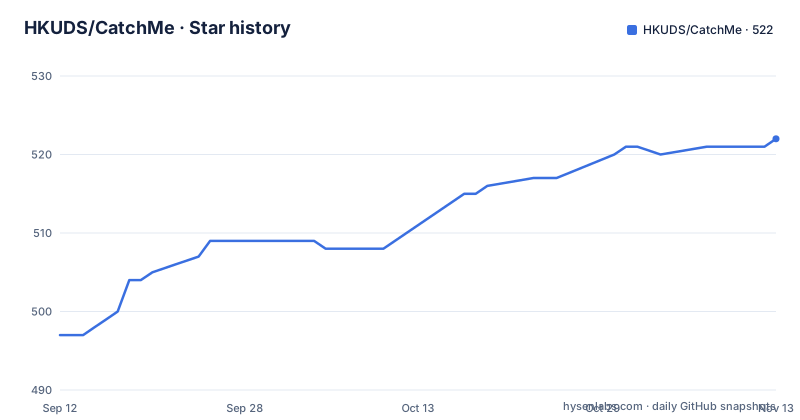
Star history
- HKUDS/CatchMe522 ★ · +25
| Repository | 2026-09-12 | 2026-11-13 |
|---|---|---|
| HKUDS/CatchMe | 497 | 522 |
25 Stars in the last 62 days, measured from the daily GitHub snapshot. Compare with other projects
Editorial analysis
The gap CatchMe targets: an agent that knows nothing about your last four hours
Most agent tooling assumes the model's context window is the boundary of what it can reason about. Ask a coding assistant what you were editing this morning and it has no way to answer, because nothing recorded it. CatchMe is built for that specific gap. The README frames the use cases as personal: replaying a Claude Code session, recalling which files you changed today, finding what you were reading about yesterday, reconstructing how an afternoon was spent. The audience is individual developers and researchers running CLI agents such as OpenClaw, NanoBot, Claude or Cursor, who want those agents to answer questions grounded in their own machine activity rather than in a document corpus. It is not a team analytics product and it is not a knowledge base for shared material. The unit of value is one person's digital footprint on one machine.
Six recorders, mouse-triggered screenshots, and a five-level tree
The capture layer is described as six background recorders tracking window focus, keystrokes, mouse movement, screenshots, clipboard and notifications. Recording is event-driven rather than timer-driven: the README states there is no timer or delay, and that mouse actions are caught with crosshair annotation. Around each mouse action the system collects context from the other recorders, which is how a click becomes an anchored event with window, keyboard and clipboard state attached. From there the pipeline has three named stages. Capture writes raw events. Index organizes them into what the project calls a Hierarchical Activity Tree with the levels Day, Session, App, Location, Action, and attaches an LLM-generated summary to each node. Retrieve takes a question, walks the tree top-down, and inspects raw evidence such as screenshots or keystrokes before synthesizing an answer. Storage is SQLite with FTS5, and the README puts runtime memory at roughly 0.2GB. The design choice worth noting is the explicit rejection of embeddings and a vector database. Retrieval is summary reading plus branch selection plus drill-down, which means the quality of every answer depends on whether the generated summaries describe their subtree well enough for a model to choose correctly.
Getting it running: Python 3.11, a provider choice, and one skill file
The repository targets Python 3.11 or newer and ships as an agent-compatible skill for CLI agents. The README's integration story is a one-file setup: you drop a single skill file into the agent and the agent then reaches memories through CLI commands only. That separation matters architecturally. CatchMe runs on its own; the agent does not import it, it shells out to it. The LLM configuration is the part to get right first, because summaries are generated at index time and tree traversal happens at query time, so the model is on the critical path twice. The README lists Ollama, vLLM and LM Studio as offline options, which is the configuration consistent with the stated local-only posture. A hosted API is also possible, but that changes the privacy properties: summaries are derived from your screen content, so sending them out is not the same as keeping them in SQLite. Platform support is claimed for macOS, Windows and Linux. The README advertises a web interface with timelines, tree navigation and a chat view over the captured footprint, plus real-time system monitoring. No release has been published, so installation is from the repository rather than from a versioned package.
Where the design strains: summary quality, disk growth, and the wrong-machine problem
The vectorless retrieval is the most opinionated thing here and also the most fragile. A vector index degrades gracefully: a mediocre embedding still lands in a roughly useful neighborhood. A summary tree does not. If the LLM writes a vague summary for a Day node, the traversal has no signal to pick the right branch, and the failure is silent, because the model will still produce a confident answer from whatever branch it chose. The README does not describe a fallback path when summaries are poor, nor a way to re-summarize a subtree after the fact. Second, this is a recorder with screenshots and clipboard contents in it. Storage grows with use, and the README gives no retention policy, no size cap, and no expiration mechanism. Third, the privacy claim is local storage, which is true and also incomplete: local storage on a shared workstation, a machine with a managed backup agent, or a laptop that syncs a home directory is still exfiltration by other means. The README's guidance to keep data local does not address those cases. Finally, the always-on capture model is the wrong tool for anyone who cannot accept a continuous record of keystrokes and clipboard on the machine they work on.
How this differs from Recall and from screen-recording recall tools generally
The nearest comparison is Recall-style personal recall software, which also captures screen activity and also answers questions about it. The difference is in the retrieval layer. Recall-style systems index captured frames into embeddings and search that vector space, which means retrieval quality is a function of the embedding model and the index, and the raw captured content is queried directly. CatchMe inverts that: it spends LLM calls up front to compress activity into a summary hierarchy, then queries the hierarchy and only touches raw evidence after a branch has been selected. The trade is real in both directions. CatchMe avoids maintaining a vector store and can reason across days by following parent nodes, which a flat nearest-neighbor search handles poorly. In exchange it pays LLM cost at index time for every node, and it inherits the summary quality ceiling described above. A second, less obvious difference is the interface. CatchMe is deliberately not a standalone chat application first; it is a skill that a CLI agent calls, with the web interface as a secondary surface. If you want a self-contained recall app, this is a layer you would be assembling into something else.
Licence, maintenance, and what upgrading actually costs
The project is Apache-2.0, which permits commercial and private use, modification and redistribution, and includes an explicit patent grant. It also requires that you retain the licence and notice files and state significant changes if you redistribute. That is a permissive arrangement, and nothing in the README suggests dual licensing or a separate commercial tier. This is a description of the licence text, not legal advice; if you plan to ship CatchMe inside a product, read the LICENSE file and the NOTICE requirements yourself. On maintenance: the repository is not archived and the last push recorded is 2026-06-16, but no releases have been published, so there is no tagged version to pin and no changelog to read between updates. Upgrading means pulling from main. For a tool that writes a persistent SQLite database of your activity, that is the operational risk to weigh: a schema change on main has no release boundary to signal it, and the README does not document a migration path or a database version field. The recurring cost that is documented is the LLM bill, incurred at index time per node and again at query time during traversal, and it scales with how much you use the machine rather than with how often you ask questions.
What to check before you point it at your own machine
Two things determine whether CatchMe is usable for you, and neither is settled by the README. The first is where the SQLite database and captured screenshots are written. That directory, and everything that can read it, is the actual privacy boundary, not the phrase local and offline. Confirm it sits outside any synced or backed-up path before the first capture. The second is summary quality under your chosen model. The README lists Ollama, vLLM and LM Studio as offline options, but a small local model may produce summaries too thin for top-down traversal to pick the right branch, and the failure shows up as a plausible wrong answer rather than an error. The cheapest way to find out is to run it for a day and query something you already know the answer to, then check whether the traversal landed on the correct App and Location nodes or arrived there by luck. If it did not, the vectorless design is working against you and a different retrieval approach is the better fit.
Editorial conclusion
Adopt CatchMe if you already run a local LLM and want an agent to answer questions about your own recent activity without sending screen data to a hosted service, and if you accept that the whole thing is a recorder pointed at your own machine. Do not adopt it on a shared or managed workstation, on a laptop you use for other people's confidential material, or if you want retrieval that works without an LLM in the loop, because the tree traversal depends on a model reading summaries. Before installing, verify three things: that Python 3.11 or newer is available, that your chosen provider is reachable (Ollama or vLLM or LM Studio locally, or an API key), and where the SQLite database and captured screenshots land on disk, because that directory is the whole privacy story.
Frequently asked questions
Does CatchMe use a vector database?
No, and that is its stated central design choice. Raw activity is organised into a five-level tree of day, session, application, location and action, each node carrying a model-generated summary, and retrieval is a top-down traversal where the model reads summaries and descends into branches. Storage is SQLite with full-text search, and near-duplicate screenshots are collapsed using perceptual hashing rather than embeddings.
What does CatchMe actually record?
The page describes this twice and the lists differ. One section says five recorders cover windows, keyboard, clipboard, notifications and files. The architecture section says six cover window focus, keystrokes, mouse movement, screenshots, clipboard and notifications. Together that means window focus, keyboard, mouse, screenshots, clipboard, notifications and files, and all raw data is kept in a directory inside your home folder.
Does any CatchMe data leave the machine?
Not with a local model configured, which is what the offline option using a local runtime is for. If you configure a cloud provider instead, the documentation states that cloud APIs will be used to summarise your daily activities and warns that untrusted endpoints may expose private data. The example cloud configuration points at a third-party model router with a preview model.
How do AI agents query CatchMe?
The recorder runs separately from any agent and agents query it through command line calls, with the tool distributed as a single skill file for command line agents. The dependency manifest also provides an optional extra that installs a protocol server library, so a second integration path exists alongside the command line route.
Does CatchMe work on Linux?
With a caveat on input capture. Mouse and keyboard recording is excluded from the default dependency set on Linux and moved into an optional extra, with an inline comment explaining that the underlying library needs kernel headers to build and a display server present at import. Screen capture itself uses four separate native bridges on macOS and two on Windows rather than one portable implementation.
How do I control CatchMe's cost?
Two configuration settings. A maximum-call limit on the model section caps requests as forced cost control, and a mouse clustering gap filter reduces how often summarisation runs by grouping activity more aggressively. The model also has to be able to handle images, and its context window must exceed a maximum token limit set in the configuration file.
Official sources
Add this badge to your README
If you maintain this project, the badge below links readers to this analysis and shows its maintenance status from the daily GitHub snapshot. Paste the markdown into your README; add ?metric=license or ?metric=stars to the image URL for a different field.

[](https://hysenlabs.com/projects/hkuds-catchme)Star history chart for your README
[](https://hysenlabs.com/projects/hkuds-catchme)Was this useful?