DeepTutor v1.7: a self-hosted AI tutor that ships every few days and must be started through its own compose script
GitHub describes it as DeepTutor: Lifelong Personalized Tutoring. https://deeptutor.info/.. The repository metadata lists Python as its primary language. The metadata lists the Apache-2.0 license. This article stays within the project description and details documented in the GitHub repository README.
At a glance
- What is it?
- HKUDS/DeepTutor is an Apache-2.0 learning companion built on multi-agent collaboration and RAG, with a web app, a CLI and Docker deployment. It moves fast, with more than a dozen releases between late August and the end of October 2026, and its Docker setup has rules that the plain docker compose habit will break.
- Who is it for?
- DeepTutor fits learners, teachers and small groups who want to run a tutoring workspace on their own hardware, point it at their own documents and choose their own model provider, including local ones. It is a poor fit for anyone who wants a stable install they can leave alone for months, given a release every few days and a breaking refactor as recent as v1.6.3.
- Can I use it commercially?
- Yes. Apache-2.0 is a permissive licence: you can use, modify and sell software built on it, as long as you keep its copyright and licence notices.
- Is it still maintained?
- Yes. The repository last received commits 8 days ago.
- What is it written in?
- Mainly Python, according to GitHub's language statistics.
Answers come from the project's GitHub data, last synced on November 15, 2026, and from our analysis. They are not legal advice.
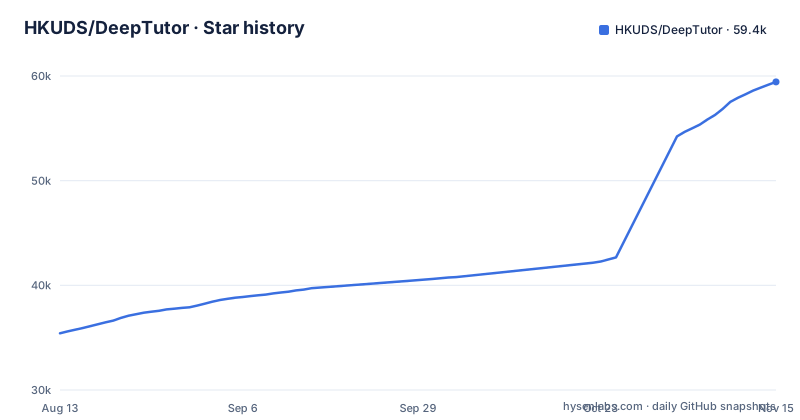
Star history
- HKUDS/DeepTutor59,440 ★ · +24,022
| Repository | 2026-08-13 | 2026-11-15 |
|---|---|---|
| HKUDS/DeepTutor | 35.4k | 59.4k |
24,022 Stars in the last 94 days, measured from the daily GitHub snapshot. Compare with other projects
Editorial analysis
A release every few days, with a breaking refactor in v1.6.3
DeepTutor changes quickly. v1.6.0 shipped on August 27, 2026, and by October 31 the project was at v1.7.1, with releases such as v1.6.1 on August 30, v1.6.2 on August 31 and v1.6.3 on September 2 arriving days apart. v1.6.3 was a breaking front and back-end refactor with strict canonical routes and recoverable streams, and it also added Python 3.14 support. Two later releases were pure fix releases: v1.6.6 fixed answers that could not submit and Codex sign-in inside Docker, and v1.6.7 fixed books that arrived as one empty chapter, quizzes that produced nothing, and formulas printed raw. For a self-hoster, the lesson is to pin a version and read the release notes before each upgrade.
Docker must start through scripts/docker_compose.py, not docker compose
The repository ships several compose files, including docker-compose.yml, docker-compose.dev.yml and docker-compose.ghcr.yml, but the usage notes route everything through a Python wrapper. The reason given is that port mappings are rendered from system.json, so running compose directly skips that step. Production, development and build-only runs look like this:
python scripts/docker_compose.py up -d
python scripts/docker_compose.py -f docker-compose.yml -f docker-compose.dev.yml up
python scripts/docker_compose.py build
Runtime settings are stored in ./data/user/settings, which is created automatically. Model providers are configured from the web Settings page or in model_catalog.json. Redis runs as internal-only coordination state with append-only persistence, so unflushed event and command streams survive a sidecar restart, while business data stays in SQLite and PocketBase.
Local models need host.docker.internal in the provider URL
DeepTutor can use local LLM servers such as LM Studio, Ollama and vLLM, but inside Docker the provider address has to change. The compose file says to use host.docker.internal instead of localhost in provider base_url fields, and to set provider endpoints in data/user/settings/model_catalog.json or in the UI. An Ollama or LM Studio URL copied from the host, with localhost in it, has to be rewritten before it goes into the Settings page of a Docker install. The same applies to any self-hosted model endpoint running on the host machine. Hosted providers are configured in the same catalog, and v1.6.1 added one vendor key linked to every service that vendor serves.
The content workspace defaults to ./data/user/workspace
Since v1.6.5, DeepTutor has a content workspace you can point at any folder. In Docker, that folder is mapped to a fixed in-container path, /workspace, through an environment variable passed to the same wrapper script:
DEEPTUTOR_WORKSPACE_HOST=/absolute/host/folder python scripts/docker_compose.py up -dThe host path has to be absolute. If you leave the variable out, ./data/user/workspace inside the checkout remains the default, which means your study material ends up under the repository's data directory unless you set it. Later releases built on this: v1.6.9 added folder-based learning workspaces and v1.6.12 added workspace knowledge base moves and Kiwix archives.
Python 3.15 is refused on purpose
Outside Docker, the package is named deeptutor and installs a deeptutor command that points to deeptutor_cli.main:main. pyproject.toml sets requires-python to >=3.11,<3.15. The comment beside it explains the cap: Python 3.14 is supported now that compiled base dependencies such as FAISS publish compatible wheels, and the upper bound stays so that a future interpreter is not advertised before the compiled dependency stack is ready. Individual optional integrations may carry tighter markers. The core dependency list includes openai>=1.30.0, mcp>=1.26.0,<2.0.0, typer, rich, aiosqlite, python-docx and openpyxl. If your system Python is already 3.15, installation fails by design, and you need a 3.11 to 3.14 environment.
Optional modules own their dependencies, and full is only a profile
v1.7.0 introduced modular installation, and the build files show how it works. pyproject.toml declares optional dependencies as dynamic, setup.py feeds extras_require from build_metadata.optional_dependencies(), and each optional module owns its code and dependencies. Examples include cli with no extra packages, codebuddy with codebuddy-agent-sdk>=0.3,<0.4, claude-code with claude-agent-sdk>=0.2.174,<0.3, and video-learning, which pins deeptutor-reading to the same version as DeepTutor itself. Full is described as an installation profile rather than a module. requirements.txt contains only one line, -r requirements/full.txt, labelled as the source and Docker full profile. So a bare package install gives you the core, and features like video learning arrive only with their extra.
Tutoring features that grew release by release
pyproject.toml describes DeepTutor as an agent-native intelligent learning companion with multi-agent collaboration and RAG, and the accompanying paper is arXiv 2604.26962. Most of the visible features arrived through the recent releases. v1.6.1 made LightRAG first-party. v1.6.2 added immersive YouTube learning and three new agent harnesses. v1.6.3 brought learner and guardian accounts. v1.6.4 added controllable Book generation and Mastery paths. v1.6.15 added bounded tutoring memory and native Gemini speech. v1.7.0 added block notebooks with Dito and narrated video lessons, and v1.7.1 added desktop previews, password changes, and Anki and calendar exports. The README is translated into eleven further languages, and the code is Apache-2.0 licensed. The most recent push was on October 31, 2026.
Editorial conclusion
DeepTutor fits learners, teachers and small groups who want to run a tutoring workspace on their own hardware, point it at their own documents and choose their own model provider, including local ones. It is a poor fit for anyone who wants a stable install they can leave alone for months, given a release every few days and a breaking refactor as recent as v1.6.3. Before deploying, confirm your Python is between 3.11 and 3.14, start Docker only through scripts/docker_compose.py, and read the release notes before each upgrade.
Frequently asked questions
How do I install DeepTutor?
For Docker, run python scripts/docker_compose.py up -d so port mappings are rendered from system.json. A Python install needs a version from 3.11 up to but not including 3.15.
What is DeepTutor?
DeepTutor is an Apache-2.0 agent-native learning companion from HKUDS that uses multi-agent collaboration and RAG for lifelong personalized tutoring, described in arXiv paper 2604.26962.
How to use DeepTutor?
After starting it, configure model providers on the web Settings page or in model_catalog.json, then point the content workspace at your study folder. A deeptutor command-line tool is also installed.
Official sources
Add this badge to your README
If you maintain this project, the badge below links readers to this analysis and shows its maintenance status from the daily GitHub snapshot. Paste the markdown into your README; add ?metric=license or ?metric=stars to the image URL for a different field.

[](https://hysenlabs.com/projects/hkuds-deeptutor)Star history chart for your README
[](https://hysenlabs.com/projects/hkuds-deeptutor)Was this useful?