Easy-Vibe: A Structured On-Ramp to Vibe Coding for Non-Programmers
Vibe coding 101: the first course for AI-native product builders.
At a glance
- What is it?
- Easy-Vibe is an open textbook and interactive tutorial that teaches AI-assisted product building from zero. It targets beginners who want to ship real products without a traditional programming background, using a learning map, visual walkthroughs, and simulated IDE exercises.
- Who is it for?
- Adopt Easy-Vibe if you are a non-programmer or early-stage developer who wants a guided, visual path into AI-assisted product building, and if you accept its non-commercial license and its reliance on general AI tools rather than a specific stack. Skip it if you need deep technical training or a production-ready codebase, since it is a course, not a framework.
- Can I use it commercially?
- Not without permission. GitHub finds no licence file in the repository, and without a licence all rights are reserved by default: you may read the code but not reuse it. Check the README, or ask the authors, before using it.
- Is it still maintained?
- Yes. The repository last received commits 23 days ago.
- What is it written in?
- Mainly JavaScript, according to GitHub's language statistics.
Answers come from the project's GitHub data, last synced on November 13, 2026, and from our analysis. They are not legal advice.
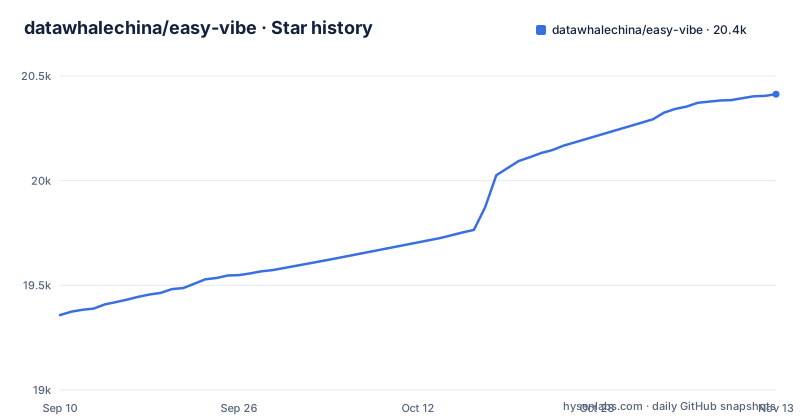
Star history
- datawhalechina/easy-vibe20,413 ★ · +1,055
| Repository | 2026-09-10 | 2026-11-13 |
|---|---|---|
| datawhalechina/easy-vibe | 19.4k | 20.4k |
1,055 Stars in the last 64 days, measured from the daily GitHub snapshot. Compare with other projects
Editorial analysis
What Easy-Vibe Actually Is
Easy-Vibe is not a software library or a framework. It is an open textbook and interactive course, hosted on GitHub under the Datawhale China organization, with a companion website. The README calls it "vibe coding 101" and positions it as "The first course for AI-native product builders." The core promise is that you can learn AI coding from zero by shipping real products, rather than by studying abstract syntax or algorithms first. The target audience is broad: the README lists separate study suggestions for beginners, junior and mid-level developers, and advanced developers. That breadth is both its strength and its weakness. A beginner gets a gentle on-ramp, while an experienced engineer might find the visual metaphors too slow. The course is language-localized to ten languages, which is unusual for a technical tutorial and signals a serious effort to reach a global audience.
The Learning Map: Fighting the Learn-and-Forget Cycle
The project's main pedagogical device is a "learning map." The README describes it as "a beginner-friendly learning map" that provides "clear guidance from zero, so you can stop 'learning and forgetting'." This is a direct response to a common failure mode in self-taught coding: you watch a video, follow along, and then forget everything a week later. Easy-Vibe tries to solve that by structuring the content as a path, not a pile of links. The map presumably sequences topics so that each new concept builds on the previous one, and the interactive components let you click through data flows. For example, the README says interactive components let you click through the full RAG data flow, and another feature visualizes terminal concepts. The idea is to make abstract concepts tangible. Whether that works depends on your learning style. Some people need to type code themselves; others benefit from seeing the mechanism first. Easy-Vibe leans heavily on the second group.
Interactive Tutorials and Simulated IDE
A distinctive feature is the "immersive simulated coding" environment. The README mentions a "virtual mouse guidance" that helps you learn the core IDE workflow. This is not a real IDE; it is a simulation that shows you where to click and what to type. For a total beginner, this reduces the cognitive load of juggling a browser, a code editor, and a terminal. The course also includes "step-by-step visual tutorials" that feel like "learning with a private tutor," according to the README. These are likely embedded animations or interactive walkthroughs on the website. The trade-off is that a simulated environment cannot fully prepare you for the messiness of a real project: real errors, real dependency conflicts, real deployment issues. The course acknowledges this by pointing to other resources, such as a separate OpenClaw tutorial, but the core experience is deliberately sandboxed.
How You Get It Running
The README has a section titled "Run Locally." The project lives in a GitHub repository with a main branch and has a homepage at datawhalechina.github.io/easy-vibe. The repository is primarily JavaScript, which suggests that the interactive components are web-based. package.json shows the site is built with VitePress: after installing dependencies with npm, the dev script runs vitepress dev docs, and the Dockerfile builds the static site and serves it with Nginx. The release history shows a v0.4.0 tagged as "Easy-Vibe Open Textbook," which implies that the content is versioned and updated regularly. The last push was on 2026-10-22, so the project is actively maintained. For most learners, the simplest path is to use the hosted online version, which requires no local setup at all.
The License Is a Real Constraint
The package.json declares the license as CC-BY-NC-SA-4.0, which is a Creative Commons license with a non-commercial clause. That means you can freely use, share, and adapt the material for personal or educational purposes, but you cannot use it in a commercial product or service without explicit permission. For an engineer evaluating this as a resource to train a team inside a company, that is a significant limitation. If you want to build a paid course on top of Easy-Vibe, or integrate its content into a commercial tool, you would need to seek separate licensing. For individual learners, the license is not a problem. But for organizations, it is a boundary that must be checked before adoption.
What It Does Not Cover
The course is an introduction, not a reference manual. If you are looking for a deep dive into a specific tool like LangChain or a specific model API, this is the wrong resource. The course assumes that you will use AI coding tools; the examples/ directory holds demo projects named after Trae, such as trae-block-game and trae-linear-dashboard. The README's "Study Suggestions" section has separate entries for beginners, junior and mid-level developers, and advanced developers. In practice, you may need to pick and choose sections rather than follow the whole path linearly.
Alternatives and Comparisons
A direct alternative is the official documentation and tutorials for specific AI coding tools, such as GitHub Copilot's own guides or Cursor's documentation. Those are narrower and tool-specific, but they are also more current and detailed for a particular workflow. Another alternative is a traditional introductory programming course, like those on freeCodeCamp or The Odin Project, which teach you to code from scratch without AI assistance. The difference is fundamental: traditional courses build your own coding ability, while Easy-Vibe teaches you to direct an AI to build for you. That distinction matters for your long-term skill set. If you learn only vibe coding, you may struggle when the AI hits a problem it cannot solve. Easy-Vibe seems to acknowledge this by including visual explanations of AI principles, like how image generation works, but it is not a substitute for understanding code yourself. The README also links to a separate OpenClaw course, which suggests that Easy-Vibe is part of a larger curriculum ecosystem.
Maintenance and Upgrade Cost
The project has a regular release cadence, with v0.4.0 released in August 2026 and a push on 2026-10-22. That indicates active maintenance. For a course, the main upgrade cost is not code maintenance but content drift: AI tools change rapidly, and a tutorial written for one version of an IDE may become outdated. The interactive components, being JavaScript-based, will need to be updated as web standards and browser APIs evolve. The repository's active status is a positive sign, but you should check the changelog or release notes for each new version to see what changed. The license, as noted, restricts commercial reuse, so if you plan to fork the course for internal training, you must keep it non-commercial or seek permission. For an individual, the cost is just your time. There is no subscription fee or paid tier mentioned in the README.
Editorial conclusion
Adopt Easy-Vibe if you are a non-programmer or early-stage developer who wants a guided, visual path into AI-assisted product building, and if you accept its non-commercial license and its reliance on general AI tools rather than a specific stack. Skip it if you need deep technical training or a production-ready codebase, since it is a course, not a framework. Before starting, verify that your target AI coding tools (such as GitHub Copilot, Cursor, or similar) are available and that you can access the online interactive tutorial, as some features may rely on external services.
Frequently asked questions
How much does the Easy-Vibe course cost?
The repository sets out no price and links no purchase page, and it presents the course as an open textbook, with its single release titled Easy-Vibe Open Textbook v0.4.0. The material is served from a public site, and the terms in package.json are CC-BY-NC-SA-4.0.
What exactly is vibe in Easy-Vibe?
Vibe coding is the subject of the course, described as vibe coding 101 and the first course for AI-native product builders. Its premise is that in the AI era programming starts by describing what you want, and the examples it opens with include an expense tracker and a booking system with WeChat login.
What is an example of a vibe coding project?
The examples/ directory contains four: trae-3d-block-game, trae-block-game, trae-linear-dashboard, and trae-screenshot-demo. The Stage 2 full-stack project is a copywriting platform built with Supabase.
What is the Easy-Vibe app used for?
It is a tutorial site rather than an application, built with VitePress and served as static files. It covers three stages, from a first experience and Stage 1 project to a Stage 2 full-stack project and Stage 3 workflows, in ten languages, with an appendix knowledge base and an interactive RAG walkthrough.
Official sources
Add this badge to your README
If you maintain this project, the badge below links readers to this analysis and shows its maintenance status from the daily GitHub snapshot. Paste the markdown into your README; add ?metric=license or ?metric=stars to the image URL for a different field.

[](https://hysenlabs.com/projects/datawhalechina-easy-vibe)Star history chart for your README
[](https://hysenlabs.com/projects/datawhalechina-easy-vibe)Was this useful?