banteg/agents: Git Worktrees, Sandboxes and Zip Archives for Coding Agents
my workflows for ai agents like codex and claude
At a glance
- What is it?
- A personal collection of agent workflows built around git worktrees, macOS seatbelt sandboxing and devcontainers. The useful parts are the config keys and shell commands, not the repository structure.
- Who is it for?
- Adopt the individual recipes if you already run Codex or Claude Code on a Mac and want worktree isolation plus seatbelt sandboxing, since the config keys are short and reversible. Skip it if you expect an installable package: there is no release, no setup.py or pyproject.toml described, and the licence is unknown, so treat the code as read-and-copy rather than a dependency.
- Can I use it commercially?
- The repository metadata does not identify a licence. Check the project’s published terms and any component-specific licences before reuse.
- Is it still maintained?
- Activity is slowing. The repository last received commits 6 months ago.
- What is it written in?
- Mainly Python, according to GitHub's language statistics.
Answers come from the project's GitHub data, last synced on November 25, 2026, and from our analysis. They are not legal advice.
Star history
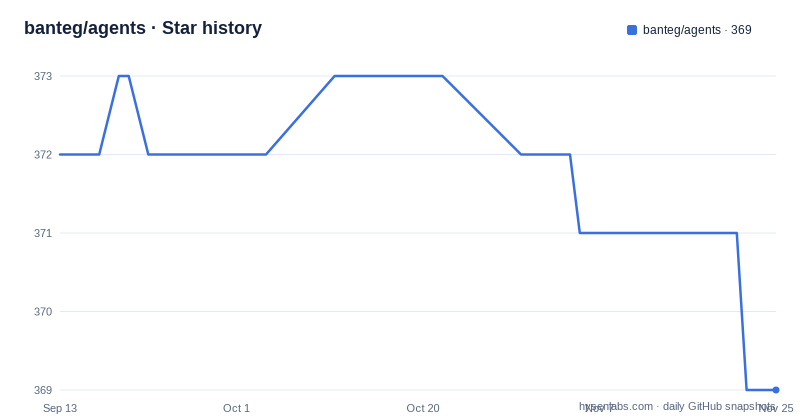
- banteg/agents369 ★ · -3
| Repository | 2026-09-13 | 2026-11-25 |
|---|---|---|
| banteg/agents | 372 | 369 |
-3 Stars in the last 73 days, measured from the daily GitHub snapshot. Compare with other projects
Editorial analysis
The problem: agents that fight over the same working directory
The README opens with the constraint that drives everything else: ai agents don't like files changing under them as they carry out their plans. An agent mid-plan reads a file, edits it, runs a test, and expects the tree to look the way it left it. A second agent, or your own editor, breaks that assumption. The repository is a set of answers to that problem rather than a library. It targets people who already run Codex or Claude Code from a terminal and have hit the failure where two sessions touch the same checkout. The stated workflow is create a worktree, make some commits, then either discard it or open a pull request. That is the whole loop, and everything else in the repo is either isolation for the agent process or context for the model. If you only ever run one agent at a time against a clean tree, most of this is overhead.
Why plain git worktree is not enough for agent sessions
Git already ships a worktree subcommand for checking out a branch into a separate directory. The README is blunt about why that is not used directly: its ux isn't great. The two wrappers it points at differ in how much of the lifecycle they own. git-wt handles the common cases, and the documented surface is four commands: git wt to list worktrees, git wt feat/branch to switch to a worktree and create the branch if needed, git wt -d feat/branch for a soft delete of worktree and branch, and git wt -D feat/branch for a hard delete. Worktrunk goes further and matches the create, pr, merge, cleanup cycle, with extras such as auto-running install scripts or generating commits through the llm cli. Its documented commands include wt switch -c -x codex feat/branch to create a worktree and run codex in it, wt merge to squash, rebase, merge into master and remove the worktree and branch, wt step commit to commit based on the diff and previous commit style, wt remove, and wt select as an interactive switcher showing all worktrees and their diff from master. The trade-off is scope: git-wt is a thin wrapper you can reason about in one sitting, while worktrunk owns merging and commit generation, which means more of your git history is produced by a tool rather than by you.
Configuring worktree paths and relative path metadata
Both wrappers need to know where worktrees live. For git-wt the README puts worktrees under .worktrees in the repo, adds that to ~/.gitignore_global, and sets the path with git config wt.basedir .worktrees. For worktrunk the equivalent lives in ~/.config/worktrunk/config.toml as worktree-path = ".worktrees/{{ branch }}", which keeps one directory per branch and matches the naming structure the author uses. Install for git-wt is brew install k1LoW/tap/git-wt. There is a second, subtler configuration point that has nothing to do with either wrapper. By default git stores absolute paths in worktree metadata, and the README states this breaks if you use devcontainer. Git 2.48 and later added relative path support, enabled with git config --global worktree.useRelativePaths true. New worktrees then use relative paths in all repos, and existing worktrees can be migrated with git worktree repair. That last command is worth noting because it rewrites metadata rather than recreating checkouts, so it is the cheap path if you already have a pile of worktrees pointing at an old absolute location.
Seatbelt sandboxing and auto-approval in Claude Code
The second half of the README is about reducing permission prompts without giving an agent unrestricted access to the machine. On macOS, the documented approach is seatbelt sandboxing, which runs bash commands inside macOS's seatbelt sandbox. According to the README, that restricts file writes to the project directory and limits network access. Combined with auto-approval it lets you skip most permission prompts while staying protected. The configuration goes in ~/.claude/settings.json as a sandbox object with enabled set to true and autoAllowBashIfSandboxed set to true. The intent is to make Claude Code behave more like Codex, which is a fair description of the difference in default posture between the two tools. Two things are not stated in the README and should be checked before relying on this: which writes outside the project directory are actually blocked, and how network access is limited. The README gives the mechanism and the config keys, not a policy table.
Devcontainers for unattended runs, and what the install script does
For runs where nobody is watching, the README says running agents unattended (yolo mode) is best done in a devcontainer, because it provides isolation and lets you skip permission prompts. Docker is required, and the author prefers orbstack as a drop-in replacement. The invocation given is two commands: ./devcontainer/install.sh self-install followed by devc /path/to/repo, with the comment that you are then in tmux with claude and codex. That is the most consequential line in the repository for anyone evaluating it, because it means the script sets up a container, a multiplexer session and two agent processes. The README points to devcontainer/readme.md for detail, and that file is where you should look before running the script. There is no description here of which base image is used, what the container can reach on the network, or how credentials for the agents are passed in. Those are exactly the questions that decide whether a devcontainer is a boundary or just a different shell.
Giving the model the repository without repomix
For architecture work, refactors, debugging or reviews, the README recommends handing the model the repository directly and calls the repomix and code2prompt approach of feeding a giant xml or md file outdated practice. The replacement is a zip produced by git itself: git archive HEAD -o code.zip, or git archive HEAD:src -o src.zip when only part of the repo is needed. The README states this works with gpt pro, claude, and gemini. When commit messages, prior attempts or regressions matter, a git bundle is offered instead: git bundle create repo.bundle --all. The distinction between the two is the interesting part. An archive is a snapshot of one tree with no history, while a bundle carries the full ref history and is understood by the same models. Choosing between them is a question of whether the model needs to see how the code got here or only what it looks like now. Both commands are git built-ins, so there is nothing to install and nothing to keep updated.
Notifications, Telegram control and the beads removal warning
Two notification paths are described. For full control, takopi bridges codex, claude code, opencode, and pi, streams progress, and supports resumable sessions so a task can be started on a phone and picked up in the terminal later. It installs with uv tool install takopi and runs inside the repo. For simple end-of-turn notifications, the repository ships a codex notify script under codex/notify_telegram/readme.md that sends a Telegram message at the end of each turn. The final section is a warning rather than a feature: beads is often recommended, but the README says removal requires a 730-line shell script and that it installs hooks in places you didn't know existed. That is a maintenance cost argument, and it is the one place in the document where the author is arguing against adopting something rather than for it.
What this repository is not, and what to check first
This is a personal workflow collection, not a package. There are no releases, no homepage, and the licence is unknown, which matters if you intend to copy files such as devcontainer/install.sh or the notify script into your own project. The Python label on the repository tells you little about what you would be running, since the documented surface is shell commands, git config keys, a JSON settings file and a TOML config file. The realistic alternative is to skip the wrappers entirely and use git worktree plus a short shell alias, which gives you the isolation with no dependency on git-wt or worktrunk and no merge automation you did not ask for. The cost of that choice is the lifecycle commands: wt merge, wt remove and wt select have no one-line equivalent, and the worktree path templating in worktrunk is more convenient than typing paths by hand. If you do adopt pieces, start with the two git config lines, worktree.useRelativePaths and wt.basedir, because they are global, reversible, and independent of every tool in the repository.
Editorial conclusion
Adopt the individual recipes if you already run Codex or Claude Code on a Mac and want worktree isolation plus seatbelt sandboxing, since the config keys are short and reversible. Skip it if you expect an installable package: there is no release, no setup.py or pyproject.toml described, and the licence is unknown, so treat the code as read-and-copy rather than a dependency. Verify the licence and read devcontainer/install.sh and codex/notify_telegram before running anything, because the README says the install script puts you in tmux with both agents.
Frequently asked questions
What is in the banteg/agents repository?
It is a workflow note rather than a library: git worktree isolation for parallel agents with git-wt and worktrunk wrappers, macOS seatbelt sandbox settings for Claude Code, a devcontainer script for unattended runs, git archive and git bundle instead of repomix for code reviews, and Telegram notifications through takopi.
How do I stop git worktrees from breaking inside a devcontainer?
Git stores absolute paths in worktree metadata by default, which breaks when a devcontainer sees a different path. Git 2.48 and newer support relative paths: run git config --global worktree.useRelativePaths true, then migrate existing worktrees with git worktree repair.
How do I let Claude Code run bash commands without permission prompts on macOS?
Enable the sandbox in ~/.claude/settings.json with sandbox.enabled true and sandbox.autoAllowBashIfSandboxed true. Seatbelt then restricts file writes to the project directory and limits network access, and auto-approval applies only inside that boundary.
What does the note say about giving an AI model a repository to review?
It calls repomix and code2prompt output outdated practice and recommends a zip produced by git instead, for example git archive HEAD -o code.zip, or git archive HEAD:src -o src.zip for one subtree. For commit history, prior attempts and regressions, it suggests git bundle create repo.bundle --all.
Official sources
Add this badge to your README
If you maintain this project, the badge below links readers to this analysis and shows its maintenance status from the daily GitHub snapshot. Paste the markdown into your README; add ?metric=license or ?metric=stars to the image URL for a different field.

[](https://hysenlabs.com/projects/banteg-agents)Star history chart for your README
[](https://hysenlabs.com/projects/banteg-agents)Was this useful?