hoothin/UserScripts: 29 script folders behind 13 README links
Greasemonkey scripts (Pagetual / Picviewer CE+ / DownloadAllContent) - a userscript collection.
At a glance
- What is it?
- hoothin/UserScripts keeps 29 Greasemonkey scripts as flat top-level folders, and the README links only 13 of them. It is a personal toolbox rather than a library, with no package file, no build step and no install command, so the work is picking the one script you want and reading its source.
- Who is it for?
- Take this collection script by script, not as a package. The three scripts the project names itself, Pagetual, Picviewer CE+ and DownloadAllContent, are the sensible starting points, and each one is worth reading before it touches a page you care about, because all three act on whatever is in front of you.
- Can I use it commercially?
- Not without permission. GitHub finds no licence file in the repository, and without a licence all rights are reserved by default: you may read the code but not reuse it. Check the README, or ask the authors, before using it.
- Is it still maintained?
- Yes. The repository last received commits 1 day ago.
- What is it written in?
- Mainly JavaScript, according to GitHub's language statistics.
Answers come from the project's GitHub data, last synced on November 14, 2026, and from our analysis. They are not legal advice.
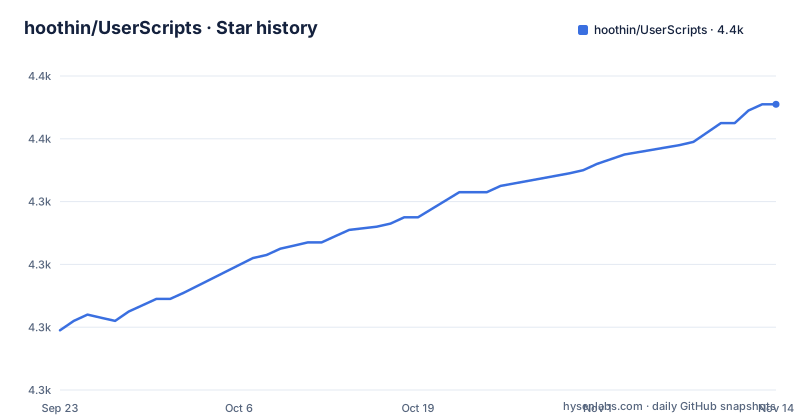
Star history
- hoothin/UserScripts4,371 ★ · +72
| Repository | 2026-09-23 | 2026-11-14 |
|---|---|---|
| hoothin/UserScripts | 4.3k | 4.4k |
72 Stars in the last 52 days, measured from the daily GitHub snapshot. Compare with other projects
Editorial analysis
Each script is a flat directory with no package file
hoothin/UserScripts is a toolbox of browser scripts rather than a library: the default branch is `master`, the primary language is JavaScript, and nothing in the tree has to be built before a userscript manager loads it. The top level holds 29 folders for scripts, sitting next to `.github/`, `.gitignore`, `CODE_OF_CONDUCT.md` and `README.md`. Three of those entries are plain files, `.github/` is not a script, and the rest are script directories; eight of the top-level entries look like this:
.gitignore
CODE_OF_CONDUCT.md
README.md
Pagetual/
Picviewer CE+/
SearchJumper/
DownloadAllContent/
Easy offline/
With no package.json, no lock file and no test directory anywhere in that list, there is nothing to install from a package registry and no dependency tree to reason about. Each script stands alone, which is also why a new tool can be dropped in without touching anything else.
The README links 13 titles while the tree holds 29 folders
That gap is the first thing worth knowing about the project. Only 13 scripts appear in the README list, so sixteen folders have no entry there at all: A Real Me, Anti-anti-pic-stealing-link, Appinn Comment, Bilibili Bangumi Cover, BingBgForBaidu, Disable AD of ThisAV, FlashViewer-HTML5 Video, Invite Code Tool, Kill Baidu AD, Kill TieBa AD, Messi, Mouse Gestures, RandomSexyPic, T66y tool, Valentine's Day and X-Downloader. The project's own description is narrower still, naming only Pagetual, Picviewer CE+ and DownloadAllContent. A reader who trusts the README never hears about the Mouse Gestures folder or the X-Downloader folder, and no file at the top level explains what those sixteen contain.
Seven links carry a description, six are bare titles
Descriptions are unevenly spread: seven of the 13 linked titles carry a one-line summary inside the link tooltip, and six are bare names. The detail worth catching sits in the link targets rather than in the titles. HGT Decode points at the `HacgGodTurn/` folder and JandanHero points at `JiandanHero/`, where the title lacks the folder's letter i. Nine other targets are relative paths, with spaces turned into %20 and the plus sign in Picviewer CE+ escaped as %2B, and each of those matches its directory name exactly. Two targets leave the repository altogether:
https://pagetual.hoothin.com/
https://search.hoothin.com/
Easy%20offline
Picviewer%20CE%2B
Switch%20Traditional%20Chinese%20and%20Simplified%20Chinese
Greasyfork%20Search%20with%20Sleazyfork%20Results%20include
DownloadAllContent
HacgGodTurn
Select%20All%20Checkboxes
MoreSteamRatings
Highlight%20Every%20Code
True%20URL%20downloads
JiandanHero
Not one of those 13 targets is a script file. Eleven are folders inside this repository and two are documentation sites, so the README sends a reader to source code and to product pages, and a userscript manager has nothing to fetch from it.
Pagetual keeps fetching the next page on its own
Pagetual is the one script whose description describes a running data flow rather than a single action: it fetches the next page automatically, so the list under your cursor keeps extending instead of stopping at a page number. That is the whole job of an auto pager, and it is also one of only two scripts here with a documentation site of its own, at pagetual.hoothin.com. The README does not document a site list, a selector list or a way to register your own page, so you have to open the script itself before deciding whether it will do anything on the pages you actually read.
SearchJumper and Easy offline read the open page
Both work from what is already on screen rather than from a page you describe in advance. SearchJumper turns selected text or a selected image into a search and lets the destination be Google, Bing or a custom engine, which removes the copy, paste and delete cycle. Easy offline looks for magnet links, torrents and video links in the current page and streams them from cloud storage, so there is no download step to sit through. Both are page-local, and that is their limit: what either one does is decided by the markup in front of you, and the README does not say which pages have been tried.
One script rewrites characters, another merges two indexes
Switch Traditional Chinese and Simplified Chinese operates on the text of any page: it converts between simplified and traditional characters, shows the Pinyin beside the characters, and takes custom text replacement rules. Greasyfork Search with Sleazyfork Results include works at a different level, merging the adult results of sleazyfork into greasyfork once that script is no longer anonymously available, and from then on adding a rating score and the version number to each script.
Picviewer CE+ and DownloadAllContent go past reading
Picviewer CE+ opens pictures in a popup, scales them, rotates them and batch saves them, which turns a gallery page into something closer to a local viewer. DownloadAllContent is described as a lightweight web scraping script that fetches the main textual content of the current page and gives novels special handling, so it aims at long text rather than at links. Two more folders carry download names with nothing attached to them, True URL downloads and X-Downloader. They promise the same shortcut, but no line of the README says what either one extracts, and that silence is the reason to read the source before pointing either at a page you care about.
Site-specific blockers sit beside generic ones
Three folders are named after a single site, Kill Baidu AD, Kill TieBa AD and Disable AD of ThisAV, and a fourth, Anti-anti-pic-stealing-link, is named for countering picture anti-hotlinking. Those four can only work where the author already knew the markup. The rest of the tree carries names that give no clue what any of them matches, so choose by directory name rather than by expectation. The last push to master landed on 2026-10-07, which says the collection as a whole still changes, but nothing in the tree records when an individual script was last touched.
Editorial conclusion
Take this collection script by script, not as a package. The three scripts the project names itself, Pagetual, Picviewer CE+ and DownloadAllContent, are the sensible starting points, and each one is worth reading before it touches a page you care about, because all three act on whatever is in front of you. Skip the whole repository if you want a single version to track or a dependency you can pin. Before enabling anything, open the directory of the script you picked: that source file is the only place the site list and the match rules live, and the README entry is just a pointer.
Frequently asked questions
What are userscripts, in the case of hoothin/UserScripts?
Userscripts are browser scripts that a manager such as Greasemonkey runs on the pages you open. hoothin/UserScripts collects them as 29 top-level folders, with 13 of them linked from the README by title.
How do I use userscripts from hoothin/UserScripts?
Pick the folder you want on the master branch and take the file from there; the README carries no install command and no code block. Two scripts, Pagetual and SearchJumper, have documentation sites of their own at pagetual.hoothin.com and search.hoothin.com.
How do I use userscripts in Chrome with hoothin/UserScripts?
The README does not name a browser or a version of one. The collection is described as Greasemonkey scripts and each one sits in its own folder, so you load the file you want in whatever userscript manager you already run.
How do I install userscripts from hoothin/UserScripts?
The README gives no install command. The repository homepage is the Greasyfork user page greasyfork.org/users/8227-hoothin, and the README points to documentation sites of its own for Pagetual and SearchJumper, and to the script folders inside the repository.
Official sources
Add this badge to your README
If you maintain this project, the badge below links readers to this analysis and shows its maintenance status from the daily GitHub snapshot. Paste the markdown into your README; add ?metric=license or ?metric=stars to the image URL for a different field.

[](https://hysenlabs.com/projects/hoothin-userscripts)Star history chart for your README
[](https://hysenlabs.com/projects/hoothin-userscripts)Was this useful?