StreamSaver.js writes to disk through a service worker, not through memory
StreamSaver writes stream to the filesystem directly asynchronous
At a glance
- What is it?
- StreamSaver.js hands the browser a writable byte stream that a service worker pipes to the file system, sidestepping the blob size and RAM ceilings that stop FileSaver.js. It costs you a page-level service worker, an unload handler and, ideally, a secure context.
- Who is it for?
- Adopt it when the bytes are generated inside the browser and the file is too large for a blob: an export, a recording, a text file built as you type. Leave it alone when the file already lives on a server, since the honest fix there is a response header and a non-AJAX request.
- Can I use it commercially?
- Yes. MIT is a permissive licence: you can use, modify and sell software built on it, as long as you keep its copyright and licence notices.
- Is it still maintained?
- Yes. The repository last received commits 107 days ago.
- What is it written in?
- Mainly JavaScript, according to GitHub's language statistics.
Answers come from the project's GitHub data, last synced on November 14, 2026, and from our analysis. They are not legal advice.
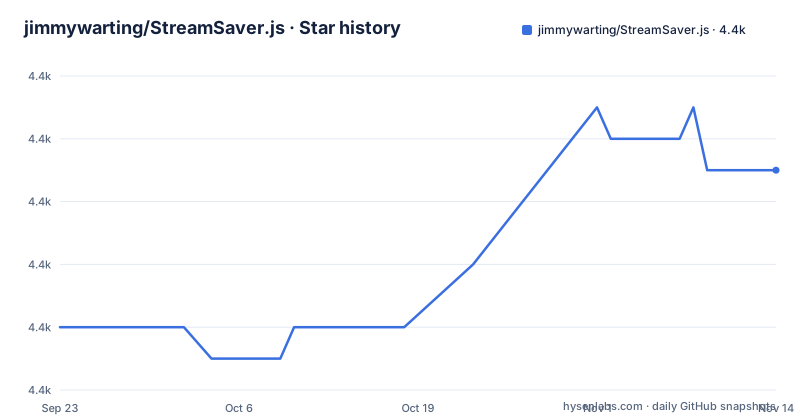
Star history
- jimmywarting/StreamSaver.js4,375 ★ · +5
| Repository | 2026-09-23 | 2026-11-14 |
|---|---|---|
| jimmywarting/StreamSaver.js | 4.4k | 4.4k |
5 Stars in the last 52 days, measured from the daily GitHub snapshot. Compare with other projects
Editorial analysis
The blob size ceiling is what StreamSaver.js is built around
The usual browser download path runs through Object URLs and the a[download] attribute, which is the trick FileSaver.js uses. Both require the whole payload to exist as a Blob in the page first, so it sits in client-side memory and runs into a size cap before the user sees anything.
StreamSaver.js takes a different route. It gives you a writable byte stream aimed at the file system, so data can be written as it is produced. That is the case for web apps that generate a lot of data on the client: exports, recordings, a text file assembled as the user types. The author also points to a separate project, native-file-system-adapter, as a bridge to the native FS API.
The author is also candid about scope. If the file you are saving comes from the cloud or a server, set the response headers on the server and stop there. If the headers cannot be changed, treat StreamSaver.js as the last resort rather than the plan.
A service worker and mitm.html stand in for the server response
There is no saveAs() function that writes a stream to disk. What StreamSaver.js does is emulate the exchange a server performs when it tells a browser to save a file: some response headers plus a service worker.
Two files carry the trick. sw.js is the worker that receives the download and streams what it is given to disk. mitm.html sits in front of it as a stand-in for the server response. Registering the worker needs a secure context, because a service worker cannot be installed from an insecure page without first opening a window into one.
That is where the pop-up blocker bites. On http, a hidden frame has to open a popup to install the worker from a secure context, and popups get blocked. Over https the worker installs directly and the same frame can ping it to keep it awake, which matters because Firefox idles a worker after 30 seconds and Blink after five minutes. Where transferable streams are supported through postMessage, the worker holds no logic at all: the stream transferred to it is the stream it responds with.
The minimal page: two script tags and three ways to import the module
The simplest form in the README loads the ponyfill for WritableStream, because some browsers ship ReadableStream without WritableStream. It prefers the ponyfill over the polyfill so a native ReadableStream stays transferable to the service worker, which is the case the library handles best.
<script src="https://cdn.jsdelivr.net/npm/[email protected]/dist/ponyfill.min.js"></script>
<script src="https://cdn.jsdelivr.net/npm/[email protected]/StreamSaver.min.js"></script>
<script>
  import streamSaver from 'streamsaver'
  const streamSaver = require('streamsaver')
  const streamSaver = window.streamSaver
</script>
<script>
  const uInt8 = new TextEncoder().encode('StreamSaver is awesome')

  // streamSaver.createWriteStream() returns a writable byte stream
  // The WritableStream only accepts Uint8Array chunks
  // (no other typed arrays, arrayBuffers or strings are
The three lines inside the script block are alternatives, not a sequence: ES module import, CommonJS require or the global on window. Whichever your bundler gives you, createWriteStream() returns a writable byte stream, and it accepts Uint8Array chunks only. Strings and plain ArrayBuffers are rejected, so the first line of real code is a TextEncoder().encode() call.
Leaving the page kills the download, so the README asks for an unload handler
Because the write target looks like a normal download, users assume they can close the tab and let it finish in the background. They cannot. The stream is fed by the page, so unloading the document breaks the transfer partway and leaves a truncated file.
The README's fix is to abort explicitly on unload and to warn on beforeunload while the write is unfinished:
// abort so it dose not look stuck
window.onunload = () => {
  writableStream.abort()
  // also possible to call abort on the writer you got from `getWriter()`
  writer.abort()
}

window.onbeforeunload = evt => {
  if (!done) {
    evt.returnValue = `Are you sure you want to leave?`;
  }
}
Abort makes the state honest instead of leaving the UI looking stuck. Timing differs by context: on http, StreamSaver navigates to the download URL rather than using the hidden iframe, so beforeunload fires when the download starts and onunload does not fire at all. On https you can attach both handlers straight away.
Configuration hooks exist for the ponyfill and for self-hosting the worker
Three settings cover most of what a real deployment needs. StreamSaver can pick up the WritableStream and TransformStream that the ponyfill already loaded from the CDN. And if you would rather run mitm.html and sw.js yourself instead of using the default ones, point the mitm setting at your own URL.
// StreamSaver can detect and use the Ponyfill that is loaded from the cdn.
streamSaver.WritableStream = streamSaver.WritableStream
streamSaver.TransformStream = streamSaver.TransformStream
// if you decide to host mitm + sw yourself
streamSaver.mitm = 'https://example.com/custom_mitm.html'
Self-hosting matters for anyone with a content security policy or an audit rule against third-party script origins, and it puts the worker under your own cache lifetime.
Where StreamSaver.js is the wrong tool: server-hosted files and huge archives
The clearest wrong-tool case is a file that already lives on a server. Wrapping that response in a client-side stream to reach the disk is work the server could have done with a header, and doing it this way spends the user's CPU on a transfer that should be a plain navigation.
A third constraint sits in package.json: the test script is the default placeholder that exits zero without running anything. There is no test suite to catch a regression, so the browser check has to be manual.
How it differs from FileSaver.js and the native File System Access API
FileSaver.js works one layer down. It hands you a Blob and an object URL, and the browser handles the rest, which is short code and no worker, at the price of holding the entire payload in memory and meeting the blob cap. StreamSaver.js accepts a stream instead, so the caller decides when bytes leave.
The native File System Access API removes the emulation entirely: the page asks for a file handle and writes to it directly, no worker and no mitm page. The author says as much in the README, describing the FS API as a native way to save files to disk that will make FileSaver and StreamSaver partly obsolete, while noting it is still experimental and not implemented by every browser. That is also why native-file-system-adapter exists, to expose those handles across browsers, Deno and Node with different storage backends.
Editorial conclusion
Adopt it when the bytes are generated inside the browser and the file is too large for a blob: an export, a recording, a text file built as you type. Leave it alone when the file already lives on a server, since the honest fix there is a response header and a non-AJAX request. Before shipping, open the page over https in the target browser and leave the tab mid-download, because the transfer dies with the document and that is the failure users will report first.
Frequently asked questions
How do I install StreamSaver.js in a web app?
Load the web-streams-polyfill ponyfill and StreamSaver.min.js from jsdelivr in script tags, then reach the library through an ES module import, a CommonJS require or the window global. If you host the worker yourself, set streamSaver.mitm to the URL of your own mitm.html.
Does StreamSaver.js work on http pages?
It works, but the service worker has to be installed from a secure context, so an insecure page opens a popup to get there and pop-up blockers can stop it. The README recommends https, and notes that on http the library navigates to the download URL rather than using a hidden iframe.
Why does my StreamSaver.js download stop when I leave the page?
The page is what feeds the stream, so unloading the document breaks the transfer. The README asks you to handle the unload event and abort the writable stream or writer, and to set returnValue on beforeunload while the write is unfinished.
Official sources
Add this badge to your README
If you maintain this project, the badge below links readers to this analysis and shows its maintenance status from the daily GitHub snapshot. Paste the markdown into your README; add ?metric=license or ?metric=stars to the image URL for a different field.

[](https://hysenlabs.com/projects/jimmywarting-streamsaver-js)Star history chart for your README
[](https://hysenlabs.com/projects/jimmywarting-streamsaver-js)Was this useful?