portless swaps local dev ports for named .localhost URLs, and leaves alone scripts it cannot parse
Replace port numbers with stable, named local URLs. For humans and agents.
At a glance
- What is it?
- A look at how the Vercel Labs CLI hands out HTTPS hostnames, decides which framework scripts it is allowed to touch, and where that decision leaves you with a port you did not ask for.
- Who is it for?
- portless is worth adopting for a single app or a clean pnpm workspace where your dev scripts are plain framework invocations, because the named HTTPS hostname removes port juggling from every bookmark and cookie you own. Hold off if your repo already wraps dev commands in npm run chains or runner flags, since those are shapes portless deliberately leaves untouched.
- Can I use it commercially?
- Yes. Apache-2.0 is a permissive licence: you can use, modify and sell software built on it, as long as you keep its copyright and licence notices.
- Is it still maintained?
- Yes. The repository last received commits 1 day ago.
- What is it written in?
- Mainly TypeScript, according to GitHub's language statistics.
Answers come from the project's GitHub data, last synced on November 13, 2026, and from our analysis. They are not legal advice.
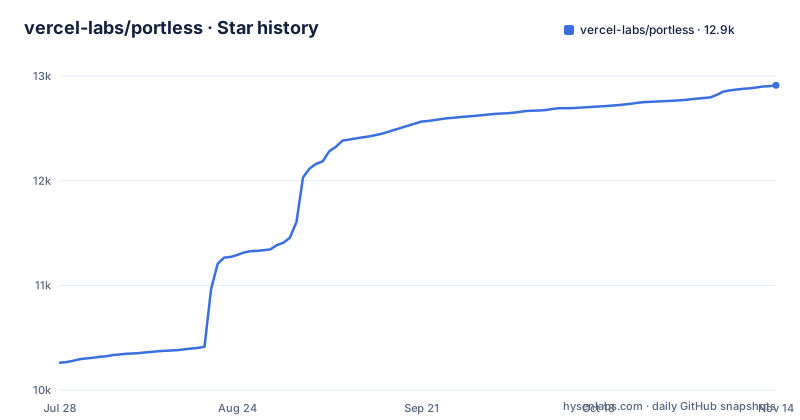
Star history
- vercel-labs/portless12,903 ★ · +2,642
| Repository | 2026-07-28 | 2026-11-13 |
|---|---|---|
| vercel-labs/portless | 10.3k | 12.9k |
2,642 Stars in the last 108 days, measured from the daily GitHub snapshot. Compare with other projects
Editorial analysis
The first run takes port 443 and a root prompt before your app boots
The proxy does not start quietly. On its first run portless generates a local certificate authority, trusts that CA, and binds port 443, auto-elevating with sudo on macOS and Linux. HTTPS with HTTP/2 is enabled by default, which is why the headline example is a diff against your package scripts rather than a curl command:
- "dev": "next dev"                  # http://localhost:3000
+ "dev": "portless run next dev"     # https://myapp.localhost
The recommended install is a global one, so the binary is the same for everyone on the machine:
npm install -g portlessTwo consequences follow from that design. First, machine state changes before your framework does. A CA goes into the system trust store, and that store is shared by every browser and every other tool on the machine, not just by this project. Second, there is a privilege boundary in the path, because binding a privileged port and trusting a CA both need it. The README's opt-out is `--no-tls`, which leaves you on plain HTTP.
Flag injection quits the moment a script looks unfamiliar
When the proxy starts your app it assigns a random port between 4000 and 4999 through the `PORT` environment variable. Most frameworks, Next.js, Express and Nuxt among them, read that variable and the job is done. A named set does not: Vite, VitePlus, VitePress, Astro, React Router, Angular, Expo, React Native and Wrangler ignore `PORT`, so portless appends a `--port` flag and, when needed, a matching `--host` (`--ip` for Wrangler). Injection only travels through a package script whose command starts with the framework itself or a known runner, so `"dev": "vite"` and `"dev": "bunx vite"` both qualify, and only server subcommands are eligible: `dev`, `serve`, `preview`, `start`, a bare `vite`, or `vite [root]`.
What it will not do is guess. A command that does not serve, such as `vite build`, `vite optimize`, `vp test` or `astro check`, rejects the flags and is left alone. So is a script portless cannot classify, for example `vp --mode dev build`, where a flag sits before the subcommand on a CLI whose flag grammar it does not track. It also leaves a script alone when appending would not work: a compound command using `&&`, `|` or `;`, a trailing `#` comment, the script's own `--` option terminator, an env prefix such as `NODE_ENV=production vite`, delegation to another script like `"dev": "npm run dev:vite"`, or runner flags before the script name such as `bun run --bun dev`. Expo connection modes `--localhost`, `--lan` and `--tunnel` survive, with the assigned port still injected.
The consequence: every script in that second list keeps its own port, and you are expected to set the port in the script yourself.
Workspace hostnames are guessed from whichever npm scope wins
Outside a monorepo the name comes from the package name, the git root or the directory, and you can pin it in a `portless.json`:
{ "name": "myapp" }In a workspace the guessing gets more interesting. Packages are discovered from `pnpm-workspace.yaml` or the `"workspaces"` field in `package.json` for npm, yarn and bun, and one `portless.json` at the repo root covers all of them. Without an `apps` map, hostnames follow `<package>.<project>.localhost`, where the project name is the most common npm scope across workspace packages, so `@myorg/web` and `@myorg/api` both produce `myorg`, falling back to the workspace root directory name. A package whose short name already equals the project name gets the bare `<project>.localhost` rather than a duplicated host. The `apps` map is optional and exists only for overrides, keyed by relative path:
{
  "apps": {
    "apps/web": { "name": "myapp" },
    "apps/api": { "name": "api.myapp" }
  }
}portless # from repo root: starts all workspace packages with a "dev" script
cd apps/web && portless # start just one packageBecause the project name comes from the most common scope, a repository that straddles scopes gets a project name chosen by frequency unless you set names in the `apps` map. The `name` field also still has a worktree prefix applied.
State lives in ~/.portless and its format is allowed to break
Per-user state goes in `~/.portless`. When the proxy runs under sudo, portless resolves that path from the invoking user's home rather than root's, so the privileged proxy and your unprivileged app processes end up sharing the same route registrations. This is a pre-1.0 project and it says so directly: installed per-project, different contributors can run different versions, and the state directory format may change between releases, which can require re-running `portless trust`.
npm install -D portlessThe global install is the recommended one for exactly that reason, but it also means the version on disk is whatever happens to be on your PATH. What survives a restart is deliberate too. When auto-starting, portless reuses the port, TLS and TLD settings from the most recent proxy run, so a reboot or a fresh shell does not quietly revert to defaults, and explicit environment variables such as `PORTLESS_PORT` and `PORTLESS_HTTPS` always take priority over remembered settings.
The repair step the README names for a state format change is re-running `portless trust`.
No TTY and CI=1 turn a prompt into an exit
Portless draws a trust prompt on its first run, so it has to decide what to do when nobody can answer. In a non-interactive environment, meaning no TTY or `CI=1`, it exits with a descriptive error instead of prompting, and the stated purpose is that task runners like turborepo and CI scripts fail early with a clear message.
portless myapp next dev
# -> https://myapp.localhost
That is a good default and still only a default. The practical reading: a CI job needs a CA that is already trusted, or the TLS path turned off, and which of those applies is decided by your own image rather than by anything portless reports at startup.
Turbo support turns the dev script into a re-entrant one
Turborepo needs a specific shape, and the real command has to move out of `dev` so that turbo's own `dev` becomes a call into portless:
{
  "scripts": {
    "dev": "portless",
    "dev:app": "next dev"
  },
  "portless": { "name": "myapp", "script": "dev:app" }
}
Turbo runs each package's `dev` script, which invokes portless. Portless reads the config, detects the package manager, and runs `pnpm run dev:app`, or the yarn, bun or npm equivalent, through the proxy. No edits to `turbo.json` or `turbo.jsonc` are needed, `pnpm dev` at the root still goes through turbo as usual, and a teammate without portless installed can run `pnpm run dev:app` directly. The `turbo` config field defaults to `true`, and setting it to `false` switches to direct spawning instead of turborepo.
The indirection is the cost. Delegation to another script, written as `"dev": "npm run dev:vite"`, is exactly the pattern portless refuses to inject flags into, so a repo that already wraps its dev command that way gets no injection at all and the two-level pattern has to be adopted deliberately.
Three config layers, and the winner depends on which key you wrote
Configuration can arrive three ways and they do not merge symmetrically. A `portless.json` holds defaults, a `"portless"` key in `package.json` can be a bare string shorthand for the name or an object carrying `name`, `script`, `appPort` and `proxy`, and CLI flags sit above both. The `package.json` key takes precedence over `portless.json` app entries but is overridden by CLI flags:
portless --script start       # run "start" instead of "dev"
portless --script test        # run "test" instead of "dev"
The remaining fields decide what actually happens. `script` defaults to `"dev"`. `appPort` pins a fixed port for the child process where the default is auto. `proxy` is a boolean defaulting to auto and is auto-detected, so turning routing off is how you get a plain fixed-port run with no named host. `apps` holds per-package overrides keyed by relative path. `name` is inferred when absent, from the package name, the git root or the directory.
The field table does not state whether an unknown key is rejected or ignored, and does not say whether a `name` set in one layer clears an `apps` entry in another. If you adopt this in a team, the fields worth agreeing on first are the ones that default to auto, `appPort` and `proxy`, and how wide the `apps` map is allowed to be.
A pnpm monorepo pinned to Node 24 ships a pre-1.0 CLI
The published package comes out of a private workspace, `portless-monorepo`, declared with `"type": "module"`, `packageManager` of `[email protected]`, and engines requiring Node `>=24` and pnpm `>=11 <12`. Build, dev, lint, test and type-check all run through turbo, and `prepare` runs husky, so a clone needs the whole toolchain rather than a single package. Linting is eslint with typescript-eslint and eslint-config-prettier, formatting is prettier at `^3.8.1`, and lint-staged rewrites staged `*.{ts,js}` with `eslint --fix` plus `prettier --write`, and staged `*.{json,md,yml,yaml}` with `prettier --write`. The tree also carries `patches/`, `skills/`, `tests/`, an `AGENTS.md`, a `CHANGELOG.md`, and a single `examples/google-oauth/` directory.
Shipping is steady: v0.15.13 on 2026-11-01, v0.15.12 on 2026-10-26 and v0.15.11 on 2026-10-24, under Apache-2.0 with the homepage at https://portless.sh. The install instructions do not state a Node floor for consumers, while the repository itself demands Node 24. The release cadence is the reassuring half; the consumer-side Node requirement is the half you still have to check on your own.
Editorial conclusion
portless is worth adopting for a single app or a clean pnpm workspace where your dev scripts are plain framework invocations, because the named HTTPS hostname removes port juggling from every bookmark and cookie you own. Hold off if your repo already wraps dev commands in npm run chains or runner flags, since those are shapes portless deliberately leaves untouched. Before you commit, check what already holds port 443 on your machines, decide whether a globally trusted local CA is acceptable, and pin how you will re-run `portless trust` when a pre-1.0 state format changes under you.
Frequently asked questions
what does portless do
In this repository, portless runs your app through a local proxy and replaces the port with a named .localhost URL such as https://myapp.localhost. It assigns the child process a random port between 4000 and 4999 through the PORT environment variable, and serves that route over HTTPS with HTTP/2 by default.
what is portless
portless is the Vercel Labs CLI published on npm as the portless package, written in TypeScript under the Apache-2.0 license, with its homepage at https://portless.sh. It describes itself as a tool for humans and agents doing local development.
what does portless mean
The package description reads: Replace port numbers with stable, named local URLs. For humans and agents. The word also shows up in the per-user state directory ~/.portless, in the optional portless.json config file, and in environment variables such as PORTLESS_PORT and PORTLESS_HTTPS.
what is portless 3pl
That question is about freight and logistics, and it does not apply to this project. The vercel-labs/portless repository is a local development proxy for serving apps at named .localhost URLs, and nothing in its configuration fields, config file format or bundled example relates to shipping.
Official sources
Where developers are discussing it
Posts on Hacker News, dev.to and Lobsters that link to this repository, found by our scan of those communities. 1 in the last 30 days; newest first.
- pingpad: table tennis in the browser, with your phone as the paddledev.to · Nov 3, 2026 · 2 points · 1 comments
Add this badge to your README
If you maintain this project, the badge below links readers to this analysis and shows its maintenance status from the daily GitHub snapshot. Paste the markdown into your README; add ?metric=license or ?metric=stars to the image URL for a different field.

[](https://hysenlabs.com/projects/vercel-labs-portless)Star history chart for your README
[](https://hysenlabs.com/projects/vercel-labs-portless)Was this useful?