HQarroum/docker-android: an Android emulator as a Docker service
🤖 A minimal and customizable Docker image running the Android emulator as a service.
At a glance
- What is it?
- HQarroum/docker-android packages the Android emulator, an ADB server and KVM support into a container you drive over port 5555. It is a CI-oriented image, not a desktop replacement for a phone.
- Who is it for?
- Adopt it if you need a headless Android emulator inside a Linux CI runner that already exposes /dev/kvm, and you are willing to pre-build or pull a multi-gigabyte image per API level. Do not adopt it if you want to run Android apps on a laptop desktop, on macOS, or on hardware without KVM, since the repository only documents x86 and x86_64 system images and a /dev/kvm device.
- Can I use it commercially?
- Yes. MIT is a permissive licence: you can use, modify and sell software built on it, as long as you keep its copyright and licence notices.
- Is it still maintained?
- Activity is slowing. The repository last received commits 6 months ago.
- What is it written in?
- Mainly Shell, according to GitHub's language statistics.
Answers come from the project's GitHub data, last synced on November 13, 2026, and from our analysis. They are not legal advice.
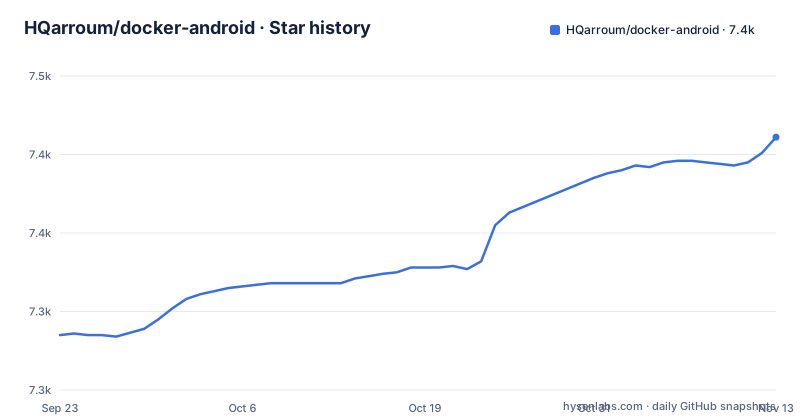
Star history
- HQarroum/docker-android7,411 ★ · +126
| Repository | 2026-09-23 | 2026-11-13 |
|---|---|---|
| HQarroum/docker-android | 7.3k | 7.4k |
126 Stars in the last 51 days, measured from the daily GitHub snapshot. Compare with other projects
Editorial analysis
What problem HQarroum/docker-android solves
Running an Android emulator on a build machine is normally a manual setup problem. You install the SDK, the platform tools, the emulator binary, a Java runtime, the right system image for each API level, and you keep all of that in sync across every machine that runs your tests. HQarroum/docker-android moves that setup into a Docker image so a CI job can start an emulator the same way it starts a database container.
The README describes the target narrowly: a size-optimized image carrying the emulator, an ADB server, and QEMU with libvirt support, with the emulator exposed as a service that is controllable over the network. That framing matters. This is not a tool for running Android applications on a desktop; it is a tool for giving a pipeline an Android device it can talk to over TCP. The README itself says the image runs headless and is suitable for CI farms.
Who it is for, concretely: teams testing an APK against several Android versions in an automated job, and anyone who wants a disposable emulator they can start, connect to with adb, and throw away. If your workflow is interactive, if you want a graphical Android environment on your own machine, or if your host is not Linux with KVM, the design works against you.
How the image is put together and how traffic reaches the emulator
The Dockerfile starts from eclipse-temurin:25, which supplies the Java runtime the emulator needs, and installs a list of system packages including curl, wget, unzip, bzip2, libdrm-dev, libxkbcommon-dev, libgbm-dev, libnss3, xauth, xvfb, x11vnc, fluxbox, socat and virt-manager. Several of those are graphics and windowing libraries rather than emulator-specific ones, which is part of why the finished image is large even though the README calls it minimal.
Build-time arguments drive the contents. INSTALL_ANDROID_SDK, API_LEVEL, IMG_TYPE, ARCHITECTURE, CMD_LINE_VERSION, DEVICE_ID and GPU_ACCELERATED are declared as ARG values, and the ones that matter at runtime are promoted to environment variables: ANDROID_SDK_ROOT points at /opt/android, PACKAGE_PATH is assembled from the API level, image type and architecture, and ANDROID_AVD_HOME is set to /data. The PATH is extended with the platform-tools, emulator and cmdline-tools directories, and LD_LIBRARY_PATH points into the emulator's lib64 and Qt library folders. The image exposes ports 5554 and 5555, the emulator console port and the ADB port.
The data flow at runtime is short. The container starts the emulator headless, an ADB server inside the container listens on all interfaces, and your client connects over the published port. Because ANDROID_AVD_HOME is /data, the AVD named android lives in the container filesystem unless you mount something over it. The README states that emulator images are wiped each time the emulator restarts, so persistence is opt-in through a volume, not a default. That is a deliberate trade-off: a clean device every run, at the cost of a slower boot and no state between runs.
Building and running your first emulator container
The repository offers two entry points. The compose file defines services named android-emulator, android-emulator-cuda and android-emulator-cuda-store, so the shortest path is to let compose build and start one of them. The compose service builds with API_LEVEL=34, CMD_LINE_VERSION=11076708_latest and IMG_TYPE=google_apis, publishes 5554 and 127.0.0.1:5555, and passes /dev/kvm through as a device.
docker compose up android-emulatorIf you prefer plain Docker, the README gives a direct build command. Note that a build with the default arguments bundles the Android SDK and emulator, so expect a large image; the README's own size table lists API 33 with emulator at 5.84 GB uncompressed.
docker build -t android-emulator .To run it, the README mounts the KVM device and publishes the ADB port. The same section warns that API 33 needs 4GB of memory and at least 8GB of disk.
docker run -it --rm --device /dev/kvm -p 5555:5555 android-emulatorOnce the kernel has booted, the README says the ADB server is already listening inside the container and you connect from the host. If you want the device state to survive a restart, add a volume on /data, which is where the AVD named android is stored.
docker run -it --rm --device /dev/kvm -p 5555:5555 -v ~/android_avd:/data android-emulatoradb connect 127.0.0.1:5555After connecting, the README points at scrcpy for remote screen control; run it on the client after adb is connected. The default device preset is a Pixel at 1080x1920. If you would rather not build at all, pre-built images are tagged by API level on Docker Hub, for example halimqarroum/docker-android:api-33.
Choosing an API level, image type and architecture at build time
The customization surface is build arguments, not runtime configuration, which means changing the Android version means rebuilding or pulling a different tag. The README lists API_LEVEL for the Android version, IMG_TYPE for the system image flavor, and ARCHITECTURE for the CPU architecture, adding that only x86_64 and x86 are actively supported. That last sentence is the most consequential constraint in the whole document: an arm64 host is not covered here.
The README's example builds Android Pie with Play Store support:
docker build \
  --build-arg API_LEVEL=28 \
  --build-arg IMG_TYPE=google_apis_playstore \
  --build-arg ARCHITECTURE=x86 \
  --tag android-emulator .
There is a second lever for size. Setting INSTALL_ANDROID_SDK=0 skips downloading the SDK into the image, which the README suggests for keeping the SDK on a shared filesystem such as NFS. The size table shows the gap: 414 MB uncompressed without SDK and emulator, against 5.84 GB for API 33 with the emulator. The trade is that you must then mount the SDK at /opt/android yourself, and the image is useless without that mount.
Runtime behavior is tuned through environment variables rather than build arguments: DISABLE_ANIMATION, DISABLE_HIDDEN_POLICY, SKIP_AUTH, MEMORY, CORES and EXTRA_FLAGS. The compose file sets MEMORY=16384 and CORES=16, well above the README's stated 4GB minimum, and the README's own default listing shows MEMORY=8192 and CORES=4 with EXTRA_FLAGS="-no-metrics -no-audio -partition-size=8192". Those defaults are a starting point, not a recommendation for your runner.
Where this image gets in the way
The KVM dependency is the first hard wall. Every run command in the README passes --device /dev/kvm, and the android-emulator compose service declares it as a device with privileged: true. On a host without KVM, or in a container runtime that does not allow device passthrough, nothing here starts. That rules out most hosted macOS runners and any environment where nested virtualization is unavailable.
Size is the second wall, and it is not a small one. A single API 33 image is 5.84 GB uncompressed and 1.97 GB compressed, and testing against several Android versions means several images. Caching helps, but a cold CI runner still pays that download. The README's answer is INSTALL_ANDROID_SDK=0 plus an NFS-mounted SDK at /opt/android, which only helps if you already have shared storage.
The wipe-on-restart behavior is a third constraint that cuts both ways. It gives you a clean device every run, which is usually what tests want, but it also means boot time is paid on every start and no state carries over unless you mount /data. If your test suite depends on an app being installed once and reused, you are fighting the default.
Finally, authentication. The README states that google_apis_playstore images require the same adbkey on the emulator side and the client side, generated with adb keygen and placed in ./keys. The compose file mounts ./keys/adbkey and ./keys/adbkey.pub read-only into /root/.android/. If your keys are missing or mismatched, the Play Store variant will not behave as expected, and the README does not document a recovery path beyond regenerating the pair. If you only need Google APIs rather than Play Store, avoiding that variant removes the whole key-management step.
How it differs from budtmo/docker-android and alpine-android
The README's See also section names two alternatives directly. The budtmo/docker-android project, according to the README, offers a WebRTC interface to an Android emulator, which is a different product shape: you get a browser-accessible view of the emulator rather than a bare ADB endpoint. If your team wants to look at the screen without installing scrcpy locally, that is a meaningful difference. HQarroum/docker-android instead expects you to bring your own client and connect over ADB on port 5555.
The other named project is alpine-android, which the README describes as based on a different Alpine image. That is a base-image difference with practical consequences: HQarroum/docker-android currently builds from eclipse-temurin:25 rather than Alpine, despite the README's feature list saying "Minimal Alpine based image bundled with the Android emulator and KVM support". The Dockerfile and the feature bullet disagree, and the Dockerfile is the one that builds. That inconsistency is worth knowing before you assume the image inherits Alpine's small footprint.
A broader comparison is against redroid or Waydroid, which take an entirely different route: they run Android as a container or as a host system rather than running the emulator inside a container. Those approaches do not carry the emulator's memory overhead or the system-image download per API level, but they also do not give you the emulator's device profiles and API-level matrix in the same packaged form. If your requirement is a full Android userspace rather than an emulated device, this image is the wrong tool.
Maintenance, upgrades and the MIT licence
The repository is not archived, and the last push was on 2026-05-07. That is recent enough that the project is not abandoned, but there is no release history to inspect: the repository has no published releases, and the README's stated current version is 1.1.0 while the Dockerfile labels itself version 1.0.0. Anyone tracking versions should read the Dockerfile label as decorative rather than authoritative.
Upgrade cost is dominated by image size and by the API-level matrix. Moving from API 33 to API 34 in the compose file is a build argument change, but the resulting image is a fresh multi-gigabyte layer set, so a CI cache that keys on the image tag will invalidate. Pinning CMD_LINE_VERSION and API_LEVEL explicitly, as the compose file does, is the only way to keep builds reproducible; the README does not document rollback to a previous image beyond pulling an older Docker Hub tag.
The licence is MIT, which is permissive and places few conditions on redistribution or modification. That said, the MIT licence covers this repository's own files. The image also bundles the Android SDK, platform tools, the emulator and a Java runtime, each of which carries its own terms, and the README does not enumerate them. If you redistribute a built image rather than using it internally, check those upstream terms rather than assuming the MIT grant covers everything inside the container.
Editorial conclusion
Adopt it if you need a headless Android emulator inside a Linux CI runner that already exposes /dev/kvm, and you are willing to pre-build or pull a multi-gigabyte image per API level. Do not adopt it if you want to run Android apps on a laptop desktop, on macOS, or on hardware without KVM, since the repository only documents x86 and x86_64 system images and a /dev/kvm device. Before committing, verify that your runner has at least 4GB of memory and 8GB of disk for API 33, that the adbkey pair in ./keys matches between container and client when you use google_apis_playstore, and that the pre-built tag you intend to pull (for example halimqarroum/docker-android:api-33) exists for your API level and image type.
Frequently asked questions
How do I install docker-android?
There is nothing to install as a package. You either build the image from the repository with docker build -t android-emulator . or pull a pre-built tag such as halimqarroum/docker-android:api-33 from Docker Hub, then run it with the KVM device passed through.
How do I use docker-android to run an emulator?
Start the container with the KVM device and the ADB port published, wait for the kernel to boot, then connect from the host with adb connect 127.0.0.1:5555. The README also notes that scrcpy can be run locally after connecting to control the emulator screen.
What is docker-android?
It is a Docker image that bundles the Android emulator, an ADB server and QEMU with libvirt support so the emulator can run headless as a service reachable over the network. The README describes it as size-optimized and aimed at CI pipelines.
How does docker-android compare with redroid?
The README does not mention redroid, so no direct comparison is documented. What the README does say is that this project runs the Android emulator itself inside the container, with x86 and x86_64 system images and a /dev/kvm device requirement, which is a different approach from running Android as a host or container system.
How does docker-android compare with Waydroid?
The README does not discuss Waydroid. Based on the documented design, docker-android gives you an emulated Android device inside a container with ADB on port 5555, rather than an Android userspace running directly on the host.
What can I use instead of docker-android?
The README's See also section names two alternatives: budtmo/docker-android, which the README says offers a WebRTC interface to an Android emulator, and alpine-android, which is based on a different Alpine image. The choice mostly comes down to whether you want a browser-accessible emulator or a bare ADB endpoint.
Official sources
Add this badge to your README
If you maintain this project, the badge below links readers to this analysis and shows its maintenance status from the daily GitHub snapshot. Paste the markdown into your README; add ?metric=license or ?metric=stars to the image URL for a different field.

[](https://hysenlabs.com/projects/hqarroum-docker-android)Star history chart for your README
[](https://hysenlabs.com/projects/hqarroum-docker-android)Was this useful?