Canvas Editor: A Canvas-Based Rich Text Editor for Pixel-Perfect Documents
Hufe921/canvas-editor is an open-source project for practical engineering and operations.
At a glance
- What is it?
- Hufe921/canvas-editor is a TypeScript library that renders rich text documents on an HTML canvas, aiming for consistent typography and precise pagination. It is a solid choice for document-heavy web apps, but its rendering model comes with trade-offs in accessibility and DOM integration.
- Who is it for?
- Adopt canvas-editor if you need a document-centric editor with consistent cross-browser rendering, native pagination, and features like headers, footers, and watermarks, especially for EMR, contracts, or reports. Do not use it if you require full accessibility, native text selection, or tight integration with the DOM, as the canvas model hides text from standard browser tools.
- Can I use it commercially?
- Yes. MIT is a permissive licence: you can use, modify and sell software built on it, as long as you keep its copyright and licence notices.
- Is it still maintained?
- Yes. The repository last received commits 1 day ago.
- What is it written in?
- Mainly TypeScript, according to GitHub's language statistics.
Answers come from the project's GitHub data, last synced on November 14, 2026, and from our analysis. They are not legal advice.
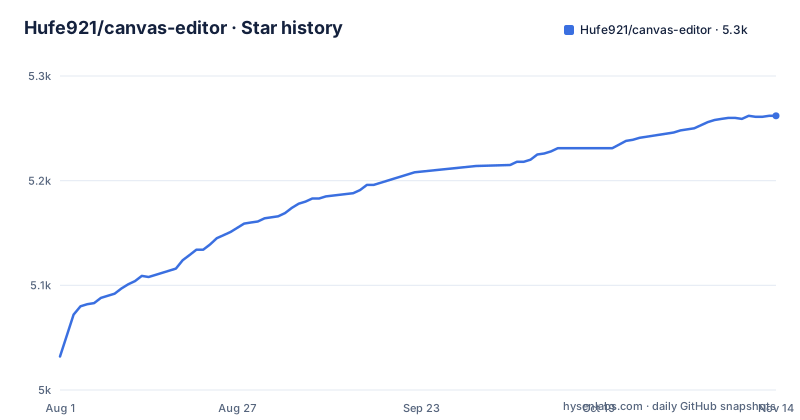
Star history
- Hufe921/canvas-editor5,262 ★ · +230
| Repository | 2026-08-01 | 2026-11-14 |
|---|---|---|
| Hufe921/canvas-editor | 5k | 5.3k |
230 Stars in the last 105 days, measured from the daily GitHub snapshot. Compare with other projects
Editorial analysis
What Problem This Solves and Who It Is For
Canvas Editor targets a specific pain point: the inconsistency of contenteditable-based editors across browsers. When a document must look identical in Chrome, Firefox, and Safari, contenteditable often fails because each browser applies its own rendering rules. Canvas Editor bypasses that by drawing every glyph, line, and page on an HTML canvas. The README positions it for use cases like Electronic Medical Records, legal contracts, and reports, where pixel-perfect output and precise pagination matter more than the conveniences of the standard web editing model. The intended user is a developer building a document-centric application, not someone who needs a simple blog editor. The library assumes a certain level of engineering effort, as integrating a canvas-based editor requires more thought about accessibility and interaction than dropping in a contenteditable widget.
How It Works: Full Control of the Rendering Pipeline
The core mechanism is a custom rendering engine that draws directly onto a canvas. The project structure shows src/editor/core with a draw directory for the canvas rendering engine and a render directory for pluggable render backends (canvas / SVG). The README also mentions Web Workers for word counting, catalog generation, and async value retrieval, which implies that some heavy operations are off the main thread. The overall design is a deliberate move away from the browser's built-in editing behaviors, trading them for deterministic rendering.
Installation and Quick Start: Real Commands
Getting started is straightforward. The README lists npm, pnpm, and yarn commands: npm install @hufe921/canvas-editor, pnpm add @hufe921/canvas-editor, or yarn add @hufe921/canvas-editor. The quick start example shows a simple HTML container div with class canvas-editor, then JavaScript that imports Editor from the package and instantiates it with the container and an options object. The options object includes a main array with a single object containing a value string. That minimal setup renders a document with the text 'Hello, Canvas Editor!' inside the container. The library is published on npm, so the package name is @hufe921/canvas-editor. For development from source, the prerequisites are Node.js version 24.13.1 or higher and pnpm. The repository offers scripts for linting, type checking, unit tests with Vitest, and end-to-end tests with Cypress. These commands are documented, so a team can integrate the project into an existing CI pipeline.
Limitations: The Canvas Trade-Off
The most significant limitation is inherent to the canvas approach: the rendered text is not part of the DOM. This means standard browser accessibility tools, such as screen readers, cannot read the content directly, and users cannot select text with native browser interactions. The editor must implement its own selection and accessibility features. This is a genuine trade-off. For a public-facing website with strict accessibility requirements, this could be a deal-breaker. Additionally, the README lists a built-in SVG rendering backend, enabled via the `backend: 'svg'` editor option, which supersedes the old `feature/svg` branch. The PDF export feature is also on a separate branch, so out-of-the-box PDF generation may not be fully integrated into the main package. Users should verify the status of these features before relying on them. The editor is also a heavy dependency, as it brings a full rendering engine, which may be overkill for simple text editing needs.
Alternatives: contenteditable and Its Ecosystem
The primary alternative is the traditional contenteditable-based editor, such as TipTap or Slate. The README itself provides a comparison table, highlighting that contenteditable editors have cross-browser rendering that varies, manual or unsupported pagination, and limited typography control. The key difference is that contenteditable editors keep the text in the DOM, which means native accessibility, text selection, and integration with browser spell-check and translation tools work out of the box. They also tend to have richer ecosystems for extensions, as they build on web standards. However, they require heavy custom logic for document features like tables of contents, headers, and footers, which canvas-editor provides natively. The choice is between a self-contained rendering engine that gives you full control and a standards-based approach that leverages browser capabilities but demands more custom work for document-specific features. For teams already invested in React or Vue, contenteditable-based editors often offer framework-specific wrappers, while canvas-editor appears to be framework-agnostic, as the quick start uses plain JavaScript.
Maintenance and Upgrade Cost
The README announces version 1.0.0 with release notes, which suggests the project has reached a stable milestone. The repository is not archived, and there is an active discussions page, so it is likely under maintenance. However, the repository has no published GitHub releases, so the maintenance cadence is unclear. The development prerequisites specify Node.js >= 24.13.1, which is a very recent version as of this writing, meaning contributors and users must keep their toolchain current. The project has a plugin ecosystem, with an official plugin collection at canvas-editor-plugin, which can help extend functionality without modifying the core. The license is MIT, which is permissive and allows commercial use, but it comes with no warranty, as is standard. Upgrade costs will depend on how tightly you integrate with the editor's API. The README says the 1.0 release notes include upgrade notes, so teams upgrading from earlier versions should review them carefully. The documentation is built with VitePress, and the docs directory is part of the repository, so you can build it locally.
Extensibility and Ecosystem: Plugins and Feature Branches
The README lists a plugin system as a feature, and the ecosystem table mentions an official plugin collection. This suggests that the core editor is designed to be extended through `instance.use`. The feature branches are telling: feature/pdf for PDF export, feature/ai for AI-powered text processing, and feature/CRDT for collaboration. These are experimental and not part of the main package, so users must evaluate whether the main branch meets their needs or whether they need to track these branches. The CRDT branch is particularly interesting because it implies that real-time collaboration is not supported in the core, which is a significant limitation for many modern document applications. The AI branch is a demo, not a production feature. This means that if you need PDF export or collaboration, you will have to either wait for these features to be merged or build your own integration on top of the core.
Editorial conclusion
Adopt canvas-editor if you need a document-centric editor with consistent cross-browser rendering, native pagination, and features like headers, footers, and watermarks, especially for EMR, contracts, or reports. Do not use it if you require full accessibility, native text selection, or tight integration with the DOM, as the canvas model hides text from standard browser tools. Before adopting, verify the current state of the PDF feature branch, and test whether the plugin system covers your specific needs, since the core library alone may not include all export or collaboration capabilities.
Frequently asked questions
What is Canvas Editor?
Canvas Editor is a WYSIWYG document editor built on the HTML canvas API rather than contenteditable, aimed at document-centric apps such as electronic medical records, legal contracts and reports. It handles pagination, page layout, TOC generation and print and PDF export. The npm package is @hufe921/canvas-editor at version 1.0.6.
Is the Canvas editor free?
The package is MIT licensed and installs from the public npm registry with npm, pnpm or yarn. Nothing in package.json carries a price, a licence key or a watermark requirement.
How do I edit on Canvas with this project?
Add a container div, import Editor, and pass the element plus a main array holding the document text. Undo and redo, fonts, sizes, bold, italic, underline, strikeout, superscript, alignment, headings and lists are in the feature list, and drag-and-drop covers text, elements and controls.
Is there a better editor than Canva for document work?
The repository makes no comparison to design tools. Its one published comparison is against contenteditable editors: pagination is native rather than manual, print fidelity matches on-screen output, typography is fully controlled, and TOC, headers, footers and watermarks ship in core rather than requiring heavy custom logic.
Official sources
Add this badge to your README
If you maintain this project, the badge below links readers to this analysis and shows its maintenance status from the daily GitHub snapshot. Paste the markdown into your README; add ?metric=license or ?metric=stars to the image URL for a different field.

[](https://hysenlabs.com/projects/hufe921-canvas-editor)Star history chart for your README
[](https://hysenlabs.com/projects/hufe921-canvas-editor)Was this useful?