Huginn: Self-hosted agents for web monitoring and automation
Huginn is a self-hosted workflow tool that monitors sources and triggers actions when configured events occur.
At a glance
- What is it?
- Huginn is a Ruby-based system for building agents that watch the web and act on events. It runs on your own server, keeps your data with you, and can be extended with custom agents.
- Who is it for?
- Adopt Huginn if you want a self-hosted, hackable alternative to IFTTT or Zapier and you are comfortable running a Ruby on Rails app with MySQL or PostgreSQL. Do not adopt it if you need a managed service or if you cannot maintain a server and update a Rails codebase.
- Can I use it commercially?
- Yes. MIT is a permissive licence: you can use, modify and sell software built on it, as long as you keep its copyright and licence notices.
- Is it still maintained?
- Yes. The repository last received commits 1 day ago.
- What is it written in?
- Mainly Ruby, according to GitHub's language statistics.
Answers come from the project's GitHub data, last synced on November 25, 2026, and from our analysis. They are not legal advice.
Star history
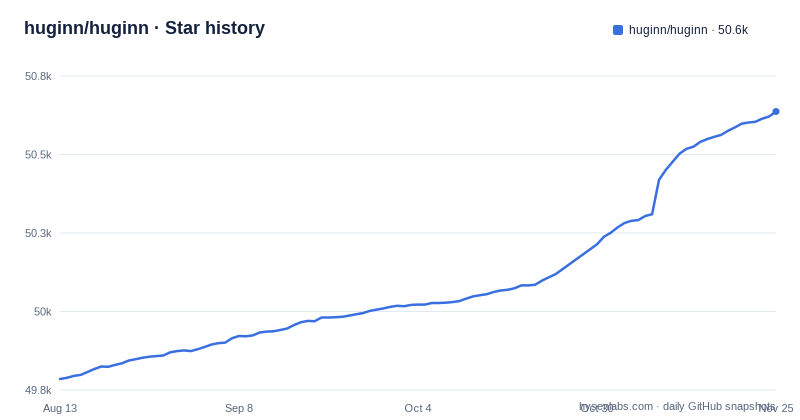
- huginn/huginn50,637 ★ · +852
| Repository | 2026-08-13 | 2026-11-25 |
|---|---|---|
| huginn/huginn | 49.8k | 50.6k |
852 Stars in the last 104 days, measured from the daily GitHub snapshot. Compare with other projects
Editorial analysis
What Huginn actually does
Huginn is a system for building agents that perform automated tasks online. Agents read the web, watch for events, and take actions on your behalf. They create and consume events, propagating them along a directed graph. That graph is the core idea: you connect agents so that an event from one triggers another. The README describes it as a hackable version of IFTTT or Zapier on your own server. The key difference is that you control the server and the data. The README lists many integrations: RSS, IMAP, webhooks and MQTT as inputs, and Slack, Telegram, Threads, Tumblr, Twitter, Weibo, Pushover, Pushbullet, Jabber and Twilio as outputs, plus Dropbox, S3 and FTP for files. It can also run custom logic in JavaScript, Liquid templates or jq, and track your location over time. This is for people who want automation without handing their data to a third party.
The event graph mechanism
The architecture is a directed graph of agents. Each agent can create events, consume events from other agents, or both. The flow is event-driven: an agent that watches a website for changes produces an event when a change is detected; that event feeds into another agent that sends an email or an SMS. The README's examples include scraping a website and getting an email when it changes, and detecting peaks and gaps in a stream of events. The system is not a single script; it is a network of small, reusable components. This design makes it possible to build sophisticated automations by combining simple agents. The trade-off is that you have to design and debug the graph yourself. The README mentions that all agents have specs, which suggests the project values testability, but that does not remove the need for you to understand how events propagate.
Getting Huginn running
The quickest path is the official Docker image, documented in doc/docker/install.md. For local development, you fork the repository, add the upstream remote, copy .env.example to .env, and edit the APP_SECRET_TOKEN. You need MySQL or PostgreSQL installed. If you use PostgreSQL, you prepend DATABASE_ADAPTER=postgresql to the commands. Then run bundle to install dependencies, followed by bundle exec rake db:create, db:migrate, and db:seed. The seed creates a development database with example agents. Start the server with bundle exec foreman start and visit localhost:3000. Login is admin with the password printed by rake db:seed (or one you choose with SEED_PASSWORD). In development, email is intercepted by default and viewable at /letter_opener. Set SEND_EMAIL_IN_DEVELOPMENT to true in .env to send real email. That is a concrete setup path, but it assumes a Rails environment. The README also mentions a novice setup guide in the wiki, which suggests the process can be tricky for beginners.
Extending Huginn with agent gems
The README invites contributions of new agents and points to a wiki page, Creating a new agent. Writing an agent requires Ruby knowledge and familiarity with the Huginn API. The documentation is not in the README; you have to consult the wiki. This is a real barrier for non-developers.
Deployment options and constraints
Huginn runs as a web process plus a background worker, backed by MySQL or PostgreSQL. The README recommends Docker Compose on your own server for production, using the official images ghcr.io/huginn/huginn (all processes in one container) or ghcr.io/huginn/huginn-single-process (one process per container), with example Compose files for MySQL and PostgreSQL in docker/single-process/. It also describes Dokku deployment using the single-process image, and managed platforms that can run a public Docker image with an always-on worker and a managed database, such as Render, Fly.io, Railway and DigitalOcean App Platform. The main constraint is that Huginn is a Rails application, so you need a platform that can run a web process, a worker and a database. You still need to configure environment variables, so none of these options is zero-maintenance.
Limitations and wrong-tool cases
Huginn is not a managed service. You are responsible for server maintenance, database backups, and security updates. The README advises periodically merging upstream changes, which means you must track the project's releases. The last push was on 2026-11-02, and the latest release is v2026.11.01 of the same day, so the project appears active, but you cannot rely on that alone. The system is complex: building a graph of agents requires planning and debugging. For a simple task like sending an email when a website changes, a cron job with a script might be simpler. Huginn is also overkill if you only need one or two automations. The README lists many integrations, but not all are maintained equally; some may break when external APIs change. The documentation is spread across the wiki, which is not versioned with the code, so it may lag behind.
Alternatives and how they differ
The README explicitly compares Huginn to IFTTT and Zapier. Those are hosted services: you do not control the servers or the data. Huginn is self-hosted, which is the main difference. With IFTTT or Zapier, you get a polished UI and many integrations out of the box, but your data passes through their infrastructure. Huginn gives you full control but requires setup and maintenance. Another alternative is a generic workflow automation tool like n8n, which is also self-hosted and node-based. n8n uses a visual editor for workflows, whereas Huginn uses a graph of agents that you configure through a web interface. The key difference is that Huginn is Ruby-based and extensible via gems, while n8n is JavaScript-based and extensible via custom nodes. If you prefer JavaScript and a visual canvas, n8n might be easier. If you are comfortable with Ruby and want a system designed specifically for event-driven monitoring, Huginn is a fit.
Maintenance and license considerations
Huginn is licensed under MIT, which means you can use, modify, and distribute it freely, with attribution. That is a permissive license, but it comes with no warranty, so you are responsible for how you use it. Maintenance cost is not trivial. You need to keep the codebase updated, as the README suggests merging upstream changes periodically. You also need to manage the database schema changes that come with new releases. The project releases frequently: the latest releases are v2026.11.01 (2026-11-02), v2026.10.26 and v2026.10.24, and the repository is not archived. The README mentions that all agents have specs, which is good for quality, but it does not guarantee that third-party agent gems are maintained. If you write your own agents, you are on the hook for their maintenance.
Editorial conclusion
Adopt Huginn if you want a self-hosted, hackable alternative to IFTTT or Zapier and you are comfortable running a Ruby on Rails app with MySQL or PostgreSQL. Do not adopt it if you need a managed service or if you cannot maintain a server and update a Rails codebase. Before deploying, verify the current state of the Docker image and the .env configuration, especially APP_SECRET_TOKEN and the database adapter. Check doc/docker/install.md for deployment options and the wiki for usage examples to see if the built-in agents cover your needs. Huginn is a solid choice for those who want full control over their automation data and are willing to invest in setup and maintenance.
Frequently asked questions
how to use huginn
Fork the repository, copy .env.example to .env and at least set APP_SECRET_TOKEN, install MySQL or PostgreSQL, then run bundle, bundle exec rake db:create, bundle exec rake db:migrate, and bundle exec rake db:seed. Start it with bundle exec foreman start, open http://localhost:3000/, and log in as admin with the password that db:seed printed.
what is huginn
It is a system for building agents that perform automated tasks online, reading the web, watching for events, and taking actions for you. The agents create and consume events and propagate them along a directed graph, which the project describes as a hackable version of IFTTT or Zapier on your own server.
is huginn free
The software is MIT licensed and self hosted, so the code costs nothing. Hosting is a separate matter: the README recommends Docker Compose on your own server for production.
Who is Huginn in Norse mythology?
This repository says nothing about the mythology; it only borrows the name for a Ruby automation system. Everything documented here concerns the software: agents, events, the graph that connects them, the configuration template, and the supported deployment targets.
Official sources
Where this project is recommended
Add this badge to your README
If you maintain this project, the badge below links readers to this analysis and shows its maintenance status from the daily GitHub snapshot. Paste the markdown into your README; add ?metric=license or ?metric=stars to the image URL for a different field.

[](https://hysenlabs.com/projects/huginn-huginn)Star history chart for your README
[](https://hysenlabs.com/projects/huginn-huginn)Was this useful?