FeHelper: one Manifest V3 extension holding thirty developer tools
FeHelper: a web frontend assistant, an all-in-one toolbox browser extension for Chrome, Firefox and MS Edge.
At a glance
- What is it?
- FeHelper folds JSON formatting, encoding, timestamps, mock data, screenshots and a userscript runner into one browser extension for Chrome, Edge and Firefox. It is deep on small utilities and thin wherever a real client would be expected: the request tool stops at GET, POST and HEAD, and the automated net is 79 tests across two files.
- Who is it for?
- Adopt FeHelper when the cost you care about is switching browser tabs: encoding, timestamps, Base64, QR codes and page screenshots all work without a server. Do not expect a replacement for a dedicated API client, since the request panel handles GET, POST and HEAD with no history, environments or certificate handling.
- Can I use it commercially?
- Yes. MIT is a permissive licence: you can use, modify and sell software built on it, as long as you keep its copyright and licence notices.
- Is it still maintained?
- Yes. The repository last received commits 1 day ago.
- What is it written in?
- Mainly JavaScript, according to GitHub's language statistics.
Answers come from the project's GitHub data, last synced on November 15, 2026, and from our analysis. They are not legal advice.
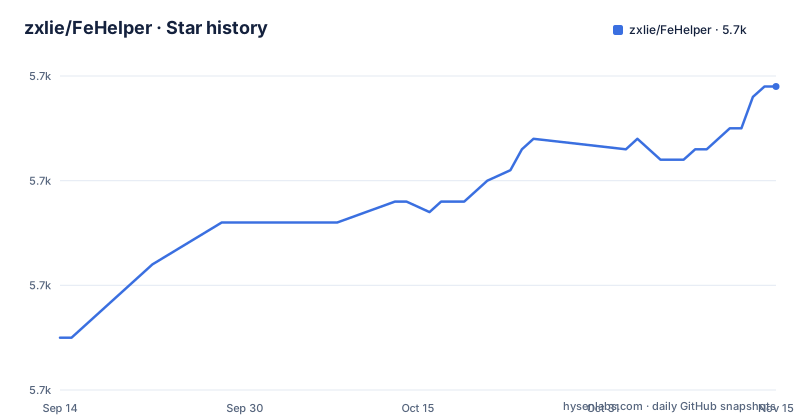
Star history
- zxlie/FeHelper5,689 ★ · +24
| Repository | 2026-09-14 | 2026-11-15 |
|---|---|---|
| zxlie/FeHelper | 5.7k | 5.7k |
24 Stars in the last 62 days, measured from the daily GitHub snapshot. Compare with other projects
Editorial analysis
One apps directory holds thirty tools behind one permission set
The whole product ships as one extension source tree under apps/, and the manifest lives inside that tree rather than at the repository root. A tool is a directory with its own index.html, index.css and index.js, and it only becomes reachable once it is registered in apps/background/tools.js. That registry sits next to the Service Worker code responsible for context menus, statistics and injection logic, so every new tool touches the same file the browser already runs. The popup is the entry surface, options holds the settings page and the tool marketplace, and the working areas have their own directories: json-format, json-diff, en-decode, datetime-calc, timestamp, page-monkey, poster-maker, chart-maker and svg-converter. The manifest asks for tabs, scripting, contextMenus, storage, webNavigation and notifications. Data sits in browser local storage and there is no remote account system, so nothing depends on signing in anywhere.
The JSON beautifier reformats the page before you press anything
This tool does not wait for you to paste a payload. It looks for JSON on the current page, formats what it finds, and also takes input by hand. Formatting comes with syntax highlighting, collapse and expand for deep objects, key sorting, repair of garbled text, lossless handling of BigInt values, parsing of nested escape sequences, selectable skins, plus copy and download. The v2026.04 notes record two fixes on this path: duplicated content in the automatic beautifier, and protection against mounting the format container twice on the same page. The diff tool takes two payloads and reports added, deleted and modified nodes structurally rather than as raw text. What the documentation never says is how detection decides a page holds JSON, or which content types it refuses, so on a mixed page the automatic route is the part with the least visible contract.
A new tool needs three files, a registry entry and a docs page
The contribution checklist is short and explicit about what a tool has to ship with:
apps/<tool-name>/index.html
apps/<tool-name>/index.css
apps/<tool-name>/index.js
apps/background/tools.js
website/docs/<tool-name>.md
That fifth line is the one people forget. The documentation site lives in website/, and the online help is served from fehelper.com/docs.html, so a tool page that was never written is invisible to anyone reading outside the code. The sixth checklist item is deliberately loose: either unit tests or a written note describing manual verification. The FH developer tool in the toolbox targets the same loop from the other end, letting you run a custom tool locally and plug it into the FeHelper tool marketplace. Linting runs through the flat config in eslint.config.js, tests run through vitest.config.js with a test/ directory beside apps/, and the workflow that runs them lives in .github/.
Load the apps folder, not the repository root
Chrome, Edge and Firefox users install from their own store listing, and the offline route is a CRX or ZIP downloaded from Chrome-Stats and dragged onto the extensions page. Working from source is five lines, and the test run in the middle tells you whether the checkout is healthy before you load anything:
git clone https://github.com/zxlie/FeHelper.git
cd FeHelper
npm install
npm test
npm run build
The suite reports its own size:
npm test
# 2 test files, 79 tests
Then open chrome://extensions/ or edge://extensions/, switch on developer mode, choose Load unpacked, and point the file picker at the apps directory in the repository. First use happens in the popup, where individual tools are enabled on demand. One thing the instructions leave open: npm run build packages the Chrome extension, but the output directory is never named, and the load-unpacked steps point at the source directory rather than at build artifacts.
Injection and screenshot features stop at restricted pages
Several tools depend on browser capabilities a site can take away. Screenshots, picking a color from an element, userscript injection, CompressionStream and WebSocket are all named as capability dependent, and the boundaries are stated plainly: browser restricted pages, Chrome Web Store pages, and sites with strict CSP. The userscript tool is the most exposed of these, since it injects scripts and styles by matching page rules. It can import and export .user.js files, supports @require, and the v2026.04 notes record a fix to @all-frames parsing plus frame precise injection, along with a run log for diagnosis. That run log is the only diagnostic the docs point at when an injection silently does nothing. The local-loading steps cover only Chrome and Edge, so a feature that depends on a Chrome specific behavior is worth checking by hand in Firefox.
The request tool stops at GET, POST and HEAD
The built-in request tool is small by design: GET, POST and HEAD, with the JSON result formatted for reading. There is no collection runner, no environment or variable substitution, and no saved request history in the docs. Proxy settings, client certificates and response diffing between runs are absent too, and that gap is what sends people to a dedicated API client. The WebSocket tool covers the other half of the job: open a connection, send a message, read the result. Around them sit a regex cheatsheet with live match and replace, code beautification for JavaScript, CSS, HTML, XML and SQL, and minification for HTML, JavaScript and CSS. In v2026.04 the beautifier gained a fileType allowlist while unsafe dynamic execution paths were replaced, so the accepted types are now an explicit list. Excel and CSV input converts into JSON, XML, MySQL and PHP structures.
package.json still says version 1.0.0
The top-level package.json carries version 1.0.0 while the update notes are headed v2026.04, and the project publishes no GitHub releases to reconcile the two numbers. What the file does carry is the entire build chain: gulp, gulp-uglify-es, gulp-htmlmin, gulp-imagemin with imagemin-mozjpeg, gulp-zip, svgo, run-sequence, nodemon and pretty-bytes all sit in devDependencies beside vitest ^4.1.4, eslint ^10.2.0 and @eslint/js ^10.0.1. Nothing is listed as a runtime dependency, which fits an extension that ships its bundle inside apps/ instead of resolving modules at install time. Two overrides pin transitive versions, fast-xml-parser at ^5.7.0 and postcss at ^8.5.14, and Babel targets Chrome 100. npm run build goes through gulpfile.js while npm test runs vitest run. The last push to master was on 2026-11-01, and the README claims maintenance since 2012, but with two test files the automated net stays narrow and .github/ carries the regression watch.
Editorial conclusion
Adopt FeHelper when the cost you care about is switching browser tabs: encoding, timestamps, Base64, QR codes and page screenshots all work without a server. Do not expect a replacement for a dedicated API client, since the request panel handles GET, POST and HEAD with no history, environments or certificate handling. Before switching your daily driver, load the apps directory unpacked and check the handful of tools you actually use, because two test files cannot cover thirty tools.
Frequently asked questions
How do I install FeHelper on Chrome?
Install it from the Chrome Web Store listing, or build from source and load it unpacked: open chrome://extensions/, enable developer mode, choose Load unpacked and select the apps directory in the repository. Edge Add-ons and Firefox Add-ons listings exist as well.
Does FeHelper format JSON on a page automatically?
The JSON beautifier detects JSON on the current page and formats it, and it also accepts pasted input by hand. The same tool adds syntax highlighting, collapse and expand, key sorting, garbled text repair, lossless BigInt handling and nested escape parsing.
How well is FeHelper covered by automated tests?
Running npm test starts Vitest and reports 2 test files and 79 tests. The suite is wired into GitHub Actions, and there is a test/ directory plus vitest.config.js at the repository root.
Official sources
Add this badge to your README
If you maintain this project, the badge below links readers to this analysis and shows its maintenance status from the daily GitHub snapshot. Paste the markdown into your README; add ?metric=license or ?metric=stars to the image URL for a different field.

[](https://hysenlabs.com/projects/zxlie-fehelper)Star history chart for your README
[](https://hysenlabs.com/projects/zxlie-fehelper)Was this useful?