Label Studio: one annotation server for audio, text, images and time series
Label Studio is a multi-type data labeling and annotation tool with standardized output format
At a glance
- What is it?
- Label Studio is an Apache-2.0 data labeling server that ships a single UI and a standardized export format across media types. It fits teams who need to stand up their own annotation instance; it is not a managed service and the README points elsewhere for hosted options.
- Who is it for?
- Adopt Label Studio if you need to run your own annotation instance and want one tool to cover audio, text, images, video and time series. Do not adopt it without checking operational details such as the export schema and moving between the SQLite and PostgreSQL setups in the documentation.
- Can I use it commercially?
- Yes. Apache-2.0 is a permissive licence: you can use, modify and sell software built on it, as long as you keep its copyright and licence notices.
- Is it still maintained?
- Yes. The repository last received commits 1 day ago.
- What is it written in?
- Mainly TypeScript, according to GitHub's language statistics.
Answers come from the project's GitHub data, last synced on November 15, 2026, and from our analysis. They are not legal advice.
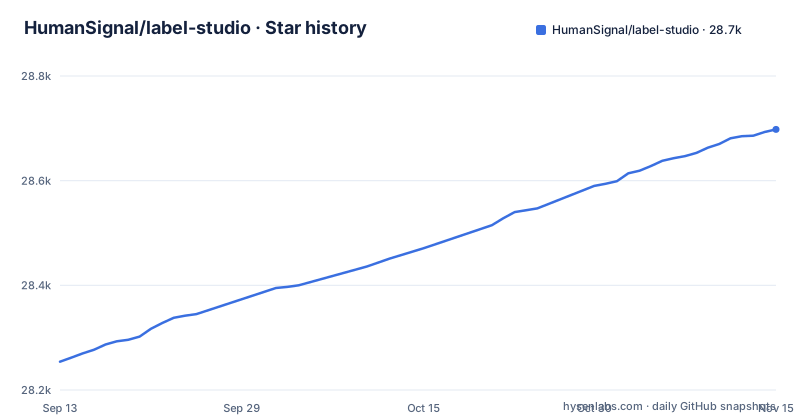
Star history
- HumanSignal/label-studio28,698 ★ · +444
| Repository | 2026-09-13 | 2026-11-15 |
|---|---|---|
| HumanSignal/label-studio | 28.3k | 28.7k |
444 Stars in the last 63 days, measured from the daily GitHub snapshot. Compare with other projects
Editorial analysis
The problem Label Studio addresses: one annotation surface for heterogeneous datasets
Most annotation tools pick a lane. An image labeling tool handles bounding boxes and segmentation masks. A text tool handles spans and classification. Teams that work across modalities end up running two or three systems, each with its own export format, its own user accounts and its own upgrade schedule. Label Studio's stated goal is to collapse that into one tool: the README describes it as an open source data labeling tool that lets you label audio, text, images, videos and time series through a single UI, then export to various model formats. The audience is machine learning teams that already have raw or partially labeled data and need human annotation in the loop. The README frames the output as a way to prepare raw data or improve existing training data. If your pipeline is entirely text classification and you already have a working internal tool, the multi-type surface is overhead rather than benefit. The value shows up when the same team needs to label a folder of images and a set of transcripts in the same week, and does not want to reconcile two export schemas.
How the annotation stack is put together
The repository is primarily TypeScript, with a Python backend that the installation instructions expose through Django management commands. The local development path is the clearest view of the architecture: poetry install pulls dependencies, then python label_studio/manage.py migrate runs database migrations, python label_studio/manage.py collectstatic gathers static assets, and python label_studio/manage.py runserver starts the server on port 8080. That is a conventional Django application layout, and the presence of collectstatic implies a separate static file serving concern in production, which is why the Docker Compose stack adds Nginx as a proxy web server for static data such as uploaded audio and images. Storage defaults to SQLite3, with the database file named label_studio.sqlite3 inside the mounted data directory. The Compose stack swaps that for PostgreSQL, which the README describes as a production-ready database that replaces the less performant SQLite3. There is also a MinIO variant for local S3-compatible storage, invoked by layering docker-compose.minio.yml on top of the base file. The README notes that without a static IP address you must add a hosts file entry so both Label Studio and the browser can reach MinIO. That is a real constraint, not a footnote: the MinIO path assumes name resolution that a laptop on a dynamic address does not provide by default.
Getting an instance running: Docker, pip, Compose and the data directory
The fastest path in the README is two Docker commands. Pull the image with docker pull heartexlabs/label-studio:latest, then run it with docker run -it -p 8080:8080 -v $(pwd)/mydata:/label-studio/data heartexlabs/label-studio:latest. The volume mount matters: the README states that generated assets, including the SQLite3 database and uploaded files, land in the ./mydata directory on the host. If you omit the mount, your annotations live inside the container. The default launch command can be overridden by appending arguments, and the README gives the example of appending label-studio --log-level DEBUG to raise log verbosity. For a production-shaped stack, docker-compose up starts Label Studio behind Nginx with PostgreSQL. For local S3 testing, docker compose -f docker-compose.yml -f docker-compose.minio.yml up -d starts the extended stack. If Docker is not in play, pip install label-studio is marked in the README as requiring Python 3.10 or newer, though pyproject.toml declares Python 3.11 or newer, and the label-studio command starts the server at http://localhost:8080. Poetry and Anaconda paths are documented as well, with the Anaconda instructions installing psycopg2 before the package, which suggests the PostgreSQL driver is expected to be present when you point the app at Postgres. The README also lists one-click deploy buttons for Heroku, Microsoft Azure and Google Cloud Platform, plus a link to a Starter Cloud edition trial and a page comparing editions.
The standardized output format is the load-bearing claim, and the README does not specify it
The repository description promises a standardized output format, and the README repeats that you can export to various model formats. That is the part of the pitch a data engineer actually depends on, because an annotation tool is only as useful as the shape of the JSON it hands back. A team evaluating Label Studio should treat the export format as the first thing to verify, not the last, because a mismatch there means writing a conversion layer that you maintain forever. The generic claim is credible given the tool's scope, but credibility is not a schema. Until you have exported a sample project and inspected the result, treat the standardized output claim as unverified.
Where Label Studio is the wrong choice, and what to use instead
Label Studio is a self-hosted server. That is the point and also the boundary. If you do not want to run a database, manage migrations, and keep a container image updated, this is the wrong tool, and the README itself points to a Starter Cloud edition for teams that would rather not operate the stack. The second case is narrower and easier to miss: if your labeling need is a single modality with a well-established incumbent, the multi-type surface buys you nothing. For pure image annotation at scale, CVAT is the obvious comparison, and the difference is architectural rather than cosmetic. CVAT is built around video and image annotation as its core domain, with frame-level tracking and interpolation as first-class concepts, while Label Studio is a general annotation server that treats images as one of several supported data types. If your work is tracking objects across video frames, a tool designed around that workflow will fit better than a general one. If your work spans modalities and you want one export pipeline, the general server wins. The README does not make this comparison for you, and it should not be read as claiming superiority in any single domain.
Maintenance, release cadence and the licence boundary
The release list shows a nightly build numbered 1.24.0.dev20261103, a 1.23.2 release dated 2026-09-29, and a 1.23.1 release dated 2026-09-25. That is two patch releases days apart, with nightly builds published alongside them. The practical consequence is that pinning matters. The Docker instructions use the latest tag, which moves. If you deploy from latest and a nightly-style change lands, you find out in production. Pin a specific version tag instead, and read the release notes before moving. The database choice also carries a migration cost: starting on SQLite3 and later switching to PostgreSQL is a data migration, so decide the storage backend before you collect annotations. On licensing, the repository is Apache-2.0, which permits commercial use and modification under its terms. The README separately links to a page comparing editions and to a cloud trial, which implies that some capabilities sit outside this repository. The Apache-2.0 grant applies to the code here, not automatically to hosted offerings. That is a factual boundary, not legal advice; read the licence text and the edition comparison yourself before planning around a feature.
Editorial conclusion
Adopt Label Studio if you need to run your own annotation instance and want one tool to cover audio, text, images, video and time series. Do not adopt it without checking operational details such as the export schema and moving between the SQLite and PostgreSQL setups in the documentation. Verify three things before committing: the exact export format your training pipeline consumes, whether the Docker Compose stack with PostgreSQL matches your expected concurrency, and what the licence and edition comparison page says about the features you need. The Apache-2.0 licence covers the code in this repository, not the hosted editions, and that distinction is worth reading carefully before you plan around it.
Frequently asked questions
What is Label Studio used for?
Label Studio is an open source data labeling tool for audio, text, images, videos and time series, and it exports results to various model formats. The project positions it for preparing raw data and for improving existing training data so models get more accurate.
How much does Label Studio cost?
The repository is licensed Apache-2.0, so the self-hosted build carries no license fee. The README also points to a free trial of the vendor's Starter Cloud edition and links a page comparing what each edition offers, but it publishes no price list in the repository itself.
how to install label studio in windows
The Windows path tells you to download wheel packages from a third-party archive first so the compiled build matches your Python, and names lxml as the wheel to fetch. You then upgrade pip and install the package. pyproject.toml declares Python 3.11 or newer.
how to install label studio in anaconda
Create a conda environment named label-studio, activate it, install psycopg2 with conda, then install label-studio with pip. Installing psycopg2 at that point is what lets the same environment talk to PostgreSQL later instead of only to the default SQLite3 file.
how to install label studio with docker
Pull heartexlabs/label-studio:latest and run it with port 8080 published and the host's mydata folder mounted at /label-studio/data. The interface is then at http://localhost:8080, and the generated assets, including the label_studio.sqlite3 database, are in that mounted folder.
Official sources
Where this project is recommended
Add this badge to your README
If you maintain this project, the badge below links readers to this analysis and shows its maintenance status from the daily GitHub snapshot. Paste the markdown into your README; add ?metric=license or ?metric=stars to the image URL for a different field.

[](https://hysenlabs.com/projects/humansignal-label-studio)Star history chart for your README
[](https://hysenlabs.com/projects/humansignal-label-studio)Was this useful?