Toonflow puts scripts, characters and video clips on one canvas, but you bring the models
Toonflow is an open-source AI tool that turns stories and scripts into animated short dramas. Features AI scriptwriting, storyboarding, character and video generation. A cross-platform desktop app for efficient content creation.
At a glance
- What is it?
- Toonflow from HBAI-Ltd is an MIT-licensed desktop and self-hosted studio for AI short dramas and comic videos. It organizes the whole production on an infinite canvas, while every image, video and language model is something you connect and pay for yourself.
- Who is it for?
- Toonflow suits creators who want script, storyboard, character assets and generated clips in one local workspace and who already have model access, either paid APIs or a local ComfyUI setup. It is not a free source of generated video: the generation bill comes from whatever provider you connect.
- Can I use it commercially?
- Yes. MIT is a permissive licence: you can use, modify and sell software built on it, as long as you keep its copyright and licence notices.
- Is it still maintained?
- Yes. The repository last received commits 10 days ago.
- What is it written in?
- Mainly TypeScript, according to GitHub's language statistics.
Answers come from the project's GitHub data, last synced on November 14, 2026, and from our analysis. They are not legal advice.
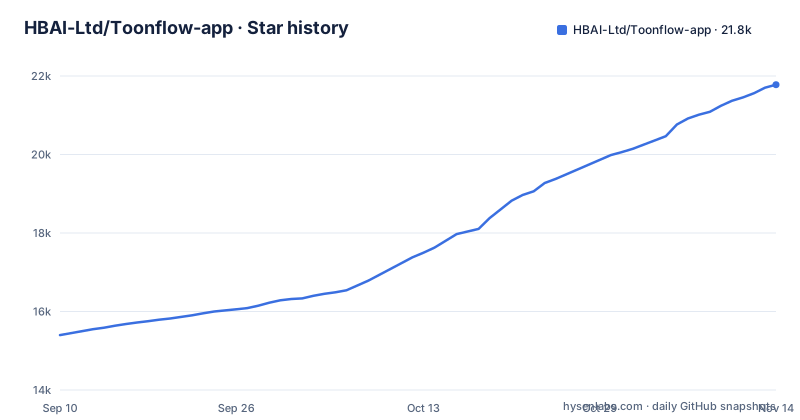
Star history
- HBAI-Ltd/Toonflow-app21,779 ★ · +6,380
| Repository | 2026-09-10 | 2026-11-14 |
|---|---|---|
| HBAI-Ltd/Toonflow-app | 15.4k | 21.8k |
6,380 Stars in the last 65 days, measured from the daily GitHub snapshot. Compare with other projects
Editorial analysis
One infinite canvas carries the story from script to clip
Toonflow's central idea is that a short drama should not be scattered across a text editor, an image folder and a video tool. Scripts, characters, scenes and video clips all sit as nodes on the same infinite canvas. The intended order of work starts in text nodes, where you organize the story, character settings and shot descriptions, use a language model to help draft them, and then review and edit the result by hand. From there you prepare character and scene assets and generate images and video from them.
The consequence is that continuity lives in the canvas rather than in your head. A character sheet and the shots that use it are visible side by side, which is the practical difference between Toonflow and calling an image API from a script. The app targets short dramas, comic dramas (manju) and short videos, and the interface ships in 21 languages.
No model ships with the app, so generation cost is yours
Toonflow is the workspace, not the generator. You configure third-party APIs, or you connect a local ComfyUI instance and a local LLM. HBAI-Ltd also runs its own model platform at api.toonflow.net, and the project's sponsors sell video generation by the second; Metaso, for example, advertises MiniMax H3 output at 0.09 yuan per second for 768P and 0.15 yuan per second for 2K.
This is the first thing the app cannot do for you: produce video without an external model. The MIT license makes the code free, but a drama with dozens of shots means dozens of paid generation calls unless you run ComfyUI on your own GPU. Output quality, clip length and resolution are set by the model you pick, not by Toonflow. Anyone budgeting a project should price the provider first and treat the app itself as the zero-cost part.
The Docker service builds from source and listens only on localhost
The repository ships a compose file that builds the image from the checkout instead of pulling a published one:
services:
  toonflow:
    build: .
    init: true
    restart: unless-stopped
    ports:
      - "127.0.0.1:3000:3000"
    volumes:
      - toonflowData:/app/data
Two consequences follow. First, the port is bound to 127.0.0.1, so a server deployment is unreachable from other machines until you edit that mapping or put a reverse proxy in front of it. That is a sensible default, since nothing in the compose file adds authentication. Second, every build runs the full install inside the container. The Dockerfile starts from oven/bun:1.4.3, installs ffmpeg and ca-certificates with apt, then installs the whole workspace before running bun run build:server:
RUN bun install --frozen-lockfileA comment in the Dockerfile says the workspace and dependencies are kept in the image on purpose, for compatibility with runtime dynamic loading, and that splitting the build into stages is deferred until image size matters. Expect a large image.
Projects live in one data directory that you must back up
The container sets two environment variables and runs as the unprivileged bun user:
ENV NODE_ENV=production
ENV TOONFLOW_DATA_DIR=/app/data
During the build it creates data/workspaces/myProject and hands ownership of data to bun, and the compose file mounts the named volume toonflowData at /app/data. Everything you make lives there, which matches the project's pitch that projects and assets stay on your own device or server.
The flip side is that local storage means local responsibility. Removing the volume removes the projects, and the compose file defines no backup. If you run the server build outside Docker, point TOONFLOW_DATA_DIR at a location you already back up. The service starts with bun build/server/index.js on port 3000.
A Bun monorepo with three patched dependencies
Toonflow is TypeScript in a Bun workspace pinned to [email protected]. The workspaces cover apps/*, packages/*, and separate trees for packages/nodes/*, packages/tools/*, packages/teams/* and packages/ext/*, which is where canvas nodes, tools and extensions are split out. Development scripts start the web front end and server together, or one at a time:
"dev": "bun run --filter '@toonflow/web' --filter '@toonflow/server' dev",
"dev:web": "bun run --filter '@toonflow/web' dev",
"dev:server": "bun run --filter '@toonflow/server' dev",
"dev:desktop": "bun run --filter '@toonflow/desktop' dev",
The root also carries electrobun.config.ts for the desktop shell and an updateServer app with its own publish script. Contributors should note the patchedDependencies entry: @vue-flow/[email protected], @earendil-works/[email protected] and @earendil-works/[email protected] are each modified by a file in patches/. Bumping any of those three packages means reapplying or rewriting the patch, so a routine dependency upgrade can break the canvas or the agent layer.
Agents, MCP and plugins extend the pipeline through hosted pieces
Toonflow exposes its agent prompts, tools and A2A so you can change how its AI agent behaves and let outside agents collaborate with it. MCP support connects external tools and services, and a plugin marketplace adds nodes, tools and creative capabilities.
The marketplace sits at api.toonflow.net, the same domain as the vendor's model platform, so extension discovery depends on a service HBAI-Ltd operates rather than on the repository. The user tutorial and the developer documentation are Feishu documents rather than files in the repo. For a team that wants a fully offline setup, that is the second gap: local deployment covers your projects and can cover your models through ComfyUI, but the plugin catalog and the guides live on hosted pages.
Fast releases and a Chinese-first README
The project moves quickly. Version 2.0.7 shipped on 2026-10-20, 2.0.8 on 2026-10-27 and 2.0.9 on 2026-10-31, and the last push to master landed on 2026-11-02. Desktop clients come from the GitHub releases page, and the code is mirrored on Gitee and AtomGit. Deployment targets listed for the app are desktop, Android, Docker and server.
A weekly release rhythm is good for fixes but means behavior can shift between versions, so pin the version you validated before a production run. The main README is written in Simplified Chinese; an English version sits at docs/readme/readmeEn.md among more than twenty translations. Support questions go to the community group and Discord, while the sponsor contact explicitly does not answer usage questions.
Editorial conclusion
Toonflow suits creators who want script, storyboard, character assets and generated clips in one local workspace and who already have model access, either paid APIs or a local ComfyUI setup. It is not a free source of generated video: the generation bill comes from whatever provider you connect. Before adopting it, check which providers you will wire in and what they charge, and note that the Docker setup listens only on 127.0.0.1:3000 until you change the port mapping.
Frequently asked questions
Is the Toonflow app free to use?
Toonflow's code is open source under the MIT license, and desktop clients are offered on the GitHub releases page. Image and video generation runs through models you connect, such as third-party APIs, which charge separately unless you run a local ComfyUI.
Where can I download the Toonflow app?
Desktop clients are published on the HBAI-Ltd/Toonflow-app GitHub releases page. The latest listed release is v2.0.9, published on 2026-10-31.
Can Toonflow use local models instead of paid APIs?
Yes. Besides third-party APIs, Toonflow can connect to a local ComfyUI instance and a local LLM.
Why can't I reach Toonflow's Docker deployment from another machine?
The compose.yaml maps the port as 127.0.0.1:3000:3000, so the service only listens on localhost. Change that mapping or put a reverse proxy in front to expose it.
Official sources
Add this badge to your README
If you maintain this project, the badge below links readers to this analysis and shows its maintenance status from the daily GitHub snapshot. Paste the markdown into your README; add ?metric=license or ?metric=stars to the image URL for a different field.

[](https://hysenlabs.com/projects/hbai-ltd-toonflow-app)Star history chart for your README
[](https://hysenlabs.com/projects/hbai-ltd-toonflow-app)Was this useful?