Hypit: an SVML workflow compiler for agent-driven video cloning
Clone any viral video with AI agents. Not just a script, the whole workflow: swap the face, the words, the B-roll, ship 100 variants in one command, and get your 100M views.
At a glance
- What is it?
- Hypit gives coding agents a markup language for video, then compiles that markup into a rendered file. It is a workflow tool for teams already producing short-form video in volume, and a poor fit for anyone who wants a one-shot prompt-to-video generator.
- Who is it for?
- Adopt Hypit if you already produce short-form video at volume and want a versionable, agent-editable description of the workflow rather than a timeline project file. Do not adopt it if you want a single prompt to produce a finished video, or if your pipeline depends on a licence whose terms you have not read: the repository metadata reports NOASSERTION and package.json says only SEE LICENSE IN LICENSE, so read ./LICENSE before you ship anything built on it.
- Can I use it commercially?
- Check first. The repository uses a licence we do not classify automatically, so read its LICENSE file before any commercial use.
- Is it still maintained?
- Yes. The repository received new commits within the last day.
- What is it written in?
- Mainly TypeScript, according to GitHub's language statistics.
Answers come from the project's GitHub data, last synced on November 13, 2026, and from our analysis. They are not legal advice.
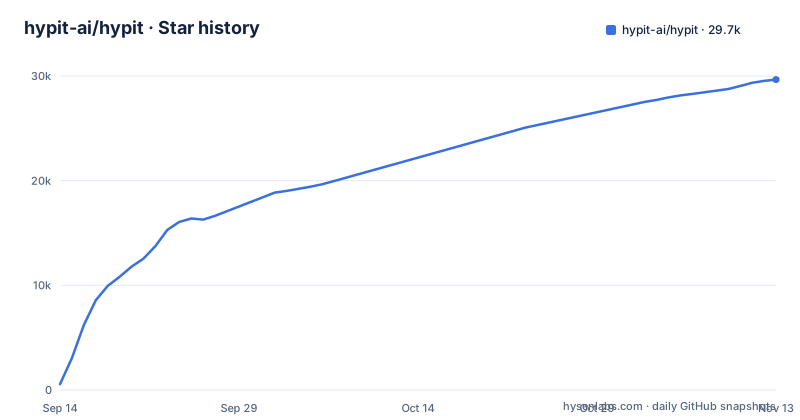
Star history
- hypit-ai/hypit29,660 ★ · +29,109
| Repository | 2026-09-14 | 2026-11-13 |
|---|---|---|
| hypit-ai/hypit | 551 | 29.7k |
29,109 Stars in the last 60 days, measured from the daily GitHub snapshot. Compare with other projects
Editorial analysis
What problem Hypit actually solves
Most video tooling assumes a human sitting in front of a timeline. Hypit assumes an agent sitting in front of a file. The README frames the problem as cloning: you drop in a viral video and the agent reproduces it as a complete workflow covering footage, captions, B-roll and effects. The important part of that sentence is the last clause. Everything is anchored to words rather than seconds. That single design decision is what makes the output editable by a language model, because a model can rewrite a line of dialogue reliably and cannot reliably rewrite a keyframe at 00:04:12.
The target user is not a solo editor experimenting with AI. It is a team that already ships short-form video repeatedly and wants the workflow itself to be a text artifact that can be diffed, copied and parameterised. The README's own framing is blunt about the volume intent: one command, 100 variants. Cloning is described as the fastest way in rather than the only way, with templates and from-scratch authoring as the other two entry points.
SVML as the interface between agent and renderer
The language is called SVML, and the README shows it as a two-pane arrangement: SVML source on the left, the corresponding video rendered live on the right. The examples directory carries reference.svml files alongside per-example README files with run and production notes, so the language is the unit of distribution. You share a workflow the way you share a Dockerfile.
The compilation story is where the project differs from a wrapper around a video API. According to the README, a workflow can compile captions, motion graphics and code-rendered visuals into a finished video without calling a single generation model, which is why the project says such a workflow incurs no generation-model service charges. That claim only holds for the code-rendered path. The football example in the README lists two Seedance 2 Mini 720p A-rolls, a 2K portrait from GPT Image 2, ten 1K B-rolls, WhisperX word alignment and background music, and puts the total at $1.15. Model calls are optional inputs to the compiler, not the compiler itself.
The rendering mechanism visible in the README is headless Chromium. The football example states it was concurrently rendered in 64 headless Chromium processes. That is a real architectural constraint worth understanding before adoption: the render stage is browser-based and parallel, so throughput depends on how many Chromium instances the host can sustain.
Installing the skill and preparing the executable
The documented install is a single command:
npx skills add hypit-ai/hypit -g
That installs the Skill, which is the piece that teaches an agent such as Claude Code or Codex how to write SVML. The README is explicit that the video project itself can live anywhere, so the install is global tooling rather than a per-project dependency. The second step is not a command you run by hand: on first use, the agent checks for the Hypit executable and helps prepare it if needed.
That indirection is the part to watch. If you are putting this into CI, treat the first-use preparation as an interactive step you will need to replicate or pre-empt, because the documentation describes it as something the agent handles rather than something a script invokes.
The repository publishes GitHub releases, the latest being v0.3.1 on 2026-10-09, matching the version in package.json.
Where the workflow model breaks down
Word-anchored editing is a strong bet for talking-head and caption-driven formats, and a weak one for anything where timing is the content. A cut that lands on a musical beat, a reaction shot held for exactly nine frames, a comedic pause: these are second-anchored decisions, and the README's central claim is that Hypit anchors to words instead. The examples are consistent with that bias. A ranking video and a podcast are both formats where the script leads and the visuals follow.
The cost claim deserves the same scrutiny. The no-charge claim applies to workflows that never call a generation model, which means captions, motion graphics and code-rendered visuals only. The moment you want generated A-roll or B-roll, you are back to per-call pricing, and the README's own worked example lands at $1.15 for a 20-second video. Multiply that by the 100 variants the tagline promises and the arithmetic stops being trivial.
The licence situation is the other unresolved item. The repository metadata reports NOASSERTION, and package.json says only "SEE LICENSE IN LICENSE". Read the LICENSE file directly before you build a commercial pipeline on this.
How it compares with Remotion
The closest well-known project in this space is Remotion, which also renders video through headless Chromium and also treats the video as code. The difference is the authoring surface and the intended author. Remotion is a React library: you write components, you compose them with JSX, and the person writing them is a developer who understands the component model.
Hypit puts a markup language in between. The person writing SVML is expected to be an agent, and the design goal is that a model can generate and mutate the source without understanding a component tree. That is a genuine difference in approach, not a cosmetic one. It also means Hypit inherits a different failure mode: when a Remotion composition breaks, you get a TypeScript error at a line you wrote. When SVML breaks, the question is whether the language or the agent that wrote it is at fault.
If your team is already fluent in React and wants fine-grained control over every frame, Remotion is the more direct tool. Hypit's bet is that the agent-authored markup layer is worth the loss of direct control.
Maintenance, upgrade cost and what to check first
The repository is not archived. The last push was on 2026-11-02, so the project is under current development. That cuts both ways for adopters: the code is moving, and releases come quickly, with v0.2.18, v0.3.0 and v0.3.1 published between 2026-10-08 and 2026-10-09. A monorepo with a custom markup language, a plugin system and a Chromium render path has a wide surface for breaking changes.
The upgrade cost is concentrated in two places. First, the SVML dialect itself: any workflow you author is written against whatever the language accepts today, and the README does not document a versioning scheme for the language. Second, the executable that the Skill prepares on first use, which the README does not describe pinning. Both are places where an upstream change can silently alter what your stored workflows mean.
On licensing, the practical step is the same one the conclusion repeats: open ./LICENSE and read its terms, because the repository metadata reports NOASSERTION and package.json only points to that file.
Editorial conclusion
Adopt Hypit if you already produce short-form video at volume and want a versionable, agent-editable description of the workflow rather than a timeline project file. Do not adopt it if you want a single prompt to produce a finished video, or if your pipeline depends on a licence whose terms you have not read: the repository metadata reports NOASSERTION and package.json says only SEE LICENSE IN LICENSE, so read ./LICENSE before you ship anything built on it. Verify first that the Hypit executable the Skill prepares on first use actually lands on the machine where your render runs.
Frequently asked questions
What does Hypit actually install into my coding agent?
One command, npx skills add hypit-ai/hypit -g, installs the Hypit Skill. Nothing is compiled at that point: on first use your agent checks for the Hypit executable and helps prepare it if it is missing, and your video project can live anywhere.
Do I need a paid generation model to use Hypit?
No. A workflow can compile captions, motion graphics and code-rendered visuals into a finished video without calling a generation model, so that path incurs no service charges. Hypit is free to use, though your coding agent and any model service bill their own accounts separately.
Which model services can Hypit connect to?
HypiHub is the recommended hosted model service. You can also use your own API or local models by telling your agent the service name and API documentation, and docs/guide/service-partners.md covers model and deployment services while docs/guide/agents.md covers agent environments.
How much does one Hypit video cost to produce?
The README prices two examples: the 20-second football tier list at $1.15 and the 18-second podcast clip at $1.07. Both use Seedance 2 Mini 720p, GPT Image 2 and WhisperX.
Official sources
Add this badge to your README
If you maintain this project, the badge below links readers to this analysis and shows its maintenance status from the daily GitHub snapshot. Paste the markdown into your README; add ?metric=license or ?metric=stars to the image URL for a different field.

[](https://hysenlabs.com/projects/hypit-ai-hypit)
[](https://hysenlabs.com/projects/hypit-ai-hypit)Star history chart for your README
[](https://hysenlabs.com/projects/hypit-ai-hypit)Was this useful?