Hyprland: A wlroots-free Wayland compositor that puts visuals first
GitHub describes it as Hyprland is an independent, highly customizable, dynamic tiling Wayland compositor that doesn't sacrifice on its looks.. The repository metadata lists C++ as its primary language. The metadata lists the BSD-3-Clause license. This article stays within the project description and details documented in the GitHub repository README.
At a glance
- What is it?
- Hyprland is a dynamic tiling Wayland compositor independent of wlroots. It targets users who want deep customization and visual effects, but its independence comes with real trade-offs in ecosystem compatibility and maintenance burden.
- Who is it for?
- Adopt Hyprland if you are a desktop Linux user who values visual polish, per-workspace layouts, and a plugin system, and you are comfortable with a fast-moving codebase that may break between releases. Do not adopt it if you need a stable, minimal compositor for a server or kiosk, or if you rely on wlroots-based tools and libraries.
- Can I use it commercially?
- Yes. BSD-3-Clause is a permissive licence: you can use, modify and sell software built on it, as long as you keep its copyright and licence notices.
- Is it still maintained?
- Yes. The repository received new commits within the last day.
- What is it written in?
- Mainly C++, according to GitHub's language statistics.
Answers come from the project's GitHub data, last synced on November 15, 2026, and from our analysis. They are not legal advice.
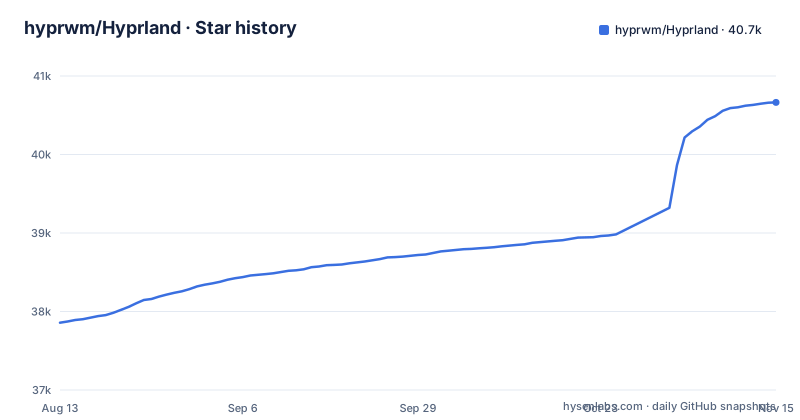
Star history
- hyprwm/Hyprland40,664 ★ · +2,807
| Repository | 2026-08-13 | 2026-11-15 |
|---|---|---|
| hyprwm/Hyprland | 37.9k | 40.7k |
2,807 Stars in the last 94 days, measured from the daily GitHub snapshot. Compare with other projects
Editorial analysis
What Hyprland solves and who it is for
Hyprland solves a specific problem: users who want a tiling Wayland compositor that looks and feels like a modern, animated desktop, not a bare utility. Most tiling compositors, like Sway or dwl, prioritize minimalism and stability over aesthetics. Hyprland takes the opposite stance. The README is explicit: it is a dynamic tiling compositor that 'doesn't sacrifice on its looks.' It targets desktop enthusiasts who want gradient borders, blur, animations, and shadows, but also want the productivity of tiling. The intended audience is not server administrators or embedded developers. It is for people who spend hours configuring their desktop and want the latest Wayland features as soon as they land. The project's own language, 'bleeding-edge features,' confirms that this is a user-facing, fast-moving project.
A compositor built without wlroots
The most striking architectural fact about Hyprland is that it is '100% independent.' It does not use wlroots, libweston, kwin, or mutter. This is a deliberate choice. The README thanks wlroots for 'powering Hyprland in the past,' which implies that Hyprland once relied on wlroots and later moved away. That independence means Hyprland implements its own Wayland server logic, its own rendering, and its own input handling. The README lists features such as custom bezier and spring curves for animations and a built-in plugin manager. The cost is that every bug in the compositor is Hyprland's own, and compatibility with the broader Wayland ecosystem has to be maintained manually. For an engineer evaluating this, the key question is whether you want to bet on a project that has chosen to reinvent the base layer rather than build on a shared foundation.
Dynamic tiling, layouts, and per-workspace control
Hyprland's tiling model is dynamic, meaning windows are automatically arranged rather than manually placed. The README lists four built-in layouts: Dwindle, Scrolling, Master, and Monocle. Dwindle is a binary tree layout, Master gives a main area plus a stack, Monocle makes all windows fullscreen, and Scrolling lays windows in a scrollable strip. What sets Hyprland apart is that layouts can be assigned per workspace. You can have a Master layout on workspace one and a Dwindle layout on workspace two. Additionally, custom layouts can be written in Lua or as plugins. For users who switch between coding, browsing, and media tasks, per-workspace layouts mean the window arrangement adapts to the task without manual intervention. The README also mentions window groups, which allow tabbed mode, and special workspaces, which act as scratchpads.
Getting it running: installation and configuration
The README does not include installation commands, but it links to a dedicated installation page on the wiki. The project's homepage is hypr.land, and the wiki is at wiki.hypr.land. The README points to a 'Quick Start' section and a 'Configure' section, both on the wiki. From the repository layout, you can infer that Hyprland is built from source using CMake (the Makefile drives it), but the README does not say so. What is clear is that configuration is a major part of the experience. The README states that 'config reloaded instantly upon saving,' which means you edit a config file and the compositor picks up the changes without a restart. This is a concrete workflow detail: you can tweak your config, save it, and see the effect immediately.
The plugin system and IPC: extending beyond traditional compositors
Hyprland has a built-in plugin manager and 'powerful plugin support.' The README mentions 'custom layout with Lua' and 'custom layouts with plugins,' so plugins are a first-class way to alter the tiling behavior. In addition, Hyprland exposes 'socket-based IPC.' This means external programs can send commands to the compositor over a Unix socket, which allows for scripting and integration with other tools. For example, you could write a script that changes the active workspace or toggles floating based on an external event. This IPC mechanism is a key differentiator for power users who want to automate their desktop.
Where Hyprland falls short: stability and ecosystem risk
The biggest limitation is the flip side of its independence. Because Hyprland does not use wlroots, it cannot rely on the testing and compatibility that wlroots provides across many compositors. The README admits to 'fast and active development' and being 'not afraid to provide bleeding-edge features.' That means breaking changes are likely between releases. The recent releases are v0.56.1 (27 July 2026), v0.56.2 (5 August 2026) and v0.57.0 (28 October 2026), with the last push on 2 November 2026, which indicates an active iteration cycle. For a production desktop, this can be a problem: a config option that works in v0.56.2 might change in v0.57.0. Also, the user documentation the README points to lives on a separate wiki, which it links for installation and configuration. Tearing support is listed as a feature for better gaming performance.
Alternatives: Sway and the wlroots ecosystem
The most direct alternative is Sway, which is mentioned in the README's special thanks as 'for showing how 2 do stuff the overkill way.' Sway is built on wlroots, so it inherits the stability and wide compatibility of that library. Sway's approach is to be a drop-in replacement for i3, with a similar configuration syntax and a focus on minimalism. It does not have blur, gradient borders, or animations by default. The trade-off is clear: Sway gives you a rock-solid tiling compositor with a large user base and predictable behavior, but you give up Hyprland's visual polish and plugin ecosystem. Another alternative is dwl, which the README thanks for 'the hacky way.' dwl is a minimal compositor that is essentially a patch of wlroots tinywl; it is for users who want to hack on the compositor itself. For most users, the choice is between Hyprland's feature-rich but fast-moving codebase and Sway's conservative stability. If you need a compositor for a critical workstation, Sway is the safer bet. If you want the latest effects and are willing to chase updates, Hyprland is the more exciting option.
Maintenance and licensing implications
Hyprland is licensed under BSD-3-Clause, which is permissive and allows commercial use, modification, and redistribution with attribution. This is favorable for companies that want to embed or fork the compositor. However, the maintenance cost is significant. The project is written in C++, and the codebase is described as 'easily expandable and readable,' but that is a claim from the README, not a verified fact. The rapid release cycle means you will need to follow releases closely if you use the project. The wiki is the primary documentation, and it is separate from the repository, so you need to check both for updates. There is no mention of a long-term support release or a stable branch. For an organization, this means you should pin a specific version and test before upgrading. The plugin API is powerful, but it also means that plugins must be updated when the compositor changes, adding another layer of maintenance. Overall, Hyprland is a project for users who are comfortable with a moving target and are willing to invest time in keeping their desktop up to date.
Editorial conclusion
Adopt Hyprland if you are a desktop Linux user who values visual polish, per-workspace layouts, and a plugin system, and you are comfortable with a fast-moving codebase that may break between releases. Do not adopt it if you need a stable, minimal compositor for a server or kiosk, or if you rely on wlroots-based tools and libraries. Before adopting, verify that your GPU drivers support the required Wayland protocols (especially for tearing and blur effects), check the wiki for the current configuration syntax, and test the latest release on a non-critical machine. The project's independence from wlroots is both its strength and its risk: you get features no one else has, but you also own the full maintenance cost of a custom compositor.
Frequently asked questions
What is Hyprland used for?
It is a dynamic tiling Wayland compositor, built to run windows in tiled, pseudotiled, floating or fullscreen arrangements with animations and window rules. Control comes through socket-based IPC and the hyprctl command line tool, and a built-in plugin manager in hyprpm/ extends it.
Is Hyprland a DE or WM?
The project calls it a compositor, and the repository holds no desktop around it, with no panel, file manager or display manager in the tree. A session built on it means combining Hyprland with a bar, a launcher and a login manager that the project does not ship.
how to install hyprland
The README sends installation to a wiki page and gives no package command of its own. From source, the Makefile's release target configures CMake with -DCMAKE_BUILD_TYPE:STRING=Release into ./build with PREFIX set to /usr/local, then cmake --install ./build puts it in place.
how to use hyprland
The project links a master tutorial and a configuration wiki, and states that the config is reloaded instantly upon saving, so you edit and keep going without restarting the compositor. The repository itself documents no keybinds or rule syntax, so the tutorial is where the first session comes from.
Which is better, the i3 or Hyprland?
The repository draws no comparison with i3. It states that it now runs with no wlroots, libweston, kwin or mutter underneath it, and credits wlroots, tinywl, Sway, dwl and Vivarium as projects it learned from rather than as alternatives it benchmarks against.
Official sources
Add this badge to your README
If you maintain this project, the badge below links readers to this analysis and shows its maintenance status from the daily GitHub snapshot. Paste the markdown into your README; add ?metric=license or ?metric=stars to the image URL for a different field.

[](https://hysenlabs.com/projects/hyprwm-hyprland)Star history chart for your README
[](https://hysenlabs.com/projects/hyprwm-hyprland)Was this useful?