JHenTai: a Flutter client for E-Hentai that runs on five platforms
A cross-platform manga app made for e-hentai & exhentai by Flutter
At a glance
- What is it?
- JHenTai is a cross-platform E-Hentai and ExHentai reader written in Dart with Flutter. It ships prebuilt binaries through GitHub releases, and its own README flags the macOS and Linux builds as unmaintained.
- Who is it for?
- Adopt JHenTai if you want one E-Hentai reader that covers an Android phone, an iPad and a Windows desktop, and you are willing to update by reinstalling binaries from the releases page. Do not adopt it if you need a maintained macOS or Linux build, or a server-side component; the README marks those two desktop targets as no maintenance.
- Can I use it commercially?
- Yes. Apache-2.0 is a permissive licence: you can use, modify and sell software built on it, as long as you keep its copyright and licence notices.
- Is it still maintained?
- Yes. The repository received new commits within the last day.
- What is it written in?
- Mainly Dart, according to GitHub's language statistics.
Answers come from the project's GitHub data, last synced on November 15, 2026, and from our analysis. They are not legal advice.
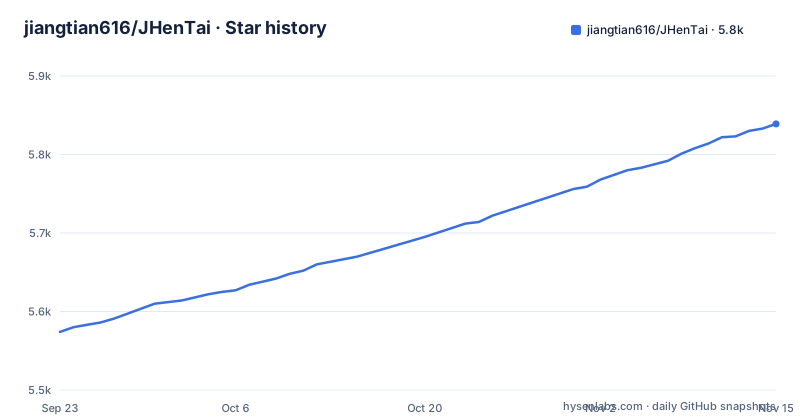
Star history
- jiangtian616/JHenTai5,839 ★ · +265
| Repository | 2026-09-23 | 2026-11-15 |
|---|---|---|
| jiangtian616/JHenTai | 5.6k | 5.8k |
265 Stars in the last 53 days, measured from the daily GitHub snapshot. Compare with other projects
Editorial analysis
What JHenTai replaces, and for whom
JHenTai is a client application for E-Hentai and ExHentai. The project targets people who already use those sites and want a native reader instead of a browser tab. The README states that the author used E-Hentai apps before and found several bugs in them, and that the lack of Android or iOS development experience made their source code hard to read. JHenTai is the author's first Flutter project, written to learn Flutter while producing something usable on an Android phone, an iPad and a Windows computer. That origin explains the shape of the project: one Dart codebase compiled to five targets, with platform folders for android, ios, windows, macos and linux sitting side by side in the repository root. It is a personal-use reader that grew into a distributed app, not a service. There is no server, no self-hosted component and no API for other tools to call. If you need to search galleries, read them offline, and keep your session on a device you control, that is the scope. If you need shared library management across a team, this is not the tool.
How the Flutter codebase is laid out
The architecture is a standard Flutter application structure. The lib/ directory holds the Dart source, and the platform directories (android/, ios/, windows/, macos/, linux/) hold the native shells that Flutter generates and that the build scripts invoke. Shell scripts named apk.sh, ipa.sh, pkg.sh, dmg.sh, linux.sh, windows.sh and thin-payload.sh sit at the repository root, which tells you the release artifacts are produced by scripted builds rather than by a CI-only pipeline. There is a built_in_blocked_user.json at the top level, a static data file the app ships with. The README notes that the author refactored the gallery page, reading page and download code after five months of development, extracting shared behaviour between pages to reduce coupling. The test/ directory exists, and analysis_options.yaml plus devtools_options.yaml indicate linting and Flutter DevTools configuration are part of the repo.
Installing JHenTai on Android, iOS and Windows
Apart from a third-party Fedora repository, installation means downloading a release artifact from the GitHub releases page and installing it per platform. For Android, the README says to pick the APK matching your device architecture: arm64-v8a for phones with an 8th generation ARM processor, which it calls the common choice; armeabiv-v7a for 7th generation ARM; and x86_64, which it labels rare. The Android application id used by the Obtainium link is top.jtmonster.jhentai. If you prefer automated updates on Android, the README offers an Obtainium import link that points at the GitHub repository and reads version strings from the release tag with the pattern v(.*).
# Obtainium-style source configuration, as encoded in the README badge link
# id: top.jtmonster.jhentai
# url: https://github.com/jiangtian616/JHenTai
# versionExtractionRegEx: v(.*)
# matchGroupToUse: $1
On iOS, you download the .ipa and sign it yourself with AltStore or SideLoadly. The README also publishes an AltStore source at altsource/AltSource.json in the repository, which the badge links point to, and mentions SideStore and Feather as alternative clients for the same source. On Windows, you download a Windows_xxx.zip and unpack it; the README warns that Windows 11 users who cannot launch the app should try running jhentai.exe in compatibility mode, and that Windows Defender may block it, in which case it says to trust it. On Windows, macOS and Linux, the README says to set a proxy address on the network setting page if you use a proxy server.
Linux and macOS builds the README calls unmaintained
This is the part to read carefully. The README labels the MacOS and Linux install sections "(No maintenance)". That phrase is the project's own, and it applies to both the install and the update instructions for those platforms. On macOS you download a .dmg and trust it in system settings. On Linux you download Linux-amd64.deb or Linux-x86_64.AppImage, and the README notes you may need webkit2gtk-4.1 installed. Fedora-based distributions get a third-party RPM repository hosted at meeks233.github.io, not at the project's own domain:
sudo rpm --import https://meeks233.github.io/Jhentai-rpm/fedora/RPM-GPG-KEY-jhentai
sudo curl -fsSL -o /etc/yum.repos.d/jhentai.repo https://meeks233.github.io/Jhentai-rpm/fedora/jhentai.repo
sudo dnf install -y jhentai
Note who signs that key: a separate GitHub Pages host, not the jiangtian616 repository. The README presents it as the Fedora path, but the trust chain runs through a third party. The update instructions for Linux say to delete the old product and download the latest one. For macOS, download the new .dmg. That is a manual update loop on both desktops, and the "no maintenance" label means you should treat desktop breakage as expected rather than exceptional. Windows, by contrast, is documented without that caveat, and the update instruction is to delete the old unpacked directory and unpack the new zip.
Where JHenTai is the wrong tool
The clearest limitation is platform support asymmetry. The README's own headings mark macOS and Linux as unmaintained, so a Linux desktop user is choosing a target the project does not promise to keep working. The second is the update model. Apart from the Obtainium path and the iOS AltStore repo, which the README says gives easier installation and updates, platforms require downloading a new binary by hand; there is no auto-update on Windows, macOS or Linux, and the Windows instructions tell you to delete the old directory first, which means anything stored inside the unpacked folder rather than in a user data directory is at risk if you follow that literally. The third is documentation. The README covers downloads, a translation contribution link and the author's motivation, and points to a wiki page titled Common Questions. The fourth is scope: JHenTai is a client for one pair of sites. If your reading list spans several sources, a general-purpose reader will fit better.
How it compares to EhViewer and to a browser
The README credits EHViewer as a layout and style reference, which makes it the obvious comparison. EhViewer is an Android-only E-Hentai client; JHenTai's distinguishing claim is reach, since it builds for Android, iOS, Windows, macOS and Linux from one Dart codebase. If you only ever read on an Android phone, that difference buys you nothing, and EhViewer's longer history on that one platform is the reason people stay. The second alternative is the site itself in a mobile or desktop browser. A browser needs no install, no signing and no architecture check, and it updates the moment the site changes. What it does not give you is a native reader with local downloads and offline reading, which is the reason a client exists at all. The third comparison is a self-hosted library tool. Those put a server between you and the source and let multiple devices share state; JHenTai has no server component, so each device holds its own session and its own downloads. Choose accordingly: JHenTai for one person on several devices, a browser for occasional reading, EhViewer if Android is your only target.
Maintenance, releases and the licence
The repository is not archived, and the last push was on 2026-10-31. Releases are frequent: v8.0.18 landed on 2026-10-23, after v8.0.17+339 on 2026-10-21 and v8.0.16+334 on 2026-09-09. That cadence is real, but it does not extend to every platform, because the README's unmaintained labels for macOS and Linux sit alongside the same release stream. Practically, the upgrade cost is asymmetric. Android users can automate it through Obtainium and never think about it. iOS users re-sign an .ipa on every update, which is the friction of sideloading rather than of this project. Windows users unpack a zip. Linux and macOS users follow instructions the project itself declines to maintain. The licence is Apache-2.0, which permits commercial use, modification and redistribution provided you keep the notices and state changes; it also includes an explicit patent grant. That is a permissive licence, and it is worth noting that the app's own legal footing rests on the source sites' terms, not on this repository's licence.
Editorial conclusion
Adopt JHenTai if you want one E-Hentai reader that covers an Android phone, an iPad and a Windows desktop, and you are willing to update by reinstalling binaries from the releases page. Do not adopt it if you need a maintained macOS or Linux build, or a server-side component; the README marks those two desktop targets as no maintenance. Before you commit, check the releases page for your exact architecture and read the Common Questions wiki page.
Frequently asked questions
Which platforms does JHenTai support?
The README lists Android, iOS, Windows, MacOS and Linux, and the repository has matching platform directories. The MacOS and Linux install sections are labelled "(No maintenance)" by the project itself.
How do I install JHenTai on Android?
Download the APK from the GitHub releases page that matches your device architecture: arm64-v8a is described as the common choice, armeabiv-v7a for older ARM phones, and x86_64 as rare. The README also provides an Obtainium link that tracks the repository's releases.
Does JHenTai update itself on desktop?
No. For Windows the README says to delete the old unpacked directory and unpack the latest zip, and for Linux it says to delete the old product and download the latest one. The README offers Obtainium on Android and an AltStore repo on iOS for easier updates.
What licence is JHenTai released under?
The repository is licensed Apache-2.0, which allows commercial use, modification and redistribution as long as notices are kept and changes are stated. It also includes an explicit patent grant.
Is JHenTai the same as EhViewer?
No. EhViewer is an Android-only client, while JHenTai is built with Flutter and targets Android, iOS, Windows, MacOS and Linux from one codebase. The README credits EHViewer as a layout and style reference.
Official sources
Add this badge to your README
If you maintain this project, the badge below links readers to this analysis and shows its maintenance status from the daily GitHub snapshot. Paste the markdown into your README; add ?metric=license or ?metric=stars to the image URL for a different field.

[](https://hysenlabs.com/projects/jiangtian616-jhentai)Star history chart for your README
[](https://hysenlabs.com/projects/jiangtian616-jhentai)Was this useful?