TagTinker for Flipper Zero: Infrared ESL Image Transmission
Flipper Zero app for ESL research using IR. All based on https://www.furrtek.org/?a=esl
At a glance
- What is it?
- TagTinker is a GPL-3.0 Flipper Zero application for researching and writing images or text to supported infrared electronic shelf labels. It combines protocol profiles, run-length-encoded infrared streaming, NFC-assisted tag identification, and a browser-based BMP preparer, but it cannot control radio-based labels and carries a serious battery-removal risk.
- Who is it for?
- TagTinker suits Flipper Zero owners or authorized researchers who have a compatible infrared ESL tag and can accept volatile hardware risks. It is unsuitable for radio-based labels, unidentified NFC hardware, or environments that cannot preserve tag power.
- Can I use it commercially?
- Yes, with conditions. GPL-3.0 is a copyleft licence: if you distribute software that includes it, you must release that software's source code under the same licence. Running it internally without distributing it does not trigger that obligation.
- Is it still maintained?
- Yes. The repository last received commits 36 days ago.
- What is it written in?
- Mainly C, according to GitHub's language statistics.
Answers come from the project's GitHub data, last synced on October 22, 2026, and from our analysis. They are not legal advice.
Star history
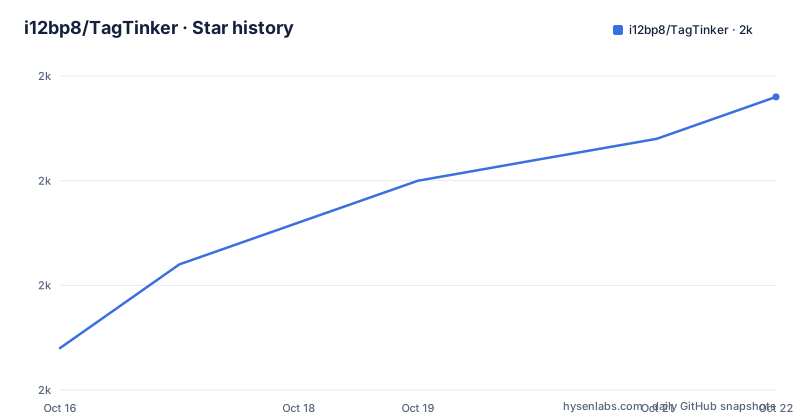
- i12bp8/TagTinker2,004 ★ · +12
| Repository | 2026-10-16 | 2026-10-22 |
|---|---|---|
| i12bp8/TagTinker | 2k | 2k |
12 Stars in the last 6 days, measured from the daily GitHub snapshot. Compare with other projects
Editorial analysis
TagTinker's infrared ESL Scope and Hardware Boundary
TagTinker targets a narrow but specific class of electronic shelf labels: models that receive updates through infrared and have a matching entry in TagTinker's graphics profile table. The profile is selected from digits 13 through 16 of a 17-character barcode. Those digits identify the type code, while the profile tells the application which display format and payload behavior to use. This is not a universal ESL controller.
The application sends through the Flipper Zero's infrared LED, using the same basic transmission medium as television remotes according to the quoted Flipper Zero team note in the README. It can display custom images and text on supported monochrome tags and supported accent-color graphics tags, including red or yellow accents. A 1-bit or two-plane BMP prepared in the web tool can also be rescaled by the Flipper for other supported graphics-tag sizes and pages.
Radio communication is a hard boundary. TagTinker cannot drive labels updated through radio, regardless of what their barcode or NFC content suggests. The README contrasts infrared labels with SES-imagotag VUSION devices that use proprietary 2.4 GHz radio and with Hanshow models documented at 2402 to 2480 MHz. A label being described as an ESL or having an NFC chip does not establish infrared compatibility. Users must confirm the type code and update mechanism rather than infer support from retail hardware alone.
The intended audience is small: Flipper Zero users, IoT security researchers, protocol learners, and people experimenting with digital art on e-ink tags. The README explicitly limits testing to tags the user owns or is allowed to test. That boundary matters because the hardware warning describes a failure with direct operational consequences.
Profile Matching, NFC Scans, and TagTinker Payload Selection
TagTinker supports two documented paths for identifying a target. A barcode can be typed through the `+ Type Barcode` action, which allows the application to use digits 13 through 16 of the 17-character barcode to find a profile. NFC scanning is a convenience only when the label's NFC data contains an ID that TagTinker can decode. `Show Tag Info` can then display the model, or `Model: Unknown` when the type code is absent from the profile table.
An NFC scan does not detect infrared or radio communication. A missing decodable ID may mean the tag is radio-based, but it is not proof of a particular model. The README describes a `Likely radio tag` result when no ID is decoded and the NFC link points to `nfc.imagotag.com`, while also stating that the link alone does not prove the model. Other outcomes distinguish an unrecognized but readable chip from an unreadable NFC-A chip. An unreadable result can occur when the tag moves during the read, or when the chip is outside the NTAG and Ultralight families read by this feature.
The app stores up to 16 targets. `Target list full` appears when every slot is occupied, so an existing target must be deleted before another can be added. These behaviors make the scan suitable for triage rather than definitive hardware identification. The documentation does not document automatic signal probing, radio detection, or a fallback that infers a profile from unsuccessful infrared transmission. The barcode and the published profile table remain the dependable compatibility path.
TagTinker's BMP, RLE, and WiFi Data Paths
The repository layout separates the Flipper application from image preparation, protocol logic, infrared handling, NFC handling, scenes, WiFi support, and optional cloud plugins. At the root, `application.fam` describes the Flipper application package. Directories such as `ir/`, `nfc/`, and `protocol/` reflect those responsibilities, while `web-image-prep/` contains the browser tool and `cloud-plugins/` contains the optional worker project.
The ordinary image path begins in the browser. TagTinker Image Prep is a dependency-free HTML application that runs locally in the browser, lists supported graphics profiles, and provides tone, contrast, detail, sharpen, dither, and three-colour Oklab quantization controls. It exports a Flipper-ready BMP. No server-side image processing is required for this part of the workflow.
On the device, the app's documented “high-performance RLE streaming IR engine” sends the selected payload through the Flipper's infrared LED. RLE is meaningful here because many e-ink graphics tags contain large unchanged regions, but the README does not expose the frame format, timing constants, error handling, or retransmission behavior. Prepared one-bit and two-plane BMPs can be rescaled on the Flipper for other supported sizes and pages. Type 1626, identified in the README as SmartTAG Color 2.6, imposes a separate constraint: its image file must be no larger than 24 KB.
Optional WiFi plugins change the data source, not the core infrared destination. With a Flipper WiFi Dev Board based on the ESP32-S2, the device can request live designs such as price cards, weather tiles, and identicons. The board firmware communicates with the worker configured by `CONFIG_TT_CLOUD_URL`, which can point to a separate deployment of `cloud-plugins/`. Plugins therefore do not require reflashing the Flipper application, although they add board hardware, firmware, network configuration, and a separately selected worker deployment.
Building TagTinker and Sending the First Image
The documented development entry point is the root `Makefile`. It targets the Flipper Zero FAP, Cloudflare Worker, ESP32-S2 firmware, and a local server for the static web tool. The README says GNU Make 3.81 on macOS and GNU Make 4.x are supported. Running `make` without arguments lists the available targets rather than starting a build.
Use `make setup` for the documented one-time setup. The Makefile states that it creates `.venv/`, obtains the `ufbt` SDK, and installs the worker's Node dependencies. The available project-specific command is:
make setupAfter setup, `make launch` builds the application, installs it, and runs it on a USB-connected Flipper Zero. That is the shortest documented route to the first launch:
make launchThe first launch creates `apps_data/tagtinker/dropped/` on the Flipper SD card. Open the hosted image preparer, select the tag profile, add an image, adjust the available processing controls, and download the BMP. The README gives no separate command for uploading it, so transfer it with `qFlipper`, USB MTP, or the reader's normal file-transfer method.
The file must be copied into this exact directory:
apps_data/tagtinker/dropped/On the Flipper, navigate to `Targeted Payloads`, open the target tag, choose `Set Image`, select the BMP, choose a page, and send it. Before doing that, confirm that the profile matches digits 13 through 16 of the barcode and that the label is infrared-based. If using Type 1626 graphics tags, keep the prepared BMP at or below 24 KB.
Volatile ESL Memory and TagTinker Failure Modes
The most serious limitation is electrical, not software. The README warns that many infrared ESL tags keep firmware, address, and display data in volatile RAM to reduce cost and energy. Removing the battery or allowing a full discharge can erase that programming and leave the label unresponsive. It usually cannot be recovered without the original base station. TagTinker should therefore not be used on unlabeled property, disposable test stock without a recovery plan, or any tag whose power state cannot be preserved.
Compatibility failures can appear to be application failures. A barcode type absent from the profile table produces `Model: Unknown`; an NFC chip may expose no decodable ID; and a radio label may look plausible in scans while remaining outside the infrared transmission path. An image file may also be rejected by a profile-specific constraint, as illustrated by the 24 KB ceiling for Type 1626 graphics tags. The documentation does not state whether TagTinker verifies complete tag-side storage before signaling completion, so users should retain the prepared BMP and avoid assuming that a sent command guarantees durable display data.
The optional WiFi path introduces additional failure surfaces. It requires an ESP32-S2 WiFi Dev Board connected to the Flipper GPIO header, compatible firmware, network access, and a worker selected through `CONFIG_TT_CLOUD_URL`. The README does not document authentication, transport security, offline fallback, retry policy, or behavior when the worker is unavailable. The local BMP flow is therefore the more direct documented path when the goal is only sending artwork.
TagTinker Maintenance, Releases, and GPL-3.0 Upgrade Work
The repository is not archived, and its last push was on 2026-09-17. That date supports calling it recently changed, but the README does not establish a release cadence. There are no GitHub releases, so users should not assume that `V2.1` corresponds to packaged binaries or a formal upgrade path through GitHub Releases. The README identifies the project version as V2.1, while installation instructions point to building from the repository with `ufbt`.
Development covers three compiled products plus a static web tool. The root `Makefile` supports the Flipper Zero FAP, Cloudflare Worker, and ESP32-S2 WiFi firmware, as well as a local server for Image Prep. This breadth creates upgrade work beyond the Flipper app alone. Cloud plugin changes can live in the worker without reflashing the FAP, but the Flipper, WiFi board firmware, and local web tool still need to remain compatible with the protocols and payload formats used by each other. No migration or rollback procedure is documented.
The project is licensed under GPL-3.0. Anyone distributing a modified binary or incorporating covered source must examine the applicable GPL obligations, including source availability, license notices, and copyleft requirements. That is a licensing consideration rather than legal advice. For adoption review, the important practical fact is that users need source access and may need to build, track repository changes, and verify protocol or profile changes themselves because the repository publishes no formal release artifacts.
Editorial conclusion
TagTinker suits Flipper Zero owners or authorized researchers who have a compatible infrared ESL tag and can accept volatile hardware risks. It is unsuitable for radio-based labels, unidentified NFC hardware, or environments that cannot preserve tag power. Before adoption, verify the label's type code against the app profile table, confirm it receives infrared updates, and retain power until the image is written because removal or full discharge can make the tag unresponsive.
Frequently asked questions
Which electronic shelf labels work with TagTinker?
TagTinker works with infrared ESLs whose type code, digits 13 through 16 of the 17-character barcode, appears in its profile table. It cannot update radio-based labels.
How do I send an image to a supported TagTinker target?
Prepare and download a Flipper-ready BMP, copy it to `apps_data/tagtinker/dropped/`, then use `Targeted Payloads → <your tag> → Set Image` on the Flipper, choose a page, and send it.
Does scanning an ESL with TagTinker prove that it uses infrared?
No. The NFC scan only reads tag data and cannot determine whether the display accepts infrared or radio. Confirm compatibility through the barcode type code and supported profile list.
What happens if I remove the battery from a TagTinker-compatible ESL?
Many supported-style tags store firmware, address, and display data in volatile RAM. The README warns that battery removal or full discharge can make the tag unresponsive and that recovery usually requires the original base station.
Official sources
Add this badge to your README
If you maintain this project, the badge below links readers to this analysis and shows its maintenance status from the daily GitHub snapshot. Paste the markdown into your README; add ?metric=license or ?metric=stars to the image URL for a different field.

[](https://hysenlabs.com/projects/i12bp8-tagtinker)Star history chart for your README
[](https://hysenlabs.com/projects/i12bp8-tagtinker)Was this useful?