agent-md splits agent guidance into rules you read and checks that block
Production-grade agent directives for autonomous coding agents: Claude Code, Codex, Cursor, Windsurf, Aider.
At a glance
- What is it?
- agent-md is an installer that drops a set of contracts into a repository so coding agents stop guessing: one source of truth rules file, hooks that the host agent can enforce, a memory directory that survives between sessions, and a configuration file that declares your project checks as commands. The project is unusually honest about which of those can be enforced and which are only advisory.
- Who is it for?
- agent-md fits a team that has already been bitten by an agent claiming success on work it did not verify, because the design pushes the important instructions out of prose and into commands the host can block on, and the enforcement matrix shows exactly which agent can block what.
- Can I use it commercially?
- Yes. MIT is a permissive licence: you can use, modify and sell software built on it, as long as you keep its copyright and licence notices.
- Is it still maintained?
- Yes. The repository last received commits 48 days ago.
- What is it written in?
- Mainly Shell, according to GitHub's language statistics.
Answers come from the project's GitHub data, last synced on November 6, 2026, and from our analysis. They are not legal advice.
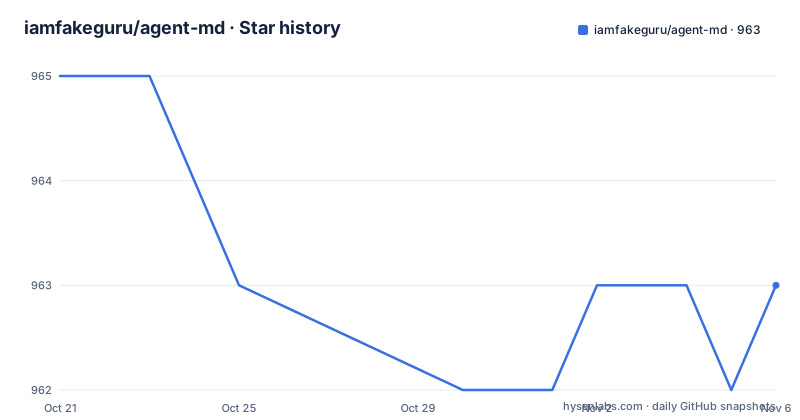
Star history
- iamfakeguru/agent-md963 ★ · -2
| Repository | 2026-10-21 | 2026-11-06 |
|---|---|---|
| iamfakeguru/agent-md | 965 | 963 |
-2 Stars in the last 16 days, measured from the daily GitHub snapshot. Compare with other projects
Editorial analysis
What the installer actually puts in your repository
The install writes a predictable tree. At the top level there is AGENT.md as the source of truth, AGENTS.md for Codex, Cursor and Windsurf, and CLAUDE.md for Claude Code, plus agent-md.toml.example as a deterministic verification config. Per agent there are directories: .claude/ with a settings.json and a hooks/ directory for Claude Code enforcement, .codex/ with hooks.json and hook wrappers, .agents/skills/ with native Codex skills for agent-md-verify and visual-evidence, a Cursor project rule at .cursor/rules/agent-md.mdc and a Windsurf workspace rule at .windsurf/rules/agent-md.md. Then there is .agent-md/bin/ with three helper scripts, discover_helpers.sh, doctor.sh and playwright-capture.sh, a memory/ directory with five Markdown files, and an optional .githooks/pre-commit fallback for any agent. The install command from inside a project directory is a curl pipe to the install.sh script, and it supports Claude Code, Codex, Cursor and Windsurf by default.
The scope section tells you what to trust
The README opens its substance with an honest scope statement, and it is the most useful three lines in the document. Markdown rules are advisory, because the agent has to read and follow them. Hooks and git hooks are enforceable where the host agent supports them. And tests, type-checks, screenshots and evidence notes are stronger than model self-assessment. That is an honest ranking of the mechanisms, and it is the difference between a tool that claims to make agents reliable and one that tells you exactly which parts of reliability it can actually buy you. The install options make the same point from the other side, with flags to install for all supported agents, for specific agents such as claude or codex,cursor, with or without the git hook fallback, and with three choices for handling an existing Claude settings.json, skip, merge or replace. The installer backs up existing top-level rule files before replacing them, existing memory/*.md files are never overwritten, and an existing .claude/settings.json is skipped by default.
Two layers, and the rule for choosing between them
The core idea is stated as a table. Rules files carry judgment, planning, style and process, and their reliability is advisory. Hooks and artifacts carry type-checks, tests, lint, state updates and visual evidence, and their reliability is enforceable where supported. The rule that follows is the sentence to take away: if something can be forgotten or rationalised away, move it out of prose and into a checked artifact. That is a well framed design principle, because the failure mode of agent guidance is not that the agent ignores a rule, it is that the agent convinces itself a rule does not apply, and a command that either passes or fails has no room for that argument. The lessons the project applies are grouped as cost and context discipline, reliability, performance, tool use and output quality, and it is explicit that provider level features such as prompt caching, streaming display, retries, idempotency keys, temperature tuning and batch processing belong in the application or the host runtime, and that this project tells the agent to document and verify those choices rather than pretending to enforce them from a rules file.
The enforcement matrix, agent by agent
The matrix is the part to read before you install, because it tells you which guarantees you are actually buying for your host. Bash safety is a hard block in Claude Code through .claude/hooks/block-destructive.sh and a hard block in Codex through .codex/hooks/pre-tool-use.sh, and it is not covered for the other hosts. Type-check, lint and tests at finish are a hard block in Claude Code through stop-verify.sh and a continuation in Codex through .codex/hooks/stop.sh, with an optional .githooks/pre-commit elsewhere. The memory/progress.md update is enforced the same way, and the state hook blocks completion when source files have changed without it. UI visual evidence is advisory by default and a hard block when the visual requirement is set to true, the same through the Codex Stop wrapper, and advisory through the rules for the other agents. A new export without a nearby test, truncated bash output, and planning, context and edit safety are all advisory, and truncated output is not covered at all in some hosts. The Codex hooks are marked experimental and need a features block enabling codex_hooks in the config file under the home directory.
One rules file, and a wrapper for Claude Code
AGENT.md is the single source of truth, and the interesting decision is what happens with the other agents. Installing writes CLAUDE.md as a one-line wrapper that imports AGENT.md through Claude Code's native import syntax, guarded by a comment that tells the /init skill and humans not to strip it. The reason is spelled out in the README. It prevents /init from seeing two identical files, applying DRY, and silently deleting every directive from Claude Code's active context. That is a bug class every team hits once and few document, and the linked issue holds the full story. The other agents, which do not support import syntax, still get the AGENT.md body inlined, either in AGENTS.md or in the rules directory form their tool expects, so the content survives everywhere while the duplication is kept to one place that a human maintains.
Your checks become configuration
The deterministic verification config is where the project stops being advice. You copy the example file and declare your project checks:
cp agent-md.toml.example agent-md.tomland the config holds the commands, with a section for verification and one for visual work:
[verify]
typecheck = "npx --no-install tsc --noEmit"
lint      = "npx --no-install eslint ."
test      = "pnpm test"
lint_file = "npx --no-install eslint {file}"
The visual section carries a required flag, an artifacts directory and a freshness window in seconds, which is what the strict visual hook checks against. The no-install flag on the npx commands is a small but deliberate detail, since it stops the check from silently downloading a package during a hook. And the behaviour when nothing is configured is defined rather than undefined, since when no checks are detected the hooks allow completion but warn that the work is unverified.
Memory files and visual evidence
The memory directory is the durable handoff surface between sessions, and the five files have distinct jobs. agents.md holds the active agents, the MCPs, the tech stack and the tooling, plan.md holds the macro design and the vertical slices, progress.md holds the current task, the completed tasks, the backlog and the blocked work, verify.md is the definition of done, and gotchas.md records the mistakes already corrected by the human, which is the file that saves a session from repeating a mistake somebody already paid for. Visual evidence works the same way. For UI work you capture a screenshot with the helper script, and then write a Markdown note next to it listing the changed files, the route, the viewport, the artifact name and the observed result. The strict visual hook requires a fresh, non-empty Markdown file that references a fresh, non-empty image by filename and includes the required fields, which is a much stronger claim than a screenshot existing in a directory. The project is MIT licensed, the last push was on 2026-09-21, and the repository publishes no GitHub releases.
Editorial conclusion
agent-md fits a team that has already been bitten by an agent claiming success on work it did not verify, because the design pushes the important instructions out of prose and into commands the host can block on, and the enforcement matrix shows exactly which agent can block what. It does not fit a team on Cursor or Windsurf expecting the same guarantees, since the enforcement matrix marks those hosts advisory for most checks, and it does not fit a project that has no test or type check command to declare, since the verification config is where the value comes from. Before you install, read the enforcement matrix and pick the agent flags to match the host you actually use, and note that the Codex hook support is experimental and needs a feature flag in your config.
Frequently asked questions
What does agent-md install?
One source of truth rules file at the top level, per agent directories for Claude Code, Codex, Cursor and Windsurf with hooks, skills and rules, a .agent-md/bin directory with helper scripts, a memory directory with five Markdown files, and an optional git hook fallback, installed with a curl pipe to install.sh from inside your project.
Which parts of agent-md are actually enforced?
Hooks and git hooks are enforceable where the host supports them, while Markdown rules are advisory, because the agent has to read and follow them. The README's enforcement matrix lists each check per agent, and Codex hook support is experimental and needs the codex_hooks feature flag enabled in the Codex config.
Why is CLAUDE.md a wrapper instead of a copy?
AGENT.md is the single source of truth and CLAUDE.md is written as a one-line wrapper importing it through Claude Code's native import syntax, guarded by a comment, so that the /init skill does not see two identical files, apply DRY and silently delete every directive from the active context.
What is the verification config for?
It is where you declare your project checks as explicit commands, with a verify section for type-checking, lint, tests and per-file lint, and a visual section for the artifact directory, whether visual evidence is required and how fresh it must be. When no checks are detected the hooks still allow completion but warn that the work is unverified.
What is in the memory directory?
Five files that act as a handoff between sessions: agents.md for the active agents, MCPs, tech stack and tooling, plan.md for the macro design and vertical slices, progress.md for the current task, completed tasks, backlog and blocked work, verify.md for the definition of done, and gotchas.md for mistakes the human has already corrected.
Official sources
Add this badge to your README
If you maintain this project, the badge below links readers to this analysis and shows its maintenance status from the daily GitHub snapshot. Paste the markdown into your README; add ?metric=license or ?metric=stars to the image URL for a different field.

[](https://hysenlabs.com/projects/iamfakeguru-agent-md)Star history chart for your README
[](https://hysenlabs.com/projects/iamfakeguru-agent-md)Was this useful?