Folder11: Windows 11-style custom directory icons
Windows 11-like custom directory icon.
At a glance
- What is it?
- Folder11 is a collection of Windows 11-like custom folder icons, with SVG masters and optional small-size variants. It is aimed at contributors and personal desktop customization, not commercial icon distribution.
- Who is it for?
- Adopt Folder11 for personal Windows-style folder customization and icon contributions. Do not treat it as a general-purpose icon package for commercial products, and first verify the icon's SVG format, size variants, naming rules, and trademark status.
- Can I use it commercially?
- Not without permission. GitHub finds no licence file in the repository, and without a licence all rights are reserved by default: you may read the code but not reuse it. Check the README, or ask the authors, before using it.
- Is it still maintained?
- Yes. The repository received new commits within the last day.
- What is it written in?
- GitHub does not report a main language for this repository.
Answers come from the project's GitHub data, last synced on November 7, 2026, and from our analysis. They are not legal advice.
Star history
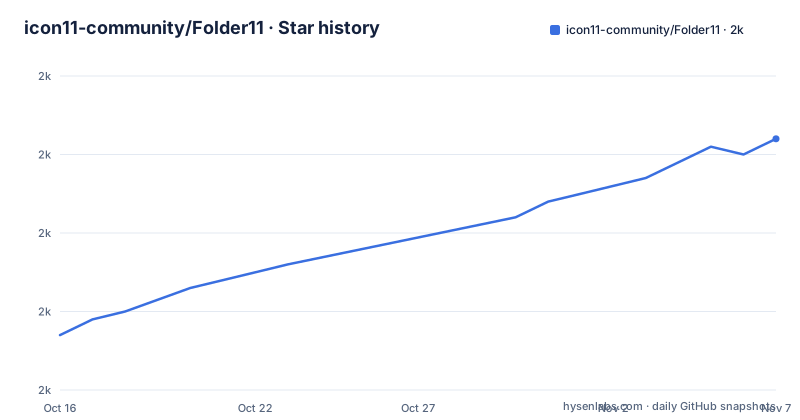
- icon11-community/Folder112,012 ★ · +25
| Repository | 2026-10-16 | 2026-11-07 |
|---|---|---|
| icon11-community/Folder11 | 2k | 2k |
25 Stars in the last 22 days, measured from the daily GitHub snapshot. Compare with other projects
Editorial analysis
Folder11's scope and personal-use boundary
Folder11 addresses a narrow problem: providing directory icons whose visual form resembles the folder treatment associated with Windows 11. It is not an icon theme manager, a file explorer extension, or a script that changes Windows folder rendering. The repository contains artwork and contribution rules for that artwork. Based on the repository layout, the main assets are stored in `svg/`, while `small/` holds optional reduced-size variants and `template/` contains source material for contributors.
The intended contributors are people who want to add a custom folder design while following a shared visual and file structure. The intended users are people looking for Windows 11-like directory artwork for personal customization. The README does not document an installer, runtime, configuration file, API, or command-line interface. It also does not claim that copying an SVG automatically changes the icon shown by Windows Explorer.
There is an important rights boundary. The README states that icons may contain trademarks, registered trademarks, or branded logos, and that the icons are allowed for personal purposes only. Use outside personal purposes, including commercial use, requires express permission from the relevant copyright holder. The repository metadata does not identify a license for the project, so the artwork should not be treated as permission to redistribute arbitrary branded assets. The separate ICO repository is mentioned, but the README does not explain its licensing or conversion process.
SVG masters and the Folder11 asset pipeline
Folder11's primary format is SVG vector artwork. The contribution specification says that an icon must be in SVG format, must not contain an embedded raster image, and must use a square, 1:1 canvas. The project does not require one particular vector editor. That makes the format suitable for contributors who use different graphics tools, provided the exported file follows the stated technical constraints.
The specification gives a reference layout based on a 256px-high canvas. It lists a left margin of 17px, a right margin of 15px, and a bottom margin of 46px. The top margin differs by orientation: 34px for the `back` element and 62px for the `front` element. These values are design guidance for consistent composition rather than a documented command-line validation process. The README does not say that a script checks margins or rejects invalid artwork.
The `small/` directory is optional. It is intended for icons optimized for common Windows folder sizes such as 32px, 24px, 20px, and 16px. Its structure should mirror `svg/`, which makes it easier to keep the large and reduced artwork associated with the same icon. The repository does not specify an automatic resizing command or a required tool for producing these variants. Contributors must therefore create or adapt the small artwork using a workflow they choose, while preserving the documented directory relationship.
Folder11 naming rules and replacement policy
Folder11 uses a naming convention that encodes the base icon name and its variants. The file name starts with the icon name and ends with a variant number separated by a dash. The icon name itself must use snake case. The first icon is not numbered, while later variants are numbered starting at 1.
The README gives this structure:
Folder11
├──📁 svg/
│   ├──📄 my_folder.svg
│   ├──📄 my_folder-1.svg
│   └──📄 my_folder-2.svg
└──📁 small/
    ├──📄 my_folder.svg
    ├──📄 my_folder-1.svg
    └──📄 my_folder-2.svg
This policy is also a replacement control. Contributors are instructed not to replace an existing icon. A new design should therefore be added as a new numbered variant, which reduces the chance of silently changing artwork already referenced by someone. The repository does not define an ownership model, approval workflow, or automated duplicate check, so the naming rule is a repository convention rather than a guaranteed enforcement mechanism.
Commit messages follow conventional categories. `feat:` introduces a new icon or modifies an existing one, `docs:` changes documentation, `chore:` covers changes not visible to users such as `.gitkeep` and `.gitignore`, and `ci:` changes an action workflow. A breaking change is written with an exclamation mark, such as `feat!:`. The repository also requires commit messages to be written in English. No release process is documented, and there are no GitHub releases.
Getting Folder11 artwork and making a first contribution
The README does not provide installation or packaging steps. It points readers to the project page at `https://icon11-community.github.io/icons` and identifies the separate `Folder11-ico` repository for ICO format. There is no documented download command, installation package, or setup script to copy into this tutorial. A first real use therefore begins with reviewing the artwork page and the repository's `svg/` and `small/` directories.
For a contribution, the documented workflow is to prepare an SVG icon, check that it contains no embedded raster image, use a 1:1 canvas, apply the stated margins, and place it under the matching name in `svg/`. If a reduced-size design is supplied, its path should mirror the corresponding `svg/` entry under `small/`. The `template/` directory contains `svg`, `ai`, and `fig` templates, although the README does not say which template is mandatory or how to open each one.
A useful first contribution is a single new folder design with a matching small variant. The contributor should confirm that the base name uses snake case, that the first design has no number, and that later variants use `-1`, `-2`, and so on. The contributor should also inspect the file name before committing it. The README does not define a local test command, lint command, or preview server, so the exact validation procedure is limited to comparing the new files with the documented specification.
What Folder11 does not automate
Folder11 should not be selected when the required outcome is automatic replacement of Windows directory icons. The repository describes artwork files and contribution rules, but does not document an Explorer integration, shell extension, icon cache command, installer, or operating-system configuration. The Windows 11-like description concerns the design direction of the directory icons, not a documented feature that changes the operating system.
The optional nature of `small/` is another practical limitation. A contributor can follow the contribution rules without creating reduced artwork, which makes the repository easier to extend but leaves display quality at smaller sizes unverified for that icon. The README lists target sizes, yet it gives no evidence that every icon has a separate optical adjustment for each size. An SVG scaled mechanically to a small display may not preserve the intended composition, but the repository does not prescribe an optimization or inspection procedure.
The absence of a stated project license also matters for adoption outside personal customization. The trademark notice is stricter than a general reuse permission: even if a file is technically an SVG, branded content may require permission from the rights holder. The README does not identify the copyright holder for each icon, nor does it provide a license file in the documented material. That makes provenance and usage rights something to check per asset, not properties inferred from the repository.
Folder11 versus the Folder11-ico format
The README identifies `Folder11-ico` as the place to find ICO format, while Folder11 itself is presented as the source-oriented directory icon project with SVG artwork. The practical difference is format and likely workflow. SVG is the format used for the master artwork and contribution specification. ICO is the format named by the separate repository for users who need Windows icon files.
This distinction does not mean that the README documents a conversion pipeline. It does not state which application should create an ICO, whether conversion preserves transparency or dimensions, or whether every Folder11 asset has an ICO counterpart. It also does not provide installation instructions for either repository. A user who needs a directory icon for Windows should therefore check the ICO repository and its own documentation rather than assume that an SVG can be installed directly.
The main design choice is also visible in the repository structure. Folder11 separates large SVG assets from optional small variants, with naming and margins defined for contributors. The ICO reference points format needs elsewhere instead of making Folder11 a full Windows icon deployment package. That separation keeps the artwork contribution rules focused, but it adds a second repository and leaves format-specific operational details outside this README.
Folder11 maintenance status and upgrade considerations
The repository is not archived. Its last push was on 2026-10-16, which is recent relative to the current project state. However, the repository has no GitHub releases, so there is no documented release number, upgrade path, or changelog associated with published versions. The README describes contribution categories and icon specifications, but it does not explain how existing artwork is versioned for consumers.
For contributors, maintenance cost is concentrated in following the SVG, margin, naming, and directory-structure rules. Existing icons should not be replaced, so additions are expected to accumulate as numbered variants. A contributor who supplies only `svg/` artwork can follow the documented requirements because `small/` is optional. A contributor who supplies reduced versions must mirror the naming and structure, but the repository does not define how those small files are reviewed.
For users, there is no documented automatic upgrade mechanism. Changes are made in the repository, and the project page is the stated place to find icons. The absence of releases also means that the README does not provide a reliable way to compare an installed local copy with a named project version. Asset-specific rights and format compatibility should be checked directly against the relevant files and the ICO repository.
Editorial conclusion
Adopt Folder11 for personal Windows-style folder customization and icon contributions. Do not treat it as a general-purpose icon package for commercial products, and first verify the icon's SVG format, size variants, naming rules, and trademark status.
Frequently asked questions
What is Folder11 used for?
Folder11 is a collection of Windows 11-like custom directory icons. The repository provides SVG artwork, optional small-size variants, templates, and contribution specifications.
How do I install Folder11 icons in Windows?
The README does not document installation or Explorer integration. It points to the project page at `https://icon11-community.github.io/icons` and to the separate `Folder11-ico` repository for ICO format, but gives no installation steps.
Can I use Folder11 icons commercially?
The README says the icons are allowed for personal purposes only. Commercial use or other non-personal use requires express permission from the copyright holder of any trademark, registered trademark, or branded logo.
What file format does Folder11 use?
Folder11 uses SVG for its icon artwork. The separate `Folder11-ico` repository is identified as the source for ICO format, but the README does not document a conversion workflow.
Are small icon variants required for every Folder11 contribution?
No. The README says the `small` folder is optional. When provided, it should contain smaller versions and mirror the structure and naming of the `svg` folder.
Official sources
Add this badge to your README
If you maintain this project, the badge below links readers to this analysis and shows its maintenance status from the daily GitHub snapshot. Paste the markdown into your README; add ?metric=license or ?metric=stars to the image URL for a different field.

[](https://hysenlabs.com/projects/icon11-community-folder11)Star history chart for your README
[](https://hysenlabs.com/projects/icon11-community-folder11)Was this useful?