JazzHands: Keyframe Animations for UIKit Intros, Frozen in Time
GitHub describes it as A simple keyframe-based animation framework for UIKit. Perfect for scrolling app intros.. The repository metadata lists Objective-C as its primary language. The metadata lists the MIT license. This article stays within the project description and details documented in the GitHub repository README.
At a glance
- What is it?
- JazzHands is a keyframe animation framework for UIKit that ties view animations to scroll offsets, gestures, or KVO. It solved a real problem in 2015, but its age and Objective-C roots make it a poor fit for most modern iOS projects.
- Who is it for?
- Adopt JazzHands only if you are maintaining a legacy Objective-C app that already uses CocoaPods and needs a simple scroll-driven intro without adopting a new animation system. Do not use it for new Swift projects; RazzleDazzle is the direct successor and supports the same scrolling keyframe model natively.
- Can I use it commercially?
- Yes. MIT is a permissive licence: you can use, modify and sell software built on it, as long as you keep its copyright and licence notices.
- Is it still maintained?
- Probably not. The repository last received commits 27 months ago, on July 30, 2024.
- What is it written in?
- Mainly Objective-C, according to GitHub's language statistics.
Answers come from the project's GitHub data, last synced on October 21, 2026, and from our analysis. They are not legal advice.
Star history
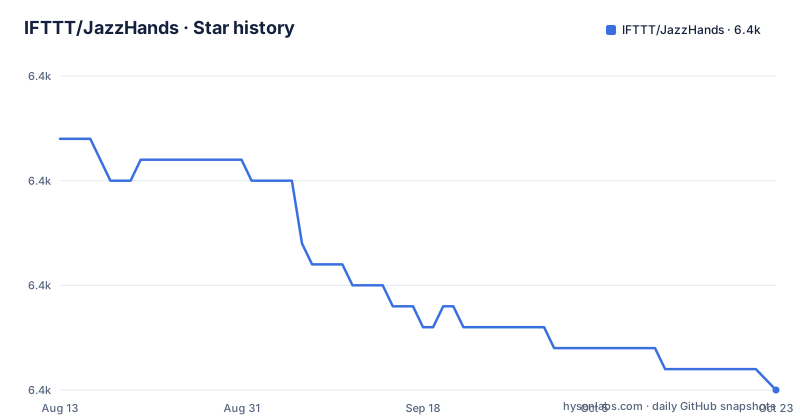
- IFTTT/JazzHands6,351 ★ · -11
| Repository | 2026-08-13 | 2026-10-21 |
|---|---|---|
| IFTTT/JazzHands | 6.4k | 6.4k |
-11 Stars in the last 69 days, measured from the daily GitHub snapshot. Compare with other projects
Editorial analysis
What JazzHands Actually Solves
JazzHands solves a narrow but common problem: making UIKit views animate in sync with a scrolling container, typically an app intro. Instead of using Core Animation timelines or gesture recognizers, it maps a single numeric time value, such as a scroll view's contentOffset.x, to a set of keyframes that define view properties at specific times. The README shows how a view fades out between scroll positions 30 and 60. The intended audience is iOS developers, circa 2015, who wanted to build paging intros without hand-writing scroll delegate logic or juggling multiple animation states. It also works with gestures, KVO, and ReactiveCocoa, so the time source is not tied to a scroll view. That flexibility is the core value: one animator, one time value, and a collection of keyframe animations.
The Mechanism: Keyframes, Animator, and Time
The architecture is straightforward. You create an IFTTTAnimator instance, then create animation objects for specific view properties, such as IFTTTAlphaAnimation for alpha or IFTTTTranslationAnimation for position. Each animation holds keyframes added with methods like addKeyframeForTime:alpha:. You register the animation with the animator, and then, whenever a time value changes, you call animate: on the animator. The animator interpolates between keyframes for each registered animation. The README's scrollViewDidScroll example passes scrollView.contentOffset.x directly. The time value is a CGFloat, so it works with any continuous source. This design means the framework does not run its own timer or display link; it simply responds to external time updates. That is both a strength and a constraint: it keeps the library simple, but it also means you must drive the animation from your own code, which is fine for scroll-driven intros but less useful for autonomous animations.
Getting Started: Installation and First Animation
Installation is via CocoaPods. The README tells you to add pod "JazzHands" to your Podfile and run pod install from the Example directory to see the demo. If you avoid CocoaPods, you can copy the JazzHands folder into your project directly, which is rare for a framework of this age. The quick start is explicit: import <IFTTTJazzHands.h>, create an IFTTTAnimator, create an animation with animationWithView:, add keyframes, and call animate: from your scroll delegate. The example uses IFTTTAlphaAnimation, but the README lists 17 animation types, including transforms, background color, corner radius, and AutoLayout constraints. The AutoLayout ones, like IFTTTConstraintConstantAnimation and IFTTTScrollViewPageConstraintAnimation, are part of the 2.0 release and address the pain of paging scroll views in an AutoLayout world. The demo workspace is JazzHandsDemo.xcworkspace, so you need CocoaPods to open it.
What the Animation Types Cover, and What They Miss
The list of animation types is the real substance of the library. It covers alpha, rotation, scale, translation, 3D transforms, background color, corner radius, hidden, text color, fill color, stroke start and end for CAShapeLayer, path position, frame, and several AutoLayout constraint animations. That is a broad set for a small framework. But there are gaps. The README notes that IFTTTStrokeStartAnimation does not work with IFTTTStrokeEndAnimation, which is a hard limitation if you want to animate both ends of a shape's stroke. Also, IFTTTFrameAnimation is not compatible with AutoLayout, which is a significant restriction in a library that otherwise pushes AutoLayout-friendly paging. The notes also state that an animator can only handle one animation per type per view. That means you cannot have two alpha animations on the same view, even if they target different time ranges. That is a real design constraint that could force you to create multiple animators or restructure your views.
The AutoLayout Paging Helper: A Rare Gem
JazzHands 2.0 introduced IFTTTAnimatedPagingScrollViewController and the keepView:onPage: method. This is the most distinctive feature because it solves a specific AutoLayout problem: laying out paging scroll views that behave correctly on rotation and on iPad split-screen in iOS 9. The README claims it is a super easy way to achieve that, and it lets you place a view on multiple pages with keepView:onPages:. This is not a generic animation helper; it is a purpose-built controller that integrates with the keyframe system. For a 2015 iOS app targeting iOS 9, this would have been a time-saver. However, the framework has not been updated since 2015, so this helper makes no mention of later iOS versions, safe area insets, or modern multitasking APIs. If you adopt it today, you are relying on code that predates many UIKit changes, and you may need to adapt it yourself.
Limitations and Failure Modes
The most obvious limitation is age. The last push was July 2015, and the latest release is 2.0.3 from the same date. The repository is not archived, but it is clearly dormant. The README points Swift users to RazzleDazzle, which is the successor, but that does not help an Objective-C project that needs fixes. The framework is Objective-C, so Swift projects would need a bridging header, which is an extra step. The single-animation-per-type-per-view rule is a genuine constraint that can cause runtime surprises if you add a second alpha animation and expect it to coexist. The stroke start and stroke end incompatibility is another trap. Also, the time-based model means that if you use a scroll view, you must call animate: on every scroll event; the README shows that. If you forget, the animation freezes. There is no built-in easing or timing curve control beyond the keyframe interpolation, so complex easing requires many keyframes. Finally, the framework does not appear to support animation reversal or looping; it simply interpolates between keyframes based on the current time.
Alternatives: RazzleDazzle and Modern Approaches
The README itself names the primary alternative: RazzleDazzle, also from IFTTT, described as a brand new scrolling keyframe animations library reimagined in Swift. That is the direct successor, and it uses the same keyframe concept but with Swift syntax and likely improved APIs. If you are starting a new project, RazzleDazzle is the obvious choice because it is maintained for current Swift. Another alternative is to use Apple's UIScrollView delegate methods and UIViewPropertyAnimator directly, which gives you more control but requires writing the keyframe interpolation yourself. For simple intros, you could also use a collection view with paging and static cells, avoiding animation altogether. The difference in approach is that JazzHands centralizes animation state in an animator object, whereas modern UIKit animations are often per-view and per-property, with less need for a global time source. If you need AutoLayout-aware paging, RazzleDazzle likely carries that forward, but you should verify that in its documentation.
Maintenance, Upgrade Cost, and License
The license is MIT, which gives you freedom to modify and redistribute, but the lack of maintenance means you own any fixes. The last release is from 2015, so there is no upgrade path; you are on your own. If you adopt JazzHands, you must be prepared to read Objective-C source and patch it for new iOS versions. The repository has a demo project, which helps, but the documentation is thin beyond the README. The CocoaPods integration is standard, but if your project uses SPM or Carthage, you will need to vendor the source manually. The cost of upgrading to a newer version is zero because there is none. The cost of maintaining it is the risk that a future iOS update breaks the AutoLayout or transform code, and no one will fix it. For a production app, that is a serious consideration. The framework's simplicity is its saving grace: the source is small enough that a competent iOS developer could fork and maintain it, but that is a commitment, not a convenience.
Editorial conclusion
Adopt JazzHands only if you are maintaining a legacy Objective-C app that already uses CocoaPods and needs a simple scroll-driven intro without adopting a new animation system. Do not use it for new Swift projects; RazzleDazzle is the direct successor and supports the same scrolling keyframe model natively. Before adopting, verify that the animation types you need are present, especially the AutoLayout constraint animations in JazzHands 2.0, and confirm that the lack of maintenance since 2015 does not conflict with your iOS deployment target or your team's ability to debug stale code. The last release, 2.0.3, is from July 2015, and the repository shows no activity since then, so treat it as frozen software with no upstream fixes.
Frequently asked questions
What is JazzHands used for in IFTTT's own apps?
It was used extensively in IF and DO by IFTTT for iPhone and iPad, most famously in the app intro, and it animates views with moving, scaling, fading and transform effects tied to a scroll view.
How do I install JazzHands in an Objective-C project?
Add `pod "JazzHands"` to your Podfile, or copy the contents of the JazzHands folder into the project. The import line is `#import <IFTTTJazzHands.h>`.
Can I use JazzHands from a Swift project?
The README sends Swift developers to RazzleDazzle, its scrolling keyframe animation library reimagined in Swift, rather than to this Objective-C framework.
How many animations of the same type can one animator apply to a view?
One. The notes state that an animator can only handle one animation per type per view, so a second animation of the same type on the same view is not supported.
Which animation types cannot be combined on the same shape or view?
IFTTTStrokeStartAnimation is marked as not working with IFTTTStrokeEndAnimation, and the reverse is stated as well. IFTTTFrameAnimation moves and sizes views and is marked as not compatible with AutoLayout.
Official sources
Add this badge to your README
If you maintain this project, the badge below links readers to this analysis and shows its maintenance status from the daily GitHub snapshot. Paste the markdown into your README; add ?metric=license or ?metric=stars to the image URL for a different field.

[](https://hysenlabs.com/projects/ifttt-jazzhands)Star history chart for your README
[](https://hysenlabs.com/projects/ifttt-jazzhands)