Animate UI swaps one import path to animate shadcn/ui primitives, under a license that forbids reselling them
Fully animated, open-source component distribution built with React, TypeScript, Tailwind CSS, Motion, and Shadcn CLI. Browse a list of components you can install, modify, and use in your projects.
At a glance
- What is it?
- A React component distribution that wraps Radix UI, Base UI and React Aria primitives with Motion animations, installed through a CLI. The license is MIT with the Commons Clause, so the components can ship in products but cannot be sold on.
- Who is it for?
- Use Animate UI if you already run shadcn/ui on Radix UI, Base UI or React Aria and want animated versions without rewriting components: run the animate all command on a branch and read the diff. Avoid it if you plan to repackage the components in a kit or template you sell, because the Commons Clause forbids selling or redistributing them.
- Can I use it commercially?
- Check first. The repository uses a licence we do not classify automatically, so read its LICENSE file before any commercial use.
- Is it still maintained?
- Yes. The repository last received commits 5 days ago.
- What is it written in?
- Mainly TypeScript, according to GitHub's language statistics.
Answers come from the project's GitHub data, last synced on November 7, 2026, and from our analysis. They are not legal advice.
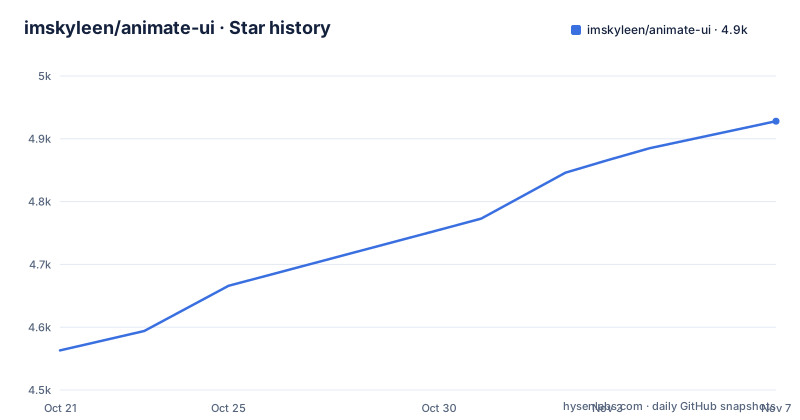
Star history
- imskyleen/animate-ui4,928 ★ · +365
| Repository | 2026-10-21 | 2026-11-07 |
|---|---|---|
| imskyleen/animate-ui | 4.6k | 4.9k |
365 Stars in the last 17 days, measured from the daily GitHub snapshot. Compare with other projects
Editorial analysis
One import path decides whether a primitive is animated
Animate UI describes itself as animated drop-in primitives for Radix UI, Base UI and React Aria, built with Motion. The promise is stated as: swap the import, keep your shadcn/ui components. The README shows the change in one line. A component that imports Accordion from 'radix-ui' as AccordionPrimitive instead imports it from '@animate-ui/react/primitives/radix-ui'.
// Before
import { Accordion as AccordionPrimitive } from 'radix-ui';
// After
import { Accordion as AccordionPrimitive } from '@animate-ui/react/primitives/radix-ui';
The alias AccordionPrimitive stays the same, so the rest of the file does not change. The path segment after primitives names the underlying library, and the README example uses radix-ui. It does not show the equivalent paths for Base UI or React Aria, so check the documentation at animate-ui.com/docs for the exact subpath before editing those imports.
The repository description calls the project a fully animated, open-source component distribution built with React, TypeScript, Tailwind CSS, Motion and the Shadcn CLI, where you browse a list of components, install them and modify them in your own code.
The animate all command rewrites every installed shadcn/ui component in one run
For a project that already uses shadcn/ui, the shortcut is a single command:
npx @animate-ui/cli@latest animate allThe README says it animates every installed shadcn/ui component. The name of the subcommand, animate, and the argument all suggest that a narrower form exists, but the README only documents the all form, so the way to animate one component is a question for the CLI help and the docs.
The README says nothing about what the command changes. It does not state whether it edits files in place, whether it creates a backup, or how it handles components you have already modified. Run it in a clean git working tree so that the diff is the record of what changed, and review it before committing. That precaution costs nothing and replaces the missing rollback documentation.
The CLI is a published package, @animate-ui/cli, and the repository root script named release publishes it together with @animate-ui/react and @animate-ui/vue. The @latest tag in the command means you get whichever version is current on the day you run it.
A Vue package exists in the release script, but the README only shows React
Everything the README demonstrates is React. The tagline names Radix UI, Base UI and React Aria, the examples are TSX, and the CLI command targets shadcn/ui. The root package.json tells a slightly wider story, because its release script runs pnpm -r with filters for @animate-ui/react, @animate-ui/vue and @animate-ui/cli, publishing all three.
That means a Vue package is part of the release process. The README does not describe what it contains, which components it covers, or how it relates to the React primitives, and it has no Vue example. A Vue developer should treat the package as something to look up on the documentation site, not as a documented feature of this repository.
The workspace layout supports the same reading. The top-level directories are apps, packages, skills, scripts and e2e, managed by pnpm and turbo, with pnpm-workspace.yaml and turbo.json at the root. The registry:build script runs pnpm --filter=v2 registry, which implies an app named v2 produces the component registry that the CLI reads.
MIT with the Commons Clause lets you ship the components but not sell them
The license line in the README is unusually direct. The project is licensed under the MIT license with the Commons Clause, and the stated meaning is that you can use it in any application, website or product, commercial or not, but must not sell or redistribute the components themselves. The terms live in LICENSE.md.
GitHub's license field for the repository reads NOASSERTION. That value means GitHub did not match the file to a standard license, and the Commons Clause addition is the usual reason a file fails to match. Many package scanners rely on the same standard identifiers, so a license audit tool may flag this dependency for manual review.
The practical effect depends on what you build. A company site or SaaS product that uses the components is covered. A template pack, a UI kit or a fork that republishes the components for others to install is what the clause forbids. Open-source projects that need an OSI-approved license for all dependencies cannot count this one as such. The README does not discuss agencies building client sites, so read LICENSE.md and ask the maintainer if your case sits at the edge.
Versions move quickly: three releases between 25 and 27 October
The repository has tagged releases. v2.4.0 was published on 27 October 2026 at 09:33 UTC, v2.4.1 less than half an hour later, and v2.4.2 on 2 November 2026. A patch release that close to a minor release suggests a quick fix after the first tag, though the repository does not say what the fix was. The last push was on 2 November 2026.
Two version numbers circulate, which can confuse a reader. The release titles read Animate UI 2.4.1 and so on, while the root package.json carries version 1.0.27. That root package is private and only holds the workspace, so its number does not track the published libraries. When you report an issue, quote the version of @animate-ui/react or @animate-ui/cli you installed, not the root number.
Because the CLI command in the README uses @latest, two people running it a week apart can get different component code. Pin a version in your lockfile if you want reproducible output, and read the release notes on GitHub before upgrading. The README includes no changelog link, and it gives no migration notes between 2.3 and 2.4.
Contributing needs Node 22.12, pnpm 10 and a commit message format
The repository is set up for people who contribute. The engines field in package.json requires node 22.12 or higher, and packageManager pins pnpm 10.34.6. Husky runs through the prepare script, and commitlint with the conventional config is a dev dependency, so commit messages follow the Conventional Commits style. A commitlint.config.mjs file sits in the top-level listing.
Scripts cover the usual cycle. `build`, `dev` and `lint` call turbo, `check-types` runs turbo check-types, and the format scripts run prettier on ts, tsx and mdx files with a cache. There is an e2e directory for end-to-end tests, a .cursor folder, an AGENTS.md file and a skills directory, which together show the project is set up for AI coding agents as well as people. The README does not explain what the skills contain, so open the folder to find out.
The README points to a CONTRIBUTING.md guide and a CODE_OF_CONDUCT.md, and asks contributors to read the code of conduct first. The site and its documentation are at animate-ui.com, and the project has a Twitter account, animate_ui. Vercel's open source program is credited at the bottom of the README.
What the README leaves out: the component list, accessibility behaviour and browser support
The README is short, so several things a buyer would ask about are simply absent. It does not list the components. It does not say how animations respect reduced-motion settings, how they behave with server rendering, or what the bundle cost of Motion is. It names no browser support range and no React version.
It also makes no performance claim, which is a point in its favor. All it commits to is the shape of the integration: the same primitive APIs from Radix UI, Base UI and React Aria, imported from a different path, with animation added by Motion. Whether every prop and ref passes through unchanged is untested in the repository text.
The documentation site is the place to confirm the rest, and the site is described as having a browsable list of components that you install and modify. Since the components land in your codebase, you own the animation code after installation. That is the shadcn model, and it means upstream fixes in a new Animate UI release do not reach files you have already installed unless you re-run the CLI and merge the result. Plan for that merge work before animating a large design system.
Editorial conclusion
Use Animate UI if you already run shadcn/ui on Radix UI, Base UI or React Aria and want animated versions without rewriting components: run the animate all command on a branch and read the diff. Avoid it if you plan to repackage the components in a kit or template you sell, because the Commons Clause forbids selling or redistributing them. Check the LICENSE.md file before shipping, since the GitHub license field reads NOASSERTION and the terms are only stated in the README and that file.
Frequently asked questions
Is Animate UI free?
You can use it in any application, website or product, commercial or not. The license is MIT with the Commons Clause, which forbids selling or redistributing the components themselves.
Is there an Animate UI alternative?
The repository names none. It positions Animate UI as animated drop-in primitives for Radix UI, Base UI and React Aria that keep your shadcn/ui components, so the comparison is with the unanimated primitives you already use.
How do I animate my existing shadcn/ui components with Animate UI?
Run npx @animate-ui/cli@latest animate all to animate every installed shadcn/ui component. You can also swap a primitive's import to a path under @animate-ui/react/primitives/radix-ui.
Which libraries does Animate UI build on?
It wraps Radix UI, Base UI and React Aria primitives and animates them with Motion. The project also uses React, TypeScript, Tailwind CSS and the Shadcn CLI.
Official sources
Add this badge to your README
If you maintain this project, the badge below links readers to this analysis and shows its maintenance status from the daily GitHub snapshot. Paste the markdown into your README; add ?metric=license or ?metric=stars to the image URL for a different field.

[](https://hysenlabs.com/projects/imskyleen-animate-ui)Star history chart for your README
[](https://hysenlabs.com/projects/imskyleen-animate-ui)Was this useful?