npm-check-updates edits version numbers in package.json and leaves the rest to you
Find newer versions of package dependencies than what your package.json allows
At a glance
- What is it?
- npm-check-updates compares the ranges in your package file against the registry, then rewrites only those lines. Ordinary checks and package-file upgrades do not install packages, while doctor mode installs and tests upgrades, it hides prereleases by default, and it reads config files that may not be in your working directory.
- Who is it for?
- Use it when you want the version numbers in a package file moved and you are willing to run a second install command afterwards. Skip it on a runtime below Node 22.22.2 or npm 10, and skip it if you cannot commit the package file first.
- Can I use it commercially?
- Yes. Apache-2.0 is a permissive licence: you can use, modify and sell software built on it, as long as you keep its copyright and licence notices.
- Is it still maintained?
- Yes. The repository last received commits 5 days ago.
- What is it written in?
- Mainly TypeScript, according to GitHub's language statistics.
Answers come from the project's GitHub data, last synced on November 15, 2026, and from our analysis. They are not legal advice.
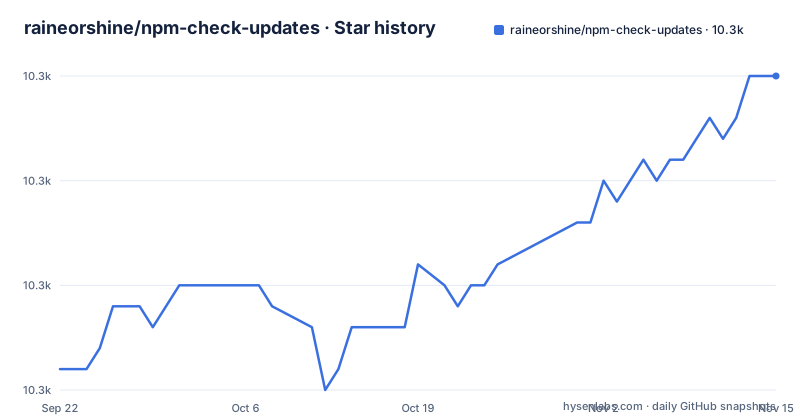
Star history
- raineorshine/npm-check-updates10,330 ★ · +14
| Repository | 2026-09-22 | 2026-11-15 |
|---|---|---|
| raineorshine/npm-check-updates | 10.3k | 10.3k |
14 Stars in the last 54 days, measured from the daily GitHub snapshot. Compare with other projects
Editorial analysis
ncu -u rewrites range strings and stops at the file
npm-check-updates edits the dependency lines in your package file, and the range syntax you wrote survives the edit. A pinned version moves to the newest stable release: `2.0.1` becomes `2.2.0`, `1.2` becomes `1.3`, and `0.1.0` becomes `1.0.1`. An operator stays in place while the number behind it changes, so `^1.2.0` becomes `^2.0.0`, `1.x` becomes `2.x`, and `>0.2.0` becomes `>0.3.0`. The one substitution that is not a preservation is a less-than range, which is discarded and rewritten as a caret: `<2.0.0` and `1.0.0 < 2.0.0` both end up as `^3.0.0`. A bare `*` is left alone.
The write is in place and destructive, which is why the project tells you to put the file under version control and commit before running it. The installed tree and package-lock.json are not touched at all, so a second command is required to move the actual code on disk.
$ ncu -u
Upgrading package.json
[====================] 1/1 100%

 express           4.12.x  →   4.13.x

Run npm install to install new versions.

$ npm install      # update installed packages and package-lock.json
The bare `ncu` form is read only. It prints the file it checked, a progress counter, and the table, then tells you the command that would apply it.
Node 22.22.2 and npm 10 are floors for install and for every run
The repository declares two engine constraints, and they are narrow. The repository package.json declares `"node": "^22.22.2 || ^24.15.0 || >=26.0.0"` and `"npm": ">=10.0.0"`. The caret ranges inside 22 and 24 name specific patch floors rather than any 22 or 24, and 26 or newer is the only open ended branch.
The README lists these as requirements, so move the runtime up before running ncu on an older setup.
Prereleases and major version zero stay invisible until you pass a flag
Prerelease versions are withheld by default, and that produces no warning line. Prerelease versions are ignored outright, so a tag such as `alpha`, `beta`, or `build1235` only enters the comparison once `--pre` is present. Major version zero is not withheld: the color scheme paints it red alongside every other major bump, and interactive mode only pre-selects it with `all`, since anything may change before `1.0.0`.
`--target` decides how far a match is allowed to travel, and its values are not interchangeable. `--target semver` moves according to the range you already declared and respects an explicit upper bound, so `^9.5.0 <10` becomes `^9.7.0 <10` and never crosses the ceiling. `--target minor` and `--target patch` are strict, and both apply inside major version zero, turning `0.1.0` into `0.2.1` or `0.1.2`. `--target @next` jumps to whatever version currently carries the `next` dist tag, for example `0.1.0` to `0.1.1-next.1`.
The gap to plan around: ncu cannot tell you that a dependency has a newer release you chose not to see. A clean looking report may simply be one where every prerelease was dropped before comparison.
The cache at ~/.ncu-cache.json can answer with ten minute old versions
Version data comes from the registry over HTTP, and there is a switch to stop asking for it on every run. `--cache` writes results to a local cache file whose default path is `~/.ncu-cache.json`, and the default lifetime is ten minutes as set by `--cacheExpiration`, which only does anything while `--cache` is on. `--cacheFile` relocates the file and `--cacheClear` wipes either the default location or whatever `--cacheFile` points at. A separate knob, `--concurrency`, caps simultaneous registry requests and defaults to 8.
The default path sits in the home directory, so one file is shared by every project on the machine. If you are chasing a version you believe was published minutes ago, clear the file instead of waiting out the expiration window.
The win is real for a repository with a long shared dependency list, where repeated runs would otherwise re-request the same metadata. The cost is that freshness becomes a time promise rather than a per run guarantee.
Turning off group formatting pre-selects every major in interactive mode
Interactive mode turns the report into a checklist, and what is already ticked when the screen appears is decided by two options that interact. With `--format group`, the default, `ncu -i` starts with patch and minor upgrades selected and majors left alone. Disable grouping with `--format no-group` and every upgrade is pre-selected, major bumps included, because the grouping is what made the conservative default meaningful.
`--interactiveSelect` overrides that choice directly. The accepted values are `none` to start empty, `patch` for patch only, `minor` for patch and minor, `all` for everything, and `auto` to defer to the default described above, which is also how you override a value coming from a config file. Two categories ignore every setting except `all`: major version zero upgrades such as `0.1.0` to `0.2.0`, and custom groups produced by `--groupFunction`.
The failure mode is a single keypress. Enter applies the highlighted selection with no per package review, and the selection can be far wider than intended because a formatting flag was changed for readability. Select with `none` and work up if you want the checklist to start empty.
Rejecting a package means picking between ! and -x, and regex needs different quotes
Package filters are positional arguments as well as options, and the same set can be named several ways. `ncu chalk mocha react` and `ncu chalk, mocha, react` are equivalent, as are `ncu -f mocha`, `ncu --filter mocha`, and `ncu -f "chalk mocha react"`. Wildcards and regex are both accepted: `ncu react-*` and `ncu "/^react-.*$/"` select the same set.
Exclusion has the same shape but a shell hazard. Prefixing a filter with `!` works in principle, yet the shell also reads `!`, so the documented spelling is `ncu \!nodemon`, and `ncu -x nodemon` is the form that survives being pasted into a shell with no escapes. Strings, wildcards, globs, comma or space delimited lists, and regex are accepted on both sides. Negating with a lookahead adds one more decision: the mac and Linux example uses single quotes, `ncu '/^(?!react-).*$/'`, while the Windows example uses double quotes, `ncu "/^(?!react-).*$/"`.
Beyond the basic filter, the project names two more advanced filters, filterResults and filterVersion.
Options merge from the command line down to a config file in your home directory
Four sources feed one option set and the order is fixed: command line options, then a local config file in the current working directory, then a project config file next to package.json, then a user config file in `$HOME`. Two checkouts in different directories can therefore behave differently under an identical command, because both the project file and the home file are in scope. The project level file name comes from `--configFileName`, whose documented default is `.ncurc`.
Any option that takes no argument can be turned off with a `--no-` prefix, and the example given is `--no-peer`. That syntax is also the way to defeat a value baked into a config file, which matters more than it first appears: a setting in a home directory config is not visible from the command you typed.
Treat a surprising report as a config problem before treating it as a registry problem, since the config layers apply before any network request happens.
One build/cli.js backs both binary names, and npx takes only the long one
Installation is a single global package, and the package.json maps two binary names to the same file: `npm-check-updates` and `ncu` both resolve to `build/cli.js`.
npm install -g npm-check-updatesThe documented alternative avoids the install entirely, and the short alias is not accepted in that form:
npx npm-check-updatesThe first run is a bare `ncu` in the project root, which prints the checked file name, a progress counter, and the version table, then names the flag that would apply it. Other documented entry points are `ncu -g` for global packages and `ncu -i` for the interactive checklist.
The module entry is separate from the CLI. The package is pure ESM with `type: module`, a `.` export pointing at `./build/index.js` with types from `./build/index.d.ts`, and a `./package.json` export, while still being usable from CommonJS through `require()`.
For containers the repository ships a Dockerfile that pins `node:lts-alpine` by digest, installs the tool globally at build time, sets the working directory to `/app`, and sets `npm-check-updates` as the entrypoint. The consequence is that the Node version inside the image is frozen by that digest and a new ncu release only reaches the image after a rebuild, and the image by itself neither copies a project in nor runs a check.
Editorial conclusion
Use it when you want the version numbers in a package file moved and you are willing to run a second install command afterwards. Skip it on a runtime below Node 22.22.2 or npm 10, and skip it if you cannot commit the package file first. Before trusting a report that looks clean, confirm that a config file in the working directory, a config file in your home directory, or a ten minute old cache did not decide what got compared.
Frequently asked questions
how to use npm check updates
Run the bare `ncu` in a project directory to print a table of newer versions without changing anything, or `ncu -u` to rewrite package.json. After an upgrade run, `npm install` is what updates the installed packages and package-lock.json.
how to run npm check updates
The command installs as two binaries, `npm-check-updates` and `ncu`, both pointing at the same CLI file. `ncu` checks a project, `ncu -g` checks global packages, and `ncu --interactive` or `ncu -i` opens the selection checklist.
how to install npm check updates globally
The global install is `npm install -g npm-check-updates`. The shorter `ncu` name is available afterward, but the npx form supports only the long name: `npx npm-check-updates`.
what is npm check updates
It finds newer versions of the dependencies in your package file than the ranges there allow, and upgrades those entries to the latest versions while ignoring the versions you specified. Ordinary upgrades modify the package file; doctor mode also installs and tests upgrades. It and it works with npm, yarn, pnpm, deno, and bun.
What does an npm update do?
In this workflow the install step is the one that changes code on disk. After ncu rewrites package.json, `npm install` updates the installed packages and package-lock.json, while ordinary ncu upgrades edit the package file. Doctor mode also installs and tests upgrades.
Official sources
Where developers are discussing it
Posts on Hacker News, dev.to and Lobsters that link to this repository, found by our scan of those communities. 0 in the last 30 days; newest first.
- NPM-Check-UpdatesHacker News · Oct 13, 2026 · 1 points · 0 comments
Add this badge to your README
If you maintain this project, the badge below links readers to this analysis and shows its maintenance status from the daily GitHub snapshot. Paste the markdown into your README; add ?metric=license or ?metric=stars to the image URL for a different field.

[](https://hysenlabs.com/projects/raineorshine-npm-check-updates)Star history chart for your README
[](https://hysenlabs.com/projects/raineorshine-npm-check-updates)Was this useful?