How-To-Secure-A-Linux-Server: A Curated Hardening Walkthrough, Not an Installer
An evolving how-to guide for securing a Linux server.
At a glance
- What is it?
- This repository is a long-form hardening guide for a single Linux server, written in Markdown with CC-BY-SA-4.0 terms. It is a reading and checklist artifact, not a tool you run, and its value depends on how you treat its unfinished sections.
- Who is it for?
- Adopt this guide if you administer one server, prefer to understand each change before applying it, and want the hardening steps grouped by area (SSH, basics, network, auditing). Do not adopt it if you need automated, repeatable configuration across many hosts: the repository points to a separate Ansible playbook project for that, and several auditing sections are still marked WIP.
- Can I use it commercially?
- Yes, with credit. CC-BY-SA-4.0 allows commercial use as long as you credit the authors and indicate what you changed. It is written for creative content, so check how it applies to any code.
- Is it still maintained?
- Yes. The repository last received commits 67 days ago.
- What is it written in?
- GitHub does not report a main language for this repository.
Answers come from the project's GitHub data, last synced on November 13, 2026, and from our analysis. They are not legal advice.
Star history
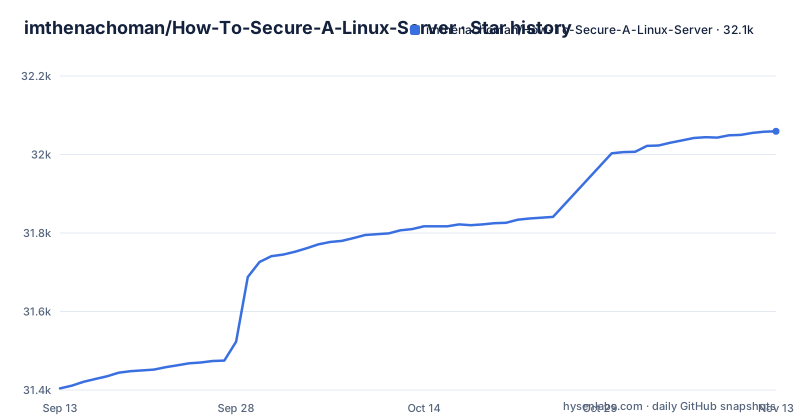
- imthenachoman/How-To-Secure-A-Linux-Server32,059 ★ · +655
| Repository | 2026-09-13 | 2026-11-13 |
|---|---|---|
| imthenachoman/How-To-Secure-A-Linux-Server | 31.4k | 32.1k |
655 Stars in the last 61 days, measured from the daily GitHub snapshot. Compare with other projects
Editorial analysis
The problem: hardening advice scattered across hundreds of articles
The README states the motivation directly. Information about securing Linux is spread across different articles that cover different things in different ways, and the author says he kept notes during a Debian build and turned them into a guide. The stated purpose is to teach you how to secure a Linux server and, in the author's words, also teach a little about security and why it matters. The audience is someone running a server exposed to the public internet who wants a single ordered path through the material rather than a search engine's worth of tabs. That framing matters for how you read the repository: it is a teaching document with an opinionated sequence, not a scanner, not a compliance report, and not a configuration management tool. The README also concedes that many topics are basic or trivial, which is honest but also tells you the guide is aimed at people early in the process, not at teams already running hardened fleets.
How the material is organized: a table of contents as the mechanism
There is no runtime here. The mechanism is the document structure. The README opens with a generated table of contents (made with the author's own nGitHubTOC tool) that splits the work into Introduction, Guide Overview, Before You Start, The SSH Server, The Basics, The Network, The Auditing, The Danger Zone, The Miscellaneous, and Left Over. Each of those is a section of the guide with its own subsections and anchors, so a reader can jump to a topic and return to the table of contents. The ordering is deliberate: you are told to identify your principles and pick a distribution before touching SSH, and network controls such as UFW, PSAD, Fail2Ban, and CrowdSec come after the SSH and baseline sections. That order is the guide's real content. The document is also described as evolving, with topics added as the author learns or as contributors send changes, so the table of contents is the map of what currently exists rather than a fixed curriculum.
What the guide actually covers, section by section
The SSH section covers public and private keys, creating a group for AllowGroups, editing /etc/ssh/sshd_config, removing short Diffie-Hellman keys, and 2FA/MFA for SSH. The Basics section covers limiting who can use sudo and su, running applications in a sandbox with FireJail, an NTP client, securing /proc, forcing secure passwords, automatic security updates and alerts, a more secure random entropy pool (marked WIP), and a panic or secondary password login system. The Network section covers UFW, the interaction between Docker and UFW, iptables intrusion detection with PSAD, and application-level detection with Fail2Ban and separately with CrowdSec. The Auditing section lists AIDE, ClamAV, Rkhunter, chrootkit (all four marked WIP), logwatch, ss for seeing listening ports, Lynis, and OSSEC. The Miscellaneous section covers MSMTP with Google, Gmail and Exim4 as an MTA with implicit TLS, and a separate iptables log file. The breadth is the point: a reader gets one place to look for each of these areas, with the caveat that the WIP markers are not decorative.
Getting started: what the guide asks you to do before commands
The Before You Start section is where the practical constraints live. It asks you to identify your principles, pick a Linux distribution, install Linux, and review pre/post installation requirements and other important notes. There is also a subsection on using Ansible playbooks to secure your Linux server, which points outward rather than inward: the README credits How To Secure A Linux Server With Ansible by moltenbit as the playbook version of this guide. That is the honest division of labor. If you want a runnable artifact, the guide sends you to that separate repository; if you want to understand what each change does and why, you stay here. Within the guide itself, the concrete configuration surface is file paths and service names rather than a CLI: /etc/ssh/sshd_config for SSH, UFW for firewall rules, Fail2Ban and CrowdSec for application-level blocking, PSAD for iptables-based detection, logwatch and Lynis for auditing, and msmtp or Exim4 for mail delivery. There is a dedicated Editing Configuration Files - For The Lazy subsection, which suggests the author expects readers to be editing files by hand on a live host rather than applying a declarative manifest.
The SSH warning is the guide's most important instruction
The table of contents contains a subsection literally titled Important Note Before You Make SSH Changes. That placement is not accidental. SSH is the section most likely to lock an administrator out of a remote machine, and the guide puts the warning at the top of the SSH block rather than burying it. The related steps, creating an SSH group for AllowGroups and editing sshd_config, are exactly the kind of change that can end a session if AllowGroups is set before the account is in the right group, or if the config is reloaded with a syntax error. The guide's structure assumes you have console or out-of-band access as a fallback. Treat that subsection as a prerequisite, not a preamble. The same caution applies to the Danger Zone section, whose name signals that the steps inside carry a higher chance of breaking something. A reader who skips straight to a command block from a search result is doing the opposite of what the document is designed for.
The WIP markers are the guide's clearest limitation
Five subsections carry a WIP tag in the table of contents: More Secure Random Entropy Pool under The Basics, and File/Folder Integrity Monitoring With AIDE, Anti-Virus Scanning With ClamAV, Rootkit Detection With Rkhunter, and Rootkit Detection With chrootkit under The Auditing. That is a meaningful share of the auditing material. The practical consequence is that the parts of the guide most associated with detection and verification are the parts least finished, while the parts associated with prevention and configuration are more complete. If your goal is to know whether a host has already been compromised, this guide's current state gives you logwatch, ss, Lynis, and OSSEC as the more developed options and leaves the file-integrity and rootkit tooling as placeholders. The README is upfront about this, describing the guide as evolving and noting that more material will be added. That is a reasonable posture for a personal project, but it means you should not treat the table of contents as a checklist of completed work. Read the WIP marker as a signal to consult the upstream tool's own documentation before relying on that section.
Alternatives: CIS Benchmarks, distribution guides, and the Ansible playbook
The README has its own Other Guides subsection, and the author acknowledges he has never found one guide that covers everything. The alternative that fits a different need most directly is the accompanying Ansible playbook repository, How To Secure A Linux Server With Ansible by moltenbit, linked from the README. The difference in approach is substantial. This guide is prose and manual edits: you read a section, open the named file or service, and apply the change yourself, which teaches you what the change does but does not produce a repeatable artifact. The playbook is declarative and repeatable: you run it against hosts and get the same result each time, which is what you want for more than one machine but which hides the reasoning unless you also read the guide. A second alternative is a formal benchmark such as the CIS distribution benchmarks, which are structured as auditable controls with pass/fail semantics rather than as a narrative. The trade-off is legibility versus verifiability. This guide explains why a setting exists; a benchmark tells you whether it is set. Neither replaces the other, and the guide's own Ansible pointer is an admission that manual editing does not scale past a small number of hosts.
Maintenance, licensing, and what to verify before you follow it
The repository is licensed CC-BY-SA-4.0, which is a content license rather than a software license. The practical implication is that reuse and adaptation carry attribution and share-alike conditions, and the README has a License and Copyright section plus a Contributing section for changes. That is a different regime from a code repository under MIT or Apache-2.0, and it fits the artifact: this is a document, and the license is chosen accordingly. On maintenance, the repository is not archived and the last push recorded is 2026-09-07, and it publishes no releases, which is consistent with a continuously edited document rather than versioned software. The cost of following it is therefore not upgrade cost in the dependency sense but re-reading cost: sections change, WIP markers get removed, and distribution-specific commands may drift. Before you apply anything, verify three things against your own system: that the package names in a section match your distribution, that the file paths such as /etc/ssh/sshd_config exist as written, and that you have out-of-band access in case an SSH change goes wrong.
Editorial conclusion
Adopt this guide if you administer one server, prefer to understand each change before applying it, and want the hardening steps grouped by area (SSH, basics, network, auditing). Do not adopt it if you need automated, repeatable configuration across many hosts: the repository points to a separate Ansible playbook project for that, and several auditing sections are still marked WIP. Before following it, read the Important Note Before You Make SSH Changes section and confirm your distribution and its package names, because the guide assumes you can adapt commands rather than copy them blindly.
Frequently asked questions
How can I harden my Linux server for security?
This guide walks through it in order: pick a distribution, edit sshd_config and restrict access with SSH keys and an AllowGroups group, limit sudo and su, set up UFW, then add Fail2Ban or CrowdSec and run auditing tools such as Lynis.
Which sections of How To Secure A Linux Server are unfinished?
Five are marked work in progress: AIDE file integrity monitoring, ClamAV anti-virus scanning, Rkhunter rootkit detection, chrootkit rootkit detection, and a more secure random entropy pool.
Does How To Secure A Linux Server include Ansible playbooks?
The guide points to a separate repository, How To Secure A Linux Server With Ansible by moltenbit, which makes the guide's steps available as playbooks. The main repository itself is a document, not a set of scripts.
How does the guide handle Docker and UFW together?
Docker And UFW is its own entry in the network section rather than being folded into the general UFW section.
Official sources
Add this badge to your README
If you maintain this project, the badge below links readers to this analysis and shows its maintenance status from the daily GitHub snapshot. Paste the markdown into your README; add ?metric=license or ?metric=stars to the image URL for a different field.

[](https://hysenlabs.com/projects/imthenachoman-how-to-secure-a-linux-server)Star history chart for your README
[](https://hysenlabs.com/projects/imthenachoman-how-to-secure-a-linux-server)Was this useful?