InfluxDB 3 Core: A Rust Rewrite That Stores Time Series as Parquet
Scalable datastore for metrics, events, and real-time analytics
At a glance
- What is it?
- InfluxDB 3 Core keeps the line protocol write path and the InfluxQL query path from earlier versions, but replaces the storage engine with Parquet files on object storage or local disk and adds SQL through DataFusion. It is a good fit for near real-time dashboards and a poor fit for anyone who needs the Flux language from 2.x.
- Who is it for?
- Adopt InfluxDB 3 Core if you write line protocol and read either SQL or InfluxQL, and you want the same binary to run against local disk in development and S3, Azure or GCP object storage in production. Do not adopt it if your dashboards are written in Flux, because this branch lists SQL and InfluxQL only, and the README points Flux users at the main-2.x branch.
- Can I use it commercially?
- Yes. Apache-2.0 is a permissive licence: you can use, modify and sell software built on it, as long as you keep its copyright and licence notices.
- Is it still maintained?
- Yes. The repository last received commits 1 day ago.
- What is it written in?
- Mainly Rust, according to GitHub's language statistics.
Answers come from the project's GitHub data, last synced on November 13, 2026, and from our analysis. They are not legal advice.
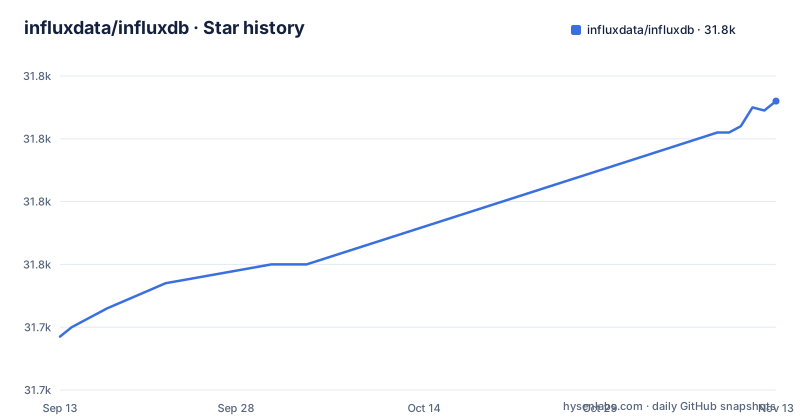
Star history
- influxdata/influxdb31,812 ★ · +75
| Repository | 2026-09-13 | 2026-11-13 |
|---|---|---|
| influxdata/influxdb | 31.7k | 31.8k |
75 Stars in the last 61 days, measured from the daily GitHub snapshot. Compare with other projects
Editorial analysis
The problem InfluxDB 3 Core targets: fast last-value reads over event streams
The README frames the product around a specific latency budget rather than around raw ingest volume. It lists fast query response times as a headline feature, quoting under 10ms for last-value queries and 30ms for distinct metadata. Those are the two query shapes a dashboard actually issues: what is the newest reading for this sensor, and what set of hosts or services currently exist. The stated use cases follow from that. Monitoring sensor data, server monitoring, application performance monitoring, network monitoring, financial market and trading analytics, and behavioral analytics all share the pattern of continuous writes plus frequent small reads that feed a user interface.
That framing matters because it tells you who this is not for. A warehouse that runs a large aggregation once an hour has different requirements. The README says InfluxDB is optimized for scenarios where near real-time data monitoring is essential and queries need to return quickly to support dashboards and interactive user interfaces. If your workload is batch analytics over cold data, the latency targets are irrelevant to you and the object storage layer is just a cost.
The project has been generally available since April 2025 according to the README, and the release tags in this repository show a steady cadence through the 3.11 and 3.12 lines, with v3.11.8 and v3.12.2 both released on 2026-11-02 and v1.13.2 on 2026-10-30. Parallel minor-line maintenance is a signal that the project is willing to backport fixes rather than force upgrades.
Parquet on object storage instead of a local time-structured merge tree
The architectural break from InfluxDB 1.x and 2.x is the persistence layer. The README describes a diskless architecture with object storage support, or local disk with no dependencies, and names Apache Parquet as the storage format on S3, Azure or GCP. The engine underneath is Rust with Apache Arrow and DataFusion, which is where the SQL support comes from.
This is a different set of trade-offs from a local LSM-style engine. Object storage decouples compute from the data it reads, so a node can be replaced without copying a local volume, and the same Parquet files are readable by any tool that speaks Parquet. The cost is that every query that misses whatever cache the engine keeps is a round trip to object storage, and the 10ms last-value figure in the README is a claim about the engine, not a property of S3. Anyone planning capacity should treat that number as the target the project is designing toward, not as a guarantee that holds on a cold cache or a cross-region bucket.
The README also says local disk works with no dependencies, which is the mode worth using for evaluation. You can confirm the storage layout, the file sizes and the query plans without provisioning a bucket first, then switch the backing store later.
Three query surfaces and two write surfaces, with the gaps spelled out
The query story is where the compatibility boundary is clearest. The README lists SQL, InfluxQL and Flight SQL as query languages, with a SQL query engine supporting FlightSQL and an HTTP query API, plus compatibility with the InfluxDB 1.x query API for InfluxQL. The write side accepts line protocol and is compatible with the InfluxDB 1.x and 2.x write APIs. The HTTP API listens on port 8181.
Read that list carefully, because the exclusions carry more weight than the inclusions. Flux does not appear anywhere in the v3 Core feature list. The version table in the README is explicit: the main branch (this one) offers SQL and InfluxQL, while the main-2.x branch offers Flux and InfluxQL. If your alerting rules, tasks or dashboards are written in Flux, this branch is not a drop-in replacement and the README lists the main-2.x branch as the version that offers Flux.
Flight SQL is the interesting addition for anyone building a service rather than a dashboard. It gives a columnar wire protocol that Arrow-native clients can consume directly, which avoids serialising rows to JSON over HTTP and then parsing them back. The README does not describe authentication, tenancy or user management for that endpoint, so treat those as things to confirm in the documentation rather than assumptions to build on.
Getting a local instance running from the published packages
The README does not inline a quickstart command. It points at the InfluxData downloads page for Docker images, Debian packages, RPM packages and tarballs, and at the getting started guide at docs.influxdata.com/influxdb3/core/get-started/ for the actual walkthrough. Building from source is covered in CONTRIBUTING.md under a building-from-source section, aimed at contributors rather than operators.
What the README does pin down is the interface contract you will be configuring against. Line protocol is the write format. The HTTP API is on port 8181. The storage backend is selectable between object storage on S3, Azure or GCP and local disk with no dependencies. Those three facts are enough to plan a deployment shape: a write client that speaks line protocol, a query client that speaks SQL over HTTP or Flight SQL, and a decision about where the Parquet files live.
The getting started guide is the source for the exact startup command and the object store configuration keys. What you can verify from the repository itself is the branch layout: main for v3 Core, main-2.x for v2.x, master-1.x for v1.x. Checking out the wrong branch is an easy mistake when the three versions share one repository.
The embedded Python VM is the least specified part of the design
The feature list includes an embedded Python VM for plugins and triggers. That is a notable choice for a Rust database: rather than asking users to write extensions in Rust and compile them against the engine, the project embeds a Python interpreter so processing logic can be written and changed without a rebuild.
The README stops there. It does not describe the plugin API, the trigger model, how the VM is isolated, what Python version is embedded, what the performance cost is per event, or what happens when a plugin raises. Those are not small omissions. A trigger that runs on the ingest path sits directly in front of your write latency, and the README's own headline numbers are under 10ms and 30ms for reads. Whether plugin execution is in that path, and what it does to throughput, is the first thing I would want to measure before putting transformation logic in Python rather than in the client.
I would also want to know whether plugins can reach the network. An embedded interpreter that can open sockets turns a database into a general compute host, which changes the security review considerably. The README does not say either way, so the safe reading is that this is an area to check in the documentation before enabling it in a shared environment.
What you give up compared with TimescaleDB or plain PostgreSQL
The obvious alternative for a team already running PostgreSQL is the TimescaleDB extension, or a hand-rolled schema with a time column and a B-tree index. The difference in approach is fundamental. PostgreSQL stores rows in its own heap and WAL, with a local disk assumption, and TimescaleDB adds chunking and compression on top of that. InfluxDB 3 Core stores columnar Parquet objects and pushes the query work into DataFusion. That means InfluxDB 3 Core can point at a bucket instead of a volume, and PostgreSQL cannot without an extension layer that is not part of its design.
What PostgreSQL gives you in return is everything else: joins against your application tables, transactions across arbitrary tables, mature replication topologies, and a query planner you already understand. The README's compatibility list is about InfluxDB's own 1.x and 2.x APIs, not about SQL dialect compatibility with PostgreSQL. If your queries need to join metrics to a customer table, that is a different architecture and probably a different product.
The other comparison worth naming is InfluxDB 2.x itself, since the README keeps it alive on a separate branch. The 2.x line gives you Flux and the task system that many existing InfluxDB deployments depend on. Moving to 3 Core means rewriting those in SQL or InfluxQL. For a deployment with a handful of dashboards that is a weekend. For one with a hundred Flux tasks, it is a migration project, and the README offers no automated translation path.
Maintenance, version branches and the licence you actually get
The repository carries three live version lines on separate branches, and the recent release list shows maintenance releases on more than one of them. That is a real operational cost to be aware of: fixes may land on the 3.11 line and the 3.12 line independently, so pinning to a specific minor version is safer than tracking main. The README directs readers to the v3.* tags and the release notes for the current version, which is where you should look before upgrading.
The licence situation needs reading rather than summarising. The README states the open source software is licensed under the permissive MIT or Apache 2 licenses at the user's choosing, and the repository holds both LICENSE-MIT and LICENSE-APACHE files. GitHub's metadata lists Apache-2.0 alone, which is not identical to the README's wording, so if you intend to redistribute or embed the project, read the licence files themselves. I am not in a position to give legal advice on which applies to your use.
The README also draws a line between open source and commercial code, saying the company's view is that open source code should be truly open and commercial code should be separate and closed. That is a statement about intent, and it implies InfluxDB 3 Enterprise exists as a separate product with its own getting started guide. Anyone evaluating 3 Core should check which features they need live on the Enterprise side before assuming the open source build covers them, because the README does not enumerate that split.
Editorial conclusion
Adopt InfluxDB 3 Core if you write line protocol and read either SQL or InfluxQL, and you want the same binary to run against local disk in development and S3, Azure or GCP object storage in production. Do not adopt it if your dashboards are written in Flux, because this branch lists SQL and InfluxQL only, and the README points Flux users at the main-2.x branch. Verify two things before committing: that your existing write clients target the 1.x or 2.x write APIs rather than something older, and that your retention and cardinality assumptions survive a storage model built on Parquet objects rather than a local time-structured merge tree.
Frequently asked questions
Is InfluxDB a SQL database?
On the v3 Core branch it accepts SQL. The query languages listed are SQL, InfluxQL and Flight SQL, and the engine is described as a SQL query engine with support for FlightSQL and an HTTP query API. It is still a time series database rather than a general relational one, since the storage format is Apache Parquet and writes arrive as line protocol.
Is InfluxDB SQL or NoSQL?
Both sides are represented, which is why the question has no clean answer. It answers SQL and InfluxQL on the `main` branch, while Flux appears on the 2.x and 1.x branches. Data is written as line protocol rather than SQL, and stored as Apache Parquet on object storage or local disk.
What is the purpose of InfluxDB?
Collecting, processing, transforming and storing event and time series data where near real time ingest and fast query response matter. The listed uses are monitoring sensor data, server monitoring, application performance monitoring, network monitoring, financial market and trading analytics, and behavioral analytics, aimed at dashboards and interactive interfaces.
how to install influxdb
Docker images, Debian packages, RPM packages and tarballs are published on the InfluxData downloads page, with a separate getting started guide for InfluxDB 3 Core and another for InfluxDB 3 Enterprise. Building from source is handled through the building from source guide in CONTRIBUTING.md.
how to use influxdb
Connect to the HTTP API on port 8181. Write data as line protocol, which stays compatible with the InfluxDB 1.x and 2.x write APIs, then read it back with SQL or InfluxQL, or use FlightSQL for the Arrow-native protocol. Query results are served from Parquet files on object storage or local disk.
Official sources
Add this badge to your README
If you maintain this project, the badge below links readers to this analysis and shows its maintenance status from the daily GitHub snapshot. Paste the markdown into your README; add ?metric=license or ?metric=stars to the image URL for a different field.

[](https://hysenlabs.com/projects/influxdata-influxdb)Star history chart for your README
[](https://hysenlabs.com/projects/influxdata-influxdb)Was this useful?