Misconfig Mapper hunts SaaS exposures from a services.json template file
Misconfig Mapper is a fast tool to help you uncover security misconfigurations on popular third-party services used by your company and/or bug bounty targets!
At a glance
- What is it?
- Misconfig Mapper is a Go CLI from Intigriti that enumerates the third-party services an organisation uses and then checks those instances for common misconfigurations, driven entirely by templates in a services.json file. It is built for the asset discovery problem that comes before a cloud review, not for exploiting what it finds.
- Who is it for?
- Adopt Misconfig Mapper if you need to know which SaaS platforms your organisation actually has accounts on, and then want an automated pass over those instances for common misconfigurations, since the template-driven design makes it cheap to extend to a service nobody has covered yet.
- Can I use it commercially?
- Yes. MIT is a permissive licence: you can use, modify and sell software built on it, as long as you keep its copyright and licence notices.
- Is it still maintained?
- Yes. The repository last received commits 2 days ago.
- What is it written in?
- Mainly Go, according to GitHub's language statistics.
Answers come from the project's GitHub data, last synced on November 7, 2026, and from our analysis. They are not legal advice.
Star history
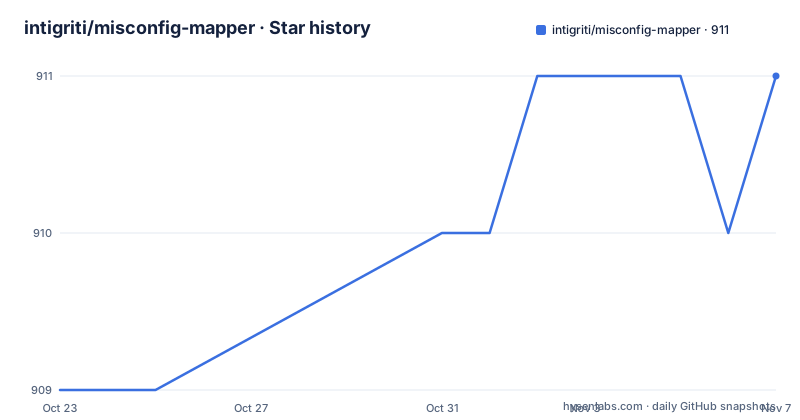
- intigriti/misconfig-mapper911 ★ · +2
| Repository | 2026-10-23 | 2026-11-07 |
|---|---|---|
| intigriti/misconfig-mapper | 909 | 911 |
2 Stars in the last 15 days, measured from the daily GitHub snapshot. Compare with other projects
Editorial analysis
The problem is that SaaS sprawl hides the accounts nobody tracks
Misconfig Mapper is a project by Intigriti for the community to help you find, detect and resolve common security misconfigurations in various popular services, technologies and SaaS-based solutions that your targets use.
The word targets is doing the work here, and it covers two audiences in one phrase: the services your own company uses, and the services belonging to a bug bounty or pentest target. The project description puts it as uncovering security misconfigurations on popular third-party services used by your company and/or bug bounty targets.
The underlying problem is inventory. A company runs a Jira instance, a GitLab, a Confluence, a Sentry, a Datadog, a handful of SaaS tools bought per team and never reviewed. Nobody has a complete list. The list lives in people's heads and in procurement records, and the misconfigurations live in the instances themselves: open sign-ups on a wiki, a public bucket, an exposed admin endpoint.
That is why the tool is built the way it is. The README says the CLI can identify and enumerate instances of services used by your company, and perform detection and misconfiguration checks at scale. By supplying a template with detection fingerprints and misconfiguration check fingerprints, the tool can quickly and accurately identify potential security risks in popular third-party software and services.
So there are two stages. Detection answers which services exist. The misconfiguration checks then probe those instances for specific known-bad configurations. The second stage is gated behind a flag, which is the right design: enumeration is often what you need, and a detection-only run produces a much quieter result.
This is a defensive posture tool. It reports misconfigurations for you to resolve, and the README frames the whole project as helping you resolve them.
Everything is driven by the services.json template file
The architecture is unusually simple, and that simplicity is the main design decision in the project.
The CLI tool is based on templates defined in the services.json file, and the README says you can add as many as you want. New services can be easily added by adding them to the services.json file. The repository layout confirms where things live: cmd/ holds the command entry point, internal/ and pkg/ hold the Go packages, and templates/ is the directory the templates come from.
Each template carries two kinds of fingerprint. A detection fingerprint is how the tool decides a service is present on a given host, and a misconfiguration check fingerprint is how it probes that instance for a specific problem. Both live in the same file, which means adding a service means writing one JSON entry rather than writing detection code and separate check code.
That is a big deal for the maintenance question. The README says the tool is based on templates and is versatile. A new service can be added by adding it to the services.json file. For a security tool whose value is the coverage of its catalogue, having the catalogue be data rather than code is the difference between a service being supported in an afternoon and not at all.
The templates are not bundled with the binary. If you download a release rather than building from source, the README marks it as important that you run a specific command to install the required templates.
./misconfig-mapper -update-templatesThe README explains that this command ensures that you download the latest templates that misconfig-mapper requires. So the binary and the template catalogue version independently, and the update command is how you pull a newer catalogue.
Two other template-adjacent commands help you see what you are working with. -list-services prints all services with their associated IDs, and -list-templates is described in the flag help as an alias for it.
Installing the CLI and building it from source
The recommended install is a single go install, with Go version 1.24 or newer recommended.
$ go install github.com/intigriti/misconfig-mapper/cmd/misconfig-mapper@latestAfter installation, the misconfig-mapper command will be available in your PATH if your Go bin directory is properly configured.
Building from source takes three steps. First check the toolchain.
$ go version
  go version go1.24.0 linux/amd64
Then clone the repository.
$ git clone https://github.com/intigriti/misconfig-mapper.gitThen compile the binary.
$ go build -o misconfig-mapper ./cmd/misconfig-mapperFinally, add or move the binary to a folder in your $PATH, which the README marks as optional.
Two details worth noting. The module file declares the module as github.com/intigriti/misconfig-mapper and the Go version as 1.26.0, which is newer than the 1.24 the README recommends, so building from a recent toolchain is the safe path. And the dependency list is remarkably short: golang.org/x/term, golang.org/x/time and, indirectly, golang.org/x/sys. The standard library does the heavy lifting, with no HTTP client library and no template engine in the dependency tree.
The project also ships CLI auto-completion for Bash and ZSH, which is a small sign of care for a tool that gets typed often. The Bash version defines a function with a fixed option list, and the ZSH version uses the _arguments mechanism with a compdef header. For ZSH, the README asks you to save the file as _auto_completion_misconfig_mapper under your $fpath and then initialise the completion system with autoload -U compinit followed by compinit.
Permutations, the as-domain flag, and why the two are exclusive
Two flags define how the tool turns your target into a list of hosts, and the README is explicit that they cannot be combined.
The -permutations flag enables permutations and looks for several other keywords of your target. It defaults to true. So if you pass a company name, the tool automatically generates permutations based on the keyword you provided and tries to find any matching services.
The -as-domain flag treats the target as if it is a domain, and it cannot be used with -permutations. Both flags carry that constraint in their own help text: -as-domain cannot be used with -permutations, and -permutations cannot be used with -as-domain.
That is a sensible split. A company name is a keyword to be permuted into candidate hostnames, because a company's Jira might live at acme.atlassian.net, jira.acme.com or acme-jira.enterprise.net. A domain is a precise hostname, and permuting it would only generate noise.
The rest of the flags are the practical controls for a scan that touches someone else's infrastructure. -delay specifies a delay between each request sent in milliseconds to enforce a rate limit. -timeout bounds the request. -max-redirects sets how many redirects to follow, defaulting to 5. -skip-ssl skips SSL/TLS verification. -headers passes request headers to comply with any request requirements, with each header separated using a double semi-colon.
-headers "User-Agent: xyz;; Cookie: session=eyJ...;;"The double semicolon separator is an unusual choice and it exists to avoid the ambiguity that a single semicolon would create in header values. It is the sort of detail that you only notice when a scan behaves strangely.
-output-json formats the output as JSON, which is what makes the tool usable from a script rather than only by eye.
Four usage shapes, from full scan to detection only
The README gives four examples, and together they cover the realistic range of use.
The first performs a scan to enumerate all misconfigured third-party services, using a service wildcard and a delay.
$ ./misconfig-mapper -target "yourcompanyname" -service "*" -delay 1000The second is the same scan without the misconfiguration checks, which the README describes as a detection-only scan to enumerate all third-party services.
$ ./misconfig-mapper -target "yourcompanyname" -service "*" -skip-misconfiguration-checks trueThe third narrows the run to one specific service, by ID or by name.
$ ./misconfig-mapper -target "yourcompanyname" -service 1$ ./misconfig-mapper -target "yourcompanyname" -service "drupal"The fourth prints out all loaded services with their associated IDs.
$ ./misconfig-mapper -list-servicesThe -service flag's help text explains the numbering. It says to specify the service ID you would like to check for, for example 0 for Atlassian Jira Open Signups, that comma separated values are used for multiple, for example 0,1 for two services, and that * checks all services. The default is 0, so a run without -service checks exactly one service, and you have to ask for more.
That default is worth pausing on. The named example, Atlassian Jira Open Signups, tells you what kind of check the catalogue contains: specific known-bad configurations on a named SaaS platform, not a generic vulnerability scan.
So the workflow the tool supports is: find which of the covered services the target actually runs, then check those instances for the specific misconfigurations the templates describe. The delay of 1000 milliseconds in the first example, and the rate limit flag, are there because step two involves sending real requests to someone else's servers.
Where Misconfig Mapper is the wrong tool
Four cases rule it out, and each one is a scope mismatch rather than a defect.
The first is when your SaaS inventory is already complete. The tool's centre of gravity is enumeration, from a company name outward through permutations. If you already know every SaaS instance you run and can enumerate them yourself, then what you want is the second half, and there are faster ways to point a set of specific checks at a known list of hosts.
The second is anything beyond the covered catalogue. The checks come from services.json, so a platform nobody has written a template for is not checked, full stop. There is no generic fallback that probes for arbitrary misconfigurations on arbitrary services. The tool is as good as its template file, and you cannot tell from the outside how complete that file is without reading it.
The third is a need for depth on a single platform. A template carries a specific misconfiguration check, which means the tool answers whether a known configuration is present. It does not enumerate the configuration surface of a service, and it does not tell you what else to look for. For one well-known platform, a full platform-specific scanner or a manual review will find more.
The fourth is a scope problem rather than a software problem, and it is the one to think about carefully. The tool generates permutations of a company name and sends requests to the hosts it guesses. Run against a bug bounty target, that guessing is the point, and it is why the -delay, -timeout and -skip-ssl flags exist. Run against your own company, the guessing is less useful and the traffic still leaves your network. Either way, the requests are yours and the responsibility for them is yours.
On the licence, it is MIT with a LICENSE.md at the repository root. The repository is not archived, the last push was on 2026-10-19, and the listed releases are v1.18.5, v1.18.4 and v1.18.3, all on 2026-08-10. Three releases on the same day in a patch series tells you the project ships often.
The alternative approach, when your target list is known and small, is to write your own checks against the documented API or configuration surface of each service and run them from a script. That is more work up front and it does not depend on a catalogue someone else maintains.
Editorial conclusion
Adopt Misconfig Mapper if you need to know which SaaS platforms your organisation actually has accounts on, and then want an automated pass over those instances for common misconfigurations, since the template-driven design makes it cheap to extend to a service nobody has covered yet. Do not adopt it if your asset inventory is already authoritative and complete, because enumeration is the part it is built around, and note that the tool will generate permutations of your company name and probe hosts on your behalf, so it needs to run inside a scope you are authorised to test. Before you run it against anything, install the templates with the update flag and read the list of covered services, so you know what the tool will send traffic to.
Frequently asked questions
How do I install Misconfig Mapper?
Install it with Go, version 1.24 or newer recommended, using go install github.com/intigriti/misconfig-mapper/cmd/misconfig-mapper@latest. From source, clone the repository and run go build -o misconfig-mapper ./cmd/misconfig-mapper.
Do I need to download templates separately?
Yes if you install a release binary. The README marks it as important to run ./misconfig-mapper -update-templates after downloading a release, because that command downloads the latest templates that misconfig-mapper requires.
What is the difference between -permutations and -as-domain?
The -permutations flag, which is on by default, generates permutations based on the keyword you provide and looks for several matching services. The -as-domain flag treats the target as a domain instead. The two flags cannot be used together.
How do I run Misconfig Mapper without checking for misconfigurations?
Pass -skip-misconfiguration-checks true, as in the README's second example, which enumerates the services in use without probing them for known misconfigurations.
How do I add a new service to the templates?
The CLI tool is based on templates defined in the services.json file, and the README says new services can be easily added by adding them to that file, with detection fingerprints and misconfiguration check fingerprints.
What licence is Misconfig Mapper released under?
MIT, with the LICENSE.md file at the root of the repository.
Official sources
Add this badge to your README
If you maintain this project, the badge below links readers to this analysis and shows its maintenance status from the daily GitHub snapshot. Paste the markdown into your README; add ?metric=license or ?metric=stars to the image URL for a different field.

[](https://hysenlabs.com/projects/intigriti-misconfig-mapper)Star history chart for your README
[](https://hysenlabs.com/projects/intigriti-misconfig-mapper)Was this useful?