intuit/auto: release automation driven by pull request labels
Generate releases based on semantic version labels on pull requests.
At a glance
- What is it?
- intuit/auto derives semantic version bumps and changelogs from labels on merged pull requests, then publishes through plugins. It is a CI-first tool for maintainers who already triage PRs by label, and the plugin list is where most of its practical weight sits.
- Who is it for?
- Adopt intuit/auto if your team already applies semver labels to pull requests and you want changelogs, version bumps and publishing to follow from that habit rather than from a separate release checklist. Skip it if your contributors will not label PRs consistently, if you need a release process that survives without a CI runner, or if you want a tool that changes version numbers without a publish step, since the README describes publishing as the point.
- Can I use it commercially?
- Yes. MIT is a permissive licence: you can use, modify and sell software built on it, as long as you keep its copyright and licence notices.
- Is it still maintained?
- Yes. The repository last received commits 5 days ago.
- What is it written in?
- Mainly TypeScript, according to GitHub's language statistics.
Answers come from the project's GitHub data, last synced on October 24, 2026, and from our analysis. They are not legal advice.
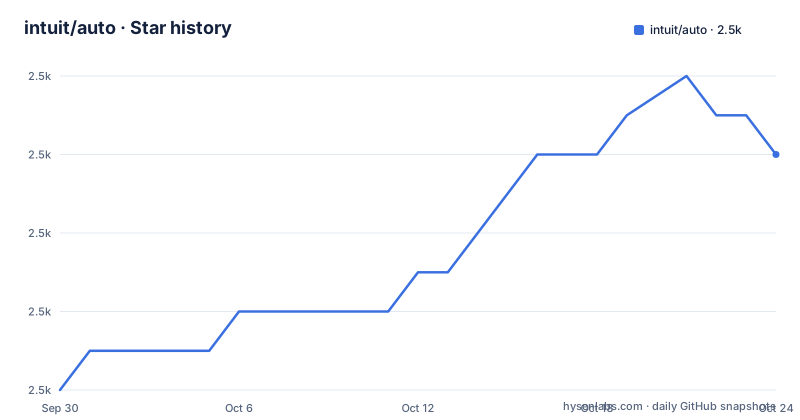
Star history
- intuit/auto2,498 ★ · +6
| Repository | 2026-09-30 | 2026-10-24 |
|---|---|---|
| intuit/auto | 2.5k | 2.5k |
6 Stars in the last 24 days, measured from the daily GitHub snapshot. Compare with other projects
Editorial analysis
The problem intuit/auto solves: releases that follow from PR labels
Most release tooling asks for a decision at release time. Someone reads the merged pull requests, decides whether the change is a patch, a minor or a major, edits a version file, writes a changelog entry and pushes a tag. intuit/auto moves that decision earlier. The README states the tool generates releases based on semantic version labels on pull requests, so the label applied during review is the version decision, and the release step becomes mechanical.
The target user is a maintainer of a repository where pull requests are already reviewed and labelled. The README lists the release features directly: calculate semantic version bumps from PRs, skip a release with the skip-release label, publish canary releases from PRs or locally, generate changelogs with headers, authors and monorepo package association, use labels to create new changelog sections, and generate a GitHub release. Every one of those depends on labels being present and correct. If your project does not label PRs, intuit/auto has nothing to read.
There is a second, smaller surface. The README groups PR interaction features separately: get the labels for a PR, set the status of a PR, check that a pull request has a SemVer label, comment on a PR with markdown, and update the PR body with contextual build metadata. That last one matters more than it sounds. A CI job that writes build metadata into the PR body gives reviewers a place to see what the release would contain before it happens.
How intuit/auto turns labels into a version and a changelog
The mechanism is a pipeline over merged pull requests. Labels are read from PRs, mapped to a semantic version bump, and the result is written into a changelog and a GitHub release. The README does not describe the internal algorithm beyond that, so treat the label-to-bump mapping as configuration you verify rather than assume.
The plugin system is where the pipeline ends. The README describes an extensive plugin system with a wide variety of official plugins, and separates them into package managers and extra functionality. Package manager plugins include brew, chrome, cocoapods, crates, docker, gem, git-tag, gradle, maven, npm, sbt and vscode. Extra functionality plugins include all-contributors, conventional-commits, exec, first-time-contributor, gh-pages, jira, magic-zero, microsoft-teams, omit-commits, omit-release-notes, pr-body-labels, released, s3, slack, twitter, upload-assets and protected-branch.
Two defaults are stated in the README and they change how you configure things. The npm plugin is the default when intuit/auto is installed through npm, and the git-tag plugin is the default when it is used as a binary. So the same tool publishes to npm or manages a plain git tag depending on how it arrived on the machine. That is a sensible default for JavaScript projects and a surprise for anyone who installs the binary expecting npm publishing.
Some plugins are about the shape of the changelog rather than the destination. conventional-commits parses commit messages for version bumps, which is a second source of version truth alongside labels. magic-zero is described as closely adhering to semver versioning for 0.0.x and 0.x.y releases, which matters because pre-1.0 projects have their own conventions about what a breaking change means. pr-body-labels lets outside contributors indicate what semver label should be applied to the pull request, which addresses the case where the person who knows the change best cannot apply labels themselves.
Installing intuit/auto and running a first release locally
The README points to the documentation site at https://intuit.github.io/auto/ for more information, and the install path shown in the repository is npm, since the npm plugin is the default when intuit/auto is installed through npm. The repository's own package.json exposes the CLI through a script that builds the binary and runs it from packages/cli/dist/bin/auto.js, which is how the maintainers invoke it during development rather than how a user installs it.
The README states that intuit/auto is meant to be run in a continuous integration environment, but that all the commands work locally as well. That local mode is the right way to see what the tool would do before wiring it into CI, because you can inspect the changelog and the computed version without publishing anything.
A minimal configuration lives in an auto.config.ts file at the repository root, which is the layout the project itself uses. The README does not print a config example, so what follows is only the file name and the shape the repository demonstrates, not a documented schema:
// auto.config.ts at the repository rootFor the build side, the repository's scripts show the commands the maintainers use. Installing dependencies and building are separate steps, and the README notes you must build at least once before running tests or lint:
yarn
yarn build
Watch mode during development is a separate script:
yarn startInstalling the bundled binary on macOS is a script that bundles the CLI, decompresses it and writes it to /usr/local/bin/auto. The README's own text is truncated mid-sentence at "This requi", so the prerequisites for the binary install are not fully stated in the README, only the command itself:
yarn install-macAfter that, the binary is on the path as auto. What you should see when you run it against a repository with labelled merged PRs is a computed version and a changelog; the README does not document the exact output format, so check the documentation site for the command reference before relying on a specific format.
Where intuit/auto stops being the right tool
The clearest limitation is the dependency on labels. Every release feature in the README is expressed in terms of labels: semantic version bumps from PRs, skipping a release with the skip-release label, using labels to create new changelog sections. A repository where labels are applied inconsistently, or where a bot merges dependabot-style PRs without labels, produces a release that is wrong or absent. The README does not document what happens when a merged PR has no semver label at all, so the failure mode in that case is unstated and worth testing before you depend on it.
A second boundary is the CI assumption. The README says the tool is meant to be run in a CI environment and that commands work locally, which is not the same as saying the workflow is CI-independent. Publishing, generating a GitHub release and posting to Slack all require credentials and a runner. If your release process has to work from a laptop with no CI, you are using a subset of the tool.
The plugin list also cuts both ways. There are plugins for npm, docker, gem, gradle, maven, sbt, crates, cocoapods, brew, chrome and vscode, which covers a lot of registries, but the list is the integration surface. If your artifact destination is not on it, you are writing a plugin or falling back to the exec plugin, which the README describes as tapping into hooks and running scripts on the terminal. At that point intuit/auto is orchestrating your script rather than understanding your registry.
Finally, the version calculation has more than one possible source. The conventional-commits plugin parses commit messages for version bumps while the core reads labels. Running both without a clear precedence rule means two systems can disagree about whether a change is minor or major, and the README does not describe how that conflict resolves.
intuit/auto compared with semantic-release
The direct alternative for the same job is semantic-release, and the difference is where the version decision comes from. semantic-release derives the release type from commit message conventions. intuit/auto derives it from pull request labels, and offers conventional-commits as an optional plugin for teams that also want commit parsing.
That difference is not cosmetic. Commit-message-driven tools depend on every contributor writing conforming messages, which is enforceable with a commit hook but easy to bypass with a squash merge that rewrites the message. Label-driven releases depend on whoever reviews the PR applying a label, which is a human step at a moment when a human is already looking at the change. Teams with a review culture and a label taxonomy tend to find the label model easier to keep honest. Teams that rely on automated merges and want zero human steps find it harder.
The second difference is the plugin model. semantic-release has a plugin ecosystem too, but intuit/auto's README lists a broad set of first-party plugins for registries that are not npm, including cocoapods, crates, gem, gradle, maven and sbt, plus non-registry destinations like s3, gh-pages, jira and twitter. If you ship to one of those, the comparison is less about the versioning model and more about whether the plugin you need already exists in the project you are evaluating.
A third difference worth naming: intuit/auto exposes PR interaction commands (get labels, set status, check for a SemVer label, comment, update the PR body). Those are useful outside the release path, for example a CI check that fails a PR missing a semver label. semantic-release is narrower in scope.
Maintenance, licence and upgrade cost
The repository is not archived, and the last push was on 2026-06-18. The most recent release listed is v11.3.6 on 2025-11-14, with v11.3.5 and v11.3.4 earlier the same day. That pattern, three patch releases within about forty-five minutes, suggests a burst of fixes rather than a steady release cadence, and it is worth reading the changelog for those versions if you are pinning a version.
The licence is MIT, declared in the repository's package.json and in the LICENSE file at the top level. MIT is permissive: it allows use, modification and redistribution with the copyright notice and licence text retained. This is a description of the licence text, not legal advice, and if you redistribute intuit/auto inside a product you should read the LICENSE file yourself.
Upgrade cost is dominated by the plugin boundary rather than the core. Because publishing goes through plugins, a major version of intuit/auto can change plugin interfaces without changing the label-to-version logic you rely on. The repository is a monorepo with packages/ and plugins/ workspaces, and the CLI is a separate package, so version numbers can move independently across those workspaces. Before upgrading, check the changelog for the plugins you actually enable, not only the core release notes.
If you use the bundled binary rather than npm, note that the README's binary install section is truncated in the repository text, so the full prerequisites are not visible there. The documentation site is the place to confirm them.
Editorial conclusion
Adopt intuit/auto if your team already applies semver labels to pull requests and you want changelogs, version bumps and publishing to follow from that habit rather than from a separate release checklist. Skip it if your contributors will not label PRs consistently, if you need a release process that survives without a CI runner, or if you want a tool that changes version numbers without a publish step, since the README describes publishing as the point. Before committing, verify three things in your own repository: that the default plugin matches how you ship (npm when installed through npm, git-tag when used with the binary), that your CI token can create GitHub releases and push tags, and which of the official plugins covers your registry, because the README presents the plugin list as the integration surface rather than the core.
Frequently asked questions
What is intuit/auto and what does it do?
intuit/auto generates releases based on semantic version labels on pull requests. The README lists calculating semantic version bumps from PRs, generating changelogs, publishing canary releases and creating a GitHub release among its features.
Which package managers can intuit/auto publish to?
The README lists official package manager plugins for brew, chrome, cocoapods, crates, docker, gem, git-tag, gradle, maven, npm, sbt and vscode. The npm plugin is the default when intuit/auto is installed through npm, and git-tag is the default when it is used with the binary.
Does intuit/auto only work in CI?
No. The README states that intuit/auto is meant to be run in a continuous integration environment, but that all the commands work locally as well.
How do I skip a release with intuit/auto?
The README lists skipping a release with the skip-release label as one of the release features. Applying that label to a pull request is the documented way to prevent it from contributing to a release.
Official sources
Add this badge to your README
If you maintain this project, the badge below links readers to this analysis and shows its maintenance status from the daily GitHub snapshot. Paste the markdown into your README; add ?metric=license or ?metric=stars to the image URL for a different field.

[](https://hysenlabs.com/projects/intuit-auto)Star history chart for your README
[](https://hysenlabs.com/projects/intuit-auto)Was this useful?