InvoiceShelf 3.x: Self-Hosted Invoicing with a Clear Production Boundary
Open Source Invoicing Solution for Individuals & Businesses
At a glance
- What is it?
- InvoiceShelf is a PHP-based invoicing application for freelancers and small businesses that want to manage invoices, payments, expenses, taxes, reports, and customer access on their own infrastructure. The 3.x branch is an alpha preview, so production users should start with the supported 2.x release.
- Who is it for?
- InvoiceShelf fits freelancers and small businesses that want invoicing, payment tracking, expenses, and customer records under their own control.
- Can I use it commercially?
- Yes, with strict conditions. AGPL-3.0 is a network copyleft licence: if people use a modified version over a network, for example as a hosted service, you must offer them its source code under the same licence.
- Is it still maintained?
- Yes. The repository received new commits within the last day.
- What is it written in?
- Mainly PHP, according to GitHub's language statistics.
Answers come from the project's GitHub data, last synced on October 23, 2026, and from our analysis. They are not legal advice.
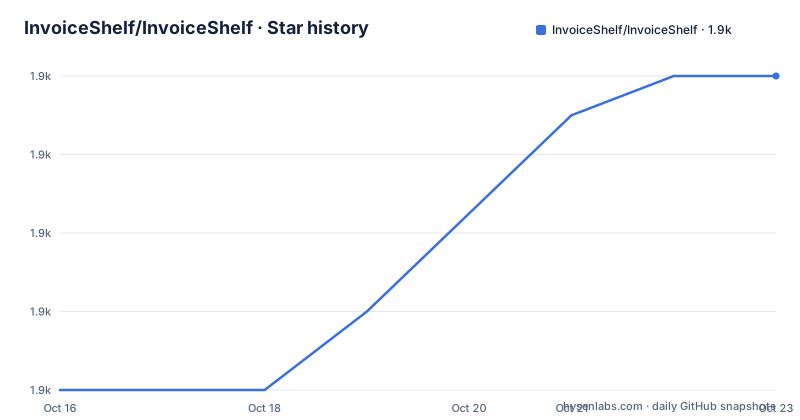
Star history
- InvoiceShelf/InvoiceShelf1,866 ★ · +8
| Repository | 2026-10-16 | 2026-10-23 |
|---|---|---|
| InvoiceShelf/InvoiceShelf | 1.9k | 1.9k |
8 Stars in the last 7 days, measured from the daily GitHub snapshot. Compare with other projects
Editorial analysis
What InvoiceShelf Handles for Freelancers and Small Businesses
InvoiceShelf addresses the administrative work that follows a sale: creating an invoice, recording a payment, checking what a customer still owes, and preserving an account history. The README positions it as a self-hosted web application for people who want to own their business data. That makes it relevant to freelancers and small businesses that prefer operating their own server rather than sending every invoice and customer record to an external service.
The scope is broader than invoice creation alone. The documented features include estimates, PDF exports, expenses, taxes, business reports, recurring invoices, and a customer portal. Multiple companies and team members with scoped roles are also supported. These features matter for an operator who needs one application to manage several workflows instead of separating invoice files, payment notes, and customer communication across unrelated tools.
The repository's application code is primarily PHP, while the repository also contains JavaScript and TypeScript assets, Vue-related tooling, database files, routes, configuration, and tests. The README links to an API reference, but it does not document an API workflow in the installation example. The clearest adoption question is therefore operational: whether the organization can host and maintain a PHP web application with its associated runtime and database.
InvoiceShelf's Data Flow and Self-Hosted Architecture
InvoiceShelf presents a browser-based application rather than a command-line invoice generator. The README describes a dashboard showing what customers owe, with overdue and due-soon categories, plus a year of sales, receipts, and expenses. That dashboard implies a workflow in which invoice records, payment records, and business events are stored in the application's database and then presented as summaries for the operator.
The application supports SQLite, MySQL/MariaDB, and PostgreSQL on the 3.x branch. The `.env.example` defaults to SQLite and includes connection variables such as `DB_CONNECTION`, `DB_DATABASE`, `DB_USERNAME`, and `DB_PASSWORD`. It also documents SQLite settings for busy timeout and journal mode, including the comment that WAL suits a local disk and should be left unset on network filesystems. That is an explicit storage constraint worth considering before selecting a deployment layout.
The customer portal is part of the documented architecture: customers can view invoices, estimates, and payment history. Team members can be invited with scoped roles, while multiple companies can be managed from the same application. These features imply shared application state with access boundaries, not a local document converter. The README does not specify the individual tables, payment gateways, authentication implementation, or API endpoints, so those details should be confirmed in the documentation or source before relying on a particular integration.
Docker Setup for a First InvoiceShelf Instance
The README provides a concrete Docker path for a first local instance. The commands clone the separate InvoiceShelf Docker repository, copy its SQLite Compose file, start the services, and use port `8090`. For the 3.x preview, the image tag must be changed to `:next`. The project documentation says that Docker includes the required application runtime.
Use the following commands for a local preview installation:
git clone https://github.com/InvoiceShelf/docker.git invoiceshelf
cd invoiceshelf
cp docker-compose.sqlite.yml docker-compose.yml
docker compose up -d
After the Compose file is selected, change its image tag to `:next` when using the 3.x preview. The README gives the tag instruction explicitly, but it does not include the surrounding Compose file contents in the application repository description, so the exact line should be edited in the cloned file rather than guessed. Open `http://localhost:8090` and complete the setup wizard. The wizard is the first documented application action after startup.
For a traditional deployment, the README directs users to its manual installation guide. It states that 3.x requires PHP 8.4 and supports MySQL/MariaDB, PostgreSQL, and SQLite. A public server requires reading the Docker guide first, according to the README. That requirement matters because a local SQLite instance does not answer questions about TLS, proxy headers, backups, process supervision, or database access from multiple hosts.
Production Limits of the 3.x Alpha Preview
The most consequential limitation is stated in the README itself: the default `3.x` branch is an alpha preview. It is intended for testing and feedback, not production data. The README points production installations to the supported `2.x` release. This is not a minor warning around an optional feature. It defines the intended maturity boundary for the branch an adopter is most likely to encounter by default.
The repository is not archived, and its last push was on 2026-10-13. Recent release entries include `3.0.0-alpha.8`, `3.0.0-alpha.9`, and `3.0.0-alpha.10`, all dated in September 2026. Those facts show recent branch activity, but they do not remove the README's production restriction. For a business handling customer records and payment history, the branch choice matters more than the existence of recent commits.
The `.env.example` also exposes security-relevant defaults. `TRUSTED_PROXIES` defaults to `"*"`, while `FORCE_HTTPS` can be set when TLS terminates outside the forwarded request headers. `DOMPDF_ENABLE_REMOTE` defaults to `false` because untrusted HTML in PDF notes could otherwise trigger outbound requests. These settings are not abstract hardening advice. They are project-specific choices that determine proxy handling, generated URLs, and whether PDF rendering may fetch remote resources. An operator deploying InvoiceShelf should review those keys instead of copying `.env.example` without checking the server topology.
How InvoiceShelf Differs from Hosted Invoicing
A hosted invoicing service is the practical alternative: the provider operates the application, database, upgrades, and public web endpoint, while the customer uses its browser interface. InvoiceShelf takes a different operational approach. It is self-hosted, so the adopter chooses the server, database, Compose setup, environment configuration, and maintenance schedule. The README's emphasis on owning business data is central to that distinction.
This trade-off changes the cost profile. A hosted service removes some server administration, but it places the application and records under the provider's operating boundary. InvoiceShelf gives the operator more control over where the instance runs, but adds responsibility for Docker, PHP, database availability, TLS termination, proxy configuration, backups, and upgrades. The repository's presence of `docker/`, `composer.json`, `database/`, `config/`, `Makefile`, and `tests/` reflects that broader operational surface.
The README does not document migration procedures from a hosted provider, payment gateway configuration, or rollback behavior. Those are not interchangeable features with self-hosting. If the deciding factor is reduced infrastructure work rather than control, a hosted service may fit better. If the deciding factor is keeping invoice and customer data under the operator's own administration, InvoiceShelf is the more relevant choice, subject to using the supported production branch.
License, Modules, and Operational Responsibilities
InvoiceShelf is released under the GNU Affero General Public License v3.0, identified in the repository as `AGPL-3.0`. The README links to the project's `LICENSE` file. This is a source and distribution consideration, not a substitute for legal review. An organization that modifies InvoiceShelf or offers the application over a network should review the actual license text and its obligations for the way it distributes or makes the software available.
The README says optional official modules can add specialized features without making the core application heavier. It does not identify the modules, so the adoption decision cannot assume a specific extension is available or compatible with a chosen release. Multiple companies, roles, reports, recurring invoices, and the customer portal are listed as core workflow capabilities, but the documentation does not explain their permission model in detail.
Maintenance responsibility follows the deployment model. The repository is not archived and the last push was on 2026-10-13, but the 3.x branch remains an alpha preview. The operator must also account for the supported `2.x` line, the PHP 8.4 requirement for 3.x, database maintenance, and application upgrades. The README provides an installation guide and API reference, but it does not document rollback. That missing procedure is especially relevant when a preview branch contains business records.
Editorial conclusion
InvoiceShelf fits freelancers and small businesses that want invoicing, payment tracking, expenses, and customer records under their own control. It is a poor production choice for the default 3.x branch because the README labels that branch an alpha preview and directs production users to 2.x. Before adopting it, verify the supported release, database choice, trusted proxy settings, PDF remote-resource policy, backup procedure, and upgrade path rather than starting a production database with 3.x.
Frequently asked questions
Can InvoiceShelf be installed with Docker?
Yes. The README provides an official Docker setup using `docker-compose.sqlite.yml`, then instructs operators to run `docker compose up -d` and open `http://localhost:8090`. For the 3.x preview, use the `:next` image tag rather than `:latest`.
Is the InvoiceShelf 3.x branch suitable for production?
No, not according to the README. It labels the default `3.x` branch an alpha preview for testing and feedback, and directs production installations to the supported `2.x` release.
Which databases does InvoiceShelf support?
The README states that InvoiceShelf 3.x supports MySQL/MariaDB, PostgreSQL, and SQLite. The `.env.example` defaults to SQLite and also includes connection settings for the other supported database types.
Official sources
Add this badge to your README
If you maintain this project, the badge below links readers to this analysis and shows its maintenance status from the daily GitHub snapshot. Paste the markdown into your README; add ?metric=license or ?metric=stars to the image URL for a different field.

[](https://hysenlabs.com/projects/invoiceshelf-invoiceshelf)Star history chart for your README
[](https://hysenlabs.com/projects/invoiceshelf-invoiceshelf)Was this useful?