is-a-dev/register: a free .is-a.dev subdomain claimed through a pull request
Grab your own sweet-looking '.is-a.dev' subdomain.
At a glance
- What is it?
- is-a-dev/register is a GitHub repository where developers add a JSON file to get a free .is-a.dev subdomain. The process is manual, reviewed, and dependent on a maintainer merging your pull request.
- Who is it for?
- is-a-dev/register suits developers who want a free, recognisable subdomain for a personal site and are willing to wait for a human to merge a pull request. It is the wrong tool for anyone who needs a custom apex domain, guaranteed uptime, or an automated provisioning API.
- Can I use it commercially?
- Yes. MIT is a permissive licence: you can use, modify and sell software built on it, as long as you keep its copyright and licence notices.
- Is it still maintained?
- Yes. The repository received new commits within the last day.
- What is it written in?
- Mainly JavaScript, according to GitHub's language statistics.
Answers come from the project's GitHub data, last synced on November 15, 2026, and from our analysis. They are not legal advice.
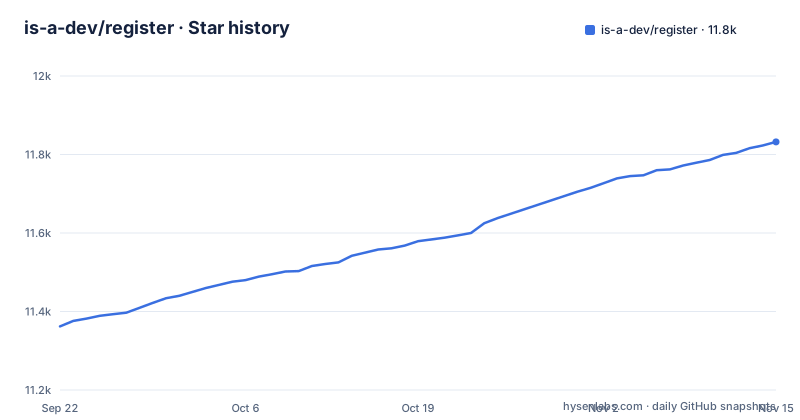
Star history
- is-a-dev/register11,832 ★ · +470
| Repository | 2026-09-22 | 2026-11-15 |
|---|---|---|
| is-a-dev/register | 11.4k | 11.8k |
470 Stars in the last 54 days, measured from the daily GitHub snapshot. Compare with other projects
Editorial analysis
What is-a-dev/register actually gives you
The project publishes subdomains under the shared apex is-a.dev. You do not buy anything and you do not run a nameserver. You get a hostname such as yourname.is-a.dev that points wherever your DNS records say, typically a GitHub Pages site or a personal server. The README describes it plainly: is-a.dev "is a service that allows developers to get a sweet-looking .is-a.dev subdomain for their personal websites."
The audience is narrow and specific. This is for individual developers who want a short, memorable address for a portfolio, a blog, or a side project, and who already have somewhere to host it. It is not a domain registrar, not a hosting product, and not a DNS control panel in the usual sense. Everything runs through a GitHub repository, which means your ability to change records depends on your ability to open and merge a pull request.
The pull request is the provisioning API
There is no signup form and no dashboard. The repository layout shows the mechanism: a domains/ directory holds one file per registered subdomain, and dnsconfig.js sits at the top level alongside util/ and tests/. To claim a subdomain you fork the repository, add or edit the file that represents your name, and open a pull request. A maintainer reviews it. If changes are requested, the README is blunt about the consequence: make them, "otherwise you will be rejected."
Once merged, the README states that DNS records "should be published with-in a few minutes." The repository is supported by Cloudflare's Project Alexandria program for DNS management, which is where that publication step happens. The practical effect is that the domains/ directory is the source of truth, and the pull request history is the audit log. If you want to know who claimed what and when, you read the git history rather than querying an API.
That design has a cost. Every change, including a routine record update, goes through the same review path as a new registration. There is no self-service edit, and the README does not document rollback or an emergency path for a record that is wrong.
Forking the repository and landing your first subdomain
The README points to docs.is-a.dev for the actual file format and says explicitly: "Do not use AI to generate your request, it WILL always get it wrong and will delay you getting a domain." Take that instruction seriously and read the documentation before writing anything.
Start by forking the repository on GitHub, then clone your fork locally:
git clone https://github.com/<your-username>/register.git
cd register
The repository ships a package.json with three scripts, and the test script is the one that matters before you push:
npm install
npm test
That runs `npx ava tests/*.test.js` against the files in the repository, so a malformed entry fails locally instead of during review. There is also a reserved-subdomain helper:
npm run add:reservedAfter the tests pass, commit your new file under domains/, push to your fork, and open a pull request against main. Keep the pull request open in a browser tab. The README warns to watch it "in case changes are needed," because a review comment that goes unanswered becomes a rejection.
Where the model breaks down
The clearest limitation is that you are a guest on someone else's apex domain. If the service changes its terms, stops operating, or decides your subdomain violates the terms of service, you have no contractual claim to the name. The README links to a terms page and an abuse-reporting issue template, which tells you enforcement exists, but it does not describe an appeal process or a notice period.
Latency is the second constraint. A merge depends on a maintainer reviewing your pull request, and the README's own framing assumes the review may request changes. That is fine for a portfolio site that is not yet live. It is a poor fit if you are pointing a production service at the subdomain on a deadline, or if you need to make a DNS change during an incident.
Third, the subdomain is not a substitute for a domain you control. If your project needs email authentication, strict TLS policy, or a brand that will outlive someone else's service, register your own domain instead.
Compared with js.org and the free-domains family
The obvious alternative in the same niche is js.org, which offers free subdomains to JavaScript projects. The difference is in eligibility and framing rather than mechanism: js.org is scoped to a language community, while is-a.dev is framed around personal developer sites.
The README also points to a sibling service from the same maintainer group: "We've launched another free subdomain service! Claim your .is-a.bot subdomain here," linking to github.com/free-domains/is-a.bot. That is a second apex with a different name, presumably with the same pull-request workflow. If the name you want is taken on is-a.dev, the sibling is a real option rather than a fallback you have to research from scratch.
Against a conventional registrar, the trade is straightforward. A registrar charges money and gives you control of the apex, an API, and a support contract. is-a.dev charges nothing and gives you a file in a git repository plus a review queue. Choose based on whether you need control or just an address.
Licence, maintenance and what upgrades look like
The repository is MIT licensed, which covers the code and configuration files in the repository. It does not grant you ownership of the is-a.dev name, and the README points to a separate terms of service page for the service itself. Read both before assuming the licence tells you anything about your subdomain's tenure; it governs the repository contents, not the DNS zone.
The last push to the default branch was on 2026-11-02, and the repository is not archived. The repository has no published GitHub releases, which is consistent with its shape: the deliverable is the state of the main branch, not a versioned artifact you install. Upgrading means pulling from upstream and re-running the test suite, and the package.json pins ava, fs-extra and prettier as dev dependencies, so a local checkout can drift from the maintainers' formatting rules if you leave it alone. Prettier 3.9.6 is pinned exactly, which suggests formatting is enforced rather than advisory.
Operationally, the cost of adoption is low and the cost of dependency is real. You maintain one JSON file. In exchange, your DNS lives in someone else's repository, and the announcement channel for downtime is a Discord server, per the README: "Only critical announcements are posted on GitHub, everything else is posted on our Discord server."
Editorial conclusion
is-a-dev/register suits developers who want a free, recognisable subdomain for a personal site and are willing to wait for a human to merge a pull request. It is the wrong tool for anyone who needs a custom apex domain, guaranteed uptime, or an automated provisioning API. Before forking, read the documentation at docs.is-a.dev and the terms at is-a.dev/terms, and check the domains/ directory to confirm the name you want is still free.
Frequently asked questions
How do I get an is-a.dev subdomain?
Fork the is-a-dev/register repository, add your subdomain file under domains/ following the documentation at docs.is-a.dev, and open a pull request. A maintainer reviews it, and once merged the README states DNS records are published within a few minutes.
Does is-a-dev/register cost anything?
No. The README describes it as a service that allows developers to get a .is-a.dev subdomain for personal websites, and the only links for money are a donate page and a sponsor page. The repository itself is MIT licensed.
Can I use AI to write my is-a-dev/register pull request?
The README tells you not to: "Do not use AI to generate your request, it WILL always get it wrong and will delay you getting a domain." Read docs.is-a.dev and write the file yourself.
What happens if my is-a-dev/register pull request needs changes?
The README says to keep an eye on the pull request in case changes are needed, and that if changes have been requested you must make them otherwise you will be rejected. A merge is required before any DNS record is published.
Official sources
Add this badge to your README
If you maintain this project, the badge below links readers to this analysis and shows its maintenance status from the daily GitHub snapshot. Paste the markdown into your README; add ?metric=license or ?metric=stars to the image URL for a different field.

[](https://hysenlabs.com/projects/is-a-dev-register)Star history chart for your README
[](https://hysenlabs.com/projects/is-a-dev-register)Was this useful?