Open Generative AI: a self-hosted studio that bills someone else's API
Unrestricted Open-source alternative to AI video platforms — Free AI image & video generation studio with 600+ models (Flux, Midjourney, Kling, Sora, Veo). No content filters. Self-hosted, MIT licensed.
At a glance
- What is it?
- Anil-matcha/Open-Generative-AI is an MIT-licensed JavaScript front end for 600+ image and video models, but the models themselves run behind MuAPI, the same vendor that sells the white-label version. Here is what you actually install, what you actually pay for, and where the trade-off sits.
- Who is it for?
- Adopt it if you want a multi-model image and video interface you control the branding and hosting for, and you accept that generation through the hosted models is a metered call to MuAPI. Do not adopt it if your requirement is offline generation, reproducible model weights, or no third-party account.
- Can I use it commercially?
- Yes. MIT is a permissive licence: you can use, modify and sell software built on it, as long as you keep its copyright and licence notices.
- Is it still maintained?
- Yes. The repository last received commits 2 days ago.
- What is it written in?
- Mainly JavaScript, according to GitHub's language statistics.
Answers come from the project's GitHub data, last synced on November 13, 2026, and from our analysis. They are not legal advice.
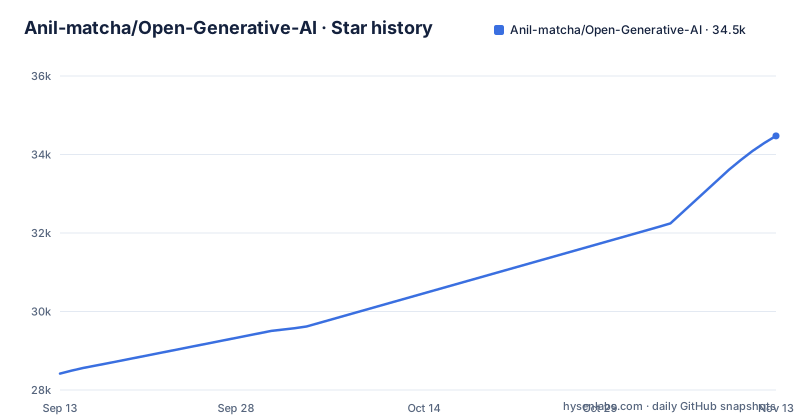
Star history
- Anil-matcha/Open-Generative-AI34,473 ★ · +6,055
| Repository | 2026-09-13 | 2026-11-13 |
|---|---|---|
| Anil-matcha/Open-Generative-AI | 28.4k | 34.5k |
6,055 Stars in the last 61 days, measured from the daily GitHub snapshot. Compare with other projects
Editorial analysis
The gap it fills: many models, one interface, no local GPU
Running image and video models yourself means picking a runtime, pulling weights, and keeping a machine with enough VRAM awake. Open Generative AI takes the opposite route. It is a JavaScript application that presents 14 studios (Image, Video, Audio, AI Clipping, Vibe Motion, Lip Sync, Cinema, Marketing, Workflows, Agents, Design Agent, Apps, MCP and CLI, according to the README) over a single interface, and it reaches the models through MuAPI rather than through local inference. The README describes it as a free, open-source alternative to AI video platforms and cites 600+ models across 14 studios, the same figure as the repository description. The audience is fairly narrow: someone who wants a branded or private front end to hosted generation, not someone who wants to own the inference stack.
How the data flow actually runs: client, key, MuAPI, result
The architecture visible in the README is a client-server split where the server is not yours. The app handles studio UI and workflow orchestration; MuAPI handles the models, the queue and the billing plumbing. The README states that under the white-label arrangement, MuAPI handles the models, the queue, and the billing plumbing underneath, and that there is no model hosting to run yourself. That sentence is about the paid white-label tier, but it describes the same dependency the open-source app has. The practical consequences are worth stating plainly. Generation latency is whatever the upstream queue gives you, not something you can tune. Model availability changes when the provider changes it, not when you upgrade. And an API key is a required secret in the running app, which means self-hosting relocates the UI to your server while leaving the metered calls and the account relationship with the vendor. Check where that key is stored and how requests are proxied in the source before you put it on a public hostname.
Getting it running: hosted, desktop, or from source
There are three entry points and they cost different amounts of effort. The hosted version at muapi.ai/open-generative-ai needs no Node.js and no setup, and the README says a free account is enough to start generating. The desktop route ships one-click installers for macOS Apple Silicon, macOS Intel, Windows x64 and Linux, with the current links pointing at the v2.0.0 release assets. Linux users can take an AppImage or a .deb, or build locally with npm run electron:build:linux. The macOS app is not notarized by Apple, and the README is unusually direct about the consequences. On macOS you mount the DMG, drag the app to /Applications, then run xattr -cr "/Applications/Open Generative AI.app" in Terminal before right-clicking the app and choosing Open twice. Those are the exact steps the README gives, and they are the price of an unsigned build rather than a defect in the app.
The licence covers the client, not the models
The repository is MIT licensed, which is permissive and unsurprising for a JavaScript application of this kind. What MIT does not do is grant you anything on the model side. The models are reached through MuAPI, and the repository description names Flux, Midjourney, Kling, Sora and Veo among the options, all of which are third-party systems with their own terms. So the honest description is: permissive licence on the code you can read, separate and largely unspecified terms on everything the code calls. If you plan to resell access, that distinction stops being academic. The README's white-label section says you keep the markup on every generation and set your own credit or subscription prices, with plans starting at $49/mo. Nothing in the README spells out what the white-label terms permit you to do with generated output or how they interact with the upstream model providers, and that is a question for MuAPI and for whoever owns each model, not for the MIT file.
Where it breaks down, and what it is not
The clearest failure mode is the one the project is built around: the hosted models depend on MuAPI. If the API is unreachable, rate-limited, or changes shape, the studios stop producing. The no-content-filter positioning has a second edge that the README does not address. Filters are not the only control a hosted provider applies; abuse detection, retention and jurisdiction all sit upstream, and none of that is described here. Then there is the maintenance surface. The recent release history shows v1.0.10 fixing a Lipsync Infinite Talk null-prompt bug, v1.0.11 fixing a Wan2GP end-frame upload that skipped the API-key prompt, and v2.0.0 adding an Audio Studio, Vibe Motion, Clipping and a Design Agent. That is a project tracking a fast-moving upstream, which means frequent small releases and a changelog that is mostly integration fixes. Budget for that cadence. Finally, the README mixes the open-source pitch with a $49/mo white-label upsell and a table of competitor subscription prices. That is a legitimate business model, but it means the README is partly marketing copy and should be read as such.
ComfyUI is the real fork in the road
The obvious alternative is ComfyUI, and the difference is not cosmetic. ComfyUI is a node-graph runtime that executes models locally on your own hardware; you supply the GPU and the weights, and the generation happens on your machine. Open Generative AI is a studio client that sends requests to a hosted provider and renders what comes back. One gives you reproducibility and offline operation at the cost of hardware and setup work. The other gives you a broad model catalogue and near-zero setup at the cost of a per-generation bill and a dependency you do not control. There is no version of this where one is simply better. If your work needs a fixed model version that behaves the same next month, the hosted route is the wrong shape. If your work needs twenty different models this week and no GPU, the local route is the wrong shape.
What to check before you commit
Read the client source for how the MuAPI key is handled, because that determines whether you can safely expose an instance. Decide early whether you are running this as a personal interface or as a product, because the second case pulls in the white-label terms and the upstream model licences, and those are outside the MIT grant. If you only want to see whether the studios fit your workflow, the hosted version requires no install and no Node.js, which is the cheapest way to find out before you spend an evening on xattr and Gatekeeper dialogs.
Editorial conclusion
Adopt it if you want a multi-model image and video interface you control the branding and hosting for, and you accept that generation through the hosted models is a metered call to MuAPI. Do not adopt it if your requirement is offline generation, reproducible model weights, or no third-party account. Before committing, verify three things in the repository: the API key handling in the client source, the current model list behind the 600+ claim, and whether the MIT licence on this code still gives you the rights you need once MuAPI's terms and the upstream model licences are layered on top.
Frequently asked questions
Is Open Generative AI free?
The code is MIT licensed and the client runs on your own machine or in your own container, so there is no licence fee. The models are reached through a vendor gateway, and the project also sells a hosted version plus a white-label plan starting at $49 a month, so model capacity is the part that costs money.
How do I install Open Generative AI?
From source, clone the repository and run `npm run setup`, which runs `git submodule update --init --recursive && npm install && npm run build:packages` because the repository uses git submodules. The alternative is a desktop installer for macOS arm64 or Intel, Windows x64, or Linux as .AppImage or .deb, or `docker compose up` for the web server on port 3001.
What is Open Generative AI?
It is a self-hostable studio covering 14 surfaces: Image, Video, Audio, AI Clipping, Vibe Motion, Lip Sync, Cinema, Marketing, Workflows, Agents, Design Agent, Apps, MCP and CLI. The README and the repository description both advertise more than 600 models across those studios.
How do I use Open Generative AI?
Either use the hosted version in a browser with a free account, which the project says needs no Node.js and no setup, or run the local Next.js app with `npm run dev` and the desktop build through the electron targets. Calls to the image, video and audio models go through the vendor gateway the project links.
Official sources
Add this badge to your README
If you maintain this project, the badge below links readers to this analysis and shows its maintenance status from the daily GitHub snapshot. Paste the markdown into your README; add ?metric=license or ?metric=stars to the image URL for a different field.

[](https://hysenlabs.com/projects/anil-matcha-open-generative-ai)Star history chart for your README
[](https://hysenlabs.com/projects/anil-matcha-open-generative-ai)Was this useful?