ishioni/homelab-ops: A Flux-Driven Homelab Repository With Sparse Documentation
Family-friendly HomeOps driven by Kubernetes and GitOps using Flux
At a glance
- What is it?
- This repository shows one person's Kubernetes homelab managed by Flux, Renovate, and GitHub Actions, but its README is nearly empty. The value lies in the YAML structure, not the prose.
- Who is it for?
- Adopt this repository if you want a concrete, MIT-licensed example of a Flux-managed homelab and you are comfortable reading raw YAML without a guide. Do not adopt it if you need documentation, onboarding, or a maintained template.
- Can I use it commercially?
- Yes. MIT is a permissive licence: you can use, modify and sell software built on it, as long as you keep its copyright and licence notices.
- Is it still maintained?
- Yes. The repository received new commits within the last day.
- What is it written in?
- Mainly YAML, according to GitHub's language statistics.
Answers come from the project's GitHub data, last synced on October 21, 2026, and from our analysis. They are not legal advice.
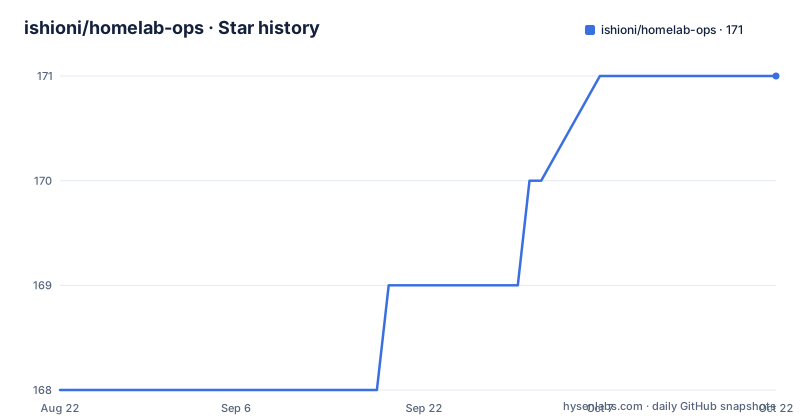
Star history
- ishioni/homelab-ops171 ★ · +3
| Repository | 2026-08-22 | 2026-10-21 |
|---|---|---|
| ishioni/homelab-ops | 168 | 171 |
3 Stars in the last 60 days, measured from the daily GitHub snapshot. Compare with other projects
Editorial analysis
What This Repository Actually Solves
ishioni/homelab-ops is a personal Kubernetes homelab configuration stored as code. It solves the problem of keeping a home cluster's applications, namespaces, and infrastructure definitions in a single place, managed declaratively. The intended user is someone running a homelab who already knows Kubernetes and GitOps, not a beginner. The README says it is managed by Flux, Renovate, and GitHub Actions. That trio points to a specific workflow: Flux reconciles the cluster state from Git, Renovate keeps dependencies current, and Actions automate tasks like commit or PR handling. For a family-friendly homelab, the repo's existence matters more than its content. It is a public example of a private setup, which is useful for learning even if the docs are absent.
The Mechanism: Flux, Renovate, and GitHub Actions in One Repo
The repository's architecture is visible only through the badges and the README text. Flux is the GitOps operator that watches this repository and applies the YAML to the cluster. Renovate scans the same repository for dependency updates, opening pull requests when a container image or Helm chart has a new version. GitHub Actions likely runs on those PRs to validate or apply changes, though the README does not specify the workflows. The data flow is straightforward: a push to master triggers Flux to sync, while Renovate runs on a schedule to propose updates. The repository uses Talos as the Kubernetes OS, according to the badge. That means the cluster nodes run Talos Linux, which is a Kubernetes-native OS that exposes an API instead of SSH. The YAML files in the repo must include Flux's Kustomization and HelmRelease resources, but without a directory listing, the exact layout is unconfirmed.
Getting It Running: What the README Does Not Tell You
The README contains no install commands, no prerequisites, and no configuration keys. It says 'Docs: Coming Soon[TM]', which is a placeholder, not a guide. To run this repository, you would need to clone it, point Flux at it, and adapt the YAML to your own cluster. The only concrete hints are the badges: Talos, Kubernetes, and Flux. You would need to install Talos on your nodes, bootstrap a Kubernetes cluster, then install Flux using the flux CLI. The repository's master branch is the default, so Flux would target that branch. Renovate would need a config file, likely renovate.json, but its presence is not confirmed. The GitHub Actions workflows are also unconfirmed. In short, this is not a turnkey project. It is a reference you must reverse-engineer.
A Genuine Limitation: Documentation Is Essentially Absent
The biggest limitation is the missing documentation. The README is a few lines of badges and a thanks section. There is no explanation of the directory structure, no list of deployed applications, no networking details, and no backup strategy. For a homelab, that is a real problem. A homelab is personal, but a public repository implies some intent to share. Without docs, the only way to learn from this repo is to read every YAML file and infer the logic. That is time-consuming and error-prone. The wrong tool for this repo is anyone who wants a quick start. If you are new to GitOps, this will confuse you more than help. The repository also has no releases, so there is no tagged stable state to reference. The master branch could change at any time, and you would not know what broke.
The Alternative: A Documented Homelab Template
The real alternative is a documented homelab template like the ones found in the Home Operations Discord or the k8s-at-home topic. Those repositories typically include a README with a getting-started guide, a folder layout, and example configurations. The difference in approach is that they treat the repository as a product for others, not just a personal backup. For example, a template might include a bootstrap script, a Flux bootstrap command, and a values file for common apps. ishioni/homelab-ops does none of that. The trade-off is that a personal repo can be more honest about real-world choices, but a template is more useful for learning. If you want to see how a real cluster is structured, this repo is fine. If you want to replicate it, you are better off with a template that explains itself.
Maintenance and Upgrade Cost, and License Implications
The repository is licensed under MIT, which is permissive. You can copy the YAML and use it in your own project, even commercially, as long as you retain the copyright notice. That is a low barrier. The maintenance cost is higher than the license suggests. Because the README has no version pins, you cannot tell which Flux, Talos, or Kubernetes versions the YAML targets. Flux APIs change, and a HelmRelease written for Flux v1 will not work on Flux v2 without modification. Renovate will help with image updates, but it cannot fix breaking changes in CRDs. You will need to track upstream releases yourself. The repository has no release tags, so there is no stable snapshot to roll back to. The last push date is unknown, so the code could be stale. Before using anything, check the commit history and the actual file contents to see how recent the APIs are.
What to Verify Before Using This as a Reference
If you decide to mine this repository for ideas, verify three things first. Check the Flux CRD versions in the YAML files against the Flux release you plan to install. Check the Talos version and the Kubernetes version, because a mismatch will break cluster bootstrap. Check the Renovate configuration, if it exists, to see how it handles major updates. The README gives no dates, so you must inspect the git log. Also verify that the GitHub Actions workflows, if present, do not require secrets you do not have. This is a read-only exercise. Do not run any script from the repo without reading it first. The repository is a snapshot of one person's setup, not a vetted tool. Treat it as an example, not a dependency.
Editorial conclusion
Adopt this repository if you want a concrete, MIT-licensed example of a Flux-managed homelab and you are comfortable reading raw YAML without a guide. Do not adopt it if you need documentation, onboarding, or a maintained template. Before using any pattern, verify the Flux version, the Talos version, and the Renovate configuration against your own cluster, because the README gives no versions and no setup steps.
Frequently asked questions
What is ishioni/homelab-ops?
It is a YAML infrastructure repository described as family friendly HomeOps driven by Kubernetes and GitOps using Flux, and the README says it is managed by Flux, Renovate and GitHub Actions. The top level holds talos/, kubernetes/, terraform/, bootstrap/, docker/ and archive/ directories.
Does the homelab-ops repository have installation instructions?
No. The documentation section of the README says Coming Soon, and no command, image version or node configuration is given in the text. The tree itself is the only description of how the system fits together.
Which operating system does homelab-ops run?
Talos Linux, with a talos/ directory holding its configuration and badges linking to talos.dev. A second badge links to kashalls/kromgo, the tooling used to render that configuration, and kubernetes/ holds the cluster manifests.
How are dependencies updated in ishioni/homelab-ops?
Renovate is named as one of three tools managing the cluster, and the configuration is explicit rather than defaulted, with both a .renovate/ directory and a .renovaterc.json5 file at the top level.
What is the licence of the homelab-ops repository?
MIT, in a LICENSE file at the root linked from the README. The repository has no GitHub releases, so there is no tagged version history and the default branch is master.
Official sources
Add this badge to your README
If you maintain this project, the badge below links readers to this analysis and shows its maintenance status from the daily GitHub snapshot. Paste the markdown into your README; add ?metric=license or ?metric=stars to the image URL for a different field.

[](https://hysenlabs.com/projects/ishioni-homelab-ops)Star history chart for your README
[](https://hysenlabs.com/projects/ishioni-homelab-ops)