OnlySwitch packs 41 macOS toggles into one menu bar app, with an honest status column
⚙️ All-in-One menu bar app, hide 💻MacBook Pro's notch, dark mode, AirPods, Shortcuts
At a glance
- What is it?
- OnlySwitch aggregates native macOS toggles, imported Shortcuts and desktop widgets behind a single status bar icon. The switch table openly marks the weak spots, including the notch hider, and scope has grown well past toggles.
- Who is it for?
- Mac users who want dark mode, AirPods connection, hidden desktop icons and their own Shortcuts in one sorted menu bar list should install via brew install only-switch and check the switch table against their needs. Skip it if reliable notch hiding is the main draw, since the README marks that switch as having some issues, or if an initial authorization step for low power mode is unacceptable.
- Can I use it commercially?
- Yes. MIT is a permissive licence: you can use, modify and sell software built on it, as long as you keep its copyright and licence notices.
- Is it still maintained?
- Yes. The repository received new commits within the last day.
- What is it written in?
- Mainly Swift, according to GitHub's language statistics.
Answers come from the project's GitHub data, last synced on November 14, 2026, and from our analysis. They are not legal advice.
Star history
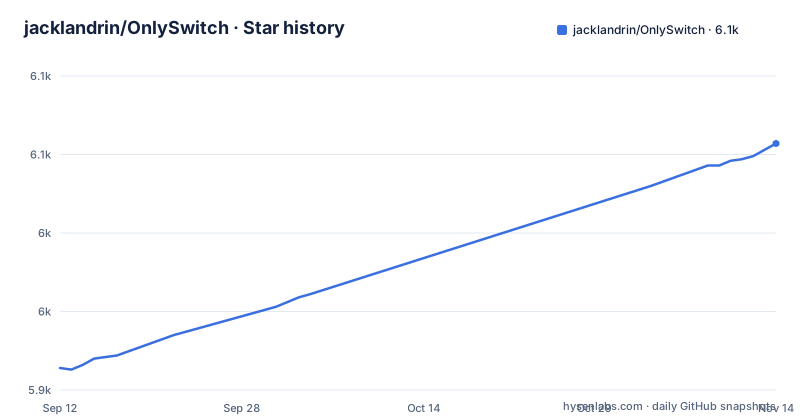
- jacklandrin/OnlySwitch6,057 ★ · +143
| Repository | 2026-09-12 | 2026-11-14 |
|---|---|---|
| jacklandrin/OnlySwitch | 5.9k | 6.1k |
143 Stars in the last 63 days, measured from the daily GitHub snapshot. Compare with other projects
Editorial analysis
Thirty-nine native switches under one status bar icon
OnlySwitch is a menu bar app for macOS, written in Swift. The idea is consolidation: instead of one utility per small preference, a single status bar item lists toggles for dark mode, Night Shift, hiding desktop icons, hiding the MacBook Pro notch, connecting AirPods, keeping the machine awake, emptying the pasteboard and trash, showing hidden files, and cleaning the Xcode cache, alongside media controls for Spotify, Apple Music and radio stations. The README's built-in switch table lists 41 switches. For a developer on a MacBook, entries like Xcode cache and Show user library folder are the practical draw. For everyone else it is the preference toggles that Apple spreads across System Settings, Control Center and scattered menus, gathered into one list you can reorder, trim and drive from the keyboard.
Three distinct item types, not just one switch list
The app is best understood as three layers. The first is the native switch table, where toggles run the app's own code. The second is Apple Shortcuts integration: macOS Shortcuts can be imported and shown in the same list, and the list itself is customizable, with items added, removed or reordered and driven by keyboard shortcuts. The repository also carries ShortcutsGalleryContributing.md and EvolutionGalleryContributing.md. The third layer is the desktop: on macOS Sonoma and later, Apple Widgets, including Evolution controls, put items on the desktop or in Notification Center.
Install with Homebrew, because auto-update broke at 2.5.6
The install path is either brew install only-switch or a direct download of OnlySwitch.dmg from the releases page. The README carries a warning worth reading before anything else: auto-updating has failed from version 2.5.6 and below, so existing users must update manually or through Homebrew. Anyone already running an older copy should treat this as the first action, not an afterthought. The homepage at onlyswitch.click carries the marketing presence. Expect to grant the usual macOS accessibility and control permissions by trial when specific switches need them.
The status column is refreshingly honest about weak switches
The switch table has a status column, and it is not decorative. Hide notch, the first feature named in the repository description, is marked as having known issues. Low power mode is marked requires initial authorization, meaning the toggle needs an authorization step rather than a clean first click. Hide Windows, Top Sticker and Hide Menu Bar Icons are marked partly finished. This transparency is unusual and useful, because it tells you exactly which expectations to lower before installing. It also frames the trade-off the whole app makes: breadth first, polish unevenly distributed later. If your reason for installing is one specific switch, the table is the contract, and two of the most visible features sit in the weak rows.
Six years of version notes read as steady scope growth
The README's feature list shows how far the scope now reaches beyond toggles. Apple Widgets work on macOS Sonoma and later, including Evolution controls. The compact Only Control interface offers a focused control panel. An optional Desktop Pet can be dragged anywhere and clicked to show or dismiss Only Control, with playback animations for Apple Music, Spotify and Radio. OnlyRemote on iPhone or iPad can control the Mac over the local network, and optional tabs add Authenticator, Sound Mixer, Brightness, Screenshots, System Monitor, Codex Usage, Claude Usage, Xcode Cleaner and App Uninstaller. The trajectory is clear: what began as a toggle list is now also a widget host, an alternate control surface and a desktop toy. Whether that is enrichment or drift depends on what you installed it for, but every addition widens the surface that the status column has to keep honest.
MIT licensed, shipping this quarter, against free built-in rivals
The project is MIT licensed, so internal distribution and modification are unproblematic on the licensing side, without that being legal advice. Maintenance looks healthy: the last push was 2026-10-01, and release_3.3.0 and release_3.4.0 shipped on 2026-10-30 and 2026-11-02, with beta_3.4.0 on 2026-10-31. The honest comparison is with tools that cost nothing to install. Apple's own Control Center and the Shortcuts app already toggle dark mode, Night Shift and Do Not Disturb, and Shortcuts can build a menu bar item on its own. The difference is aggregation: OnlySwitch sorts native toggles, imported shortcuts and third-party actions into one keyboard-drivable list and can mirror them as desktop widgets, which the built-in pieces do not do as a single surface. For the narrower job of hiding menu bar icons, dedicated managers, commercial ones like Bartender and open-source alternatives, focus solely on that problem, while in OnlySwitch that switch is only partly finished. Choose it for the aggregated list, not for any single feature.
Editorial conclusion
Mac users who want dark mode, AirPods connection, hidden desktop icons and their own Shortcuts in one sorted menu bar list should install via brew install only-switch and check the switch table against their needs. Skip it if reliable notch hiding is the main draw, since the README marks that switch as having some issues, or if an initial authorization step for low power mode is unacceptable. Verify three things before rolling it out: the status column for the switches you actually need, whether your macOS version supports the Sonoma-era widgets, and that your copy is above 2.5.6, because auto-update is broken at that version and older ones.
Frequently asked questions
How do I use OnlySwitch?
You click the OnlySwitch icon in the macOS menu bar to open its controls, then flip the switches you need, such as Hide desktop, Dark mode, Hide notch, Mute mic or Autohide Dock. Switch and Shortcuts items can be added, removed or sorted, and some of them can be placed on your desktop as widgets.
Is One Switch the same app as OnlySwitch?
The repository names the app OnlySwitch. What it gives you is its own install routes: brew install only-switch, or the OnlySwitch.dmg download from the latest release.
How do I install OnlySwitch on a Mac, and how do I keep it updated?
Run brew install only-switch, or download OnlySwitch.dmg from the latest release. Auto-updating has failed from 2.5.6 and below, so the project asks you to update manually or through Homebrew.
Why is the OnlySwitch icon missing from my menu bar?
The README's quick start says to enable OnlySwitch under System Settings, Menu Bar, if macOS does not show its icon.
Does OnlySwitch need a password or administrator rights?
One switch in the native table, Low power mode, is marked requires initial authorization. The repository also contains an OnlySwitchPrivilegedHelper target, so privileged actions are implemented as a separate helper rather than inside the menu bar app.
Official sources
Add this badge to your README
If you maintain this project, the badge below links readers to this analysis and shows its maintenance status from the daily GitHub snapshot. Paste the markdown into your README; add ?metric=license or ?metric=stars to the image URL for a different field.

[](https://hysenlabs.com/projects/jacklandrin-onlyswitch)Star history chart for your README
[](https://hysenlabs.com/projects/jacklandrin-onlyswitch)Was this useful?