Coucou: a notch mascot that turned agent permissions into a two-tap decision
A tiny friend in your Mac's notch and on your iPhone that keeps an eye on your AI coding agents: Claude Code, Codex, Cursor, Gemini CLI, Antigravity and more. Approve from the notch or your Lock Screen.
At a glance
- What is it?
- 3814 stars for a Swift menubar companion that watches coding agents, shows their diffs and asks for approval. The feature list is written for everyone, and roughly half of it is annotated as macOS GitHub build only.
- Who is it for?
- Coucou is unusual in how little of it is infrastructure and how much of it is a decision surface. The interesting engineering is in the constraints rather than the character: a Mac applies a phone approval only to the exact pending request, the request expires after two minutes, a remote action is single use and under five minutes old, and the relay is described as seeing only an agent name and a state.
- Can I use it commercially?
- Yes. MIT is a permissive licence: you can use, modify and sell software built on it, as long as you keep its copyright and licence notices.
- Is it still maintained?
- Yes. The repository received new commits within the last day.
- What is it written in?
- Mainly Swift, according to GitHub's language statistics.
Answers come from the project's GitHub data, last synced on October 23, 2026, and from our analysis. They are not legal advice.
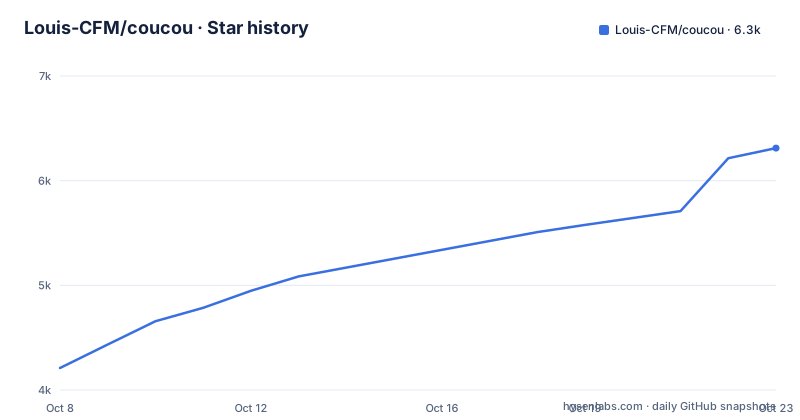
Star history
- Louis-CFM/coucou6,311 ★ · +2,101
| Repository | 2026-10-08 | 2026-10-23 |
|---|---|---|
| Louis-CFM/coucou | 4.2k | 6.3k |
2,101 Stars in the last 15 days, measured from the daily GitHub snapshot. Compare with other projects
Editorial analysis
The star count belongs to a mascot, and that is the point
Coucou has 3,814 stars, 635 forks and 160 open issues, is MIT licensed, written in Swift, and was pushed 2026-10-06 with a release landing the same day. The repository description says it is a tiny friend that lives in your Mac's notch and on your iPhone and keeps an eye on your AI coding agent sessions, naming Claude Code, Codex, Cursor, Gemini CLI and Antigravity, with approval from the notch or the Lock Screen.
What earns that attention is not the mascot art, it is the position. Approval prompts from a coding agent are modal: the agent stops, your terminal waits, and you have to find the right window to answer. Coucou's argument is that the answer should arrive where your attention already is, in a strip at the top of the screen that shows the session, the file being edited with plus and minus counts, and the permission request itself. Claude Code prompts get Allow, Deny and Always in the notch, `AskUserQuestion` prompts render their choices there including multi-select across up to four questions, and Codex gets Allow and Deny. There is also a Reply in terminal fallback, which is the detail that makes the whole thing feel considered rather than cute.
The mascot is not decoration bolted onto a utility. Mochi follows your cursor with his eyes, gets annoyed when poked and dizzy if you insist, breathes and blinks while idle, and dresses for the seasons on his own, with 28 handcrafted sounds and a greeting on launch. You can drag him out of the island onto the desktop as a 120 pt companion that flies home on alerts and returns to where you left him, or drag him onto any window to attach it as context for Claude on macOS. When nothing is running he hides, and he peeks when you hover the notch. Whether that is your taste is a five second decision; whether the permission flow is faster than your terminal is a measurable one.
Half the feature list is annotated for one build
The features list is long enough that the annotations are easy to skim past, and they are the most useful thing in it. Several entries carry a macOS, GitHub build marker: Claude plan usage in the notch header showing five-hour and weekly limits for Pro and Max plans, the Apple Music pill, and the newly added GitHub Copilot CLI, Muse Code and OpenCode and Amp session support from the 0.2.0 release notes. The chat feature is annotated too, with Gemini, OpenAI and local models marked macOS only. Several other entries carry a plain macOS marker: jumping to the exact terminal window of a session, dragging a window onto Mochi as context, and the active pills picker.
So the list you read is not the list every install gets. A GitHub build on a Mac is the configuration where the whole feature set applies, and the App Store build is a narrower one. That distinction is never stated as a caveat; it is only encoded in parenthetical tags scattered across twenty bullets, and the repository description does not mention it at all. If you are evaluating this project, the question to answer first is which build you would install, because the answer decides whether the plan usage pill, the music pill and the four newest agent integrations exist for you.
The agent coverage is also broader than the description. The description names five agents, and the features list names Claude Code, Cursor, Codex, Gemini CLI, Antigravity, GitHub Copilot CLI, Muse Code, OpenCode and Amp, plus a documented path for anything else: tag a hook payload with `coucou_agent` and that agent gets its own pill. The documentation for that lives in `docs/AGENTS.md`. For a project whose value is watching whichever agent you happen to run, having a generic hook-based route matters more than any single integration.
Windows and Linux are badged, but only one of them has a directory
The badge row advertises macOS 15 or later, iOS 18 or later, Windows 10 and 11, Linux in AppImage, deb and rpm form, Swift 6, SwiftUI and Tauri 2. The repository topics agree, listing `macos`, `windows`, `linux`, `ios`, `dynamic-island`, `notch`, `menubar-app` and `macos-app` among others. The repository record lists the language as Swift and nothing else.
The tree is where the picture narrows. Its top level holds `NotchBuddy/`, which is the Swift Mac application, `windows/`, `relay/`, `design/`, `docs/`, `scripts/`, `tests/`, plus `CHANGELOG.md`, `CLAUDE.md`, `CONTRIBUTING.md`, `LICENSE`, `LICENSE-ASSETS.md` and `.gitattributes`. There is no Linux directory at that level. The Mac application also keeps its internal name, NotchBuddy, while the product, the repository and the release notes all call it Coucou, so the name change is visible only if you look inside the source folder.
Two readings are available and the evidence does not settle between them. Either the Linux builds are generated or packaged from somewhere not visible at the top level, or the Linux badge reflects work that is planned or shipped separately from this repository. The Tauri 2 badge alongside a Swift-only language record fits the first reading, since a Tauri shell would be Rust and would likely show up as a second language. What is not in doubt is that a Windows directory exists, a Linux one does not, and the repository's own primary language is Swift, which means the star count attaches most directly to the Mac application.
The feature list is consistent with a Mac-first product. The notch itself is described as the top edge of the screen on Windows and Linux, so the placement degrades from a cutout to a bar, and the plan usage pill, the Apple Music pill, drag-a-window-onto-Mochi, the desktop companion's window-following behaviour and the mail hand-off all read as Mac-specific affordances built on system frameworks that do not exist elsewhere.
MIT for the code, reserved for the name, the character and the sounds
The badge says Code: MIT, and the Why section says every line of code is open source under the MIT License, readable, forkable, learnable from. The same paragraph then carves out the rest: the Coucou name, Mochi and the sounds stay with Louis Raillé, with a pointer to the license section.
The tree backs that split up. There are two license files, `LICENSE` and `LICENSE-ASSETS.md`, so the assets carve-out is a documented file rather than a footnote, and a project that wants you to reuse the code while protecting the character has done the conventional thing. The reason is stated plainly in the Why section, that some studios showed off gorgeous notch companions and never let anyone use them, and this is the open version. The boundary sits between the engineering, which is MIT, and the mascot, which is the identity.
What that means in practice depends on what you want to do. Reading the session plumbing, the diff ticker or the approval flow to learn from them costs nothing. Forking the Mac application to build your own notch companion means the MIT applies to your code and not to Mochi. Reusing the character art, the sound set or the name in anything you publish is a separate conversation with the copyright holder, and the presence of `LICENSE-ASSETS.md` says the project expects that conversation rather than assuming it away.
There is a second licensing note worth reading in the same spirit. Keys live in the macOS Keychain, the Windows Credential Manager or the Linux Secret Service covering GNOME Keyring and KWallet, and the app only talks to the services you plug in. No telemetry and no account is the stated position, and the app is described as private by design. Those are verifiable claims in the sense that credential storage is a documented mechanism rather than a promise, though whether a given integration phones home is a question about that integration.
Phone approvals are bound to one request and expire in two minutes
The iPhone app is the part of the project with the most interesting constraints, and they are all in the release notes rather than the feature list. Approval from the phone works like this: a notification carries the command, Deny is available straight from it, and Allow sits behind Face ID. The Mac then applies a decision only if it was meant for the exact request it is waiting on, and the request itself expires after two minutes. The iPhone keeps a history of your decisions.
Binding a decision to an exact pending request, with a short expiry, is what makes remote approval defensible. Without the binding, a phone approval could land on a different command than the one you read on the Lock Screen. Without the expiry, a stale notification could approve something that appeared minutes later. With both, the worst case is that you re-open the Mac and answer the prompt yourself.
The relay is described as small and as seeing only the agent's name and state, which is the other half of the argument. When you lock the Mac, Mochi moves to the Lock Screen and Dynamic Island, and comes back to the notch when you unlock. The iOS budget constraints are handled explicitly: the Live Activity starts 20 seconds after the Mac locks rather than immediately, so a quick lock and unlock does not spend one of iOS's hourly starts, but it starts right away when an agent is waiting on a permission or has a question. After unlocking it waits 30 seconds before ending, in case the Mac locks again.
Service integrations got the same treatment. From the phone you can see live data from Vercel, GitHub, Stripe, Resend, Cal.com, n8n and Notion, where the Mac fetches the data and the keys never leave it, and the detail is written to iCloud encrypted. Actions exist for Vercel redeploy, promote and cancel, GitHub re-run, approve, squash and merge, and n8n activate, deactivate and retry. Each action runs only if it was offered on an item in the last detail the Mac published, is used once, and must be less than five minutes old, and nothing that moves money or sends an email is included. That is a well-drawn boundary: reading anything, doing anything reversible and short-lived, and never touching the two categories where a mistake is expensive and irreversible.
Three releases in two days, and a weekly recap with its own trigger
The release cadence right now is fast. Version 0.1.8 landed 2026-10-05, 0.1.9 on 2026-10-06 in the morning, and 0.2.0 on 2026-10-06 later the same day. All three are titled for macOS 15 or later on Apple silicon and Intel, signed with a Developer ID and notarized by Apple.
The iPhone service work is the substance of 0.1.9, and it reads like a security review happened before the release rather than after. Each remote action is tied to an item in the last published detail, is single use, and has a five minute window. The Live Activity start delay is tuned against iOS's hourly budget. The post-unlock grace period handles a laptop that sleeps the moment you put it down. When the iPhone has no update token the behaviour changes, which is the kind of edge case that only shows up in the notes of a feature that has been run on real hardware.
Version 0.2.0 adds agents and a report. GitHub Copilot CLI and Muse Code sessions appear in the notch, installed from Settings, Agents, Copilot CLI or Muse Code, with the installer showing what will change in your config and backing it up before writing. OpenCode arrives through a small JavaScript plugin and Amp through a TypeScript one, both on the same preview, backup, confirm flow, and OpenCode is explicitly fire-and-forget so Coucou never blocks it. Then there is the weekly recap: on a Monday morning, the first time an agent starts working or your Mac wakes, a card covers the past week with time spent, sessions, files and lines changed, commands run, permissions and questions, plus top agent, top project, busiest day and longest session, shareable as a 1080 by 1920 image with project names optional.
The trigger condition is the interesting detail, because the feature list describes the recap as something that shows up every Monday morning while the release note says it waits for an agent to start or for the Mac to wake. Both can be true if you never use an agent on a Monday, in which case you would see it whenever you next do, but the two sentences describe different behaviour and the release note is the more precise one. The recap is also stated as all local with no sync, which sits alongside the iPhone features that do go through your iCloud, and the distinction is that the recap never leaves the Mac at all.
Editorial conclusion
Coucou is unusual in how little of it is infrastructure and how much of it is a decision surface. The interesting engineering is in the constraints rather than the character: a Mac applies a phone approval only to the exact pending request, the request expires after two minutes, a remote action is single use and under five minutes old, and the relay is described as seeing only an agent name and a state. Those rules are what make locking your laptop and approving from a Lock Screen defensible. Two things to check against your own setup. The badge row advertises Windows 10 or 11 and Linux packages in AppImage, deb and rpm form while the tree carries a `windows/` directory and no Linux one, and the repository's language is Swift, so treat the non-Mac builds as a separate codebase from the one the star count reflects. And the MIT license covers code, not the name, the character or the sounds, which stay with Louis Raillé under a separate assets file. Install the GitHub build on a Mac, add the iPhone relay only if you want approvals away from the desk, and read the contributor guide before assuming the mascot assets are yours to reuse.
Frequently asked questions
What can I do with Coucou?
Coucou watches AI coding agent sessions and surfaces them in your Mac's notch: which file is being edited with plus and minus counts, a tap for the full diff, and Allow, Deny and Always for Claude Code permission prompts with Allow and Deny for Codex. It also approves from an iPhone Lock Screen, chats with Claude, Gemini, OpenAI or a local model, and integrates with Vercel, GitHub, Stripe, Resend, Notion, Cal.com and n8n.
Does Coucou run on Windows and Linux?
The badges and topics advertise Windows 10 or 11 and Linux packages in AppImage, deb and rpm form, with the companion sitting at the top edge of the screen instead of a notch. The source tree holds a windows directory and NotchBuddy for the Mac app, but no top level Linux directory, and the repository records Swift as its language. Many features are annotated as macOS only, so confirm your platform against the list before planning around it.
Can I use the Coucou mascot in my own project?
The code is MIT and the README says every line of it is open source to read, fork and learn from. The name Coucou, the character Mochi and the sounds are reserved to Louis Raillé and covered separately in LICENSE-ASSETS.md. Forking the application is straightforward under MIT; reusing the character art, sounds or name needs a separate conversation.
Is it safe to approve an agent action from my iPhone?
The Mac applies a decision only when it was meant for the exact request it is waiting on, and that request expires after two minutes, so a stale notification cannot approve a later command. Allow sits behind Face ID. The relay is described as seeing only the agent's name and state, and remote service actions must be single use, offered on the last published detail and under five minutes old. Nothing that moves money or sends email is exposed.
Which AI coding agents does Coucou support?
Claude Code, Cursor, Codex, Gemini CLI, Antigravity, GitHub Copilot CLI, Muse Code, OpenCode and Amp, with OpenCode arriving through a small JavaScript plugin and Amp through a TypeScript one. Anything else can be brought in by tagging a hook payload with coucou_agent, which gives that agent its own pill. The Copilot CLI, Muse Code, OpenCode and Amp integrations are marked as GitHub build only.
Official sources
Add this badge to your README
If you maintain this project, the badge below links readers to this analysis and shows its maintenance status from the daily GitHub snapshot. Paste the markdown into your README; add ?metric=license or ?metric=stars to the image URL for a different field.

[](https://hysenlabs.com/projects/louis-cfm-coucou)Star history chart for your README
[](https://hysenlabs.com/projects/louis-cfm-coucou)Was this useful?