shieldcn: README badges rendered as shadcn/ui components
Beautiful README badges, inspired by shields.io and styled like shadcn/ui.
At a glance
- What is it?
- shieldcn is a hosted service that renders README badges, charts, headers and sponsor walls as real shadcn/ui components, served as SVG from a URL. It ships a starchart GitHub Action for committing star history files and an agent skill so a coding agent can add the badges itself.
- Who is it for?
- shieldcn fits an open source project that wants its README to look designed rather than assembled from generic shields.io pills, and that is willing to depend on a hosted renderer for its badge images. It does not fit a project that needs badges to render without a third party service, that needs its own self-hosted copy, or that has to avoid depending on a company-operated API for a README that outlives the company.
- Can I use it commercially?
- Yes. MIT is a permissive licence: you can use, modify and sell software built on it, as long as you keep its copyright and licence notices.
- Is it still maintained?
- Yes. The repository last received commits 1 day ago.
- What is it written in?
- Mainly TypeScript, according to GitHub's language statistics.
Answers come from the project's GitHub data, last synced on November 7, 2026, and from our analysis. They are not legal advice.
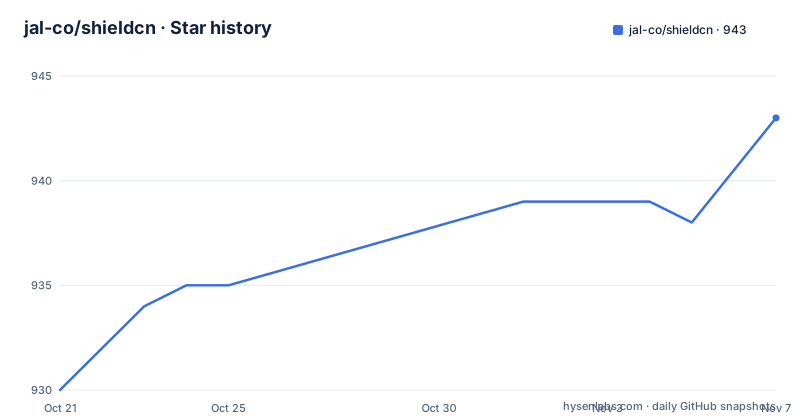
Star history
- jal-co/shieldcn943 ★ · +13
| Repository | 2026-10-21 | 2026-11-07 |
|---|---|---|
| jal-co/shieldcn | 930 | 943 |
13 Stars in the last 17 days, measured from the daily GitHub snapshot. Compare with other projects
Editorial analysis
Badges as buttons, not as shields.io pills
shieldcn takes the badge idea that shields.io established and changes what a badge looks like. The README describes the project as making README badges, charts, headers and sponsor walls, rendered as real shadcn/ui components, and calls it a shields.io alternative. The difference is stylistic rather than functional: shields.io produces flat pills with a left label and a right value, while shieldcn produces images styled like the components of the shadcn/ui design system, which is the styling used by a lot of modern React dashboards. The service is hosted at shieldcn.dev with a documentation section, a Studio at shieldcn.dev/studio, and the project describes itself as everything for your readme. The implementation is TypeScript in a pnpm workspace with a turbo pipeline, and the repository root carries packages, scripts, skills, an action.yml for the GitHub Action, a PRODUCT.md, an AGENTS.md and a .tegami directory. Since the output is an image URL rather than a library, adopting it means adding links to your README and nothing to your build.
Usage is three markdown image lines
The entire integration is a markdown image tag pointing at shieldcn.dev. The README gives three examples covering a package badge, a GitHub badge and a views counter:


The URL structure is the API. A path segment selects the badge type, npm or github or views, and the remaining segments carry the target, so a GitHub badge names owner and repository and a views badge names the repository path. The trailing .svg is the format. That design has an obvious upside: the README stays readable as text, and a badge can be swapped by editing one word in a URL. It also has an obvious consequence: every badge becomes a request to a third party service from every page view of your README, including on GitHub itself, which is a dependency you are taking on your repository's most visited page. The path scheme also means the service can change what a badge looks like without any change in your README, which is a feature for the operator and a variable for the maintainer.
The Studio sits next to the badge URLs
Alongside the docs at shieldcn.dev/docs there is a Studio at shieldcn.dev/studio, and the README links both from the header. That layout suggests two ways to work: paste a URL by hand, or compose and preview in the Studio and copy the result. The README does not describe the Studio's interface, so how much configuration it exposes beyond the URL parameters cannot be confirmed from the repository, and neither can the pricing or rate limits attached to the hosted service. What the repository does confirm is the shape of the codebase, which tells you where the logic lives. The root package.json is a private workspace root whose scripts are thin turbo wrappers, with dev, build, lint, test and typecheck all delegating to turbo, plus filtered variants such as dev:web and build:engine that target the @shieldcn/web and @shieldcn/engine packages. There are also two one-off scripts, validate:icons, which runs a TypeScript script inside packages/core to check the icon set, and seed:friends, which seeds friend brands in the same area.
Star history charts served as SVG, PNG or JSON
The chart side of the service is more involved than the badges. The README states that hosted star charts use GitHub's privacy-safe weekly history API, and that you embed a path of the form https://shieldcn.dev/chart/github/stars/{owner}/{repo}.svg for any public repository, or use .png and .json at the same path. The JSON variant is the interesting one for automation, since a machine-readable star history can be consumed rather than merely displayed. Because the chart is rendered live from GitHub, it changes over time without any commit to your repository. That is convenient and it also means the chart depends on both the service and GitHub remaining reachable and behaving the same way. The README itself embeds a light and dark SVG pair committed into the repository at .github/shieldcn/star-chart-light.svg and .github/shieldcn/star-chart-dark.svg, which is the alternative approach: a static file you control, produced by the action described next.
The shieldcn starchart Action writes the SVG pair for you
To avoid a live dependency for the star chart, the project ships a GitHub Action called shieldcn starchart. The workflow step is short:
- uses: jal-co/shieldcn@v1
  with:
    theme: violet
    pull-request: true
The theme input selects the palette, and pull-request: true changes what the action does with the result, opening a pull request with the generated files instead of pushing them to the default branch. That distinction matters because PR mode requires permissions in the repository settings: contents: write and pull-requests: write, plus permission for Actions to create pull requests. Those are meaningful permissions to hand to a third party action, and the action is pinned at the v1 tag rather than a commit SHA, so an update to that tag changes what runs in your workflow. The action reference lives at packages/action/README.md and the documentation page is linked from the README as the star history docs. The released versions of that package are the ones recorded in the repository's release list, v1.1.0 in September 2026 and v1.0.0 in July 2026.
An agent skill, and a monorepo that keeps its own house in order
shieldcn also targets coding agents. There is a skill named shieldcn-badges that lets an agent add badges, charts and headers to a README on its own, installed through skills.sh:
npx skills add jal-co/shieldcn -a claude-code # installs to Claude Code
npx skills add jal-co/shieldcn -a cursor # installs to Cursor
The skill definition lives at skills/shieldcn-badges/SKILL.md and the README says it holds prompt examples and options, so the agent gets a described procedure rather than a URL template. The rest of the repository shows a fairly disciplined setup: husky for git hooks, lint-staged running eslint over packages/web TypeScript files with no warnings allowed, a pnpm overrides block pinning a set of transitive dependencies to newer versions, and a packageManager field fixing [email protected] for the workspace. The repository also carries commit-check.toml, which suggests commit message conventions are enforced somewhere in the pipeline. For an open source project with a contributing guide implied by those files, the cost of adopting shieldcn for a badge is low and the cost of depending on it for every README render is the thing to weigh.
Editorial conclusion
shieldcn fits an open source project that wants its README to look designed rather than assembled from generic shields.io pills, and that is willing to depend on a hosted renderer for its badge images. It does not fit a project that needs badges to render without a third party service, that needs its own self-hosted copy, or that has to avoid depending on a company-operated API for a README that outlives the company. Verify first that the URL patterns you want exist in the documentation at shieldcn.dev/docs, then decide between hosted SVG endpoints and the shieldcn starchart Action for committed light and dark files. The licence field on the repository says MIT, the starchart action released v1.1.0 on 2026-09-05, and the last push was on 2026-10-19.
Frequently asked questions
What is shieldcn and how is it different from shields.io?
shieldcn is a hosted service that renders README badges, charts, headers and sponsor walls as real shadcn/ui components, and the README describes it as a shields.io alternative. The output is an SVG image served from shieldcn.dev, so you embed a markdown image link rather than installing a library.
How do I add a shieldcn badge to my README?
Add a markdown image tag pointing at shieldcn.dev, for example . The path selects the badge type and the target, and you can also use the shieldcn-badges skill so a coding agent adds the badges for you.
Does shieldcn need a self-hosted instance?
The README does not describe a self-hosted setup. It documents the hosted service at shieldcn.dev, the docs, the Studio, the chart endpoints and the starchart GitHub Action, so the documented path is to depend on the hosted renderer.
What permissions does the shieldcn starchart GitHub Action need?
In pull-request mode the action needs contents: write and pull-requests: write, plus permission for Actions to create pull requests in the repository settings. The step is configured with the jal-co/shieldcn@v1 tag, a theme input and pull-request: true.
What licence is shieldcn released under?
The licence field on the repository says MIT, and the README links the MIT licence file in the repository.
Official sources
Add this badge to your README
If you maintain this project, the badge below links readers to this analysis and shows its maintenance status from the daily GitHub snapshot. Paste the markdown into your README; add ?metric=license or ?metric=stars to the image URL for a different field.

[](https://hysenlabs.com/projects/jal-co-shieldcn)Star history chart for your README
[](https://hysenlabs.com/projects/jal-co-shieldcn)Was this useful?