Jan: A Local-First ChatGPT Alternative Built on Tauri and llama.cpp
GitHub describes it as Jan is an open source alternative to ChatGPT that runs 100% offline on your computer.. The repository metadata lists TypeScript as its primary language. The metadata lists the NOASSERTION license. This article stays within the project description and details documented in the GitHub repository README.
At a glance
- What is it?
- Jan is an open-source desktop app that runs LLMs fully offline on Windows, macOS, and Linux. This review covers its architecture, setup, limitations, and who should adopt it.
- Who is it for?
- Adopt Jan if you need a private, offline LLM interface on your desktop and are comfortable managing local model downloads and RAM constraints. Skip it if you rely on cloud-only models or need a fully mature ecosystem.
- Can I use it commercially?
- Check first. The repository uses a licence we do not classify automatically, so read its LICENSE file before any commercial use.
- Is it still maintained?
- Yes. The repository last received commits 1 day ago.
- What is it written in?
- Mainly TypeScript, according to GitHub's language statistics.
Answers come from the project's GitHub data, last synced on November 15, 2026, and from our analysis. They are not legal advice.
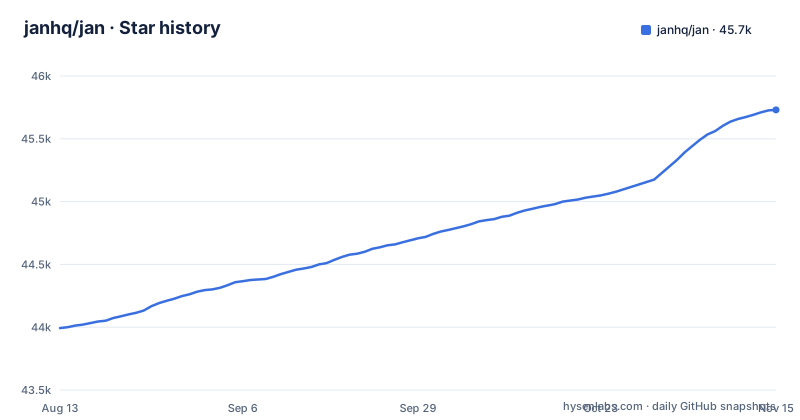
Star history
- janhq/jan45,730 ★ · +1,737
| Repository | 2026-08-13 | 2026-11-15 |
|---|---|---|
| janhq/jan | 44k | 45.7k |
1,737 Stars in the last 94 days, measured from the daily GitHub snapshot. Compare with other projects
Editorial analysis
What Jan Solves and Who It Is For
Jan addresses a specific pain: running large language models without sending data to a cloud provider. The README positions it as an open-source alternative to ChatGPT that runs 100% offline. That matters for users who handle sensitive documents, work in regulated environments, or simply distrust remote inference. The target audience is not researchers building custom pipelines. It is people who want a ChatGPT-like chat interface but with local execution and full control over models. The project also supports cloud integration for OpenAI, Anthropic, Mistral, Groq, and MiniMax, so it can serve as a unified front end for both local and remote models. That dual mode makes it a practical tool for developers who want one interface for experiments and production calls.
The Architecture: Tauri, llama.cpp, and a Local API Server
Under the hood, Jan is a desktop application built with Tauri, which explains the Rust prerequisite in the build instructions. Tauri gives a lightweight shell around a web front end, and the README credits llama.cpp as a foundational dependency for local inference. The key architectural piece is the OpenAI-compatible API server that runs at localhost:1337. That server lets other applications talk to Jan as if it were an OpenAI endpoint. The data flow is straightforward: you download a model from HuggingFace, Jan loads it via llama.cpp, and the local server exposes a standard REST interface. The Model Context Protocol (MCP) integration adds agentic capabilities, though the README does not detail how that works in practice.
Getting It Running: Downloads, Build Steps, and Config
The easiest path is to grab a prebuilt binary. The README lists direct links for Windows (jan.exe), macOS (jan.dmg), and Linux as a .deb or AppImage. There is also a Microsoft Store badge and a Flathub badge. For developers, the build process starts with prerequisites: Node.js 20 or newer, Yarn 4.5.3 or newer, Make 3.81 or newer, and Rust for Tauri. On Apple Silicon, you also need the MetalToolchain, installed via xcodebuild -downloadComponent MetalToolchain. The recommended command is make dev, which installs dependencies, builds core components, and launches the app. Manual commands are yarn install, yarn build, and yarn dev. The make targets include build, test, and clean, where clean deletes everything. The README documents two build-time settings for engine builds, JAN_ENGINE_VARIANT and JAN_ENGINE_BUILD_DIR.
System Requirements and the RAM Ceiling
The README is honest about hardware needs. For macOS, it lists 8GB RAM for 3B models, 16GB for 7B, and 32GB for 13B. That is a steep curve. A 3B model is the practical floor for a decent experience, and even that requires a machine from the last few years. On Windows, GPU support is limited to NVIDIA, AMD, and Intel Arc, so older or integrated GPUs may not accelerate inference. Linux is described as working on most distributions, with GPU acceleration available. The real constraint is memory bandwidth and capacity. Local LLMs are memory-hungry, and Jan does not magically reduce that. If you have a laptop with 8GB of shared RAM, you will likely be stuck with small models that produce mediocre output. This is not a flaw in Jan itself, but it defines who can use it effectively.
What the Documentation Does Not Tell You
The README is light on operational details. It mentions MCP integration but gives no examples or configuration syntax. It lists cloud providers but does not explain how to set API keys or switch between local and remote models. Troubleshooting is reduced to a link and a Discord channel. The README does include a Building on Windows section, which requires Git Bash, Visual Studio 2022 Build Tools, LLVM, Ninja and CMake. The release cadence is active, with v0.8.8 released on 28 October 2026, v0.8.7 on 20 October and v0.8.6 on 9 October, but the changelog is external. If you hit an issue, you are expected to read the docs or ask on Discord. That is fine for a community project, but it means production users must be prepared to dig into source code.
The License Ambiguity Is a Red Flag
The README states 'Apache 2.0 - Because sharing is caring.' The repository metadata, however, lists the license as NOASSERTION. That mismatch is significant. NOASSERTION means the repository does not declare a recognized license in its metadata, which can happen when the LICENSE file is missing or malformed. For an open-source project, this is a practical problem: you cannot legally assume Apache 2.0 terms apply. Before adopting Jan in a commercial context, you must verify the actual license file in the repository and confirm it matches the README claim. This is not a reason to dismiss the project, but it is a due diligence step that the README glosses over. The same applies to the bundled dependencies like llama.cpp, which have their own licenses.
Alternatives: LM Studio and Ollama Take Different Paths
Jan is not the only local LLM launcher. LM Studio offers a similar desktop GUI with a model browser and an OpenAI-compatible local server. The difference is that LM Studio focuses on a polished, closed-source experience, while Jan is open source and explicitly invites contributions. Ollama takes a different approach: it is a command-line daemon that manages models and exposes an API, with no built-in GUI. You bring your own front end, such as Open WebUI. That makes Ollama lighter and more scriptable, but it lacks Jan's integrated chat interface. If you need a full desktop app with a GUI and local execution, Jan fits. If you prefer a headless server that you control via scripts, Ollama is cleaner. If you want a GUI without the open-source commitment, LM Studio is a direct competitor. The choice depends on whether you value openness, GUI polish, or API flexibility.
Maintenance and Upgrade Cost
Jan is actively maintained, with three releases between 9 and 28 October 2026. That cadence suggests rapid iteration, but it also means frequent upgrades. Each release may change the API surface or model handling, so you should read the changelog before updating. The build system uses Make and Yarn, which is standard for a TypeScript project, but the Rust component adds complexity. Upgrading from source requires pulling the latest commit and rerunning make dev or yarn build. The clean target deletes everything, which is useful but also wipes any local configuration. The README does not mention migration steps or data persistence, so you should back up your models and settings manually. The project's dependence on llama.cpp means you inherit its update cycle as well. For a personal tool, this is manageable. For a team deployment, you will need to pin versions and test each release.
Editorial conclusion
Adopt Jan if you need a private, offline LLM interface on your desktop and are comfortable managing local model downloads and RAM constraints. Skip it if you rely on cloud-only models or need a fully mature ecosystem. Before adopting, verify GPU support for your specific hardware, confirm the license situation (the repository shows NOASSERTION despite README claiming Apache 2.0), and test the OpenAI-compatible server at localhost:1337 with your target client.
Frequently asked questions
Is Jan AI free to use?
The project is open source, described as an open source alternative to ChatGPT that runs fully offline, with the README stating the licence as Apache 2.0. It offers downloads for Windows, macOS and Linux, Microsoft Store and Flathub listings, and a build from source; connecting to hosted models from OpenAI, Anthropic, Mistral, Groq or MiniMax is a separate optional cost on top of running models locally.
Is Jan an open-source alternative to ChatGPT?
That is how the repository describes itself: an open source alternative to ChatGPT that runs 100% offline on your computer. The README adds that it runs local models from HuggingFace such as Llama, Gemma, Qwen and GPT-oss, offers custom assistants, exposes an OpenAI-compatible API at localhost:1337, and can also reach cloud models through OpenAI and Anthropic.
Who created Jan AI?
The README does not name an individual, and the contact section lists roles rather than people: [email protected] for business, [email protected] for jobs, GitHub Issues for bugs and Discord for general discussion. The project is developed under the janhq GitHub organisation, which is where the code, the releases and the issue tracker live.
Official sources
Where this project is recommended
Add this badge to your README
If you maintain this project, the badge below links readers to this analysis and shows its maintenance status from the daily GitHub snapshot. Paste the markdown into your README; add ?metric=license or ?metric=stars to the image URL for a different field.

[](https://hysenlabs.com/projects/janhq-jan)Star history chart for your README
[](https://hysenlabs.com/projects/janhq-jan)Community discussions
Was this useful?