VoiceCraft: Zero-Shot Speech Editing and TTS for In-the-Wild Audio
Zero-Shot Speech Editing and Text-to-Speech in the Wild
At a glance
- What is it?
- VoiceCraft is a token infilling neural codec language model from jasonppy that edits or clones unseen voices from a few seconds of reference audio. Here is how the repository is installed, what the inference scripts actually do, and where the approach breaks down.
- Who is it for?
- Adopt VoiceCraft if you need to edit words inside an existing recording or clone a voice from a few seconds of reference and you have a CUDA 11.7 class GPU. Skip it if you need a CPU-only pipeline, and plan around the 16-second prompt-plus-generation limit, which the Gradio app's Long TTS mode handles by rerunning long texts part by part.
- Can I use it commercially?
- Check first. The repository uses a licence we do not classify automatically, so read its LICENSE file before any commercial use.
- Is it still maintained?
- Yes. The repository last received commits 168 days ago.
- What is it written in?
- Mainly Jupyter Notebook, according to GitHub's language statistics.
Answers come from the project's GitHub data, last synced on November 14, 2026, and from our analysis. They are not legal advice.
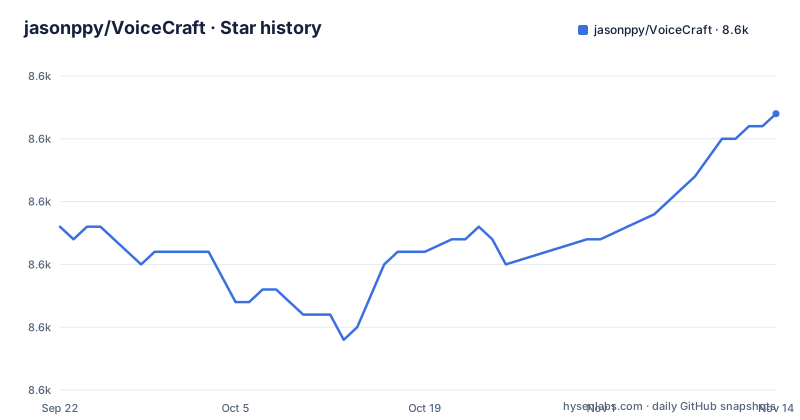
Star history
- jasonppy/VoiceCraft8,587 ★ · +9
| Repository | 2026-09-22 | 2026-11-14 |
|---|---|---|
| jasonppy/VoiceCraft | 8.6k | 8.6k |
9 Stars in the last 53 days, measured from the daily GitHub snapshot. Compare with other projects
Editorial analysis
The editing problem VoiceCraft was built to solve
Most text-to-speech tools synthesize a whole utterance from text. VoiceCraft targets a narrower and harder task: changing part of a recording that already exists. The README describes it as a token infilling neural codec language model, and the repository ships two demo entry points, tts_demo.py and speech_editing_demo.py, which map to those two jobs. Speech editing means you have an audiobook chapter, a podcast segment or an internet video, you want to replace or insert a phrase, and the result has to keep the speaker's timbre, pacing and room sound. TTS means the same model generates speech from a text transcript conditioned on a short reference clip. The README states that cloning or editing an unseen voice needs only a few seconds of reference, and that the model was evaluated on in-the-wild data including audiobooks, internet videos and podcasts. That last point matters for who this is for. If your audio is studio-clean, the harder in-the-wild case is not your bottleneck. If your audio came off YouTube, the model was designed with that messiness in mind.
Token infilling: how the model actually generates audio
The mechanism named in the README is token infilling over a neural audio codec. Audio is encoded into discrete tokens, the model predicts the missing or target tokens conditioned on the surrounding context plus a reference clip, and the tokens are decoded back to a waveform. For editing, the surrounding context is the audio you keep, so the model fills the gap rather than regenerating the file. For TTS, the context is the reference speaker clip and the target is the transcript you supply. The repository layout reflects this split: edit_utils.py sits at the top level next to config.py and main.py, with models/ and steps/ holding the network and training code. The practical consequence is that a reference clip is not optional. You cannot run either demo without audio to condition on, and the quality of that clip bounds the quality of the output. The README also records a sampling change on 2025-03-15, moving inference sampling from topp=1 to topk=40, which it says massively improved editing and TTS performance. If you are reading older tutorials or copied hyperparameters from an earlier commit, that default is why your results may not match.
Installing VoiceCraft with conda and running the command line demo
The README gives a conda path and a Docker path. The conda path pins Python 3.9.16 and installs audiocraft from a specific git commit, xformers 0.0.22, torch 2.0.1 and torchaudio 2.0.2, which the README notes assumes a system compatible with CUDA 11.7. System packages ffmpeg and espeak-ng are needed before the Python dependencies. The environment block below is copied from the README's environment setup section; the last line is the Montreal Forced Aligner install with the versions the Dockerfile uses.
conda create -n voicecraft python=3.9.16
conda activate voicecraft
pip install -e git+https://github.com/facebookresearch/audiocraft.git@c5157b5bf14bf83449c17ea1eeb66c19fb4bc7f0#egg=audiocraft
pip install xformers==0.0.22
pip install torchaudio==2.0.2 torch==2.0.1
apt-get install ffmpeg
apt-get install espeak-ng
conda install -c conda-forge montreal-forced-aligner=2.2.17 openfst=1.8.2 kaldi=5.5.1068
The README continues with the remaining pip pins (tensorboard 2.16.2, phonemizer 3.2.1, datasets 2.16.0, torchmetrics 0.11.1, huggingface_hub 0.22.2) and then the MFA dictionary and acoustic model downloads. Once the environment is active, the standalone script is the fastest first run. The README says that without arguments the script runs the standard demo arguments used elsewhere in the repository, and that you can pass input audio, target transcripts and inference hyperparameters on the command line.
python3 tts_demo.py -h
python3 tts_demo.py
The help output lists the flags the script accepts; the bare invocation runs the standard demo arguments used elsewhere in the repository.
The Docker route and what the image does not solve
The Dockerfile is built on jupyter/base-notebook:python-3.9.13 and reproduces the conda environment inside the image: it installs ffmpeg and espeak-ng at the OS level, creates the voicecraft conda environment, downloads the english_us_arpa dictionary and acoustic model through MFA, and registers a Jupyter kernel named voicecraft. The README's docker quickstart assumes an NVIDIA container toolkit, and once inside the image it points you at inference_tts.ipynb. Two caveats are visible in the repository. First, the image is a Jupyter image, so the intended entry point is a notebook, not a service. Second, the README advises cloning the repo onto a drive with plenty of free space, which is a hint about model weight and cache sizes rather than a documented requirement. If you want an HTTP endpoint, gradio_app.py exists in the repository and the README mentions running Gradio locally after environment setup.
The 16 second ceiling and other limits you should plan around
The clearest constraint in the README comes from the April 2024 TTS finetuning note: maximal prompt plus generation length must be 16 seconds or less, because utterances longer than that were dropped from the training data due to limited compute. That is not a soft guideline you can raise with a flag. It limits a single generation, although the Gradio app offers a Long TTS mode that reruns long texts part by part. A second limit is the dependency chain. audiocraft is installed from a pinned git commit, xformers is pinned to 0.0.22, and torch is pinned to 2.0.1 with the README tying that to CUDA 11.7. Moving to a newer CUDA or a newer PyTorch is not a documented upgrade path. Third, the speech editing path depends on Montreal Forced Aligner to produce alignments, installed through conda with openfst and kaldi pinned alongside it. If forced alignment fails on your audio, the edit pipeline has nothing to infill against. Finally, the TODO list still carries an unchecked Improve efficiency item, so the maintainers themselves treat runtime as unfinished work.
Where VoiceCraft is the wrong tool
VoiceCraft is a poor fit when you need a general-purpose TTS service. If your inputs are clean studio recordings and your output is a full read of a long script, the 16 second window and the reference-clip requirement add friction that a conventional TTS engine does not impose. It is also the wrong choice when you have no GPU: the README's environment assumes CUDA 11.7 compatibility, and the Docker path assumes the NVIDIA container toolkit. And it is the wrong tool when you need reproducibility across model versions, because the TTS enhanced models announced on 2024-04-22 are separate weight sets loaded through gradio_app.py or inference_tts.ipynb, not a versioned API. You pick a checkpoint and you live with it.
How it compares to a conventional TTS pipeline
A conventional pipeline separates the stages: a text front end normalizes and phonemizes the transcript, an acoustic model predicts mel spectrograms, and a vocoder renders the waveform. VoiceCraft collapses this by operating on discrete codec tokens and predicting the missing ones, which is why the same model serves both editing and synthesis. The trade-off is that the model needs a reference clip and an alignment rather than just text. If you only ever synthesize from text and never touch existing audio, a standard TTS stack asks less of your environment. If you regularly need to change a word inside a finished recording while keeping the speaker's voice intact, the infilling formulation is the reason VoiceCraft exists, and the alternative is manual re-recording or a splicing workflow that audibly seams. The README's own framing puts the emphasis on in-the-wild data, so the comparison that matters is not clean-versus-clean but messy-input-versus-messy-input.
Licensing, maintenance and what to check before you build on it
The repository carries two licence files, LICENSE-CODE and LICENSE-MODEL, and the GitHub licence field reports NOASSERTION, meaning no standard SPDX identifier was detected. Treat the code and the model weights as governed by separate terms and read both files before shipping anything. This is not legal advice; the point is that a single permissive licence assumption is unsafe here. On maintenance, the last push was on 2026-05-30, and the repository is not archived. The README's news entries cluster in March and April 2024, with the sampling change dated 2025-03-15, and the TODO list has one open item, Improve efficiency. The repository has no published GitHub releases, so there is no tagged version to pin against. Upgrading therefore means tracking master and re-testing your own audio, because the pinned audiocraft commit, xformers 0.0.22 and torch 2.0.1 chain is what the environment was validated with.
Editorial conclusion
Adopt VoiceCraft if you need to edit words inside an existing recording or clone a voice from a few seconds of reference and you have a CUDA 11.7 class GPU. Skip it if you need a CPU-only pipeline, and plan around the 16-second prompt-plus-generation limit, which the Gradio app's Long TTS mode handles by rerunning long texts part by part. Before committing, verify two things: that your audio and target transcript survive the Montreal Forced Aligner step, and that the licence terms in LICENSE-CODE and LICENSE-MODEL cover the use you have in mind.
Frequently asked questions
How do I use VoiceCraft?
The README lists four routes: the quickstart Colab notebooks, Docker, a local environment with conda, and the standalone scripts tts_demo.py and speech_editing_demo.py. After the environment is set up you can also open inference_tts.ipynb or run gradio_app.py locally.
Does VoiceCraft need a GPU?
The environment setup pins torch 2.0.1 and torchaudio 2.0.2 and states this assumes a system compatible with CUDA 11.7, and the Docker quickstart assumes the NVIDIA container toolkit.
How much reference audio does VoiceCraft need to clone a voice?
The README states that cloning or editing an unseen voice needs only a few seconds of reference. The same reference clip is what conditions both the TTS and the speech editing demos.
How long can a VoiceCraft generation be?
The April 2024 TTS finetuning note says maximal prompt plus generation length must be 16 seconds or less, because utterances longer than 16 seconds were dropped from the training data. That limit is stated for the giga330M model finetuned with the TTS objective in that 04/05/2024 note.
Where do I download the VoiceCraft model weights?
The README points to the Hugging Face repository at https://huggingface.co/pyp1/VoiceCraft/tree/main for the giga330M and giga830M weights, and to https://huggingface.co/pyp1 for the 330M and 830M TTS enhanced models. They are loaded through gradio_app.py or inference_tts.ipynb.
Official sources
Add this badge to your README
If you maintain this project, the badge below links readers to this analysis and shows its maintenance status from the daily GitHub snapshot. Paste the markdown into your README; add ?metric=license or ?metric=stars to the image URL for a different field.

[](https://hysenlabs.com/projects/jasonppy-voicecraft)Star history chart for your README
[](https://hysenlabs.com/projects/jasonppy-voicecraft)Was this useful?