trace.moe answers which anime, which episode, and at what second, and this repo is only the index page
Timestamp Retrieval for Anime Clips Everywhere
At a glance
- What is it?
- trace.moe takes a screenshot of an anime frame and returns the anime, the episode and the exact moment the scene appears. The repository you are reading is not the search engine: it holds a compose file, an .env.example, a README and housekeeping files, while the API, the web server, the Telegram bot and the feature library live in six sibling repositories.
- Who is it for?
- trace.moe is worth using when you have one frame and want the timestamp, and the query string form makes it a two line integration for a bot or a script.
- Can I use it commercially?
- Yes. MIT is a permissive licence: you can use, modify and sell software built on it, as long as you keep its copyright and licence notices.
- Is it still maintained?
- Yes. The repository last received commits 53 days ago.
- What is it written in?
- GitHub does not report a main language for this repository.
Answers come from the project's GitHub data, last synced on November 15, 2026, and from our analysis. They are not legal advice.
Star history
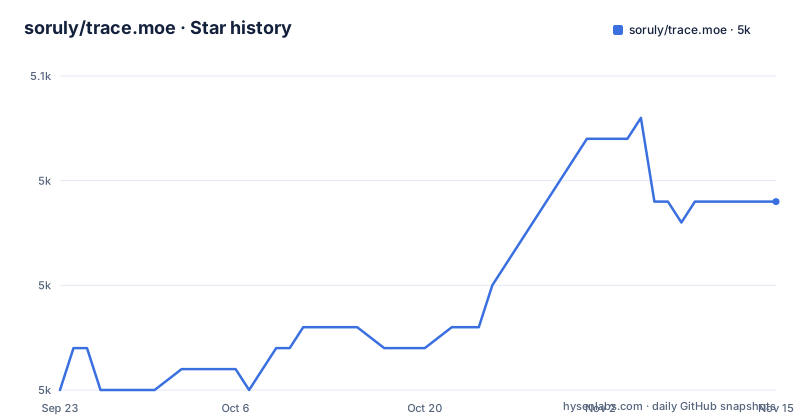
- soruly/trace.moe5,044 ★ · +9
| Repository | 2026-09-23 | 2026-11-15 |
|---|---|---|
| soruly/trace.moe | 5k | 5k |
9 Stars in the last 53 days, measured from the daily GitHub snapshot. Compare with other projects
Editorial analysis
The search engine itself is not in this repository
Everything at the top level here is configuration and documentation: `.env.example`, `.github/`, `.gitignore`, `CODE_OF_CONDUCT.md`, `LICENSE`, `README.md`, `SECURITY.md` and `compose.yml`. There is no source directory, no package manifest and no build script, because this repository is an index page for a system that lives elsewhere. If you arrived looking for the matching code, that code is in one of the sibling repositories named in the overview: the API server, the web server, the Telegram bot, the MCP server, the browser add-ons, and the image feature library. The last push to this repository was 2026-09-23, the default branch is `master` rather than `main`, and there are no GitHub releases attached, so version numbers here mean nothing.
Only two of the sibling services are in the compose file
The self-hosting instructions point at a `compose.yml` that provides the Docker images, and that file covers exactly two of the services named in the overview: trace.moe-www, the web server that serves the trace.moe page, and trace.moe-api, the API server for image search and database updates. Both come from ghcr.io with the `latest` tag, and each links to a CI build and a container package in its own repository. The Telegram bot, the MCP server for AI agents, the browser extension that helps with copying and pasting images, and the library that generates image vectors have no service here. So a local instance gives you the website and the API and nothing else: an agent talking over MCP or a browser extension pointed at your host is not something this file starts.
Folder names have to be AniList IDs, and only three extensions scan
The setup path is six steps, and step two carries the whole design. You create `/mnt/c/trace.moe/video/`, then create a subdirectory whose name is the AniList ID for the series, then drop video files inside it so a full path looks like `/mnt/c/trace.moe/video/{anilist_ID}/foo.mp4`. The directory name is the only thing tying your files to the series metadata, so a folder called `foo` or `naruto-episode-1` gives the scanner nothing to work with. Copy `.env.example` to `.env`, point `VIDEO_PATH` at that directory, start the containers, and open http://localhost:3000. The scanner walks `VIDEO_PATH` every minute for new files and takes only `.mp4`, `.mkv` and `.webm`; anything else in the directory is ignored. Progress can be checked in the logs of the API server. Windows users need docker compose under WSL2.
The compose file ships placeholder passwords and publishes the databases
Reading `compose.yml` closely is worth the minute it takes. The API service gets `TRACE_API_SALT=SALT`, `DB_USER=postgres`, `DB_PASS=postgres`, `DB_NAME=postgres`, `MILVUS_TOKEN=root:Milvus` and `MAX_WORKER=4`, and the postgres service sets `POSTGRES_PASSWORD: postgres` while publishing `5432:5432`. An adminer service publishes `8080:8080` with `ADMINER_DEFAULT_SERVER=postgres`. In other words, a default install exposes a database and a database admin UI on the host network using the word postgres as the password, which is fine on a laptop and a problem on a shared or reachable machine. One detail is deliberate: the video mount uses `${VIDEO_PATH:?error}`, so compose refuses to start at all until that variable is set, and the mount itself is read only inside the container.
The web container is hardwired to call the API on port 3001
Port mapping is the configuration knob the front page points at, and the file couples two values that have to move together. The www service publishes `3000:3000` and is given `NEXT_PUBLIC_API_ENDPOINT=http://localhost:3001`, while the api service publishes `3001:3000` and listens on `SERVER_PORT=3000` internally. Change the published port on the api service and the browser keeps calling 3001, so the page loads and every search fails. The api service also declares `depends_on` for postgres and milvus, which orders startup but not readiness: milvus itself rests on an etcd service with a healthcheck running `etcdctl endpoint health` every 30 seconds with a 20 second timeout and three retries, plus a minio service pinned to the dated release `RELEASE.2024-12-18T13-15-44`. The database image is `postgres:18`. `MAX_WORKER` is the documented way to make hashing faster.
Pre-hashed data means 140GB of RAM and up to a day of loading
If you would rather not hash your own video, there is a database dump, and the instructions come with a number attached: loading all 114,514 files to memory requires about 140GB RAM. The dump is `dump.sql.zst` from a dataset on Hugging Face, and you need zstd first:
sudo apt install zstd   # Ubuntu / Debian
sudo yum install zstd   # CentOS / RHEL
sudo dnf install zstd   # Fedora
sudo pacman -S zstd     # Arch Linux
Start the containers, then load the dump into postgres:
docker exec -i tracemoe-postgres-1 psql -U postgres postgres < <(zstdcat dump.sql.zst)That step takes a few minutes and you are told to ignore errors such as `ERROR: relation "xxx" already exists`. Loading every hash into Milvus is the slow part, and the page warns it may take 24 hours:
docker exec -i tracemoe-postgres-1 psql -U postgres postgres < <(echo "UPDATE files SET loaded=NULL")
docker exec -i tracemoe-postgres-1 psql -U postgres postgres < <(echo "SELECT status, COUNT(*) FROM files GROUP BY status")
Once every file reads as LOADED the index is searchable, though background optimization inside Milvus may run for a few days after that. Teardown is `docker compose down -v`, and the video directory is yours to delete by hand.
The web entry point hands the service a URL to fetch
The integration other sites use is a query string. You pass an image URL and the page resolves it:
https://trace.moe/?url=https://images.plurk.com/32B15UXxymfSMwKGTObY5e.jpgThe shape matters for anyone building on it: the service fetches the address you give it, so the image has to be reachable from the server rather than only from your browser, and the URL ends up in whatever logs sit in front of that request. For bots and apps the front page points at separate API documentation hosted at `soruly.github.io/trace.moe-api/`, and the overview also names an MCP server for AI agents and browser add-ons for copying and pasting images, so the same engine has three documented ways in. What this page does not carry is any statement about authentication, rate limits or how long a submitted image is kept, which is the first thing to look for in the API docs before you build on the hosted service.
Editorial conclusion
trace.moe is worth using when you have one frame and want the timestamp, and the query string form makes it a two line integration for a bot or a script. Hosting it yourself is a different proposition: you supply the video, the folder name has to match an AniList ID, and the compose file publishes postgres and adminer on your host with placeholder credentials, so treat the default `TRACE_API_SALT=SALT` and `DB_PASS=postgres` as something to change before the machine is anything but your own. If you want the existing index instead of your own video, budget for the 140GB of RAM the dump note mentions and for a hash load that can run 24 hours. The last push here was 2026-09-23 and the repository has no releases, so track the sibling repositories for actual changes.
Frequently asked questions
What is trace.moe?
It is an anime scene search engine: give it a screenshot of a frame and it tells you which anime, which episode and the exact moment the scene appears. The repository you are reading is only an index page, with the API server, web server, Telegram bot, MCP server, browser add-ons and image feature library maintained as separate projects.
Is trace.moe safe to send a screenshot to?
The documented web integration passes an image URL in the query string, as in https://trace.moe/?url=..., so the service fetches the address you hand it. The front page states no retention or privacy policy, and the repository carries a SECURITY.md, so check the API documentation at soruly.github.io/trace.moe-api/ before sending anything you would rather not publish.
What do I need to run my own trace.moe instance?
docker compose for your operating system, with WSL2 on Windows. Create `/mnt/c/trace.moe/video/`, add a subdirectory named after the AniList ID for each series, put `.mp4`, `.mkv` or `.webm` files inside, copy `.env.example` to `.env`, set `VIDEO_PATH`, run `docker compose up -d`, then open http://localhost:3000. The scanner checks the directory every minute and indexing progress appears in the API server logs.
How long does loading the pre-built trace.moe database take?
Loading `dump.sql.zst` into postgres takes a few minutes, and errors such as `ERROR: relation "xxx" already exists` can be ignored. Loading all hashes into Milvus may take 24 hours, and background optimization there may run for a few days after every file reads as LOADED. The page also notes that loading all 114,514 files to memory requires about 140GB RAM.
What does the trace.moe compose file expose on my machine?
The web service publishes 3000, the API publishes 3001, postgres publishes 5432 and adminer publishes 8080. Defaults in the file include `TRACE_API_SALT=SALT`, `DB_PASS=postgres`, `POSTGRES_PASSWORD=postgres`, `MILVUS_TOKEN=root:Milvus` and `MAX_WORKER=4`, and the video directory is mounted read only.
Official sources
Add this badge to your README
If you maintain this project, the badge below links readers to this analysis and shows its maintenance status from the daily GitHub snapshot. Paste the markdown into your README; add ?metric=license or ?metric=stars to the image URL for a different field.

[](https://hysenlabs.com/projects/soruly-trace-moe)Star history chart for your README
[](https://hysenlabs.com/projects/soruly-trace-moe)Was this useful?