Codex Security: OpenAI's cs scanner, its access gates and its locked-down container
OpenAI's Codex Security CLI and TypeScript SDK for finding, validating, and fixing security vulnerabilities. npm: https://www.npmjs.com/package/@openai/codex-security
At a glance
- What is it?
- openai/codex-security packages OpenAI's vulnerability scanning workflows as a CLI called cs, a TypeScript SDK, a GitHub Action and a Codex plugin. Local scanning is open to anyone who can sign in, but Daybreak modes and protected findings sit behind separate access approvals, and the policy and container tooling have sharp edges worth knowing first.
- Who is it for?
- Codex Security fits teams already working in Codex or on the OpenAI API who want scanning, validation, patching and SARIF export in one tool, and who can run Node.js plus Python on their scan hosts. It is a poor fit if you need every finding without extra approvals, since Daybreak modes and protected findings depend on Daybreak Blue access and Trusted Access for Cyber.
- Can I use it commercially?
- Yes. Apache-2.0 is a permissive licence: you can use, modify and sell software built on it, as long as you keep its copyright and licence notices.
- Is it still maintained?
- Yes. The repository received new commits within the last day.
- What is it written in?
- Mainly TypeScript, according to GitHub's language statistics.
Answers come from the project's GitHub data, last synced on November 13, 2026, and from our analysis. They are not legal advice.
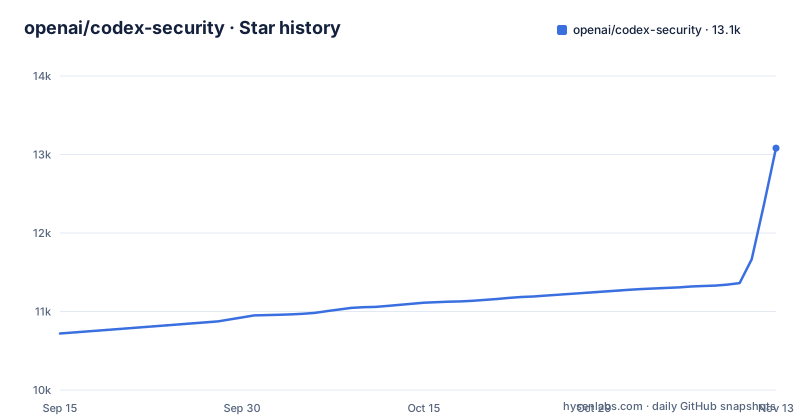
Star history
- openai/codex-security13,082 ★ · +2,362
| Repository | 2026-09-15 | 2026-11-13 |
|---|---|---|
| openai/codex-security | 10.7k | 13.1k |
2,362 Stars in the last 59 days, measured from the daily GitHub snapshot. Compare with other projects
Editorial analysis
Two runtimes on every scan host: Node.js and Python 3.10
The cs command is an npm package, but it does not run on Node.js alone. It requires Node.js 22.13.0 or later within the 22.x line, or Node.js 24.x or 26.x, and also Python 3.10 or later. On Python 3.10 specifically you also need the tomli package. A CI image that only ships Node, or an older Node 22 release below 22.13.0, will not meet the requirement.
The global install creates two commands, codex-security and its short alias cs:
npm install --global @openai/codex-security
cs login
Both land in npm's global executable directory, which has to be on your PATH. The alias is the fragile part. If cs already resolves to another tool on your machine, call codex-security instead. If npm stops with an EEXIST error for cs, skip the global install and run the package through npx:
npx @openai/codex-security scan .The same substitution works for every example: replace cs with npx @openai/codex-security.
cs scan picks a scope first, then a mode
A plain scan runs from the repository directory with cs scan . and reads any SECURITY.md guidance you already have. Narrower scopes come from flags:
# Scan selected paths.
cs scan . --path src --path tests

# Scan committed changes from a base revision to HEAD.
cs scan . --diff origin/main

# Run a deep scan of the repository.
cs scan . --mode deep
The --diff option covers committed changes from the base revision up to HEAD, so uncommitted edits in your working tree are outside that scope. Deep mode runs parallel discovery workers over repositories and selected paths. For a time budget, cs scan . --max-time 15 sets an advisory 15-minute Standard investigation allowance; advisory means it is guidance for the investigation rather than a hard kill, and Deep Scan has its own limits in the CLI guide.
Cost limits and patching after a scan are listed under cs scan --help. After a run, the scope report shows recorded exclusions, which tells you what the scanner did not look at before you treat a clean result as clean. Interrupted runs can be recovered, and bulk scans group independent repository reviews into one resumable campaign.
Daybreak and Trusted Access for Cyber decide what you are allowed to see
Not every scan is available to every account. If you have Daybreak Blue access, the scan command takes --cyber-access-program daybreak_blue. Everyone else either omits the flag or passes --cyber-access-program standard. A separate toggle, --codex daybreak=true, turns on Codex's Daybreak behavior; it defaults off and requires compatible access.
Beyond those flags, some cybersecurity requests and protected findings require approval through Trusted Access for Cyber at chatgpt.com/cyber. The consequence for a security team is that two accounts scanning the same repository can come back with different results, not because the code changed, but because one of them is approved for protected findings and the other is not. If you are comparing Codex Security against another scanner, or deciding whether a quiet report means a quiet codebase, establish which access program and approvals the scanning account holds. Without that, an apparent gap in coverage may be an access limit rather than a missed vulnerability.
SECURITY.md under .github/ or docs/ does not steer a scan
Scans read SECURITY.md files at the repository root and in components. A common layout breaks that assumption: files at .github/SECURITY.md or docs/SECURITY.md often hold vulnerability-reporting instructions, but those locations do not automatically provide repository-wide scan guidance. If that is the only place your policy lives, the scanner is working without it.
The policy command drafts a new SECURITY.md or updates an existing one, optionally for a single component:
cs policy .
cs policy . --path services/api --knowledge-base architecture.md
It saves the draft outside the repository and leaves existing files unchanged. You review the diff and notes, edit the draft, and copy only SECURITY.md to the displayed Policy target. The saved architecture and threat-model documents are meant to stay outside the repository. When updating an existing policy, keep its reporting instructions intact. If the command reports that the policy is already up to date, there is nothing to copy. Scans and policy generation both save threat models, which can be exported later without rerunning analysis.
Signing in on CI, headless boxes and Codex Cloud
Interactive use starts with cs login. For CI, the scan process reads OPENAI_API_KEY or CODEX_API_KEY from its environment. On remote or headless machines there are two routes: login --device-auth, if your workspace allows device authentication, or signing in over SSH with forwarding, which the SDK guide covers.
Codex Security Cloud is a separate, optional connection. When it is available to your account, the Security plugin's $cloud-findings skill can read findings, reports, recorded assignment and verification, and scan status from Codex desktop or the Codex CLI. Local scans do not depend on it. Inside Codex, the flow is conversational: open the repository with the Codex Security plugin enabled and ask for a scan, for example one focused on authentication and authorization that returns the saved report, source evidence and coverage limits. A completed scan saves a report, findings, coverage and, when available, a threat model, which you then use to investigate, request a patch or verify an existing fix.
The SDK wraps a run in an object you must close
For automation inside a TypeScript project, install the package locally rather than globally:
npm install @openai/codex-securityThe minimal usage creates a CodexSecurity instance, runs it against a repository path and closes it in a finally block:
import { CodexSecurity } from "@openai/codex-security";

const security = new CodexSecurity();

try {
  const result = await security.run("/path/to/repository");
  console.log(result.reportPath);
} finally {
  await security.close();
}
The shape matters: close() sits in finally, so a failed run still releases whatever the instance holds. Code that drops the try/finally and returns early on an error skips that cleanup. The result exposes reportPath, the saved report on disk, rather than returning the report inline. Deep-scan configuration, validation, severity classification, owner suggestions and result handling are covered in the SDK guide under sdk/typescript/README.md, not in this minimal example.
compose.yaml drops every capability and will not create your folders
The repository ships a Dockerfile and a compose.yaml aimed at bulk scanning in containers. The runtime image is built on node:26.12.1-bookworm-slim, pinned by digest, and adds ca-certificates, git, openssh-client and python3. The build stage uses corepack 0.36.0 to activate the pnpm 11.25.0 version pinned in package.json.
The compose service is locked down. It runs as user 10001:10001 by default (overridable through CODEX_SECURITY_USER), sets cap_drop to ALL, enables no-new-privileges, and applies a seccomp profile from ./docker/codex-security-seccomp.json unless CODEX_SECURITY_SECCOMP points elsewhere. Its command is bulk-scan /input/repositories.csv --output-dir /output.
Three bind mounts carry the work: ./repositories.csv mounted read-only at /input/repositories.csv, ./results at /output and ./state at /state. Each sets create_host_path: false, so Docker will not create a missing path for you; prepare the CSV and both directories before docker compose up, and make sure the 10001 user can write to results and state. Credentials pass through as OPENAI_API_KEY, CODEX_API_KEY, GH_TOKEN and GITHUB_TOKEN, alongside CODEX_SECURITY_GIT_HOST, CODEX_SECURITY_EMBEDDINGS_URL and CODEX_SECURITY_ENABLE_EXTERNAL_IMPORTS.
Imports, exports and a fast-moving 0.8 line
Codex Security is built to sit next to existing scanners rather than replace their output. It imports Semgrep, Snyk and Wiz findings, either locally or by publishing them to Codex Security Cloud. On the way out it exports SARIF, JSON or CSV and can publish findings to Linear or a findings service. Saved scans can be browsed, duplicates identified, severity assessed against your own rubric, and owners suggested from source and Git history. The examples directory includes Azure Pipelines and GitHub Actions setups, a custom-validation example, a findings.csv sample and a ServiceNow template CSV.
The project is young. The npm package and the GitHub Action both reached 0.8.2 on 2026-10-29, and Action 0.8.1 shipped about an hour before 0.8.2 that same day. The last push to the main branch was on 2026-11-02, and the code is released under Apache-2.0. A pre-1.0 version number with same-day releases is a signal to pin the exact npm and Action versions in CI and to read CHANGELOG.md before upgrading.
Editorial conclusion
Codex Security fits teams already working in Codex or on the OpenAI API who want scanning, validation, patching and SARIF export in one tool, and who can run Node.js plus Python on their scan hosts. It is a poor fit if you need every finding without extra approvals, since Daybreak modes and protected findings depend on Daybreak Blue access and Trusted Access for Cyber. Before adopting it, confirm which access program your account has, check that your SECURITY.md sits at the repository root or in a component rather than only under .github/ or docs/, and pin a version, because the package is still on the 0.8.x line.
Frequently asked questions
What is Codex Security used for?
Codex Security finds, investigates and fixes vulnerabilities in your code. It scans repositories, paths or Git changes, validates candidate findings, generates patches and verifies existing fixes.
How do I install Codex Security?
Run npm install --global @openai/codex-security and then cs login. It needs Node.js 22.13.0+ within 22.x, or 24.x or 26.x, plus Python 3.10 or later.
What is the Codex Security plugin?
It is the way to run Codex Security inside a Codex session: open your repository with the plugin enabled and ask for a scan. The plugin also provides the $cloud-findings skill for reading Codex Security Cloud results.
What is Codex Security Cloud?
Codex Security Cloud is an optional connection that stores findings, reports, assignment, verification and scan status. Local scans work without it, and scanner imports can be published to it.
Official sources
Where developers are discussing it
Posts on Hacker News, dev.to and Lobsters that link to this repository, found by our scan of those communities. 1 in the last 30 days; newest first.
- State of AI Instruction Quality: Coding Agent Comparisondev.to · Oct 21, 2026 · 6 points · 0 comments
Add this badge to your README
If you maintain this project, the badge below links readers to this analysis and shows its maintenance status from the daily GitHub snapshot. Paste the markdown into your README; add ?metric=license or ?metric=stars to the image URL for a different field.

[](https://hysenlabs.com/projects/openai-codex-security)Star history chart for your README
[](https://hysenlabs.com/projects/openai-codex-security)Was this useful?