Lap: A Folder-First Photo Manager That Keeps Your Library on Disk
An offline-first photo manager for large local libraries. It is a privacy-focused alternative to cloud photo services: no forced upload, local AI search, folder-first workflow, and free to use.
At a glance
- What is it?
- Lap is an open-source, offline-first desktop photo manager for large local libraries. It skips the cloud, runs AI search locally, and works directly with your folders, but its local-only metadata has real trade-offs.
- Who is it for?
- Adopt Lap if you have a large local photo library, want no cloud dependency, and are willing to keep Lap's database backed up alongside your photos. Do not adopt it if you need metadata to travel with files or if you frequently rename or move files outside Lap.
- Can I use it commercially?
- Yes, with conditions. GPL-3.0 is a copyleft licence: if you distribute software that includes it, you must release that software's source code under the same licence. Running it internally without distributing it does not trigger that obligation.
- Is it still maintained?
- Yes. The repository received new commits within the last day.
- What is it written in?
- Mainly Vue, according to GitHub's language statistics.
Answers come from the project's GitHub data, last synced on November 13, 2026, and from our analysis. They are not legal advice.
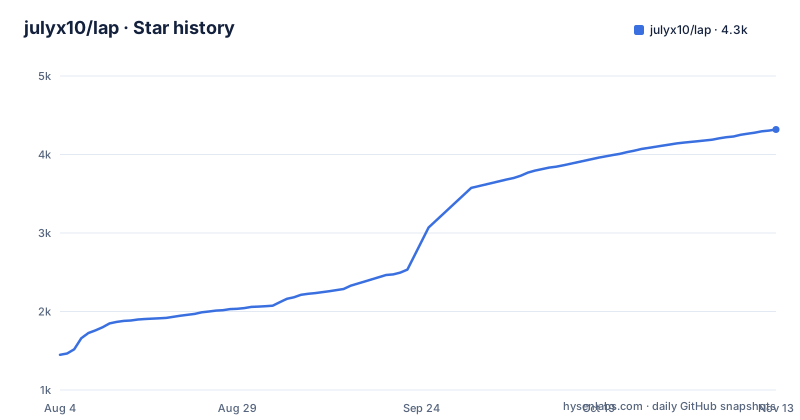
Star history
- julyx10/lap4,319 ★ · +2,871
| Repository | 2026-08-04 | 2026-11-13 |
|---|---|---|
| julyx10/lap | 1.4k | 4.3k |
2,871 Stars in the last 101 days, measured from the daily GitHub snapshot. Compare with other projects
Editorial analysis
What Lap Actually Solves
Lap targets a specific pain: managing tens of thousands of photos without handing them to a cloud service. The README states it is built for libraries with 100k+ files, and it positions itself as a privacy-focused alternative to Google Photos or iCloud. The core promise is that your originals stay in your existing folders, and all indexing, search, and face data stays on your machine. For a family archivist or a photographer with a large local disk, that removes the upload bottleneck and the subscription cost. It also avoids the lock-in of a proprietary database that holds your photos hostage. Lap is not a cloud sync tool, and it does not try to be one.
How the Folder-First Mechanism Works
Lap does not import files into a closed vault. Instead, it reads your existing folder structure and builds a local catalog. The README explains that EXIF data like capture date, camera, lens, GPS, and orientation are read from the file itself when Lap indexes it. Everything else, such as tags, ratings, collections, smart album rules, and AI search data, is stored in Lap's local database. That means Lap presents a rich view of your library, but the source of truth is split between your files and its database. The design keeps your originals untouched, but it also means changes made outside Lap can break the association between the file and its metadata. The README is explicit: for reliable results, rename and move files inside Lap when you rely on Lap-only organization.
Getting Lap Running on Your Platform
Lap ships as a desktop app for macOS, Windows, and Linux. For macOS, the README shows a Homebrew install path: `brew tap julyx10/lap` then `brew install --cask lap`. For Windows, you download an MSI from the latest release page, with separate x64 and ARM64 builds. Note the Windows installer is unsigned, and the README warns that SmartScreen may block it. Linux users get a .deb package for Debian-based distributions, again with amd64 and arm64 variants. The macOS builds are notarized by Apple, which is a nice touch for trust. After installation, you point Lap at your existing photo folders, and it starts indexing. There is no cloud account to create, and no upload step.
The Local Metadata Trade-Off
The biggest limitation of Lap is that its organization data does not travel with your files. If you copy a photo to a USB drive or export it to another app, your tags, ratings, and collections stay behind. The README is clear that this data is not written into EXIF, IPTC, or XMP sidecars. For someone who uses Lap as the sole manager of their library, that is fine. But if you also use Finder, Explorer, or another photo app on the same folders, you risk confusion. Renaming a file outside Lap can orphan its metadata. The README advises backing up Lap's database and configuration together with your photos, and it points to Settings → Storage for managing the database location. This is a real constraint, not a minor caveat.
AI Search That Stays Local
Lap's local AI search is a headline feature. It supports text prompts, visual similarity, subjects, face clustering, and optional multilingual search in 50+ languages. Everything runs on your machine, which means no photos leave your disk for analysis. The trade-off is compute cost: indexing a 100k-file library with face and similarity data will take time and CPU or GPU cycles. The README does not give benchmarks, so you cannot know exactly how slow or fast it will be on your hardware. For a privacy-focused user, the local processing is a win. For someone with an older machine, the index build might be a hurdle. The feature list also includes smart albums, which are rule-based views you can save, so you can build a '2023 trip with family' view without moving files.
Handling Live Photos and RAW Pairs
Lap has specific support for two common photo-library headaches. Apple Live Photos are recognized as paired HEIC and MOV files, and the viewer can play them. When you rename, move, copy, or delete a Live Photo in Lap, it keeps the linked MOV and AAE sidecar together. Similarly, RAW + JPEG/HEIC pairs can be grouped as one item, while the original files remain separate. This is a thoughtful touch for photographers who shoot RAW+JPEG. The README notes that these grouped operations work when you perform them in Lap. If you move a file outside Lap, the pairing logic does not apply, and you can break the association. So the feature is useful, but only when you stay inside Lap's workflow.
Maintenance, Uninstall, and License
Lap is GPL-3.0 licensed, so you can inspect and modify the code, but if you distribute a modified version, you must share it under the same license. The project is under active development, with a release in August 2026, so it is not abandoned. Maintenance cost is mostly about backing up the database. The README gives explicit commands for removing Lap completely on macOS and Windows, which is a sign that the authors thought about clean uninstall. On macOS, you delete `com.julyx10.lap` files under Application Support, Caches, and Preferences. On Windows, you remove `com.julyx10.lap` under LOCALAPPDATA. Deleting the database does not delete your photos, which is a relief. But it does delete all your tags, ratings, and AI index data, so backup is not optional if you care about that.
Alternatives and the Right Fit
The obvious alternative is a cloud service like Google Photos, which offers similar search and face clustering but forces upload and uses your data for its own purposes. Another alternative is a traditional local manager like digiKam, which writes metadata into sidecar files, so your tags travel with the folder. Lap's approach is different: it keeps metadata in a central database, which makes it faster to query across 100k files but ties the metadata to that database. If you need your metadata to be portable, digiKam or a tool that writes XMP is a better fit. If you want zero cloud and are willing to maintain a backup of Lap's database, Lap is a strong candidate. The right user is someone who manages a large local library and can commit to using Lap as the primary interface for file operations.
Editorial conclusion
Adopt Lap if you have a large local photo library, want no cloud dependency, and are willing to keep Lap's database backed up alongside your photos. Do not adopt it if you need metadata to travel with files or if you frequently rename or move files outside Lap. Before committing, verify that your file formats and RAW/HEIC pairing needs are covered, and test the rescan behavior on a copy of your library. Check the latest release for platform support and the signed status of your installer.
Frequently asked questions
What is the best photo organizing software for PC?
The repository does not compare tools. What it describes is one option: a desktop application that reads the folders you already have, builds a local index, and adds browsing by date, folder, place, camera, tags, ratings and faces, a map view, smart albums, duplicate cleanup and a comparison viewer, with no subscription and no upload step.
What are some open source photo apps?
This repository is one, released under a copyleft licence with its full source and a privacy document in the tree. Its distinguishing claim is not that it is open source but that it is folder-first: it manages your existing directories instead of importing them into its own library database.
Is Lap free?
The readme says open source and free, with no subscription and no forced ecosystem, and it is installable from a release page or through a Homebrew cask. The cost it names is your own disk and your own time, since face clustering, visual similarity search and the thumbnail index all run locally on your machine.
Can I uninstall Lap without losing my photos?
Yes, and the file says so in three separate places: uninstalling, or deleting its database and cache, does not delete the original media files. What you do lose is everything the application stored for itself, including collections, tags, ratings, culling decisions, smart album rules and the search index.
Does Lap work on Windows and Mac?
Both, plus Linux, with disk images for Apple Silicon and Intel, Windows installers for x64 and ARM, and Debian-family and AppImage packages for Linux. The macOS packages are notarized by Apple; the Windows installers are unsigned, and the file tells you to click past the SmartScreen warning if it appears.
Official sources
Add this badge to your README
If you maintain this project, the badge below links readers to this analysis and shows its maintenance status from the daily GitHub snapshot. Paste the markdown into your README; add ?metric=license or ?metric=stars to the image URL for a different field.

[](https://hysenlabs.com/projects/julyx10-lap)Star history chart for your README
[](https://hysenlabs.com/projects/julyx10-lap)Was this useful?