eslint-plugin-boundaries turns architecture rules into ESLint errors
Enforce architectural boundaries in your JavaScript and TypeScript projects
At a glance
- What is it?
- eslint-plugin-boundaries is a TypeScript ESLint plugin that classifies files as architectural elements, file categories and module origins, then enforces dependency policies between them. It fits teams that want violations caught in the editor, and it does nothing for runtime coupling or unanalysed code paths.
- Who is it for?
- Adopt eslint-plugin-boundaries if your layering is expressible as file patterns and import policies, and if you want violations surfaced while the file is open rather than in a pull request review. Skip it if your real constraint is runtime coupling, generated code, or dependency rules that depend on call sites rather than on import statements.
- Can I use it commercially?
- Yes. MIT is a permissive licence: you can use, modify and sell software built on it, as long as you keep its copyright and licence notices.
- Is it still maintained?
- Yes. The repository received new commits within the last day.
- What is it written in?
- Mainly TypeScript, according to GitHub's language statistics.
Answers come from the project's GitHub data, last synced on November 7, 2026, and from our analysis. They are not legal advice.
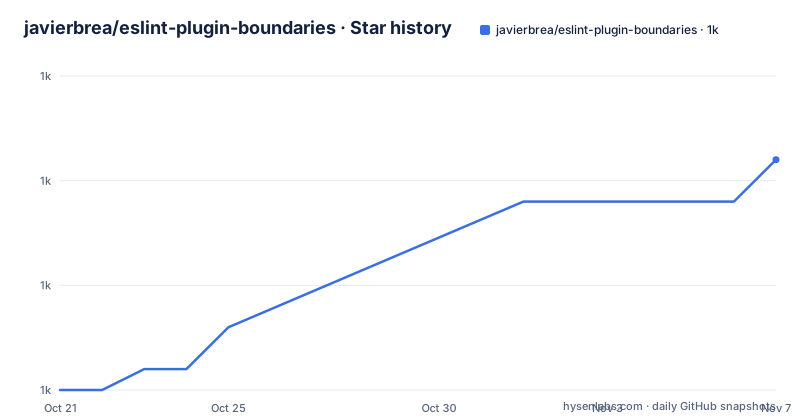
Star history
- javierbrea/eslint-plugin-boundaries1,011 ★ · +11
| Repository | 2026-10-21 | 2026-11-07 |
|---|---|---|
| javierbrea/eslint-plugin-boundaries | 1k | 1k |
11 Stars in the last 17 days, measured from the daily GitHub snapshot. Compare with other projects
Editorial analysis
Catching a broken layer while the file is still open
Architecture usually fails in the same way: a controller imports a view, a domain module reaches into a repository, and the layering diagram in the wiki quietly stops matching the code. eslint-plugin-boundaries is an ESLint plugin that turns those layer rules into lint errors. The project description is plain about the scope, enforcing architectural boundaries in JavaScript and TypeScript projects, and the plugin adds one rule in the documented example, `boundaries/dependencies`, which compares the classification of the file doing the import with the classification of the file being imported. Feedback arrives as an ordinary ESLint diagnostic, so it shows up in the editor, in a pre-commit hook and in CI, using the same reporting path as any other rule. That is the appeal for a team with a monorepo: the constraints live in one config file next to the rest of the lint setup, and a violation is a lint failure rather than a review comment. It is worth being precise about what it does not cover. The plugin reasons about import statements that ESLint can see, so it is a static, file level check, not a runtime boundary or a module loader restriction.
Three independent dimensions for every file
The part of the design that distinguishes this plugin from a single pattern list is that classification happens on three axes at once. The first is the architectural element, the layer or role a file plays, expressed as a type and a glob pattern. The second is the file category, a label such as test applied independently of the layer. The third is the origin of a dependency, which distinguishes code inside your project from an external package. The documentation states that every file or dependency can be described across these three dimensions simultaneously, and that rules can be written for any combination of them. In practice this is what lets a single policy set express two ideas that a flat layer list cannot: a controller may reach a model but not a view, and no element at all may import a test file. The selectors in the rule are what bind the two ends of an import together, and the module origin axis is what lets a rule talk about third party packages rather than only about your own folders.
Elements and categories are glob patterns in settings
Classification is configuration, not code, and it lives in the `boundaries` section of your ESLint settings. Each architectural element is a type with a pattern, and each file category is a category with a pattern.
      "boundaries/elements": [
        { type: "controller", pattern: "controllers/*" },
        { type: "model", pattern: "models/*" },
        { type: "view", pattern: "views/*" }
      ],
The three entries above are the ones in the project documentation, and they are the whole example. A file category is declared the same way, with a category name and a pattern, and the documented example uses a test category for files whose name ends in `.test.js`. The practical detail that will decide whether you like the plugin is how the patterns behave. They are matched against file paths in the project, and the example patterns are shallow, matching a `controllers` directory at a single level, so a real monorepo with packages nested several directories deep needs patterns that reflect where its code actually sits. The documentation links a dedicated classification page and a selectors page for exactly this reason.
Policies are allow lists under a default of disallow
The rule itself is configured with a default and a list of policies.
  rules: {
    "boundaries/dependencies": [2, {
      default: "disallow",
      policies: [
        {
          from: { element: { type: "controller" } },
          allow: {
            to: { element: { types: { anyOf: ["model", "view"] } } },
          },
        },
        {
          from: { element: { type: "view" } },
          allow: {
            to: { element: { type: "model" } },
          },
        },
The default of `disallow` is the part to notice. Nothing is permitted unless a policy says so, which is the opposite of how most import restriction lists are written and the reason the rule does not need an entry for every forbidden direction. A policy has a `from` selector describing the importer and either an `allow` or a `disallow` clause describing the target, and the same rule can carry both kinds. The remaining policies in the example cover the other two dimensions, one that blocks any element from importing a file in the test category, and one that restricts a single external package to a single layer.
        {
          disallow: {
            to: { file: { categories: "test" } },
          },
        },
        {
          from: { element: { type: "!controller" } },
          disallow: {
            to: { module: { origin: "external", source: "axios" } },
          },
        },
The `!controller` selector and the module origin selector together say that the `axios` package is a controller only dependency. The severity value in the rule, `2` in the documented example, is the ordinary ESLint error level, and it is what turns a detected violation into a failing lint run.
Adding the plugin to a flat ESLint config
The plugin is installed from npm as a development dependency.
npm install eslint eslint-plugin-boundaries --save-devThe documented configuration imports the plugin and registers it under the `boundaries` key, then fills in the settings that classify your files.
import boundaries from "eslint-plugin-boundaries";

export default [
  {
    plugins: { boundaries },
That export shape is the flat config style, and the repository itself uses a root `eslint.config.js` file. The plugin is written in TypeScript, and the project's own workspace declares `node` version 20 or newer and `pnpm` version 9 or newer as its engines, with pnpm 10.24.0 as the package manager. Its development dependencies pin ESLint 9.37.0, TypeScript 5.9.3 and the `@typescript-eslint/parser` at 8.57.0, which is a reasonable signal about which ESLint generation the plugin targets. The project also ships a TypeScript support guide in its documentation and an `examples/typescript` directory in the repository, so a TypeScript setup is an expected use rather than an afterthought. Once the rule is in place, a violation looks like an ordinary ESLint error on the import line, which is what the documentation means by instant feedback.
What a lint time boundary check cannot see
The failure modes here are structural rather than bugs. First, the plugin can only report what ESLint hands it, which in practice means import and export statements in files that the lint run covers. A boundary expressed through a dynamic import constructed at runtime, a dependency injected through a registry, or a shared constant folder that both layers read, is invisible to a rule that matches file paths against import edges. Second, the classification is a glob, so it describes where a file lives, not what it does. A file under `models/` that behaves like a controller inherits the model's permissions. Third, a rule that fails a build is only as good as its pattern coverage, and a pattern that matches nothing is silent, so a refactor that moves a directory can quietly disable a layer. The project itself ships fixes in this area, with v7.0.2 addressing `checkAllOrigins:true` in the dependencies rule and v7.2.0 improving deprecation warnings, which tells you the option surface is still moving and that configuration written against an older major version may need attention on upgrade.
Lint time policies versus build time module graphs
The alternative approach is to enforce the same idea outside the linter, by computing the dependency graph at build time and failing the build when it does not match the intended architecture. The difference in approach is where the graph is built and when the failure appears. A build time check works from the resolved module graph rather than from import text, so it sees what actually gets bundled, including transitive edges, and it fails once for the whole project instead of once per offending line. A lint time check works per file, at edit time, with the advantage that the developer sees the exact import that broke the rule and fixes it in the same screen where they wrote it. The costs invert too. Build time checks need a build step and a graph algorithm, and they cannot tell a developer anything until the build runs. The lint time approach needs no extra tooling but pays for it in configuration, since every architectural rule has to be expressed as selectors over paths and imports. The repository contains an `examples/oxlint-integration` directory, which is a useful signal that the author expects this rule to be combined with other linters rather than to replace them.
A monorepo with a release every few weeks
The project is organised as a pnpm and nx workspace, with a private root package named `@boundaries/workspace`, a `packages/` directory for the published code and separate `examples/` and `docs/` directories, plus a `test/` directory, `scripts/`, `support/` and a `scripts/lint-staged-file.js` hook wired through lint-staged and husky for staged linting. Renovate is configured in the repository for dependency updates, and a spell checker runs through cspell across source and documentation. Maintenance looks regular in the narrow sense of release cadence: v7.0.2 on 2026-07-07 fixed the `checkAllOrigins:true` behaviour in the dependencies rule, v7.1.0 on 2026-07-20 added descriptors accumulation options, and v7.2.0 on 2026-08-09 improved deprecation warnings, with the last push on 2026-10-18. The licence is MIT, which allows use inside commercial and closed source products without attribution obligations beyond the licence text itself, though that is a licensing fact and not advice about your own situation. The upgrade cost to budget for is configuration migration, since a rule option that changed behaviour in a patch release means your config may need review when you bump the version.
Editorial conclusion
Adopt eslint-plugin-boundaries if your layering is expressible as file patterns and import policies, and if you want violations surfaced while the file is open rather than in a pull request review. Skip it if your real constraint is runtime coupling, generated code, or dependency rules that depend on call sites rather than on import statements. Verify three things first: that your `boundaries/elements` patterns actually match the layout you have in the repository, that the `boundaries/dependencies` rule runs across every package in your workspace rather than only the root, and that the severity value you pick fails the build. The licence is MIT and the last release, v7.2.0, is dated 2026-08-09, with the last push on 2026-10-18.
Frequently asked questions
How do I install eslint-plugin-boundaries?
Install it as a development dependency with `npm install eslint eslint-plugin-boundaries --save-dev`. The project requires Node 20 or newer and pnpm 9 or newer, and its own workspace pins ESLint 9.37.0 and the `@typescript-eslint/parser` at 8.57.0.
How do I define the architectural layers of my project?
Add a `boundaries/elements` entry to your ESLint settings, giving each layer a type and a path pattern, for example a controller type matched against a `controllers` directory. A second settings key, `boundaries/files`, classifies files into categories such as test with their own patterns.
How do I allow one layer to import another?
In the `boundaries/dependencies` rule, set `default` to `disallow` and add policies that name the importer with a `from` selector and the permitted target with an `allow` clause. Nothing is permitted unless a policy allows it.
Can eslint-plugin-boundaries restrict who may use an npm package?
Yes, through the module origin dimension of a policy. The documented example blocks every element except a controller from importing the external package `axios` by matching on `module` origin `external` and source `axios`.
Does eslint-plugin-boundaries work with TypeScript projects?
The project publishes a TypeScript support guide in its documentation and keeps an `examples/typescript` directory in the repository. The plugin is written in TypeScript and its workspace uses the `@typescript-eslint/parser` alongside ESLint 9.
Official sources
Where developers are discussing it
Posts on Hacker News, dev.to and Lobsters that link to this repository, found by our scan of those communities. 1 in the last 30 days; newest first.
- eslint-plugin-boundaries vs Steiger: Which One Should You Use for FSD?dev.to · Oct 27, 2026 · 2 points · 2 comments
Add this badge to your README
If you maintain this project, the badge below links readers to this analysis and shows its maintenance status from the daily GitHub snapshot. Paste the markdown into your README; add ?metric=license or ?metric=stars to the image URL for a different field.

[](https://hysenlabs.com/projects/javierbrea-eslint-plugin-boundaries)Star history chart for your README
[](https://hysenlabs.com/projects/javierbrea-eslint-plugin-boundaries)Was this useful?