simple-bar for macOS: Übersicht Widget Setup and Trade-offs
A yabai and AeroSpace status bar widget for Übersicht
At a glance
- What is it?
- simple-bar is a macOS Übersicht widget that presents yabai or AeroSpace spaces, applications, windows, layouts, and custom widgets. It fits users who want a configurable bar tied directly to their window manager, but its yabai-only workspace actions depend on disabling SIP and adding yabai scripting support.
- Who is it for?
- simple-bar is suitable for macOS users who already use Übersicht with yabai or AeroSpace and want their workspace and window state visible in a configurable bar. It is a poor fit for users seeking a standalone menu bar replacement, a cross-platform solution, or workspace controls without the security and scripting prerequisites imposed by its yabai extension.
- Can I use it commercially?
- Yes. MIT is a permissive licence: you can use, modify and sell software built on it, as long as you keep its copyright and licence notices.
- Is it still maintained?
- Yes. The repository last received commits 88 days ago.
- What is it written in?
- Mainly JavaScript, according to GitHub's language statistics.
Answers come from the project's GitHub data, last synced on November 6, 2026, and from our analysis. They are not legal advice.
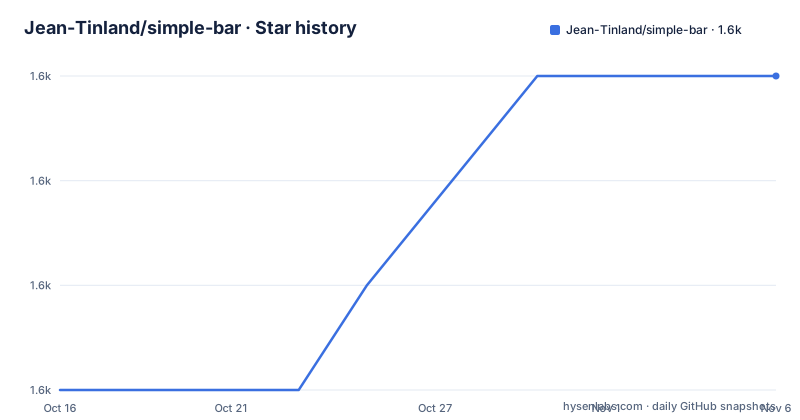
Star history
- Jean-Tinland/simple-bar1,627 ★ · +3
| Repository | 2026-10-16 | 2026-11-06 |
|---|---|---|
| Jean-Tinland/simple-bar | 1.6k | 1.6k |
3 Stars in the last 21 days, measured from the daily GitHub snapshot. Compare with other projects
Editorial analysis
Why simple-bar belongs beside yabai or AeroSpace
simple-bar solves a narrow macOS desktop integration problem. It gives Übersicht users a bar that represents the state of a yabai or AeroSpace window manager rather than serving as an independent system menu bar. The documented view can show every open application across spaces, open windows on the current space, and the current layout mode for a window, including bsp, stack, and float. That makes it most relevant to people who already organize windows through a tiling window manager and want the same operational context inside an Übersicht desktop.
The project is not limited to a passive list. A window can receive focus when clicked. Widgets can launch scripts and toggle states, while per-display settings allow individual widgets to appear on selected monitors. Users can also add widgets that display script output. This makes simple-bar a configurable desktop control surface, although every script and interaction remains tied to the behavior of the host window manager and the scripts configured by the user.
The choice between yabai and AeroSpace matters because simple-bar defaults to yabai. AeroSpace support requires changing the window manager selection in the Global tab of the settings module. Some yabai-only controls go further. Navigating to a workspace, creating one from the plus control, moving or destroying a workspace on hover, and similar operations require SIP to be disabled and the yabai scripting addition to be installed. Those capabilities are not baseline requirements for the entire widget, but they are real security and setup boundaries for part of its feature set.
The JavaScript widget and Übersicht refresh model
The repository is structured as a JavaScript package with `index.jsx`, a `lib/` directory, and configuration maintained through Übersicht. The README calls the settings module a module rather than a conventional standalone settings file, and its interaction is managed through Übersicht. Clicking the `simple-bar` widget and pressing `cmd` + `,` opens that settings interface. This places discovery and configuration inside the host application rather than requiring editors to work from the command line after installation.
The documented data path begins with the selected window manager. simple-bar expects to locate the yabai or AeroSpace executable through configurable paths, then presents application and window state supplied by that manager. Übersicht loads the JSX widget and renders the resulting controls. User actions are translated back into window manager operations, such as focusing a clicked window or invoking a configured script. The README does not publish the internal command sequence, cache policy, or widget refresh interval, so those implementation details cannot be treated as guaranteed behavior.
Refresh behavior is the main architectural trade-off. The README says that simple-bar-server can trigger refreshes and widget toggles through `curl` commands. Installing that companion project therefore replaces some demand for repeated widget refreshes with explicit server requests. The README presents simple-bar-server as a way to improve responsiveness and energy consumption, but the README provides no measurements or implementation comparison. Users should treat the server as a separate deployment with its own configuration, not as a transparent component bundled into the base repository.
Custom widgets extend the same model. Their visible content is script output, so simple-bar does not define arbitrary application widgets by itself. The value depends on the scripts selected by the user and the permissions available to those scripts.
Installing simple-bar in Übersicht
The README instructs users to clone the repository into the Übersicht widgets directory. This installs the widget as a local checkout named `simple-bar` under the user's macOS Application Support directory.
git clone --depth 1 https://github.com/Jean-Tinland/simple-bar $HOME/Library/Application\ Support/Übersicht/widgets/simple-barAfter cloning, the reader should expect a `simple-bar` directory in the specified widgets location. The README does not give a separate dependency installation command for Übersicht users. The root `package.json` is primarily associated with development checks: it defines an ESLint command and development dependencies rather than an application build step.
For the first use, open the widget settings through Übersicht by clicking `simple-bar` and pressing `cmd` + `,`. In the Global tab, confirm the window manager choice. The project selects yabai by default, so an AeroSpace user must change it. Also inspect the configured yabai or AeroSpace path. The README identifies the default values as `$(which yabai)` and `$(which aerospace)`, but also warns that `simple-bar-index.jsx: Something went wrong…` can result when the selected executable path is wrong.
Once the correct manager and path are set, save the settings and check that Übersicht renders the bar. The documentation does not define a universal command for validating the connection, so the visible result should be the presence of applications, spaces, or the configured widgets rather than output from an invented diagnostic command.
Widget behavior, themes, and multi-monitor placement
The feature set centers on desktop state rather than time, battery, or media controls. Applications can be represented across every space, while current-space windows carry their layout mode. Clicking a window focuses it. This arrangement is useful for people who need a persistent visual index of tiled windows, but the README does not document keyboard navigation, screen reader announcements, or a complete accessibility model. Accessibility improvements such as right-to-left reading direction remain on the roadmap, which makes the existing accessibility surface an area to verify rather than assume.
Themes can follow a fixed dark or light appearance or the system appearance. That is a sensible boundary for a desktop bar because it avoids requiring every user to maintain separate assets for both modes. The larger theme system is extensible, but the repository summary does not enumerate its API or supported theme destinations. Users wanting arbitrary typography, icon packs, or layout placement should consult the project's documentation rather than assume every Mac status bar customization API is supported.
Multi-monitor support is widget-specific. A user can enable an individual widget on selected displays, which is more precise than treating every bar as a global clone. The roadmap, however, still lists a broader bars configurator for spawning multiple bars and placing widgets anywhere. That distinction matters: selective display assignment is available, while arbitrary placement and multi-bar composition are presented as planned work.
Interactions extend beyond focus. Scripts can be launched and states can be toggled. These features are flexible by design, but they also transfer responsibility to the configured scripts. The README does not provide rollback behavior, script timeouts, error presentation, or isolation guarantees, so faulty scripts should not be expected to gain recovery features from simple-bar itself.
Security prerequisites for yabai workspace actions
The clearest limitation is the split between ordinary bar features and yabai scripting actions. Workspace creation, workspace navigation, moving, and destruction are described as available only when SIP is disabled and the yabai scripting addition is installed. Disabling SIP changes a core macOS protection setting, and the project documentation expressly associates several controls with that requirement. Readers should therefore treat those controls as an optional feature with a system-level prerequisite, not as a zero-configuration default.
AeroSpace users are not given an equivalent requirement for the yabai scripting addition in the README. They can select AeroSpace in the Global settings, but the documentation does not claim that every yabai-only workspace action is available under AeroSpace. The safe interpretation is that support for AeroSpace status information does not automatically establish support for all yabai scripting features.
There are other boundaries worth checking. The project targets macOS and depends on Übersicht plus a supported window manager. No Linux, Windows, or cross-platform installation path is documented. It also lacks a standalone application service in the base repository: the widget depends on Übersicht to host it.
The optional `simple-bar-server` project introduces another operational component. It is positioned as a more efficient way to trigger refreshes and toggle widgets through `curl`, but the base README does not document its installation, authentication, network exposure, or failure behavior. Enabling the server should not be treated as equivalent to leaving the default architecture untouched.
simple-bar compared with simple-bar-lite and a standalone bar
The most direct alternative identified by the project is `simple-bar-lite`, described as a more lite and basic version. That indicates a smaller configuration surface, although the README does not document which widgets or interactions it retains. It is therefore the relevant choice when someone wants a simpler bar and does not need the extensive widget and theme options associated with simple-bar, but the exact feature difference must be checked in that project's own documentation before migration.
The README names both projects as inspirations but does not document their installation, event model, or window-manager integration. It would therefore be unsafe to claim that either has the same custom-script support, display selection, or workspace controls.
The decision comes down to host requirements and interaction depth. A user who wants an independent macOS bar can investigate the dedicated alternatives. A user who wants an Übersicht-hosted widget, script output, per-display widget selection, and both yabai and AeroSpace status can prefer simple-bar. Users needing yabai workspace manipulation must additionally assess the SIP and scripting-addition prerequisites.
Maintenance, releases, and license obligations
The repository is not archived, and its last push was on 2026-08-11. That supports treating the code as having recent repository activity, but the README explicitly warns that progress may appear slow because the maintainer is working on several projects. No GitHub releases are published, so there is no documented release channel or version history to use for upgrade decisions.
The repository has no release-based upgrade checklist. Because installation uses a shallow Git clone, an existing checkout also requires a separate update procedure if the reader chooses to pull later commits. The README does not document migration of settings between revisions, rollback, compatibility ranges for Übersicht, or supported versions of yabai and AeroSpace. Those are concrete upgrade questions, not evidence that an upgrade is unsafe.
The repository identifies the project as MIT licensed in `LICENSE`, and `package.json` records `"licence": "MIT"`. MIT licensing permits use, modification, distribution, and sublicensing under its conditions, including preservation of the copyright and license notice. This is not legal advice. For redistribution, confirm that the included `LICENSE` and any third-party assets or scripts are handled separately rather than assuming every visual asset carries the repository's software license.
Editorial conclusion
simple-bar is suitable for macOS users who already use Übersicht with yabai or AeroSpace and want their workspace and window state visible in a configurable bar. It is a poor fit for users seeking a standalone menu bar replacement, a cross-platform solution, or workspace controls without the security and scripting prerequisites imposed by its yabai extension. Verify first that Übersicht can locate the installed yabai or AeroSpace executable, then review the settings changes required for SIP-dependent workspace actions and for the optional simple-bar-server architecture.
Frequently asked questions
Which window managers does simple-bar support?
simple-bar supports yabai and AeroSpace. It uses yabai by default, while AeroSpace must be selected in the Global tab of the settings module.
Where should I install simple-bar?
Clone it into the Übersicht widgets directory at `$HOME/Library/Application Support/Übersicht/widgets/simple-bar`. The README uses `git clone --depth 1` for this installation.
Why does simple-bar show an error about the yabai or AeroSpace path?
The README says the error may indicate that the configured executable path is incorrect. Its default values are `$(which yabai)` and `$(which aerospace)`, and the selected path can be changed in the settings module.
Does simple-bar require simple-bar-server?
No. The base widget can run without it, but `simple-bar-server` is available to trigger refreshes and toggle widgets through `curl`, with the README presenting it as a way to reduce freezing and improve responsiveness and energy consumption.
Are yabai workspace controls available without changing macOS security settings?
The README says workspace navigation, creation, moving, and destruction require SIP to be disabled and the yabai scripting addition installed. Those controls should be treated as optional features with system-level prerequisites.
Official sources
Add this badge to your README
If you maintain this project, the badge below links readers to this analysis and shows its maintenance status from the daily GitHub snapshot. Paste the markdown into your README; add ?metric=license or ?metric=stars to the image URL for a different field.

[](https://hysenlabs.com/projects/jean-tinland-simple-bar)Star history chart for your README
[](https://hysenlabs.com/projects/jean-tinland-simple-bar)Was this useful?