PixEz Flutter: a third-party Pixiv client for Android, iOS and Windows
A third-party Pixiv Flutter client supporting proxy-free direct connection and viewing animated images.
At a glance
- What is it?
- PixEz Flutter is a Dart and Flutter client for Pixiv that the README says works without a proxy in mainland China, and that plays ugoira animations. It ships for Android, iOS and Windows, under GPL-3.0, with the last push on 2026-11-01.
- Who is it for?
- Adopt it if you want a Pixiv client on Android or iOS and you cannot rely on a proxy, and you accept a GPL-3.0 app whose changelog is the release page. Do not adopt it if you need a documented build-from-source path, a supported Windows installer, or a client that is not tied to one upstream account system.
- Can I use it commercially?
- Yes, with conditions. GPL-3.0 is a copyleft licence: if you distribute software that includes it, you must release that software's source code under the same licence. Running it internally without distributing it does not trigger that obligation.
- Is it still maintained?
- Yes. The repository last received commits 5 days ago.
- What is it written in?
- Mainly Dart, according to GitHub's language statistics.
Answers come from the project's GitHub data, last synced on November 13, 2026, and from our analysis. They are not legal advice.
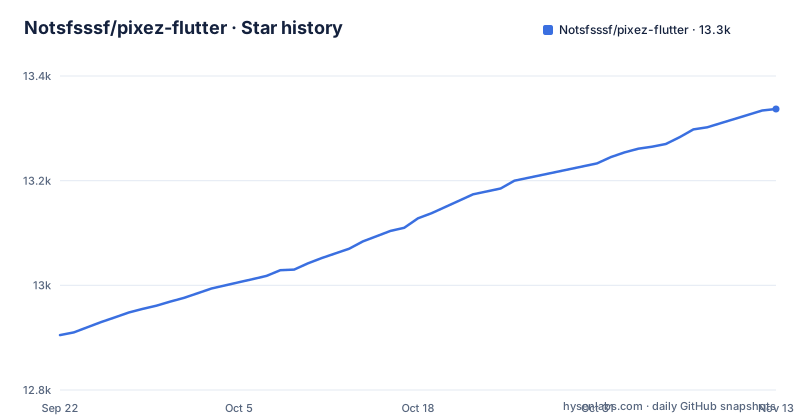
Star history
- Notsfsssf/pixez-flutter13,337 ★ · +432
| Repository | 2026-09-22 | 2026-11-13 |
|---|---|---|
| Notsfsssf/pixez-flutter | 12.9k | 13.3k |
432 Stars in the last 52 days, measured from the daily GitHub snapshot. Compare with other projects
Editorial analysis
What PixEz Flutter solves, and who it is actually for
The README states the point of the project in one line: it is a third-party Pixiv client written in Flutter, and it also supports direct connection in mainland China. That second clause is the reason the project exists as a separate app rather than as a nicer skin. If you are outside mainland China and already have a working path to Pixiv, the feature set you gain is convenience, not access.
The audience follows from that. It is for readers of Pixiv artwork who want a native client on a phone or on Windows, and for whom the official app or the web front end is either unavailable or unpleasant to use from where they are. The README's download table adds Windows through a nightly MSIX, and the repository has an ohos directory at the top level, though the README's own table does not list a HarmonyOS download channel.
It is not a library. There is no published package for other developers to depend on, and the README does not present one. If you are looking for a Pixiv API wrapper in Dart, this repository is the wrong place to look; you would be reading an application, not an SDK.
How the client is built: Flutter, MobX and a CustomPainter for ugoira
The README describes the stack directly. The app uses mobx, flutter_bloc (described as being phased out), and provider for state management, and custompainter to play ugoira. That last detail is the most concrete architectural claim in the whole document: ugoira is Pixiv's frame-based animation format, and playing it means decoding a set of frames plus timing metadata and drawing them on a canvas rather than feeding a single video file to a platform player. Doing it in CustomPainter keeps the animation inside the Flutter render tree instead of handing it to a platform view.
The README also explains why Flutter was chosen at all: hot reload shortens debug cycles, and PlatformChannel lets the project write platform-specific features per target. That is a fair description of the trade-off. Anything that needs a native capability goes through a channel, which means the Android, iOS and Windows builds can diverge in behaviour even though the UI layer is shared.
State management is the part I would question. Two systems, with a third being retired, is a migration in progress, not a settled design. The README says flutter_bloc is being gradually abandoned, so a contributor reading lib/ should expect to find both patterns and should not assume the older one is the intended style. The repository also carries l10n.yaml and an intl-based localization setup, with the README pointing contributors at lib/l10n/intl_en_US.arb, so translation work is a documented entry point.
Installing PixEz Flutter on Android, iOS or Windows
The README does not give a build-from-source procedure. It gives a download table, and it states a preferred order of channels: app store first, then GitHub, then cloud storage. For Android, the store link is Google Play under the package id com.perol.play.pixez, and the GitHub option is the latest release. The cloud drive entry is marked as temporary and not recommended, so treat it as a fallback rather than a distribution channel.
If you want to check what the newest release is before downloading, the releases page is the source of truth. The most recent tagged release in the repository is 0.9.113, published on 2026-11-01.
# the README links the latest release page for Android downloads
# https://github.com/Notsfsssf/pixez-flutter/releases/latest
On iOS the README points to the US App Store listing for PixEz, and, for people who want an IPA rather than a store install, to a GitHub Actions workflow named build_ios.yml. On Windows there is no store entry; the README points to a nightly MSIX produced by a workflow named build_windows.yml. A nightly artifact is not a stable installer, and the README does not describe signing, update behaviour or rollback for it.
Contributors are a separate case. The repository has a pubspec.yaml, a pubspec.lock and a mise.toml at the top level. The README does not spell out the build steps, so the honest starting point is to read pubspec.yaml.
# files present at the repository root
# mise.toml
# pubspec.yaml
# pubspec.lock
What you should see after a correct setup is a Flutter project that resolves its dependencies at the pinned version. What you will not see in the README is a documented release build command for any platform.
Where PixEz Flutter breaks down or is the wrong choice
The largest limitation is that the README does not document rollback, nor how to downgrade to an earlier version if a release regresses. The release cadence is fast, with 0.9.113 on 2026-11-01, 0.9.112 on 2026-10-19 and 0.9.110 on 2026-10-07, which is roughly every two weeks. Fast cadence plus no documented downgrade path is an awkward combination for anyone who needs stability.
Windows is the second weak point. The only channel the README lists is a nightly MSIX from a workflow. Nightly means the artifact tracks the branch, not a tag. If a nightly build is broken on a given day, the README offers nothing else for that platform.
Third, the app depends on an account system it does not control. The README does not describe how authentication works, what happens when Pixiv changes an endpoint, or what the app does when a request fails. A third-party client is always downstream of the service it reads, and this repository is no exception.
Finally, GPL-3.0 is a real constraint for anyone thinking about reuse. If you fork this project and distribute a modified build, the licence's copyleft terms apply to that distribution. That is a description of the licence, not legal advice; if the terms matter to your situation, read the LICENSE file in the repository.
How PixEz Flutter differs from the native Pix-EzViewer and other clients
The name invites confusion. There was an earlier native version, and the README's FAQ note explicitly tells former users of the old native version to read the guide before filing feedback, which confirms the two are related but distinct codebases. PixEz Flutter is the rewrite in Dart, and the practical difference is reach: the README's download table covers Android, iOS and Windows,.
Against the official Pixiv app, the difference is the connection claim and the scope. The README states direct connection in mainland China; it does not claim to reproduce every feature of the official client, and it does not list what is missing. Treat the feature set as what the app shows you, not as parity.
Against a generic image-board reader or a browser with a userscript, the difference is that ugoira is handled in-app through custompainter, per the README, rather than depending on a web player. If animated works are not something you look at, that advantage disappears and a browser is a perfectly reasonable alternative.
Maintenance, upgrade cost and licence
The repository is not archived, and the last push was on 2026-11-01. That is recent enough that the project should be described as currently receiving commits, and the release history backs it up with three tagged releases in the weeks before that. There is no homepage field, so the README and the release page are the documentation you get.
The upgrade cost is the interesting part. Releases arrive roughly every two weeks, and the README does not describe a migration process, a schema change policy, or a way to stay on an older tag. On Android you can simply not update through the store, but the README does not document whether an older build keeps working against the service. On Windows, where the channel is a nightly MSIX, you are on the moving branch by construction.
For contributors, the cost is a Flutter toolchain, a localization workflow built on intl with an .arb file per locale, and a state-management layer in transition between mobx and flutter_bloc. The README welcomes pull requests and translation contributions, and it names the file to edit for English strings. It does not describe a test policy, though a test directory exists at the top level.
On licensing: the project is GPL-3.0, and the README carries a GPL-3.0 badge. Redistribution of modified builds carries obligations under that licence. Whether those obligations affect your use is a question for a lawyer, not for this article.
Editorial conclusion
Adopt it if you want a Pixiv client on Android or iOS and you cannot rely on a proxy, and you accept a GPL-3.0 app whose changelog is the release page. Do not adopt it if you need a documented build-from-source path, a supported Windows installer, or a client that is not tied to one upstream account system. Before installing, read the FAQ file in .github, check the release page for the newest tag rather than a mirror, and confirm that the store listing you are about to use is the one the README names.
Frequently asked questions
What is PixEz Flutter?
It is a third-party Pixiv client written in Flutter, and the README states that it also supports direct connection in mainland China. It ships for Android, iOS and Windows, and the README says ugoira playback is implemented with custompainter.
How do I install PixEz Flutter on Android?
The README lists Google Play under the package id com.perol.play.pixez as the preferred channel, with the GitHub release page as the next option and a cloud drive marked as temporary and not recommended. There is no documented build-from-source procedure in the README.
Is there a PixEz Flutter build for Windows?
The README's download table lists Windows with a nightly MSIX produced by a GitHub Actions workflow named build_windows.yml, and no store entry. Because it is a nightly artifact, it tracks the branch rather than a tagged release.
Can I get PixEz Flutter as an IPA for iPhone?
The README points iOS users to the US App Store listing for PixEz, and for an IPA it points to a GitHub Actions workflow named build_ios.yml. The README does not describe signing or installation steps for that artifact.
What licence does PixEz Flutter use?
The repository is licensed under GPL-3.0, and the README carries a GPL-3.0 badge. That licence places copyleft obligations on redistribution of modified builds.
Official sources
Add this badge to your README
If you maintain this project, the badge below links readers to this analysis and shows its maintenance status from the daily GitHub snapshot. Paste the markdown into your README; add ?metric=license or ?metric=stars to the image URL for a different field.

[](https://hysenlabs.com/projects/notsfsssf-pixez-flutter)Star history chart for your README
[](https://hysenlabs.com/projects/notsfsssf-pixez-flutter)Was this useful?